Upgrade & Secure Your Future with DevOps, SRE, DevSecOps, MLOps!

We spend hours on Instagram and YouTube and waste money on coffee and fast food, but won’t spend 30 minutes a day learning skills to boost our careers.
Master in DevOps, SRE, DevSecOps & MLOps!

Learn from Guru Rajesh Kumar and double your salary in just one year.

Get Started Now!

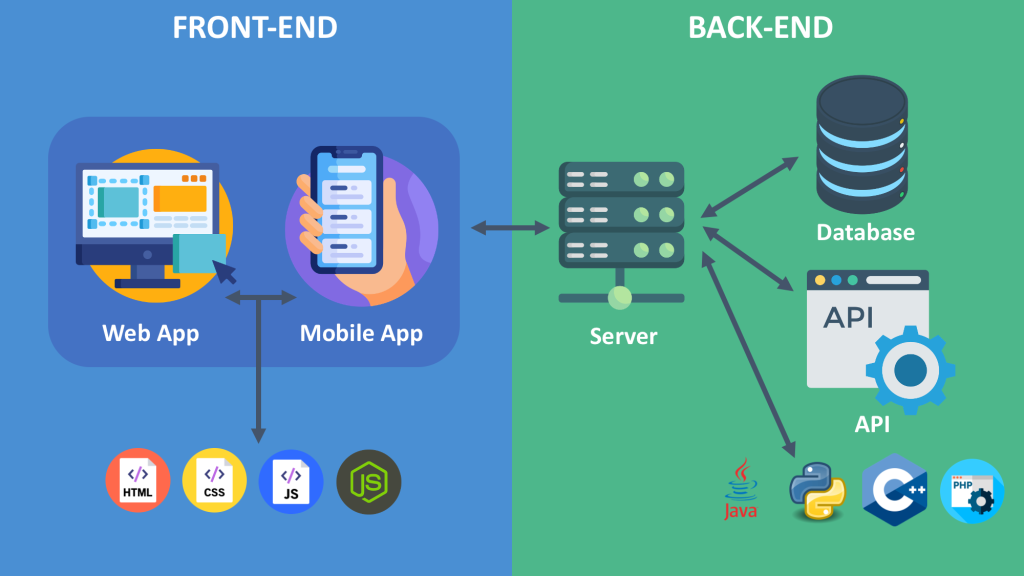
Explanation of front-end, back-end, and APIs?

Frontend

The front-end is the part of a website that users interact with directly. This includes everything you see and can click on, such as the menus, buttons, text, images, and videos. Front-end developers use programming languages like HTML, CSS, and JavaScript to create the visual elements and interactive features of a website.

Backend

The back-end is the part of a website that users don’t see directly. It’s where all the data processing and logic happens. The back-end is responsible for storing data, managing databases, and handling server-side logic. Backend developers use programming languages like Python, Java, Ruby, and PHP to build and maintain the back-end of a website.

API

An API (Application Programming Interface) acts as a messenger between the front-end and back-end. It allows the front-end to make requests to the back-end for data or to perform actions. The back-end then responds to these requests and sends back the data or performs the requested action. APIs are essential for building complex web applications because they allow different parts of the application to communicate with each other.

Here’s an analogy to understand these concepts better: Imagine a restaurant. The front-end is the dining room where customers sit and order food. The back-end is the kitchen where the chefs prepare the food. The API is the waiter who takes the customer’s order to the kitchen and brings back the food.

Thanks for visiting

Related Posts

Top 10 Web Browsers: Features, Pros, Cons & Comparison

Introduction Web browsers are software applications that allow users to access, navigate, and interact with content on the internet. They are essential for browsing websites, streaming media, Read More

Read More

Top 10 Internet Filtering Software: Features, Pros, Cons & Comparison

Introduction Internet filtering software allows families, schools, and businesses to control access to web content, block unsafe websites, and enforce browsing policies. These tools help reduce exposure Read More

Read More

Top 10 Ad Blocking Tools: Features, Pros, Cons & Comparison

Introduction Ad blocking tools are software applications or browser extensions that prevent unwanted advertisements from appearing during browsing or within apps. By filtering out banners, pop‑ups, video Read More

Read More

Top 10 Parental Control Software: Features, Pros, Cons & Comparison

Introduction Parental control software helps parents monitor, manage, and protect their children’s online activities. These tools provide features like content filtering, screen time management, app monitoring, and Read More

Read More

Top 10 Child Safety Monitoring Apps: Features, Pros, Cons & Comparison

Introduction Child safety monitoring apps help parents and guardians keep children safe in the digital and physical world. These tools offer monitoring of online activity, location tracking, Read More

Read More

Top 10 Password Vault Consumer Apps: Features, Pros, Cons & Comparison

Introduction Password vault consumer apps are digital tools that help individuals securely store, manage, and autofill passwords for websites and apps. They reduce the risk of forgotten Read More

Read More
Subscribe
Notify of
guest
0 Comments
Oldest
Newest Most Voted
0
Would love your thoughts, please comment.x
()
x