Last updated: 27 November 2026
To make sure your robot doesn’t drop your wine glass, don’t rely on cameras and one fixed grip force. Choose a stable grasp on compliant pads, calculate a starting force from friction, sense slip through touch, move smoothly, and release only after the robot feels the table.
No setup makes a drop impossible. Good robot wine glass grasping makes failure less likely, catches problems early, and limits the damage when something still goes wrong.
Why a wine glass is hard for a robot
A wine glass combines several difficult properties. It is transparent, smooth, fragile and top-heavy when upright. Liquid adds mass that moves, and condensation or spills can reduce friction.
Vision is the first problem. Transparent surfaces refract and reflect light, so standard depth cameras often return missing or wrong depth values. A planner working from that data may aim the fingers at the wrong place.
ClearGrasp, research first posted in 2019, tackled this with neural networks that estimate surface normals, transparent-object masks and occlusion boundaries from a color-and-depth image. It then corrects the depth map. Its authors trained on more than 50,000 synthetic images and reported that the corrected depth could improve grasping of transparent objects.
Better depth helps the robot reach the glass. It does not tell the robot whether the glass is starting to slide. That is where touch comes in.
Robot wine glass grasping, step by step
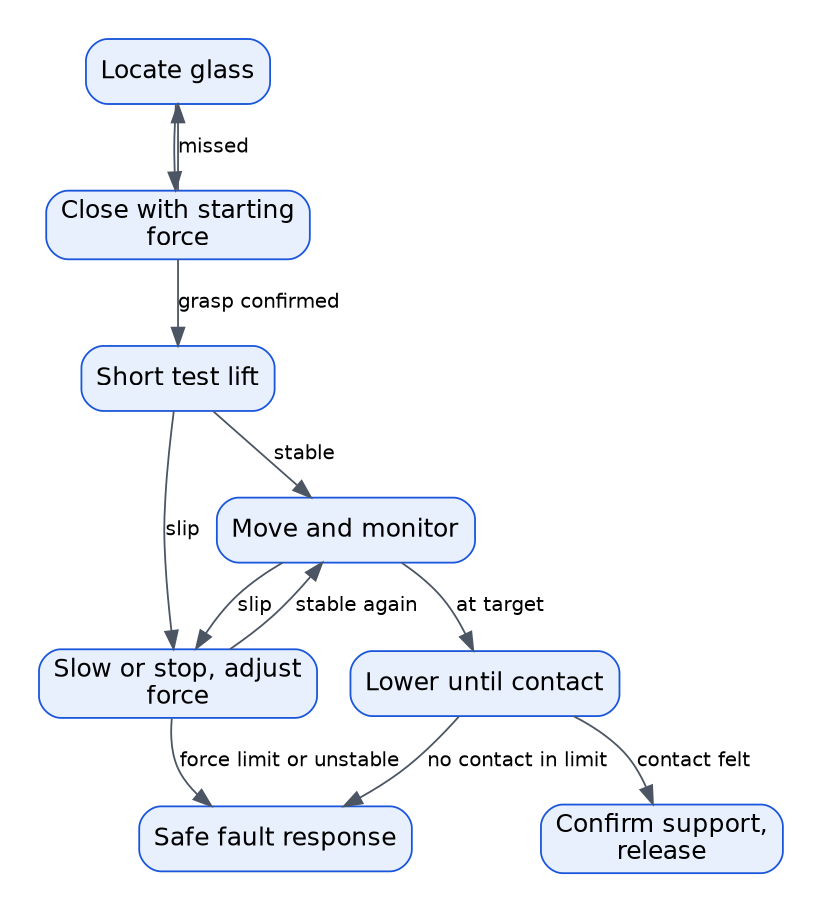
Treat the task as a chain of checks. Each stage should confirm success before the next begins.
1. Choose where to hold it
The bowl offers a wide surface but may have a thin wall. The stem is narrow and gives little contact area. Neither is always best, so decide using your glass, gripper and task.
- Line up with the center of mass. The farther it sits from the grip axis horizontally, the more twisting load the contacts must resist.
- Watch for pivoting. Two small contacts resist rotation poorly. A top-heavy glass held low can swing even if it never slides downward.
- Increase contact area. Soft or conforming fingers spread the load and can resist twisting better than hard, narrow tips.
- Plan the release. The fingers must be able to open and retreat without clipping the bowl or foot.
2. Calculate a starting grip force
For a simple two-finger gripper with vertical pad faces, friction at both contacts must support the glass. During an upward acceleration, a basic estimate of the force needed per contact is:
F >= S * m * (g + a) / (2 * mu)

F   normal force at each finger (N)
S   safety factor
m   mass of glass plus contents (kg)
g   9.81 m/s^2
a   peak upward acceleration (m/s^2)
mu  static friction coefficient between pad and glass
The table below uses a hypothetical 0.2 kg load and a safety factor of 2. These are worked examples, not recommended settings.
| Upward acceleration | Force per finger, mu = 0.5 | Force per finger, mu = 0.3 |
|---|---|---|
| 0 m/s² (holding still) | 3.9 N | 6.5 N |
| 2 m/s² | 4.7 N | 7.9 N |
| 5 m/s² | 5.9 N | 9.9 N |
Lower friction and faster motion both demand more force. The formula ignores twisting, impacts, sloshing and the curved shape of the glass. It also says nothing about breaking strength. Set a separate upper force limit from careful testing and your gripper’s documentation.
If the required force approaches that limit, change the pads, grasp pose or acceleration. Don’t simply squeeze harder.
3. Sense slip and respond
A fixed force assumes you know the mass and friction in advance. A tactile or force-sensing loop can react when those assumptions fail. When it detects early slip, it can raise force in small steps, slow the arm, or set the glass down.
| Sensing method | What it can tell you | Main limitation |
|---|---|---|
| Color and depth cameras | Object position and pose before contact | Glass confuses depth; fingers can block the view |
| Gripper width and motor feedback | Whether something is between the fingers | May miss small or early slips |
| Wrist force and torque sensor | Load changes and table contact | Measures combined loads, not each contact’s surface |
| Camera-based tactile pad | Contact shape, orientation, shear | Needs space, processing and a durable gel surface |
| Air-channel or acoustic finger sensors | Fast force, slip or fracture cues | Needs calibration or a trained detector; newer research designs |
4. Move gently and set it down by feel
Lift a short distance first and check that the glass stays put. Then limit acceleration and jerk, avoid sudden wrist rotations, and keep a filled glass upright.
For placement, don’t trust a stored table height alone. Lower slowly until force or tactile readings show contact, stop, confirm the base is supported, and only then open the fingers. Add a maximum travel distance and a timeout in case contact is never detected.
What research shows
MIT’s tactile Fin Ray finger (2022)
Sandra Liu and Edward Adelson built a soft Fin Ray finger with a camera-based GelSight tactile sensor inside. The finger bends around objects while the sensor images the contact.
In their demonstration, a robot arm received a tilted wine glass, estimated the stem’s orientation by touch, turned it upright and lowered it. It released the glass when shear force showed it had reached the table.
The attempt succeeded in 7 of 10 trials. In the other three, the grasp was not secure enough and the glass slipped slightly, which broke the orientation estimate. The gripper still detected table contact and stopped before the glass crashed. That is a useful lesson: independent safeguards matter, and a promising demonstration is not production reliability.
More recent work (2026)
FORTE, from University of Texas at Austin researchers and published in IEEE Robotics and Automation Letters, puts air channels inside 3D-printed compliant fingers. The authors report force estimates from 0 to 8 N with about 0.2 N average error, slip detection typically within 100 ms, and 93% slip detection accuracy.
The January 2026 arXiv version reports 92% grasp success overall, or 285 of 310 trials across 31 object types. The test objects included slippery, fragile and deformable items, such as raspberries and potato chips. For the fragile-object subset only, success was 98.6%, or 138 of 140 trials.
SAFE, a preprint submitted in July 2026, uses two passive acoustic sensors on a Fin Ray gripper, plus motor feedback, to classify a grasp as normal, slipping or fracturing. It reports 91.3% closed-loop success over 46 robot trials and 82.4% on novel objects. Fixed-force baselines failed on object conditions that did not match their preset.
These studies use different objects and measures, so their percentages should not be ranked against each other. None of the figures is a promise about your wine glass.
Practical code examples
The code in this article has not been tested here. Verify it against your hardware and software versions before use.
Franka’s libfranka library has a grasp call that takes object width (m), closing speed (m/s) and force (N), with optional width tolerances that default to 0.005 m. The numbers below are placeholders.
franka::Gripper gripper(robot_ip);
gripper.homing();

// width, speed, force, epsilon_inner, epsilon_outer
bool ok = gripper.grasp(0.009, 0.02, 5.0, 0.002, 0.002);
if (!ok) {
  // Do not lift. Open carefully, look again, and replan.
}
A true result means the final finger width fell within tolerance. It does not prove that the glass will stay there during motion. Also handle the library’s command and network exceptions.
This hardware-neutral Python sketch shows a slip response with a hard ceiling on commanded force. It rejects invalid force settings and a faulty sensor before commanding the gripper or arm. You must supply the robot and sensor functions, and set max_n from your own limit for the glass.
import math

def carry(gripper, arm, sensor, start_n, max_n, step_n=0.5):
    # Check everything before any gripper or arm command.
    # These comparisons also reject NaN values.
    if not (0 < start_n <= max_n < math.inf and step_n > 0):
        return "invalid_force_settings"
    if not sensor.healthy():
        return "sensor_fault"

    force = start_n
    gripper.set_force(force)
    arm.start_slow_motion()

    while not arm.done():
        if not sensor.healthy():
            arm.controlled_stop()
            return "sensor_fault"
        if sensor.slipping():
            arm.controlled_stop()
            if force + step_n > max_n:
                return "unsafe_to_continue"
            force += step_n
            gripper.set_force(force)
            if not sensor.wait_until_stable(timeout_s=0.5):
                return "unstable_grasp"
            arm.resume_slower()

    return "arrived"
A real controller needs a fixed update rate, filtered signals and a recovery plan for every failure result, such as a guarded set-down. Stopping abruptly can itself disturb the glass, so tune the deceleration.
Best practices
- Keep pads clean and dry, and retest after changing pad material.
- Weigh the heaviest expected load, including liquid.
- Test each glass shape separately.
- Log force, width, slip events and arm motion for every failure.
- Decide what happens on power loss, emergency stop and lost communication. Check whether your gripper holds, relaxes or opens.
- Keep people away from the path during development, and complete a risk assessment before working near them.
Common mistakes and troubleshooting
| Symptom | Likely cause | What to try |
|---|---|---|
| Fingers miss or bump the glass | Bad depth or camera calibration | Recalibrate, add a viewpoint, use transparency-aware perception |
| Glass slides during lift | Low friction or high acceleration | Change pads, dry surfaces, slow the lift |
| Glass swings or rotates | Center of mass far from grip axis, small contact | Move the grasp point, use conforming or wider pads |
| Grasp reports success, then fails | Width check used as the only evidence | Add a test lift and slip sensing |
| Force keeps climbing | Sensor noise or false slip detection | Filter signals, enforce a ceiling, abort safely |
| Hard landing or early release | Wrong table height or contact threshold | Use guarded descent and zero the sensor before moving down |
Hands-on exercise: test before using real glass
- Fix your pad material to a flat board. Place a flat-bottomed glass object on it, over a padded surface.
- Tilt the board slowly and record the angle at which sliding starts. Estimate friction as the tangent of that angle. Discard runs where the object tips instead.
- Repeat several times, dry and damp. Use the lowest sensible value in the formula.
- Switch to a plastic wine glass. Re-measure friction against its plastic surface, because the glass result does not carry over. Weigh it with its planned contents, then recalculate the force using the new friction value and mass.
- Start empty, over a soft mat, with a slow short lift.
- Add water in stages, keeping it away from electronics, and increase speed one setting at a time. Recalculate the force as mass or acceleration rises.
- Deliberately test a failed grasp, an unexpected table height and a disconnected sensor, using a safe procedure.
- Define your pass rule before testing, then report successes out of total attempts for each condition.
The tilt test is only a rough estimate, because soft pads and curved surfaces may behave differently under squeeze. Moving to real glass should require new friction and mass measurements, new tests, eye protection and containment for fragments.
FAQ
Can a camera alone prevent drops?
It can help locate the glass and may spot large movements. Transparency and finger occlusion make it a weak sole source of information about contact and early slip.
Is a soft gripper enough?
No. Compliance helps with contact and alignment errors, but a soft grasp can still slip or twist. MIT’s three failed placements involved exactly such an insecure hold.
How hard should the robot squeeze?
There is no universal value. Estimate the minimum from mass, friction and motion, establish a safe maximum for your glass, and adjust between them using feedback.
Should it hold the stem or the bowl?
Pick the pose that gives stable contact, handles the center of mass and allows a clean release. Validate it with your own glass and gripper.
What is the most important safeguard?
Use layers: a verified grasp, slip monitoring, gentle motion, contact-based placement and a defined fault response. Any one of them can miss something.