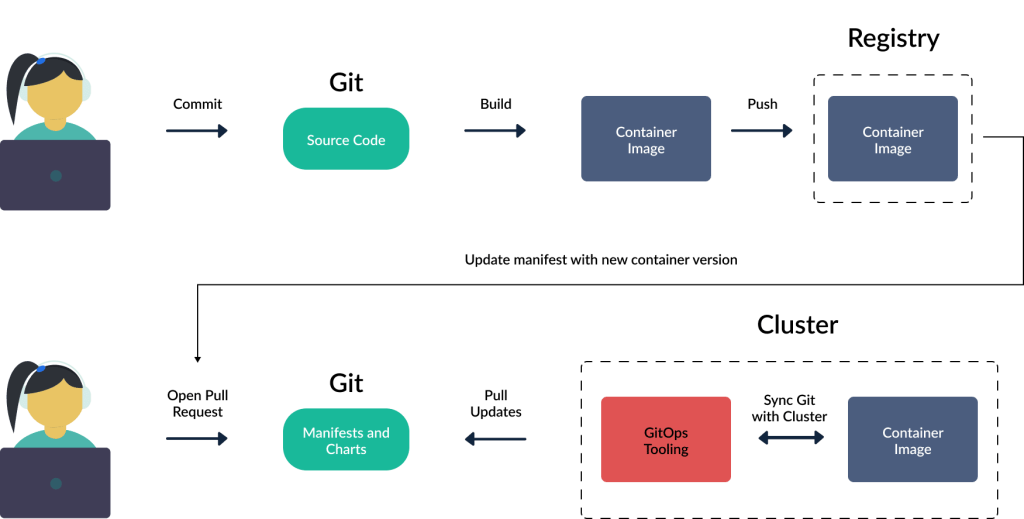
What is GitOps?
GitOps is a way of implementing a continuous delivery approach for managing infrastructure and applications. It leverages the power of Git, a distributed version control system, to manage and deploy infrastructure changes and application updates. With GitOps, the entire system configuration is stored as code in a Git repository, allowing for version control, collaboration, and automated deployments.
Why We Need GitOps?
GitOps offers several benefits that make it a compelling choice for managing infrastructure and applications:
- Simplicity: By using Git as the single source of truth, GitOps simplifies the management and deployment of infrastructure and applications. It provides a unified and consistent process for making changes, reducing complexity and improving reliability.
- Visibility: With GitOps, the entire system configuration is stored in a Git repository, providing full visibility into changes made to infrastructure and applications. This enhances transparency and enables better auditability of the system.
- Scalability: GitOps enables the management of large-scale infrastructure and applications by leveraging the scalability of Git. It allows for easy collaboration and coordination among team members, making it ideal for distributed teams and complex projects.
- Consistency: By storing system configuration as code in a Git repository, GitOps ensures consistency across different environments. This reduces the risk of configuration drift and makes it easier to maintain and troubleshoot the system.
What is the Advantage of GitOps?
The advantages of GitOps include:
- Version Control: GitOps leverages the power of Git for version control, enabling easy rollback to previous configurations and providing a history of changes made to the system.
- Collaboration: GitOps facilitates collaboration among team members by allowing them to work on the same codebase, merge changes, and resolve conflicts. This improves coordination and productivity.
- Automation: GitOps automates the deployment process by leveraging Git’s pull request and merge capabilities. It enables continuous integration and delivery, reducing manual intervention and improving efficiency.
What is the Feature of GitOps?
The key features of GitOps are:
- Infrastructure as Code: GitOps treats infrastructure as code, allowing for version control, testing, and automated deployments. It enables declarative and reproducible infrastructure management.
- Continuous Delivery: GitOps enables continuous delivery by leveraging Git’s version control and automated deployment capabilities. It provides a consistent and reliable process for deploying changes to infrastructure and applications.
- Observability: GitOps provides observability into the system by storing configuration and deployment information in a Git repository. This enhances visibility and enables better monitoring and troubleshooting.
- Policy Enforcement: GitOps allows for policy enforcement by defining configuration and deployment rules in the Git repository. This ensures compliance and reduces the risk of misconfigurations.
Top 10 Use Cases of GitOps
Top 10 use cases of GitOps:
1. Continuous Delivery and Deployment Automation
2. Multi-Cloud Infrastructure Management
3. Scalable Microservices Deployment
4. Kubernetes Cluster Management
5. Infrastructure Configuration Management
6. Disaster Recovery and Rollback
7. Compliance and Security Automation
8. Accelerated Future-proofing of Infrastructure
9. Collaboration and Alignment between Development and Operations Teams
10. Application Release Management
How to Implement GitOps?
There are a number of ways to implement GitOps. One common approach is to use a GitOps platform, such as Flux or ArgoCD.
These platforms provide a number of features that make it easier to implement GitOps, such as:
- A repository for storing infrastructure configuration
- A mechanism for triggering deployments
- A way to monitor and alert on infrastructure changes
Another approach to implementing GitOps is to use a combination of open-source tools. This approach can be more flexible, but it can also be more complex to set up and maintain.
How to Get Certified in GitOps?
To get certified in GitOps, you can:
- Attend training courses: Look for training courses or workshops that cover GitOps principles and practices. These courses will provide you with the knowledge and skills required for GitOps certification. Here some of the most popular website for learn GitOps certification.
– DevOpsSchool.com
– scmGalaxy.com
– BestDevOps.com
– Cotocus.com
2. Gain practical experience: Apply GitOps principles in real-world projects to gain hands-on experience. This will help you understand the challenges and best practices of implementing GitOps.
3. Study and prepare: Study GitOps documentation, books, and online resources to deepen your understanding of the concepts and techniques. Familiarize yourself with tools and technologies commonly used in GitOps.
4. Take certification exams: Once you feel confident in your knowledge and skills, take certification exams offered by organizations or platforms that provide GitOps certifications. These exams will test your understanding of GitOps principles and practices.
How to Learn GitOps?
To learn GitOps, you can:
- Start with the basics: Familiarize yourself with the concepts and principles of GitOps. Understand how GitOps differs from traditional infrastructure management and deployment approaches.
- Explore GitOps tools and technologies: Learn about the tools and technologies commonly used in GitOps, such as Git, Kubernetes, Terraform, and Jenkins. Understand how these tools work together to enable GitOps.
Visit these website for Explore GitOps tools and technologies:
– DevOpsSchool.com
– scmGalaxy.com
– BestDevOps.com
– Cotocus.com
3. Hands-on practice: Set up a test environment and practice implementing GitOps principles and practices. Experiment with deploying applications, managing infrastructure, and automating deployments using GitOps.
4. Join GitOps communities: Engage with the GitOps community through forums, meetups, and online communities. Participate in discussions, ask questions, and learn from others’ experiences.
5. Follow best practices: Study and adopt best practices for GitOps implementation. Learn from case studies and success stories to understand how organizations have successfully implemented GitOps.
