As modern applications become more complex and distributed, managing containerized workloads efficiently is critical for scalability, reliability, and performance. Kubernetes, often abbreviated as K8s, is the industry-leading open-source container orchestration platform that automates the deployment, scaling, and management of containerized applications. Originally developed by Google and now maintained by the Cloud Native Computing Foundation (CNCF), Kubernetes has become the standard for managing cloud-native applications.
Kubernetes eliminates many of the challenges associated with manually deploying and managing containers across distributed environments. It provides organizations with the agility, flexibility, and automation required to run containerized applications seamlessly across on-premises, cloud, and hybrid environments.
In this blog, we will explore what Kubernetes is, its top use cases, features, architecture, installation process, and a step-by-step guide to getting started.
What is Kubernetes?
Kubernetes is an open-source container orchestration platform designed to manage containerized workloads and services. It provides automation for deployment, scaling, networking, and storage for applications running in containers.
Key Characteristics of Kubernetes:
- Automated container orchestration: Eliminates manual efforts in deploying and managing containers.
- Self-healing capabilities: Restarts failed containers and reschedules workloads automatically.
- Scalability: Allows horizontal scaling of applications based on demand.
- Multi-cloud compatibility: Runs on AWS, Azure, Google Cloud, and on-premises environments.
- Declarative Configuration: Uses YAML files to define infrastructure as code (IaC).
Why Kubernetes?
Before Kubernetes, organizations relied on traditional virtual machines (VMs) or bare-metal servers, leading to resource inefficiencies. Kubernetes provides an efficient way to deploy, manage, and scale applications without worrying about infrastructure constraints.
With Kubernetes, developers can: ✔ Deploy applications faster
✔ Scale up or down automatically
✔ Manage application failures with self-healing mechanisms
✔ Optimize resource usage
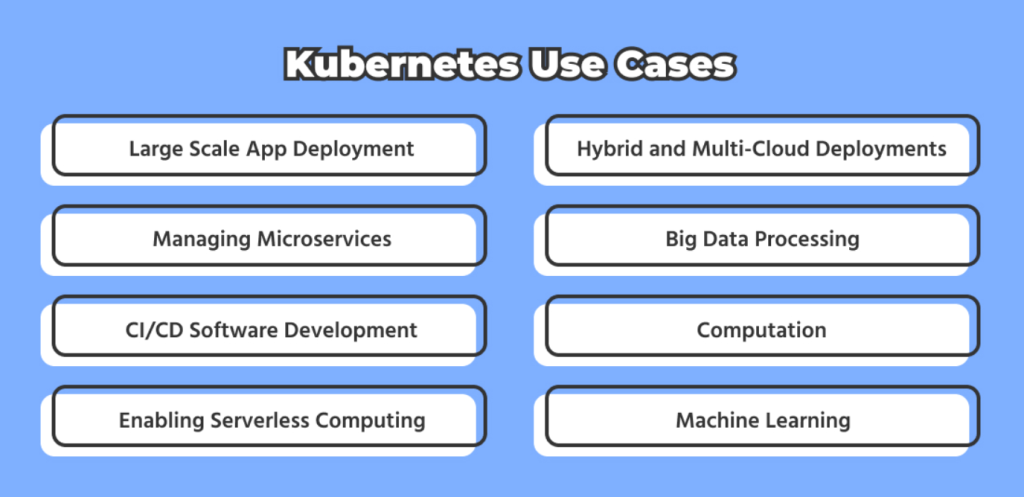
Top 10 Use Cases of Kubernetes
1. Container Orchestration
Kubernetes automates container deployment, management, and scaling, reducing manual intervention in distributed applications.
2. Microservices Management
Kubernetes simplifies the management of microservices-based applications, ensuring seamless communication between services and optimizing resource allocation.
3. Hybrid and Multi-Cloud Deployments
With Kubernetes, businesses can run applications across multiple cloud providers (AWS, Azure, GCP) and on-premises environments with minimal configuration changes.
4. Auto-Scaling Applications
Kubernetes automatically scales applications up or down based on CPU, memory, or custom-defined metrics using the Horizontal Pod Autoscaler (HPA).
5. CI/CD Automation for DevOps
Kubernetes integrates with Jenkins, GitLab CI/CD, and ArgoCD to enable continuous integration and continuous deployment (CI/CD) pipelines.
6. Big Data & AI/ML Workloads
Kubernetes manages Big Data analytics, AI/ML model training, and processing using frameworks like TensorFlow, Apache Spark, and Jupyter notebooks.
7. Serverless Computing
With Kubernetes-based serverless frameworks like Knative and OpenFaaS, developers can run event-driven applications without managing infrastructure.
8. Disaster Recovery and High Availability
Kubernetes ensures fault tolerance by automatically replacing failed containers and replicating workloads across multiple nodes for high availability.
9. IoT and Edge Computing
Kubernetes is used for deploying containerized workloads on IoT devices and edge environments, ensuring seamless operation across distributed systems.
10. Multi-Tenant SaaS Applications
Kubernetes supports multi-tenancy, allowing SaaS providers to run multiple customer applications in an isolated and secure environment.
What Are the Features of Kubernetes?
Kubernetes provides a robust set of features that make it a powerful container orchestration platform:
1. Automated Deployments and Rollbacks
- Kubernetes enables rolling updates and rollbacks, ensuring smooth deployment without downtime.
2. Self-Healing Mechanism
- Automatically restarts failed containers.
- Replaces unhealthy nodes or pods.
- Reschedules workloads to healthy nodes.
3. Horizontal & Vertical Scaling
- Horizontal Pod Autoscaler (HPA) dynamically scales applications based on demand.
- Vertical Pod Autoscaler (VPA) adjusts resource allocations for efficient CPU and memory usage.
4. Load Balancing and Service Discovery
- Kubernetes provides built-in service discovery and load balancing through Services and Ingress controllers.
5. Multi-Cloud and Hybrid Support
- Run workloads across on-premises, cloud, and hybrid environments seamlessly.
6. Secrets and Config Management
- Kubernetes securely manages secrets, environment variables, and configuration data.
7. Networking and Service Mesh
- Supports Kubernetes-native networking, enabling seamless communication between containers.
- Works with Istio, Linkerd, and Consul for service mesh implementation.
8. Persistent Storage Management
- Integrates with AWS EBS, Azure Disks, Google Persistent Disks, and on-prem storage.
9. Role-Based Access Control (RBAC)
- Implements fine-grained access controls for securing cluster resources.
10. Observability and Monitoring
- Works with Prometheus, Grafana, and ELK Stack for monitoring and logging.
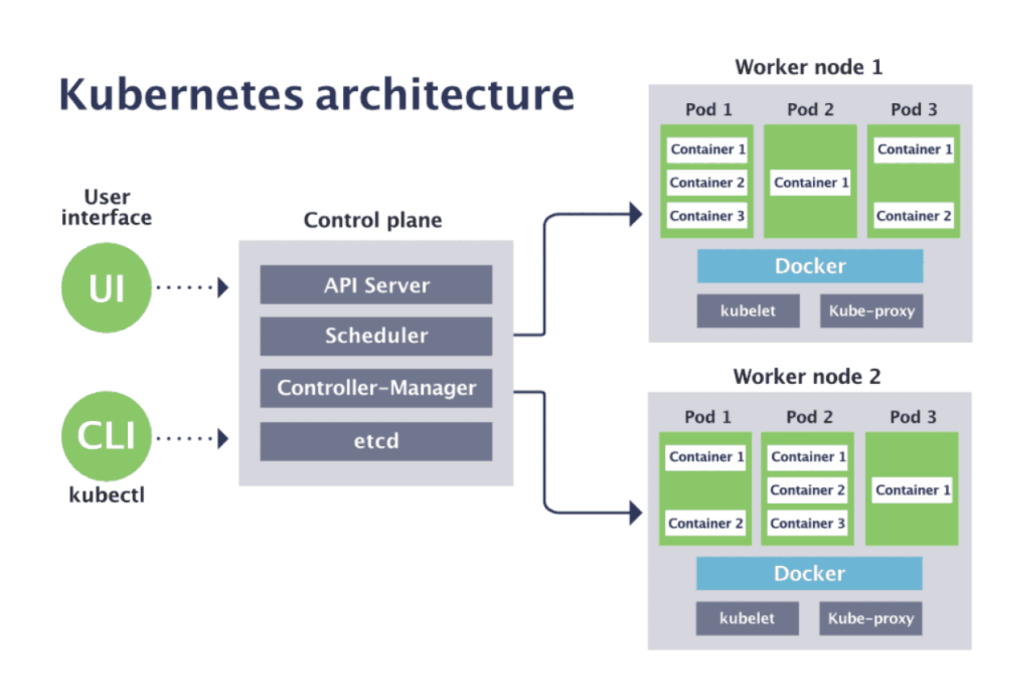
How Kubernetes Works and Architecture
Kubernetes Architecture Overview
Kubernetes follows a master-worker node architecture to manage containers efficiently.
- Master Node (Control Plane)
- API Server: Manages communication between components.
- Scheduler: Assigns workloads to worker nodes.
- Controller Manager: Manages cluster state and ensures desired configurations.
- etcd: Stores cluster configuration and metadata.
- Worker Nodes
- Kubelet: Agent running on each node to manage container execution.
- Kube Proxy: Handles network communication.
- Container Runtime (Docker/Containerd): Runs containerized applications.
- Pods: The smallest deployable unit containing one or more containers.
How to Install Kubernetes
Kubernetes can be installed in multiple ways, including Minikube, kubeadm, managed Kubernetes (EKS, AKS, GKE), or on-prem setups.
Installing Kubernetes using Minikube (For Local Development)
Step 1: Install Minikube
curl -LO https://storage.googleapis.com/minikube/releases/latest/minikube-linux-amd64
sudo install minikube-linux-amd64 /usr/local/bin/minikube
Step 2: Start Kubernetes Cluster
minikube startStep 3: Verify Kubernetes Installation
kubectl cluster-info
kubectl get nodes
Installing Kubernetes using kubeadm (For Production)
Step 1: Install kubeadm, kubectl, and kubelet
sudo apt update && sudo apt install -y kubeadm kubelet kubectlStep 2: Initialize Kubernetes Cluster
sudo kubeadm initStep 3: Configure kubectl
mkdir -p $HOME/.kube
sudo cp -i /etc/kubernetes/admin.conf $HOME/.kube/config
sudo chown $(id -u):$(id -g) $HOME/.kube/config
Step 4: Join Worker Nodes
kubeadm join <master-node-ip>:6443 --token <token> --discovery-token-ca-cert-hash sha256:<hash>Basic Tutorials of Kubernetes: Getting Started
1. Deploying a Sample Application
kubectl create deployment nginx --image=nginx
kubectl expose deployment nginx --port=80 --type=NodePort
2. Scaling Applications
kubectl scale deployment nginx --replicas=53. Viewing Running Pods
kubectl get pods -o wide4. Deleting a Deployment
kubectl delete deployment nginx