
Last updated: 28 November 2026
Python is a crucial part of the DevOps toolchain because it connects tools that were not built to talk to each other. It reads their output, calls their APIs, applies your team’s rules and returns a clear pass or fail to the pipeline.
It does not replace your CI server, infrastructure tool or container platform. It fills the gaps between them with code that can be reviewed, tested and reused.
Where Python fits in the DevOps toolchain
A delivery pipeline is a chain of handoffs: code is committed, built, tested, deployed and observed. Each stage has its own tool, data format and failure modes.
Many handoffs need a little logic. Should this release continue? Which cloud resources lack an owner tag? Did the rollout finish? Python is a practical place to put those decisions.
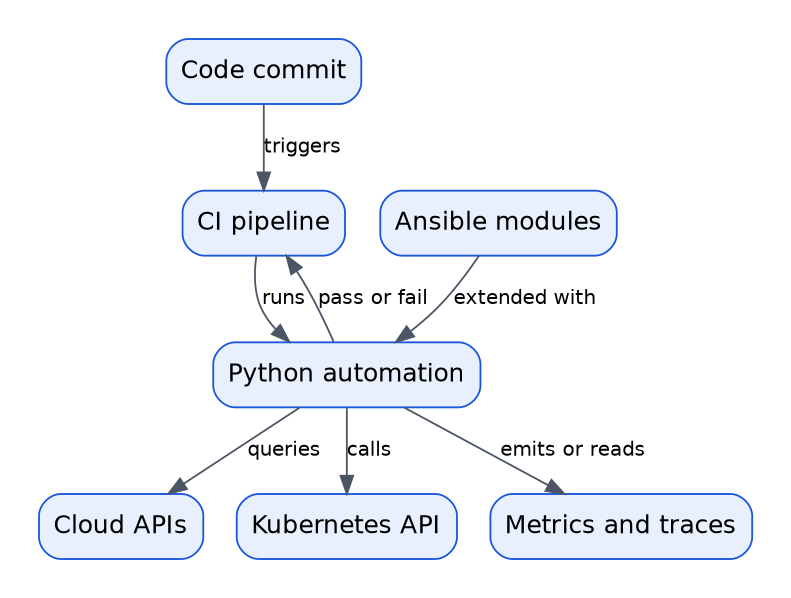
Five reasons teams reach for it
- Readable code. Operations scripts are often fixed under pressure, sometimes by someone who did not write them. Clear syntax helps.
- A broad standard library. HTTP requests, JSON, command-line arguments, subprocesses, logging and unit tests are available without extra packages.
- Libraries for major platforms. Boto3 covers AWS, and there is an official Kubernetes client for Python.
- Extensible tooling. Ansible, for example, lets you write your own modules in Python.
- Room to grow. A short script can become a tested package or internal service without a change of language.
Practical uses across the delivery lifecycle
Pipeline gates and release checks
CI systems judge a step by its exit code: zero usually means success and anything else means failure. A Python script can check a service, parse a test report or compare versions, then exit accordingly.
When the job is to run another program, use the subprocess module. Python’s documentation recommends subprocess.run() for the cases it can handle. The code samples in this article are illustrations and have not been tested here.
import subprocess
import sys

cmd = ["kubectl", "rollout", "status", "deployment/web", "--timeout=120s"]

try:
    result = subprocess.run(cmd, capture_output=True, text=True, timeout=150)
except subprocess.TimeoutExpired:
    sys.exit("kubectl did not return in time")

if result.returncode != 0:
    sys.exit(f"rollout failed: {result.stderr.strip()}")

print(result.stdout.strip())
Passing a list of arguments avoids invoking a shell, so special characters are not interpreted as shell syntax. The timeout stops a stuck command from hanging the job indefinitely.
Configuration management with Ansible
Ansible playbooks are written in YAML, but Python sits underneath. Ansible’s control node runs on Python, and many managed nodes need a supported Python version too.
When built-in modules are not enough, you can write your own. Modules for local use can be in any language, while those contributed to Ansible itself must be Python or PowerShell. Python modules get shared helpers for argument handling and results.
This makes version planning important. ansible-core 2.22 was released in November 2026 and supports Python 3.13 to 3.15 on the control node, which means it drops Python 3.12. The 2.21 line supports 3.12 to 3.14, while the 2.19 line reaches end of life in November 2026.
If your control node still runs Python 3.12, upgrade its interpreter before moving to 2.22. Check the target node versions in the support matrix as well, because they differ from the control node range.
Cloud automation
Cloud consoles are fine for one-off checks but poor for repeatable work. With Boto3, you can query AWS and apply your own policy. This read-only example lists EC2 instances without an Owner tag in the configured region.
import boto3

ec2 = boto3.client("ec2")
paginator = ec2.get_paginator("describe_instances")

for page in paginator.paginate():
    for reservation in page["Reservations"]:
        for instance in reservation["Instances"]:
            tags = {t["Key"] for t in instance.get("Tags", [])}
            if "Owner" not in tags:
                print(instance["InstanceId"])
The paginator matters. Many AWS operations return only part of the results per call, and a paginator makes the follow-up requests for you. Without it, an audit can silently miss resources.
Python also runs as serverless automation. AWS Lambda’s runtime table currently lists Python 3.11 through 3.15. Python 3.11 runs on Amazon Linux 2 and has a projected deprecation date of 30 June 2027, so newer runtimes are the better choice for new functions.
Kubernetes operations
The official Kubernetes Python client is installed with pip install kubernetes. It lets you work with API objects directly instead of parsing command output.
from kubernetes import client, config

config.load_kube_config()
v1 = client.CoreV1Api()
pods = v1.list_pod_for_all_namespaces(watch=False, _request_timeout=10)

for pod in pods.items:
    if pod.status.phase not in ("Running", "Succeeded"):
        print(pod.metadata.namespace, pod.metadata.name, pod.status.phase)
This is a first filter, not a full health check. A pod can report the Running phase while a container keeps restarting, so inspect container statuses as well.
Match the client to your cluster. Its major version tracks the Kubernetes minor release (client 37 matches Kubernetes 1.37), and the project publishes a compatibility matrix.
Observability and incident response
Python can instrument your own services and tools. In OpenTelemetry Python, traces and metrics are marked stable, while logs are still marked as in development. Check that status before building on the logging APIs.
During incidents, small scripts can gather recent deployments, query metrics and assemble a timeline. Keep diagnostic actions read-only by default, and require explicit confirmation for anything that changes production.
Python compared with other options
Choose by task. Most teams use several of these together.
| Option | Best suited to | Strength | Watch out for |
|---|---|---|---|
| Python | API integration, data parsing, custom checks, internal tools | Readable, testable, broad libraries | Interpreter and dependency versions need managing |
| Bash | Short sequences of commands | Direct access to command-line tools | Complex logic and error handling get fragile |
| Go | Distributable command-line tools and services | Compiles to native binaries | Needs a build step, often more code for quick tasks |
| Declarative configuration | Describing infrastructure and desired state | The tool works out or enforces the changes | Awkward for custom procedural logic |
A useful rule of thumb: if a mature tool can express the requirement declaratively, use it. If a task is a few commands in order, Bash is fine. Move to Python when you need data structures, retries, several APIs or tests.
Best practices for DevOps Python
Manage the interpreter version
As of late November 2026, Python 3.15 and 3.14 receive bug fixes. Versions 3.11 to 3.13 receive security fixes only, and 3.10 and older are end of life. Check that your libraries, tools and hosting platform support a version before upgrading.
Isolate dependencies
Use a virtual environment instead of installing into the system interpreter. Some operating system distributions mark their Python as externally managed, which causes pip to refuse such installs.
python3 -m venv .venv
.venv/bin/python -m pip install -r requirements.txt
.venv/bin/python audit.py
Pin dependency versions in your requirements or lock file. Treat virtual environments as disposable: rebuild them rather than copying them between machines or committing them to Git.
For single-file scripts, inline script metadata lets the file declare what it needs. Tools such as uv and pipx can read this block and prepare an environment.
# /// script
# requires-python = ">=3.12"
# dependencies = [
#   "boto3",
# ]
# ///
Write scripts like production code
- Set timeouts on network calls and subprocesses.
- Make changes idempotent, so a rerun does not create duplicates or damage.
- Offer a dry-run mode for anything destructive.
- Read credentials from your platform’s secret store or identity mechanism, never from source code.
- Log what happened, without printing secrets.
- Run tests and linting in the same pipeline as application code.
Common mistakes and troubleshooting
| Symptom | Likely cause | What to do |
|---|---|---|
externally-managed-environment error |
pip is targeting the system Python | Create and use a virtual environment |
ModuleNotFoundError only in CI |
Different interpreter, or an undeclared dependency | Declare dependencies and call the environment’s Python by path |
| Job passes although a command failed | Return code was ignored | Use check=True or test returncode |
| Pipeline hangs | No timeout, or a command waiting for input | Add timeouts and non-interactive options |
| Cloud report is incomplete | Only one page or region was queried | Paginate and loop over the regions you need |
| Unexpected command execution | shell=True with untrusted input |
Pass an argument list without a shell |
Hands-on exercise: build a deployment health gate
This exercise uses only the standard library. Save the following as healthcheck.py.
import argparse
import sys
import time
import urllib.request


def is_healthy(url, timeout=5):
    try:
        with urllib.request.urlopen(url, timeout=timeout) as response:
            return response.status == 200
    except OSError as exc:
        print(f"request failed: {exc}", file=sys.stderr)
        return False


def main(argv=None):
    parser = argparse.ArgumentParser(description="Deployment health gate")
    parser.add_argument("url")
    parser.add_argument("--attempts", type=int, default=5)
    parser.add_argument("--delay", type=float, default=3)
    args = parser.parse_args(argv)

    for attempt in range(1, args.attempts + 1):
        if is_healthy(args.url):
            print(f"healthy on attempt {attempt}")
            return 0
        if attempt != args.attempts:
            time.sleep(args.delay)

    print("service is unhealthy", file=sys.stderr)
    return 1


if __name__ == "__main__":
    sys.exit(main())
Start a local web server in one terminal, then run the check in another.
python3 -m http.server 8000

python3 healthcheck.py http://localhost:8000
echo $?
You should expect exit code 0. Stop the server and run the check again; it should retry and then return 1.
Next, save this test as test_healthcheck.py and run python3 -m unittest.
import unittest
from unittest.mock import patch

import healthcheck


class HealthGateTest(unittest.TestCase):
    @patch("healthcheck.is_healthy", return_value=False)
    def test_unhealthy_service_fails_gate(self, _mock):
        code = healthcheck.main(["http://localhost:8000", "--attempts", "1"])
        self.assertEqual(code, 1)


if __name__ == "__main__":
    unittest.main()
To extend it, add a test for the success path, then call the script from a CI job after your deployment step.
FAQ
Is Python required for DevOps?
No. DevOps is a way of working, and teams can practise it with other languages. Python is still a very useful skill because it applies to automation, cloud APIs, Ansible and Kubernetes.
Should I learn Bash or Python first?
Learn enough shell to navigate systems, chain commands and read exit codes. Then learn Python for logic that needs structure and tests.
How much Python does a DevOps engineer need?
Start with functions, data structures, files, JSON, HTTP, exceptions, subprocesses, virtual environments and testing. Then learn the libraries for the platforms you actually run.
Is Python fast enough for DevOps work?
Much automation spends its time waiting on networks, APIs or other programs, so interpreter speed is often not the limit. Measure first. For compute-heavy components or simple binary distribution, another language may fit better.
The bottom line
Python earns its place by turning manual steps and loose scripts into dependable automation. Start with one repetitive task, add timeouts, tests and clear exit codes, and keep its Python version and dependencies under control.