What is Puppet and Its Use Cases?
In today’s fast-paced IT world, automation has become a cornerstone of efficient operations. Puppet is one of the leading tools in the configuration management and automation domain. By enabling IT teams to automate repetitive tasks, Puppet enhances consistency, scalability, and reliability across complex IT environments.
Puppet is widely used for managing infrastructure as code (IaC), orchestrating application deployments, and ensuring compliance. With its powerful features and robust community support, Puppet has become a go-to solution for organizations embracing DevOps practices.
What is Puppet?
Puppet is an open-source configuration management tool designed to automate the provisioning, configuration, and management of IT infrastructure. By using a declarative language, Puppet allows users to define the desired state of their systems, ensuring consistent and predictable results.
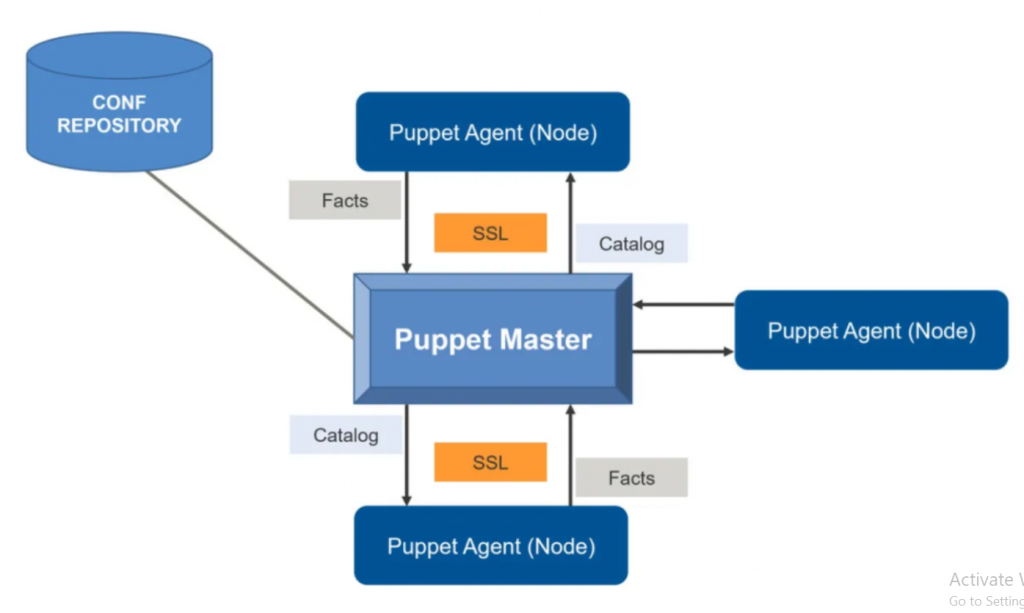
Puppet operates on a client-server model, where the Puppet Master (server) manages configurations, and Puppet Agents (clients) apply those configurations to the managed nodes. It supports a wide range of platforms, including Linux, Windows, and macOS, making it highly versatile for diverse IT environments.
Top 10 Use Cases of Puppet
- Configuration Management
Automate the configuration of servers, ensuring consistent and repeatable setups across environments. - Infrastructure as Code (IaC)
Define and manage infrastructure programmatically, enabling scalability and reducing human errors. - Application Deployment
Automate the deployment of applications, managing dependencies and configurations seamlessly. - Compliance Management
Enforce compliance by ensuring systems adhere to predefined security and operational standards. - Cloud Resource Management
Automate the provisioning and configuration of cloud infrastructure across platforms like AWS, Azure, and Google Cloud. - Patch Management
Manage and apply updates or patches to systems automatically, reducing vulnerabilities. - DevOps Integration
Integrate Puppet with DevOps tools like Jenkins, Docker, and Kubernetes to streamline CI/CD pipelines. - Network Device Configuration
Manage and configure network devices such as routers, switches, and firewalls for consistent performance. - System Monitoring and Reporting
Use Puppet’s reporting capabilities to monitor system configurations and identify drift or anomalies. - Disaster Recovery
Automate backup configurations and recovery processes to ensure business continuity.
What Are the Features of Puppet?
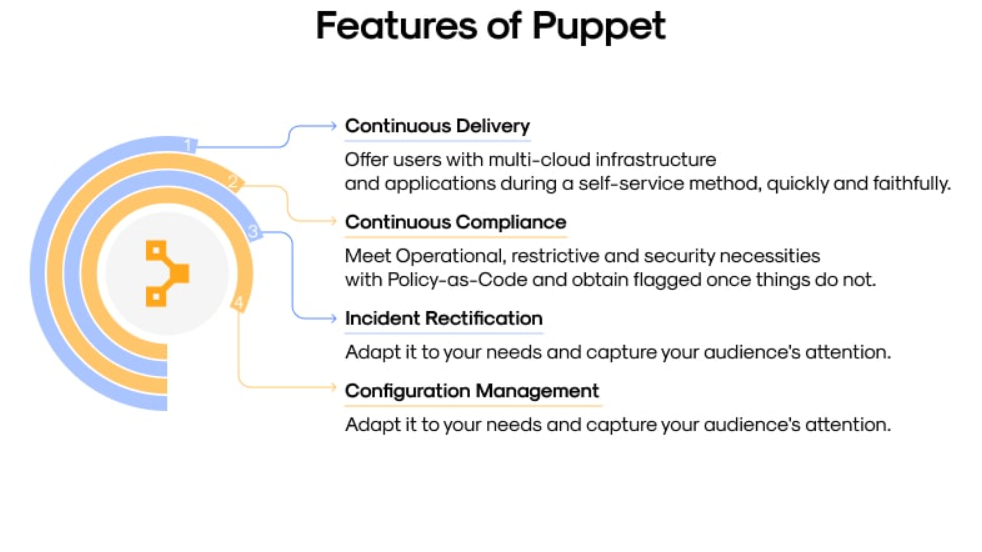
- Declarative Language
Puppet uses a domain-specific language (DSL) to define desired states, making it easy to learn and use. - Cross-Platform Support
Supports multiple operating systems, including Linux, Windows, and macOS, for broad applicability. - Idempotency
Ensures that configurations are applied only when needed, preventing repetitive changes. - Extensible Modules
Leverage a wide range of pre-built modules from Puppet Forge to simplify automation tasks. - Resource Abstraction
Manage resources such as files, users, and packages without worrying about platform-specific details. - Node Classification
Classify nodes into groups based on their roles, enabling tailored configurations. - Event Monitoring and Reporting
Gain insights into configuration changes and system performance with detailed reports. - Integration Ecosystem
Integrates with popular DevOps and IT tools like Jenkins, Git, and ServiceNow. - Scalability
Manage thousands of nodes efficiently with Puppet’s scalable architecture. - Agentless Option (Bolt)
Use Puppet Bolt for ad-hoc tasks and environments that do not require a Puppet Agent.
How Puppet Works and Architecture
How It Works:
Puppet follows a client-server model where the Puppet Master (server) manages configurations, and Puppet Agents (clients) apply those configurations. Configurations are defined in manifests, written in Puppet’s DSL, and stored in modules. Puppet ensures that managed nodes adhere to these configurations, maintaining the desired state.
Architecture Overview:
- Puppet Master:
Central server that stores and manages configuration manifests. - Puppet Agent:
Installed on managed nodes to apply configurations defined by the Puppet Master. - Manifests:
Files written in Puppet’s DSL that describe the desired state of resources. - Modules:
Collections of manifests and related files used to organize configurations. - Catalogs:
Compiled manifests sent to Puppet Agents, defining the configuration to be applied. - Reporting:
Provides logs and insights into the applied configurations and changes.
How to Install Puppet
Steps to Install Puppet on Linux:
1. Install Puppet Repository:
curl -O https://apt.puppet.com/puppet6-release-bionic.deb
sudo dpkg -i puppet6-release-bionic.deb
sudo apt update
2. Install Puppet Master and Agent:
For the Puppet Master:
sudo apt install puppetserverFor the Puppet Agent:
sudo apt install puppet-agent3. Start Puppet Server:
sudo systemctl start puppetserver4. Configure Puppet Agent:
Update the configuration file to point to the Puppet Master.
5. Verify Installation:
puppet agent --testBasic Tutorials of Puppet: Getting Started
1. Setting Up Nodes
Define your nodes in the Puppet configuration file to classify them based on roles or functions.
2. Creating a Manifest
Write a simple manifest to install a package:
package { 'apache2':
  ensure => installed,
}
3. Applying Configurations
Use the Puppet Agent to apply configurations from the Puppet Master:
puppet agent --test4. Using Puppet Modules
Install and use a module from Puppet Forge, such as the Apache module, to simplify web server setup.
5. Monitoring Changes
View reports to monitor configuration drift and ensure systems remain compliant.
