What is TensorFlow ?
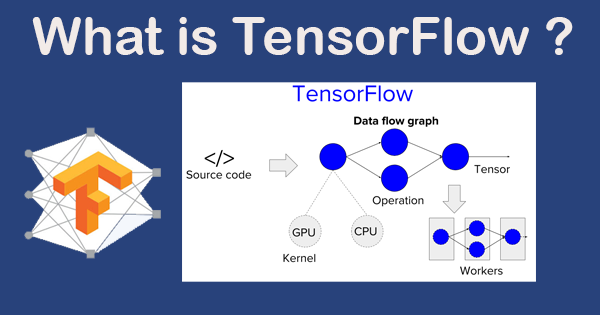
TensorFlow is an open-source machine learning library developed by Google. It provides a flexible and efficient platform for defining and running machine learning algorithms, and it supports a wide range of tasks and architectures, including neural networks, deep learning, reinforcement learning, and others.
What is top use cases of TensorFlow ?
TensorFlow is widely used in various applications, including:
- Natural Language Processing (NLP): TensorFlow can be used to develop systems capable of understanding and generating human language.
- Image Recognition: TensorFlow can be used to train models for recognizing objects in images.
- Predictive Analytics: TensorFlow can be used to build models that make predictions based on historical data.
- Autonomous Vehicle Control: TensorFlow can be used to develop systems that control autonomous vehicles.
- Healthcare Applications: TensorFlow can be used in various healthcare applications like medical diagnosis and drug discovery.
What are feature of TensorFlow ?
Some key features of TensorFlow include:
- Dataflow Graph: At the core of TensorFlow is a dataflow graph, which describes how data moves through a series of operations or transformations.
- Neural Network Training: TensorFlow provides tools for constructing and training neural networks.
- Scalability and Flexibility: TensorFlow is designed to be highly scalable and flexible, allowing the implementation of complex machine learning tasks.
- Multi-language Support: TensorFlow supports a variety of programming languages, including Python, C++, JavaScript, and Go.
- GPU Support: TensorFlow has support for running on GPUs (graphics processing units) for maximum performance
What is the workflow of TensorFlow ?
The workflow of TensorFlow involves several steps:
- Define the model architecture: This involves specifying the layers and types of neurons in the neural network.
- Compile the model: This involves setting the optimizer, loss function, and metrics.
- Train the model: This involves feeding the input data to the model and adjusting the weights based on the output error.
- Evaluate the model: This involves testing the model on unseen data and comparing the predicted output with the actual output.
- Make predictions: Once the model is trained and evaluated, it can be used to make predictions on new data
How TensorFlow Works & Architecture?
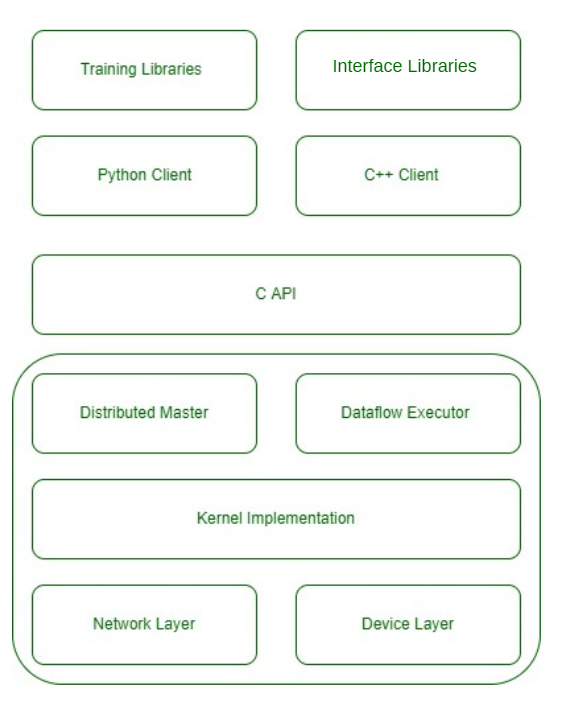
TensorFlow has different layers that help it work smoothly:
- Device and Network Layer: These are the first layers. The device layer helps TensorFlow talk to different parts of a computer like the GPU, CPU, or TPU. The network layer helps it communicate with other machines.
- Kernel Implementations: This is the second layer. It has tools mostly used in machine learning.
- Distributed Master and Dataflow Executors: The third layer has two parts. The Distributed Master spreads out tasks across different parts of a computer. The Dataflow Executor handles data flow in the smartest way possible.
- API Implementation in C Language: The next layer shows all the cool things TensorFlow can do. It’s written in C language because C is fast, reliable, and works on all kinds of computers.
- Python and C++ Support: This layer helps people use TensorFlow easily with Python and C++.
- Training and Inference Libraries: The last layer has special tools for teaching models and using them to make predictions. These tools are made in Python and C++.
How to Install and Configure TensorFlow ?
To install TensorFlow, you need to have Python installed on your system. You can then install TensorFlow using pip, which is a package manager for Python. Here is the command to install TensorFlow:
pip install tensorflowAfter installing TensorFlow, you can verify the installation by running the following commands in your Python environment:
import tensorflow as tf
print(tf.__version__)
This will print the version of TensorFlow that was installed.
Step by Step Tutorials for TensorFlow for hello world program
Here is a simple “Hello, World!” example using TensorFlow:
# Import TensorFlow
import tensorflow as tf

# Create a constant op
hello = tf.constant('Hello, World!')

# Start tf session
with tf.Session() as sess:
   # Run the op and store the result in the output variable
   output = sess.run(hello)
   # Print the output
   print(output)
