
Last updated: 27 November 2026
To scale microservices CI/CD pipelines, make the cost of a change depend on the size of that change, not on the number of services you own. Build only what is affected, share pipeline logic through versioned templates, test service compatibility without a full environment, and release each service independently with automated safety checks.
The rest is capacity planning and measurement. This guide covers each part in the order most teams can adopt it.
Why microservices CI/CD pipelines stop scaling
A few services can survive on copied pipeline files. As the count grows, the same problems tend to appear:
- Redundant work: one commit triggers builds for services that did not change.
- Configuration drift: every repository has a slightly different build, scan and deploy script.
- Queueing: jobs wait for runners, so feedback slows even when each job is fast.
- Coupled releases: shared end-to-end environments force teams to wait for each other.
- Wider risk: more pipelines mean more credentials, images and deployment paths to secure.
The goal is that each team can build and deploy its own services without disrupting others, while common standards still apply everywhere.
The target architecture
A scalable design separates concerns. CI decides what changed, then builds, tests, scans, signs and publishes an artifact. CD promotes that same artifact through environments. Production signals decide whether a rollout continues.
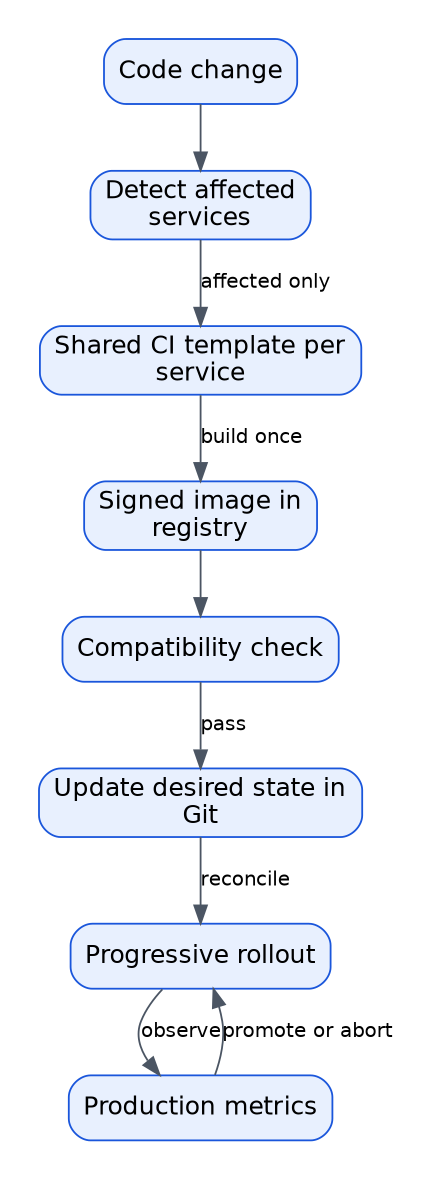
Build each image once and promote it by its immutable digest. Rebuilding for every environment costs time and means production may not run what you tested.
Step 1: Build and test only what changed
This is usually the first lever to pull. It applies to monorepos directly. With one repository per service, the repository boundary does much of the filtering, but shared libraries still need a way to trigger downstream builds.
| Approach | How it selects work | Strength | Main risk |
|---|---|---|---|
| Build everything | All services on every change | Simple, nothing is missed | Cost and queues grow with service count |
| Path filters | Changed file paths | Built into common CI systems | Hand-kept rules can miss shared dependencies |
| Dependency graph (such as Nx or Bazel) | Changed inputs and their dependents | More precise across shared code | Needs accurate declarations and more tooling skill |
| Graph plus remote cache | Affected tasks, reusing earlier results | Avoids repeating work across pushes | Undeclared inputs can produce wrong cache hits |
Two details matter in practice. First, compare against the right base commit. On the main branch, Nx recommends the latest successful commit, so changes from a failed run are not skipped. Second, fetch enough Git history for the comparison; Nx’s guidance for GitHub Actions is a full clone.
Expect some changes to select almost everything. A widely used library or a shared build setting should do that. Nx also notes that, by default, lock file changes affect every task.
Example: a dynamic matrix in GitHub Actions
The sketch below assumes services live in services/NAME and shared code in libs. It has not been tested here. Replace PINNED_SHA with a reviewed commit SHA.
# .github/workflows/ci.yml
name: ci
on: pull_request
permissions:
  contents: read
concurrency:
  group: ${{ github.workflow }}-${{ github.ref }}
  cancel-in-progress: true

jobs:
  detect:
    runs-on: ubuntu-latest
    outputs:
      services: ${{ steps.diff.outputs.services }}
    steps:
      - uses: actions/checkout@PINNED_SHA
        with:
          fetch-depth: 0
      - id: diff
        env:
          BASE: ${{ github.event.pull_request.base.sha }}
        run: |
          set -euo pipefail
          # List old and new paths of moved files, without path quoting
          changed=$(git diff --name-only --no-renames -z "$BASE...HEAD" |
            tr '\0' '\n')
          # Shared code, workflows, or files directly under services/
          shared='^(libs/|\.github/|services/[^/]+$)'
          if grep -qE "$shared" <<< "$changed"; then
            list=$(ls services)
          else
            list=$(awk -F/ '$1=="services" && NF>2 {print $2}' <<< "$changed" | sort -u)
          fi
          json=$(for s in $list; do
              if [ -d "services/$s" ]; then echo "$s"; fi
            done | jq -R . | jq -cs .)
          echo "services=$json" >> "$GITHUB_OUTPUT"

  build:
    needs: detect
    if: needs.detect.outputs.services != '[]'
    strategy:
      fail-fast: false
      max-parallel: 10
      matrix:
        service: ${{ fromJSON(needs.detect.outputs.services) }}
    uses: ./.github/workflows/service-ci.yml
    with:
      service: ${{ matrix.service }}

  gate:
    needs: [detect, build]
    if: always()
    runs-on: ubuntu-latest
    steps:
      - if: contains(needs.*.result, 'failure') || contains(needs.*.result, 'cancelled')
        run: exit 1
The --no-renames option matters. Git detects renames by default, and a name-only diff then shows just the new path. A file moved out of a service or shared library could leave the affected code untested. With rename detection off, the diff lists both the deleted path and the added path.
The -z option stops Git from quoting unusual file names, which would break the path matching. Because its output is piped, pipefail ensures that a failed diff still fails the job.
Make gate your required status check. It gives branch protection one stable name, even though the list of service jobs changes with every pull request.
Add other root-level files that affect all builds to the shared pattern. The script assumes simple service directory names without spaces. A real setup also needs a main-branch workflow with its own base-commit logic.
Step 2: Standardize with versioned templates
Move build, test, scan and publish steps into shared definitions, such as GitHub Actions reusable workflows or Azure Pipelines templates. Service teams then supply a few inputs instead of maintaining whole pipelines.
# .github/workflows/service-ci.yml (untested)
on:
  workflow_call:
    inputs:
      service:
        required: true
        type: string
jobs:
  test:
    runs-on: ubuntu-latest
    steps:
      - uses: actions/checkout@PINNED_SHA
      - env:
          SERVICE: ${{ inputs.service }}
        run: make -C "services/$SERVICE" test
This assumes each service exposes the same make test target. A common contract like that lets teams use different languages behind one pipeline.
GitHub currently allows up to ten levels of connected workflows and 50 unique reusable workflows called from one workflow file. Stay well below that, because deep nesting is hard to debug.
When templates live in a central repository, reference them by commit SHA or a controlled release tag. A SHA is the most predictable. Roll template changes out to a few services first. Note that caller-level env values are not passed to called workflows, and a called workflow cannot raise the token permissions it receives.
Step 3: Plan runner capacity and caching
Parallel jobs help only if runners are available. On GitHub-hosted standard runners, the documented concurrent job limits are 20 for Free, 40 for Pro, 60 for Team and 500 for Enterprise plans. A matrix is capped at 256 jobs per workflow run, including on self-hosted runners.
Here is a hypothetical example. Forty services take eight minutes each, and 20 jobs can run at once. Building all of them uses 320 runner-minutes and takes at least 16 minutes. If a change affects three services, it uses 24 runner-minutes and can finish in about eight, ignoring setup and queue time.
- Track queue time separately from execution time. They need different fixes.
- Cancel superseded pull request runs, but avoid cancelling a deployment midway.
- Cache dependencies and build layers using keys based on lock files and tool versions.
- Watch cache limits. GitHub includes 10 GB per repository by default, which many services in one monorepo can fill quickly.
- Use autoscaling self-hosted runners if you need custom hardware or network access, and budget for patching and isolating them.
- Use
max-parallelto stop one large change from taking every runner.
Step 4: Replace most end-to-end testing with contracts
If every release needs the whole system running, services are not independently deployable. Put most coverage in unit and component tests, verify interfaces with contract tests, and keep a small end-to-end suite for critical user journeys.
With Pact, the Broker’s can-i-deploy command checks whether a version is compatible with the versions already in a target environment. After deploying, record it so later checks stay accurate. These commands are untested here and assume your Broker connection is configured.
pact-broker can-i-deploy --pacticipant orders \
  --version "$GIT_SHA" --to-environment production

# deploy, then:
pact-broker record-deployment --pacticipant orders \
  --version "$GIT_SHA" --environment production
For integration checks that need real infrastructure, create short-lived preview environments, such as a namespace per pull request, and delete them automatically.
Step 5: Deploy independently with GitOps and progressive delivery
In a GitOps model, CI publishes an image and updates the desired state in Git. A controller inside the cluster applies it. This leaves an audit trail and means CI runners do not need direct cluster credentials.
| Strategy | Traffic behavior | Good fit | Trade-off |
|---|---|---|---|
| Rolling update | New instances gradually replace old ones | Routine, compatible changes | Both versions serve traffic during rollout |
| Blue-green | Traffic switches to the new version at once | Fast switch back | Needs capacity for both versions |
| Canary | A small share goes to the new version first | Higher-risk changes | Needs good metrics and traffic control |
Argo Rollouts expresses canaries as steps. This untested fragment belongs in a Rollout resource:
strategy:
  canary:
    steps:
      - setWeight: 10
      - pause: {duration: 10m}
      - setWeight: 50
      - pause: {}   # waits for manual promotion
Without a traffic router, Argo Rollouts approximates weights through replica counts, so small percentages are coarse. A timed pause also does not check health by itself; add metric analysis for automated promotion or abort decisions.
For many applications, Argo CD ApplicationSet Progressive Syncs can update groups in order, waiting for each to become healthy. The feature is documented as Beta as of version 3.3.0, is off by default, and disables auto-sync on the generated applications under the RollingSync strategy.
Whatever the strategy, keep APIs and database schemas backward compatible while versions overlap. A code rollback will not undo a destructive migration.
Step 6: Build security into the shared path
- Use short-lived OpenID Connect federation instead of stored cloud secrets.
- Give each job the minimum permissions and separate build from deploy identities.
- Pin third-party actions and templates.
- Generate a software bill of materials, sign images and verify signatures at admission.
- Use the SLSA specification (version 1.2 is approved) to plan build provenance improvements.
Measure whether scaling is working
DORA now describes five delivery metrics. Review them per service or application, alongside queue time, cache hit rate and flaky test rate.
| DORA metric | Group | Question it answers |
|---|---|---|
| Change lead time | Throughput | How long from commit to production? |
| Deployment frequency | Throughput | How often do you deploy? |
| Failed deployment recovery time | Throughput | How quickly do you recover from a failed deployment? |
| Change fail rate | Instability | What share of deployments need immediate intervention? |
| Deployment rework rate | Instability | What share are unplanned fixes prompted by production incidents? |
Use them to find constraints, not to rank teams. DORA warns that turning metrics into targets invites gaming.
Common mistakes and troubleshooting
| Symptom | Likely cause | What to try |
|---|---|---|
| A broken service was never tested | Missing dependency rule or wrong base commit | Fix declarations; run a scheduled full build as a backstop |
| Moving files skips the source service or library | Rename detection reports only the new path | Add --no-renames to the name-only diff |
| Every change builds everything | Broad shared paths or lock file churn | Split shared libraries and narrow inputs |
| Diff step fails | Shallow checkout | Fetch the history that includes the base commit |
| Pending deployments disappear | Default concurrency keeps only one pending run per group | Consider queue: max (up to 100 pending; not with cancel-in-progress: true) |
| Fast jobs, slow feedback | Runner queueing | Add capacity or reduce selected work |
| Random failures and reruns | Flaky tests or shared test data | Quarantine with an owner and deadline; isolate data |
Hands-on exercise
- In a test repository, create
services/a,services/bandlibs/common, with a trivialmake testtarget in each service and a sample file in the library. - Add the two example workflows, pin the checkout action and merge this setup into the main branch.
- Open a pull request touching only service a. Confirm that one build job runs.
- In a new pull request, change the shared library. Confirm that both services run.
- Move a non-essential file from service a to service b. Confirm that both run.
- Move the library’s sample file to a root-level
docsdirectory. Confirm that both services still run. - In a separate pull request, change only a README at the root. Confirm that builds are skipped and the gate passes.
- Break a test and verify that the gate blocks the merge once it is a required check.
FAQ
Should each microservice have its own pipeline?
Each should be independently buildable and deployable. The pipeline logic can still come from one shared template.
Is a monorepo or multiple repositories better?
Both work. Monorepos ease code sharing and standardization but need change detection and scalable tooling. Separate repositories clarify ownership but make shared dependencies and consistency harder.
Do I need Kubernetes or GitOps to scale?
No. Selective builds, shared templates, contract tests and good metrics apply to any deployment platform.
What should I fix first?
Measure where time goes. If queues dominate, reduce unnecessary work or add runners. If builds dominate, improve caching. If releases wait on shared testing or approvals, work on contracts and automated release checks.