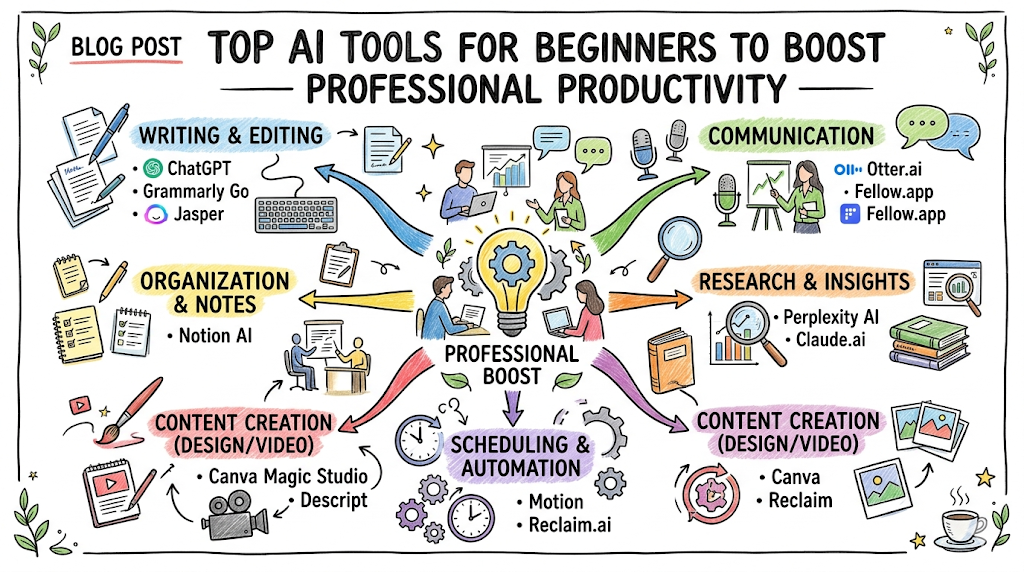
The digital workspace is changing rapidly, making traditional workflows feel remarkably slow and outdated. Staying competitive means learning how to collaborate with intelligent software assistants that handle repetitive tasks with incredible speed. In simple terms, artificial intelligence software refers to digital applications that perform tasks usually requiring human intelligence. These tasks include writing essays, designing graphics, organizing massive datasets, analyzing files, and writing programming code. Instead of replacing your unique talents, these programs act as tireless digital assistants that clear away creative blocks and administrative bottlenecks. They allow you to focus your energy on strategic decision-making and high-level problem-solving.
This guide serves as your definitive manual for understanding the modern software ecosystem. You will discover the operational frameworks of the industry’s leading platforms and learn how to choose the right tools for your specific goals. More importantly, you will master the foundational skills required to align these systems into a unified productivity framework. Now let’s explore how you can unlock your full creative potential by mastering the educational resources and expert frameworks available through AIUniverse.
The Rise of AI Tools
Early Software Automation and Digital Assistants
Traditional software programs operated strictly on rigid, pre-programmed rules defined by human developers. You clicked a specific button, and the application executed an identical, unchanging command every single time. Early digital assistants could set simple calendar reminders or search for exact text strings within a document, but they lacked deeper contextual understanding. They could not interpret human intent, spot subtle patterns, or adapt when faced with incomplete information.
As digital systems evolved, developers began training software on massive datasets using advanced mathematical models. This shift allowed applications to transition from passive tools into active, predictive assistants capable of understanding natural human language. Instead of forcing users to learn complex programming syntax, computers began adapting directly to the way humans naturally speak and write.
The Shift Toward Generative AI
The modern tech landscape shifted dramatically with the emergence of generative models capable of producing entirely original material. Traditional automation focused purely on organizing or filtering existing data points. Generative systems changed the game by synthesizing knowledge to create new text, realistic images, cinematic videos, and functional source code.
This breakthrough meant a user could describe a visual concept in plain English and receive a high-resolution design seconds later. It enabled writers to input rough bullet points and receive a polished, well-structured essay draft instantly. The barrier to technical entry dropped completely, giving anyone with a web browser the power to build, design, and code.
Global Adoption Across Industries
Small businesses, global enterprises, universities, and creative studios now use intelligent software as standard infrastructure. Educators use these systems to design personalized lesson plans and interactive quizzes tailored to different student learning speeds. Software engineers treat digital assistants as collaborative pair-programmers that suggest functional code blocks and spot tricky syntax bugs in real time.
Corporate marketing teams deploy automated platforms to manage large-scale content generation while keeping brand messaging perfectly consistent. Customer support departments use advanced conversational systems to resolve complex user inquiries instantly around the clock. This widespread adoption proves that algorithmic literacy is no longer an optional tech skill but a fundamental requirement across modern industries.
Understanding AI Tools for Beginners
The Core Categories of AI Tools
Navigating the modern software landscape becomes much simpler when you group applications into specific, functional categories based on their primary outputs. Conversational chatbots focus on text generation, general brainstorming, document analysis, and step-by-step educational coaching. Visual synthesis platforms transform descriptive text prompts into detailed graphics, website mockups, artistic illustrations, or professional marketing imagery.
Research engines combine traditional web searching with intelligent synthesis to provide direct, fully-cited answers instead of pages of links. Specialized productivity tools embed smart features directly into note-taking apps, spreadsheet software, and daily calendar management platforms. Understanding these core categories helps you select the exact software required to solve a specific workflow bottleneck.
Daily Use Cases of AI Applications
Integrating digital assistants into your daily routine can instantly eliminate hours of administrative overhead and creative stagnation. Imagine pasting a long, 50-page corporate PDF report into a browser and receiving a concise, five-bullet executive summary in under ten seconds. Think about drafting clear, professional emails to difficult clients by simply providing three basic talking points to your assistant.
Creators use these platforms to generate comprehensive video scripts, outline blog structures, and brainstorm catchphrase ideas for digital campaigns. Busy professionals use automated schedulers to analyze email threads and organize meetings without manual back-and-forth messaging. These practical applications turn minor daily time savings into hundreds of hours gained over a career.
Free vs. Paid AI Tools
Most top-tier software companies offer highly capable free tiers designed to give beginners full access to foundational models. These free versions are perfect for learning the basics of system interaction, testing simple workflows, and handling everyday writing or research tasks. However, free tiers often face strict usage limits during peak hours and run on slightly older core models.
Premium subscription tiers grant users priority access to faster processing speeds, advanced analytical features, and the company’s most powerful models. Paid plans frequently include advanced features like file uploading, custom tool creation, and direct integration with third-party software applications. As a beginner, starting with free tiers allows you to build foundational skills before investing financial resources.
The Productivity-First Mindset
The secret to maximizing modern software lies in viewing these systems as intelligent assistants rather than total human replacements. An algorithmic model can generate text and process data at incredible speeds, but it completely lacks human judgment, emotional intelligence, and authentic lived experience. True productivity occurs when you combine human creativity and oversight with the raw computational speed of software.
Think of yourself as a director or project editor rather than a passive consumer of automated outputs. Your role is to provide clear direction, analyze the generated results critically, and refine the final output to ensure accuracy and quality. This balanced approach protects the authenticity of your work while drastically increasing your daily operational output.
The 10 Most Popular AI Tools Every Beginner Should Know
1. ChatGPT
This highly flexible conversational platform serves as the perfect starting point for anyone entering the world of modern software assistants. It operates through a simple, text-based chat interface that feels exactly like messaging a knowledgeable colleague or personal tutor. You can ask it to draft complex professional documents, translate text across dozens of languages, or explain difficult scientific concepts simply.
This platform becomes especially useful when you need to brainstorm creative concepts, outline long projects, or practice conversational interview skills. For example, a beginner can input a rough, chaotic list of thoughts and ask the system to organize them into a clean corporate memo. It excels at maintaining context across long conversations, allowing you to continuously refine and adjust its responses.
2. Google Gemini
Built directly into the expansive ecosystem of daily web applications, this platform shines through its deep integration with modern search infrastructure. It features native multimodal capabilities, meaning it processes and connects information across text, images, audio, video, and code simultaneously. You can upload a photo of a broken household appliance and ask the system for step-by-step repair instructions.
Professionals benefit greatly from its ability to connect with workspace applications to summarize long email threads or extract data from spreadsheets. It provides real-time data retrieval from the live web, making it highly reliable for analyzing breaking news and current industry trends. The platform bridges the gap between conversational assistance and practical, day-to-day digital organization.
3. Claude
Engineered with a strong focus on advanced reasoning, deep safety guardrails, and nuanced language processing, this assistant excels at handling complex text assignments. It possesses a massive memory capacity, allowing users to upload entire books, financial ledgers, or massive code repositories for deep analysis. The system analyzes long-form documents with an exceptional grasp of subtle tones, underlying context, and complex structural relationships.
Most beginners start with this tool when they need to draft highly professional, human-sounding essays, research papers, or detailed technical manuals. It avoids overly dramatic or robotic marketing language, delivering clean, analytical responses that closely match professional academic writing styles. If you need to audit an extensive business contract or summarize multi-page legal documents, this platform is an exceptional choice.
4. Perplexity
This innovative search platform completely changes how we discover information on the web by replacing standard search links with direct, structured answers. When you input a question, the system scans the live internet, filters out low-quality web pages, and synthesizes a clear response. Every single fact, statistic, and claim presented includes a clear, clickable footnote citation pointing directly to the original source.
This setup allows researchers, students, and analysts to verify data points instantly and explore primary source material without wasting hours clicking through spammy websites. It organizes your research into structured workspaces and suggests logical follow-up questions to deepen your understanding of any topic. It transforms traditional search engine navigation into a guided, exploratory conversation.
5. Midjourney
Operating entirely inside a popular community chat application, this visual synthesis engine turns descriptive text sentences into breathtaking, gallery-quality imagery. Users input specific descriptions containing lighting styles, color schemes, artistic mediums, and architectural concepts to generate high-resolution graphics. It serves as an invaluable tool for graphic designers, game developers, and creative artists looking to build conceptual storyboards rapidly.
Imagine completing hours of manual digital sketching in a matter of seconds to pitch a visual concept to a prospective corporate client. The platform continuously updates its core models to better understand subtle artistic nuances, human anatomy, and complex environmental lighting. It democratizes the world of digital art, allowing anyone with a vivid imagination to create stunning visual assets.
6. Canva AI
This platform takes the complexity out of graphic design by embedding intelligent automation tools directly into a user-friendly design canvas. Beginners use its smart features to remove image backgrounds with a single click, expand photo borders, or generate custom design elements from text descriptions. It includes automated translation features that instantly convert entire multi-page slide decks into different languages while preserving font layouts.
The platform’s smart layout engine automatically suggests optimal text placement, color palettes, and graphic arrangements based on the core theme of your project. This capability makes it an essential tool for social media managers, small business owners, and educators who need to produce professional media assets quickly. It bridges the gap between abstract visual generation and practical, day-to-day graphic design production.
7. Notion AI
By embedding intelligent text and data processing capabilities directly into a popular digital workspace, this tool transforms how people organize their knowledge. It acts as an on-demand editor that can instantly clean up messy meeting notes, auto-generate action items from project descriptions, or translate workspace pages. Users can transform chaotic, unorganized data tables into structured project summaries or categorized task lists with a single click.
It eliminates the frustrating need to constantly switch back and forth between external writing applications and your primary digital filing system. Whether you are drafting a detailed project proposal, managing a personal study planner, or building a corporate wiki, it provides immediate contextual assistance. It turns a standard note-taking application into a dynamic, interactive workspace that actively helps you think and organize.
8. GitHub Copilot
Built specifically for software engineering workflows, this specialized assistant plugs directly into popular code editing environments to accelerate programming productivity. It analyzes the context of your current file and automatically suggests complete lines of code, complex functions, or comprehensive testing scripts. The system supports dozens of programming languages and excels at handling repetitive coding patterns, boilerplate setups, and tricky syntax bugs.
Instead of pausing your workflow to search online documentation for obscure functions, you can describe your coding goal in plain English comments. The assistant will instantly generate the corresponding functional code block directly inside your editor for your review and adjustment. It functions as an incredibly patient technical mentor, helping beginner programmers learn syntax conventions and build software projects much faster.
9. Runway
This pioneering video generation platform brings the power of advanced cinematic editing and visual synthesis to anyone with a standard web browser. It allows users to generate striking video clips from text descriptions, transform static photos into dynamic animations, or alter video styles using text filters. Its intelligent editing tools automate incredibly difficult post-production tasks, like removing moving subjects from footage or tracking complex motion paths.
Independent filmmakers, commercial marketers, and video content creators use this platform to prototype complex visual effects shots without massive production budgets. It provides a fascinating look into the future of multimedia creation, where producing cinematic storytelling assets requires no expensive camera hardware. By simplifying the technical barriers of video editing, it lets creators focus entirely on narrative structure and visual pacing.
10. Grammarly
Focusing deeply on professional communication, this ubiquitous writing assistant goes far beyond basic spellchecking to elevate the clarity of your prose. It analyzes your sentences in real time to evaluate structural tone, vocabulary choices, reading clarity, and grammatical correctness. The platform provides clear, actionable explanations for every suggestion it makes, helping users improve their natural writing skills over time.
This becomes especially useful when you need to adjust an email from a casual, friendly note to an authoritative, corporate response. It catches confusing passive voice constructions, highlights repetitive phrasing, and ensures your writing remains engaging and easy to digest for your target audience. It serves as a personal copyeditor, ensuring your digital communication remains polished and professional across all web platforms.
Key AI Concepts Every Beginner Must Know
Artificial Intelligence vs. Machine Learning vs. Generative AI
Understanding the modern tech ecosystem requires breaking down complex technical terms into simple, distinct concepts that show how these systems relate.
- Artificial Intelligence: The broad, overarching scientific field dedicated to building computing systems capable of performing tasks that traditionally required human intelligence.
- Machine Learning: A specific subfield of computer science focused on training algorithms to spot patterns in massive datasets and make accurate predictions without explicit instructions.
- Generative AI: A specialized branch of machine learning that goes beyond data sorting to create entirely new, original text, images, music, or code.
Prompt Engineering Basics
In simple terms, prompt engineering is the art of writing clear, structured instructions that guide an automated assistant to produce high-quality outputs. Many beginners make the mistake of typing vague, one-word queries and then feel disappointed by the generic results they receive from the system. To get excellent results, your prompts should include clear context, a specific role for the system, detailed task constraints, and a defined output format.
Instead of typing “write a business email,” a skilled user will instruct the system to “act as an executive manager and draft a polite email apologizing for a shipping delay.” You should specify that the response must be under two paragraphs, avoid corporate jargon, and conclude with a clear call to action. Providing examples of your preferred writing style within the prompt will drastically improve the relevance and quality of the output.
AI Productivity Workflows
True digital efficiency is unlocked when you learn to connect multiple specialized software platforms into a single, cohesive workflow that automates complex tasks. For example, you can use a research assistant like Perplexity to gather verified, fully-cited facts and statistics about a new industry trend. Next, you copy those structured research findings into Claude to generate a well-organized, comprehensive outline for an upcoming project proposal.
Finally, you transfer that completed text outline into Canva AI to instantly generate a visually stunning presentation deck for your business stakeholders. This multi-tool approach allows you to leverage the unique strengths of each application while maintaining complete creative control over the entire project. It transforms separate applications into a highly integrated personal production studio.
AI Limitations and Hallucinations
While modern software platforms are incredibly powerful, they operate purely on mathematical probabilities and completely lack genuine understanding of real-world facts. A system can occasionally generate confident-sounding statements that are entirely incorrect, fabricated, or completely detached from reality—a phenomenon known as a hallucination. This happens because the models are designed to predict the most plausible next words in a sentence rather than verify historical truth.
Therefore, it is a critical professional rule to thoroughly fact-check every single statistic, legal citation, and historical claim before publishing any content. Never treat an algorithmic response as a final, absolute truth without independent verification from trusted primary sources. Maintaining a healthy level of skepticism protects your professional reputation and ensures the integrity of your work.
Privacy and Security Considerations
Every piece of information you type into a public software application is transmitted directly to external cloud servers for processing and model improvement. This means you should never upload confidential business records, proprietary software code, or sensitive personal data into standard, free-tier platforms. Many organizations have implemented strict data policies prohibiting employees from pasting internal client information into public chat interfaces.
To protect your digital privacy, explore the settings menu of your applications to disable chat history storage and opt out of data training programs. For enterprise workflows, look into secured, corporate-grade subscriptions that guarantee your uploaded data remains entirely private and protected from model training cycles. Developing secure data handling habits early is essential for building a responsible, safe modern career.
The Four Pillars of Effective AI Usage
Mastering digital assistant software requires balancing your daily interactions across four core pillars that ensure long-term professional success.
- Creativity: Using systems to break through mental blocks, explore wild conceptual ideas, and expand your natural imaginative boundaries.
- Productivity: Automating low-value administrative tasks, formatting data, and summarizing long-form materials to save valuable daily time.
- Verification: Critically evaluating every automated output, fact-checking data points, and applying human oversight to protect quality.
- Learning: Treating software as an interactive personal tutor that breaks down complex technical fields into digestible educational steps.
Choosing the Right AI Tool — What’s the Real Difference?
The Philosophy Difference
Every software application is engineered with a fundamentally different design philosophy that dictates how it processes information and interacts with users. Creation-focused platforms prioritize visual imagination, artistic nuance, and aesthetic styling, making them ideal for generating striking illustrations or dynamic video assets. Research-focused engines prioritize factual data retrieval, live web scanning, and transparent source citations, completely prioritizing informational accuracy over poetic writing.
Productivity-focused tools are designed to sit quietly within your existing workspaces, prioritizing text formatting, task organization, and fast workflow summaries. Recognizing these core philosophy differences prevents you from frustratingly forcing a research tool to do creative writing, or vice-versa. Matching your specific task to the underlying philosophy of the software guarantees a smooth, highly efficient digital experience.
Roles & Responsibilities Compared
Different professionals require completely different tool combinations to maximize their daily performance and meet their career responsibilities.
- Students: Use search engines and advanced text assistants to break down academic textbooks, summarize lecture notes, and study complex scientific formulas.
- Content Creators: Combine image generators, video editors, and text brainstormers to build multimedia stories, outline video scripts, and design digital thumbnails.
- Marketers: Deploy flexible conversational chatbots to draft multi-channel ad copy, brainstorm social media hooks, and analyze large sets of customer feedback data.
- Developers: Integrate dedicated code assistants into their text editors to automate repetitive formatting, generate testing data, and debug syntax errors.
- Business Professionals: Leverage workspace assistants to clean up messy meeting notes, draft formal email correspondence, and organize multi-step project tracking timelines.
Can Multiple AI Tools Work Together?
Building a modern software toolkit is very similar to assembling a elite sports team, where every single member plays a highly specialized role. Instead of searching for one magical application that claims to do everything perfectly, learn to orchestrate combinations of tools that pass data back and forth. A writer might use one platform’s massive memory to analyze a large collection of company background documents and pull key themes.
They will then pass those distilled themes into a different platform known for its natural, highly sophisticated prose style to draft the final article. A final pass through a dedicated communication assistant ensures the text is completely clear and polished for publication. This collaborative approach ensures that every single step of your project is handled by the absolute best software available.
Which AI Tools Should Beginners Start With?
If you are feeling completely overwhelmed by the massive explosion of modern software, the best strategy is to start small with two foundational platforms. Begin with a free account on ChatGPT or Google Gemini to master the basic principles of conversational prompting and text formatting. These platforms provide a wide, accessible playground where you can test different instruction styles and understand how systems interpret human intent.
Simultaneously, adopt Perplexity as your primary research companion to replace standard search engine queries during your daily information gathering sessions. Mastering these foundational applications will naturally build the digital literacy and analytical confidence required to explore advanced multimedia tools later. Focus on building consistent daily habits with basic tools before expanding your software toolkit.
Real-World Use Cases of AI Tools
AI for Content Creation
Digital marketing teams use conversational assistants to transform a single comprehensive research article into dozens of unique social media assets. The system can instantly extract punchy quotes for short-form video platforms, draft concise summaries for professional networks, and create email newsletters. It eliminates the exhausting manual labor of reformatting content for different digital channels, allowing writers to focus entirely on deep research.
Copywriters use creative assistants to break through painful writer’s block by generating multiple introductory hooks and headline variations for review. You can instruct the system to write from different perspectives, allowing you to test how different audiences might respond to your messaging. This rapid prototyping enables creative teams to produce highly polished marketing campaigns in a fraction of the traditional time.
AI for Learning and Research
Medical students use advanced document analysis platforms to convert massive, complex textbooks into interactive, step-by-step study guides. You can upload a dense chapter on human anatomy and command the system to quiz you on key terms, correcting your answers in real time. This interactive feedback loop transforms passive reading into active learning, significantly increasing long-term information retention.
Researchers use smart search engines to map out entirely new academic fields by analyzing citations and finding connections between disparate papers. Instead of reading dozens of irrelevant articles, the system highlights the exact papers most critical to your specific research question. This targeted approach saves weeks of manual library sorting and accelerates scientific discovery.
AI for Coding and Software Development
A beginner web developer can build a functional mobile application much faster by using code assistants to write complex backend logic. When the code inevitably throws a confusing error message, the developer can paste the error directly into the assistant for an immediate explanation. The system identifies the exact broken line of code, explains why the bug occurred, and provides a corrected, clean code block.
Experienced engineers use automated assistants to generate comprehensive testing scripts that check software security before launch. The software handles the repetitive, time-consuming task of writing edge-case scenarios, freeing up the engineer to design overarching system architectures. This partnership minimizes software development costs and allows small teams to launch massive digital platforms.
AI for Design and Multimedia
Independent video producers use visual synthesis applications to create detailed, cinematic storyboards for feature film pitches before spending production capital. By typing descriptions of scene framing and emotional lighting, they can visually present their creative vision to studio executives. This capability levels the playing field, allowing small creators to secure funding using studio-grade visual presentations.
Small business owners use integrated design platforms to automate the creation of cohesive brand assets across websites, business cards, and product packaging. The system ensures that your specific brand color hex codes and font styles remain perfectly unified across every single asset generated. This automation saves thousands of dollars in early-stage agency design fees.
AI for Business Productivity
Corporate operations managers use workspace assistants to instantly turn chaotic, multi-person transcriptions into clear, actionable executive summaries. The system identifies every single decision made during the conversation and assigns specific action items to team members based on their roles. This automation eliminates the need for manual note-taking, ensuring that remote teams remain perfectly aligned after every digital call.
Human resource professionals use text systems to draft highly comprehensive, compliant employee onboarding manuals and training documentation from rough bullet points. The assistant structures the text into clear chapters, includes helpful frequently asked questions sections, and ensures the tone remains welcoming and professional. This streamlines company operations and allows HR teams to focus on direct employee care.
Common Mistakes Beginners Make While Using AI Tools
Mistake 1 — Trusting Every AI Response Without Verification
The most dangerous error a beginner can make is assuming that a beautifully written, highly confident software output is factually accurate. These systems are designed to mimic the natural structure of human language, not to act as absolute source truths. They can easily weave completely fictitious historical dates, nonexistent legal cases, or fabricated scientific data into an otherwise perfect report.
Always cross-reference every critical claim, financial statistic, and citation against verified primary sources before sharing the information with colleagues or clients. Treating automated outputs with a high degree of critical skepticism is essential for maintaining your personal and professional credibility. Remember: you are entirely legally and professionally responsible for any content you publish, regardless of how it was generated.
Mistake 2 — Using Weak or Vague Prompts
Many new users type incredibly short instructions like “write a blog about business management” and then wonder why the result feels generic and boring. Automated systems require clear guardrails, detailed context, and precise stylistic directions to produce high-quality, actionable material. When you provide a vague prompt, the system falls back on generic internet data, resulting in uninspiring, repetitive text.
To fix this, always include details about your target audience, the specific tone you want to achieve, and structural constraints like word limits. Tell the system exactly what perspectives to embrace and what overused corporate cliches or phrases it must completely avoid. High-quality inputs naturally lead to high-quality outputs.
Mistake 3 — Expecting AI to Replace Human Judgment
An automated model can process data at blinding speeds, but it possesses absolutely no emotional intelligence, moral ethical compass, or authentic human experience. Beginners often make the mistake of copying and pasting raw, unedited software outputs directly into their final professional projects. This practice results in soulless, robotic content that fails to truly connect with human readers or solve real-world customer problems.
Your unique human perspective, personal stories, and professional judgment are the most valuable elements of any project you create. Use digital assistants to build foundational structures and brainstorm raw ideas, but always inject your personal voice and insights into the final edit. The best work is always a collaborative partnership between human direction and technological speed.
Mistake 4 — Ignoring Privacy and Security Risks
Pasting proprietary software code, sensitive customer data, or private personal journals into a public chat interface can lead to severe security leaks. Most standard free-tier applications save your inputs to continuously train future versions of their public models. This means your confidential business strategies could theoretically be served as a response to a competitor querying the system later.
Develop strict digital data habits by removing all identifying personal names, account numbers, and corporate secrets from your text before submission. Explore your application account settings to turn off data sharing and history retention features completely. Protecting your data privacy is a fundamental pillar of professional digital literacy.
Mistake 5 — Using Too Many Tools at Once
The massive explosion of new software launches can easily cause beginners to fall into a frustrating trap of tool overload. Trying to learn ten different platforms simultaneously creates severe mental fatigue and fragments your attention across too many confusing user interfaces. You end up wasting hours managing software accounts rather than actually completing your primary professional tasks.
Instead, select two core applications that directly solve your biggest daily workflow bottlenecks and commit to mastering them completely. Build deep familiarity with their advanced features, shortcut commands, and prompting quirks before introducing new applications to your routine. A simple, highly integrated toolkit is infinitely more effective than a chaotic collection of half-understood programs.
Mistake 6 — Focusing on Tools Instead of Skills
It is easy to get so swept up in the exciting features of a new software update that you forget the core skills behind great work. A gorgeous image generator cannot make you an elite graphic designer if you completely lack a foundational understanding of color theory and balance. An advanced text assistant cannot turn you into a top-tier technical writer if you do not understand logical narrative structure.
Software programs are powerful amplifiers of your existing abilities, but they cannot replace the hard work of building core domain expertise. Dedicate continuous energy to studying the foundational principles of your specific industry alongside your software practice. True professional authority comes from human expertise amplified by smart technology.
Essential Skills to Maximize AI Tools
Prompt Writing and Communication
Developing the ability to write precise, highly structured instructions is one of the most valuable professional skills you can cultivate today. This skill requires clear logical thinking, an exceptional command of language, and the ability to break complex projects into small steps. Think of prompt engineering as managing a talented but completely literal digital intern who requires exact direction to succeed.
You must learn to clearly define roles, provide rich contextual background, establish strict formatting boundaries, and deliver constructive feedback loops. The better you communicate your goals to the system, the more creative and accurate the resulting outputs will be. Refining your prompt writing skills naturally sharpens your overall human communication clarity.
Research and Information Verification
As automated content floods the digital ecosystem, the ability to rapidly verify facts and spot misinformation becomes a critical superpower. Maximizing modern software requires you to become an elite digital detective who knows how to trace claims back to primary sources. You must learn to evaluate source authority, spot logical inconsistencies in text, and cross-examine automated data points.
This skill involves knowing which specialized search engines to deploy when checking academic citations versus cross-checking live news events. Developing a systematic verification checklist for your work ensures that hallucinations are caught long before publication. Informational integrity is the absolute foundation of professional trust in modern careers.
Creativity and Problem Solving
True digital innovation occurs when professionals treat automated systems as interactive sparring partners to explore unexpected creative directions. This requires a curious mindset that treats unusual or surprising software outputs as fascinating creative prompts rather than simple mistakes. You must learn to ask open-ended questions, combine wildly different concepts, and challenge the system to think outside standard conventions.
For example, you could ask an assistant to analyze a modern marketing problem through the lens of an ancient historical philosopher. This collaborative approach breaks you out of comfortable thinking ruts and unlocks fresh perspectives that traditional brainstorming sessions rarely produce. Technology handles the data sorting, freeing your human mind to focus entirely on creative leaps.
Automation and Workflow Design
To achieve true efficiency, you must develop an architectural mindset that views separate software applications as connected components of a larger system. This skill involves analyzing your daily routine to spot repetitive data entries, formatting loops, and communication bottlenecks. Once identified, you design automated pipelines where data flows smoothly from one specialized tool to the next with minimal human friction.
You learn to create reusable prompt templates, build custom internal assistants, and leverage system integrations to handle background admin tasks. This layout transforms individual acts of productivity into a permanent, scalable personal operating framework. It allows independent creators and small teams to match the operational output of large corporations.
Continuous Learning and Adaptability
The modern software landscape evolves at a breathtaking pace, with foundational models and interface updates launching almost every single week. Staying ahead requires a committed mindset of continuous learning and a total willingness to let go of outdated digital habits. You must dedicate consistent weekly time to experimenting with new software features, reading technical documentation, and refining your workflows.
View this constant technological change as an exciting opportunity to grow rather than a stressful burden to manage. Those who develop a natural comfort with digital ambiguity and a passion for experimentation will continuously thrive across their careers. Adaptability is the ultimate skill that keeps your professional expertise relevant over the long term.
Building an AI Career Roadmap
Skills Every Beginner Should Learn
Entering the modern digital workforce requires a balanced mix of fundamental tech literacy and strong interpersonal communication skills. Begin by building a rock-solid understanding of foundational data principles, learning how algorithmic systems process information, spot patterns, and store data. Pair this technical knowledge with exceptional prompt composition, mastering the subtle art of guiding systems through precise linguistic direction.
Equally important is cultivating advanced critical thinking, which enables you to audit automated outputs and detect subtle errors or biases. Finally, focus heavily on developing deep emotional intelligence and human relationship management, as these qualities can never be replicated by code. This well-rounded skillset ensures you remain highly valuable to employers as technology continues to advance.
Step-by-Step Learning Path
Your journey into modern digital workflows should follow a clear, progressive path that builds sustainable confidence and practical skill over time.
- Phase 1 (Discovery): Set up free accounts on foundational platforms to practice basic conversational prompts and explore text formatting.
- Phase 2 (Integration): Replace your standard web search routines with citation-backed research engines to gather and verify daily data points.
- Phase 3 (Orchestration): Build multi-tool pipelines where you pass text data from research tools into specialized graphic design and presentation platforms.
- Phase 4 (Automation): Design custom personal assistants trained on your specific style guides to handle repetitive professional writing and formatting tasks.
Certifications and Learning Programs Worth Exploring
As industries adapt to technological change, completing structured educational programs can significantly boost your professional credibility and market value. Look for comprehensive courses offered by prestigious universities and leading tech companies that focus on practical prompt engineering and workflow automation. These structured programs provide a clear, guided path through complex technical concepts, saving you from getting lost in fragmented online tutorials.
Prioritize learning paths that require you to build real-world portfolio projects, like designing automated customer pipelines or auditing large data models. Earning these recognized credentials demonstrates to prospective employers that you possess both theoretical understanding and verifiable hands-on skills. Continuous professional development ensures your resume remains highly competitive in an evolving job market.
Educational Resources with AIUniverse
Accelerating your educational journey requires accessing top-tier, curated learning resources designed specifically for ambitious digital professionals. Exploring the comprehensive learning tracks available through AIUniverse provides you with expert-led masterclasses, practical prompting blueprints, and deep-dive tool breakdowns. These structured modules remove the confusing guesswork from software education, helping you master complex automation systems rapidly.
You will gain access to a supportive community of forward-thinking practitioners who share real-world insights and cutting-edge workflow strategies daily. Investing time in structured educational platforms transforms overwhelming technology into an organized, highly empowering personal career asset. Let structured expert guidance transform you from a curious beginner into a highly confident digital leader.
The Future of AI Tools
AI-Powered Personal Assistants
The next major evolution in digital technology will see simple chat interfaces transform into highly proactive, deeply personalized life assistants. Instead of waiting for you to type specific commands, these intelligent systems will quietly analyze your daily workflows, calendar habits, and email threads. They will automatically schedule necessary meetings, draft contextual responses to urgent messages, and flag critical project deadlines before they become problems.
These advanced assistants will possess a secure, holistic understanding of your professional preferences, writing tone, and long-term career goals. They will handle the overwhelming mental load of daily administrative organization, functioning as a tireless chief of staff for your digital life. This shift allows you to dedicate your absolute best mental energy to high-level strategic creation.
Multimodal AI Systems
Future software infrastructure will move completely away from separate, isolated applications for text, images, and video editing. Next-generation ecosystems will feature unified multimodal models that seamlessly process and generate across all forms of media simultaneously. You can speak a complex creative concept aloud while sketching a rough idea on a digital tablet.
The unified system will instantly interpret your combined inputs to produce a fully rendered, animated 3D prototype complete with matching audio. This deep integration removes the frustrating technical barriers between different creative mediums, unlocking unprecedented freedom for multimedia storytellers. The line between imagining a complex concept and producing it will vanish completely.
AI in Everyday Business Operations
Enterprise workflows will soon be built entirely around interconnected networks of custom, specialized algorithmic agents that manage complex corporate systems. These intelligent agent networks will automatically monitor supply chain logistics, predict market shifts, optimize advertising budgets, and handle compliance auditing in real time. Human managers will step into high-level strategic roles, reviewing data dashboards and guiding agent behavior through clear policy choices.
This deep operational automation will allow agile startups to scale their businesses globally with a fraction of traditional infrastructure costs. Data-driven decision-making will become the standard across every industry, completely eliminating inefficient corporate guesswork. Businesses that master these autonomous frameworks will achieve unprecedented levels of market speed and efficiency.
Skills That Will Matter Most in Future AI Careers
As basic content generation becomes fully automated and universally accessible, true career value will shift toward high-level systemic mastery. The professionals who command the highest market value will be those who excel at complex workflow architecture and strategic prompt design. Deep critical thinking and advanced informational verification skills will be absolutely vital to protect organizations from algorithmic errors and security risks.
Above all, uniquely human traits like deep empathy, collaborative leadership, and authentic creative storytelling will become highly prized career premiums. Success will belong to adaptable professionals who view technology as an evolving canvas to amplify their human capability. Developing a harmonious partnership with intelligent tools is the ultimate blueprint for a resilient career.
FAQ Section
- What are the best free AI tools available for a complete beginner?
A complete beginner should start with free platforms like ChatGPT and Google Gemini for general text tasks, writing assistance, and conversational brainstorming. For internet research and gathering verified data points with direct source citations, Perplexity offers an exceptional, user-friendly free tier. If you want to explore graphic design and visual editing, Canva AI provides highly accessible smart features built directly into its standard free design workspace. Start with these foundational applications to build your confidence before investing in paid subscriptions.
2. Can using AI tools really help me advance my career and find new job opportunities?
Yes, mastering modern software tools can significantly accelerate your career progression by transforming you into a highly efficient, data-driven professional. Employers actively seek out candidates who know how to use digital assistants to automate administrative tasks, analyze large reports, and accelerate project timelines. By demonstrating deep software literacy, you show companies that you can manage a massive volume of work while maintaining high quality. This technical expertise positions you for high-paying roles like workflow architect, digital content strategist, or AI integration specialist.
3. How do I know if an AI tool is safe to use with my personal data?
To evaluate the safety of any software application, you must review its data privacy policy to see if your inputs are used to train public models. Avoid pasting highly sensitive information like bank account details, corporate trade secrets, or private identification numbers into free-tier public platforms. Look for applications that allow you to explicitly opt out of data training cycles within their user account settings menus. For handling highly confidential professional workflows, look into secured enterprise-tier subscriptions that guarantee complete data isolation and encryption.
4. Are there professional AI certifications that are actually worth pursuing for beginners?
Yes, earning recognized digital certifications can give you a powerful competitive advantage in the modern corporate job market. Focus on structured learning programs offered by elite universities and major technology infrastructure companies that cover practical prompt engineering and automation design. Avoid short, low-quality video courses that only provide a basic certificate of completion without requiring hands-on project work. Prioritize comprehensive certifications that force you to build a verifiable portfolio of real-world automation systems, data models, and workflow designs.
5. What is the most common mistake people make when they first start using AI tools?
The most frequent and dangerous mistake beginners make is blindly trusting the factual accuracy of an automated response without independent verification. These conversational systems are designed to mimic human speech patterns based on mathematical probabilities, meaning they can easily generate completely fabricated facts with absolute confidence. Another common error is using incredibly short, vague instructions that inevitably produce generic, low-quality results. Always thoroughly fact-check every statistic before publication, and provide rich context within your prompts to ensure excellent outputs.
6. How will the next generation of AI tools change the way we work over the next few years?
The next generation of digital applications will shift from passive chat interfaces into highly proactive, autonomous agent networks that manage entire business operations. Systems will become fully multimodal, allowing users to move fluidly between text, voice, design, and video generation within a single workspace. The mental burden of managing daily administrative emails, calendar scheduling, and data formatting will be completely handled by secure personal assistants. This evolution will lower the technical barriers to starting a business, making human creativity and strategic oversight the ultimate values in the global economy.
7. How can generative AI tools improve daily productivity for busy professionals?
Professionals can use generative systems to clear away daily administrative bottlenecks and repetitive tasks that consume valuable working hours. For example, you can use text models to instantly draft professional email replies, summarize massive multi-page meeting transcripts, or format unstructured data into clean tables. By acting as an on-demand editing and sorting assistant, the software handles low-level layout tasks in seconds. This allows you to reclaim hours of your day and redirect your core energy toward high-level strategic problem-solving and client relationships.
8. What exactly is the difference between machine learning and generative AI?
In simple terms, machine learning focuses on teaching computer algorithms to analyze massive datasets, detect hidden patterns, and make highly accurate predictions or decisions. It powers systems like credit card fraud detection and online product recommendation engines that sort existing information behind the scenes. Generative AI is a specialized branch of machine learning that goes a step further by using those detected patterns to create entirely new content. Instead of just sorting data, generative systems actively synthesize knowledge to produce original text, high-resolution images, unique music, or functional programming code.
9. Do I need to have a strong technical or coding background to learn prompt engineering?
No, effective prompt engineering does not require any prior computer programming experience or technical computer science degrees. Because modern conversational assistants are designed to understand natural human language, your primary tools are clear thinking, precise vocabulary, and strong communication skills. Good prompting is simply the art of giving detailed context, establishing clear boundaries, assigning a specific role, and defining the exact output structure you need. Anyone who can explain a task clearly to a human assistant can master prompt engineering with daily practice.
10. How can beginners avoid workflow complexity when building their first AI toolkit?
The easiest way to avoid tool fatigue is to strictly limit your toolkit to two foundational platforms that solve your biggest daily operational bottlenecks. Do not fall into the trap of signing up for every new app launch, which creates massive mental clutter and fragments your attention across too many confusing interfaces. Commit to mastering a flexible conversational chatbot for writing alongside a cited search engine for data verification. Once you build consistent daily habits and deeply understand their advanced settings, you can gradually introduce specialized multimedia tools as needed.
Final Summary
Embracing the modern world of intelligent software completely changes how we approach education, career growth, and creative expression. Throughout this comprehensive guide, we have explored how digital assistants have evolved from rigid, rule-based systems into dynamic, generative partners. By understanding the core philosophies behind conversational text platforms, visual synthesis engines, and research systems, you can easily select the perfect tool for any professional challenge. The secret to true digital efficiency lies in building an integrated personal workflow, where multiple applications work together under your careful human direction and oversight.
As you step forward, remember to maintain a strict focus on informational integrity, thoroughly verifying data points to avoid common traps like hallucinations and privacy leaks. The future belonging to the global workforce will be defined not by the technology itself, but by the human skills that guide it—critical thinking, creative adaptability, and precise communication. By continuously sharpening your domain expertise alongside your technical software skills, you build a highly resilient, future-proof professional career. Let your natural curiosity drive you to experiment daily, test new prompting frameworks, and view technological evolution as a lifelong canvas for growth.
