Introduction
Template Management Tools are platforms that help organizations create, organize, store, govern, and reuse standardized templates across business workflows such as documents, emails, presentations, code snippets, contracts, and marketing assets. These tools ensure consistency, reduce manual work, and improve productivity by enabling teams to reuse approved content instead of recreating it every time.
In modern enterprises, content is produced at massive scale across departments like sales, marketing, HR, legal, and engineering. Without structured template systems, organizations face version chaos, inconsistent branding, compliance risks, and inefficient collaboration. Template management platforms solve this by centralizing templates, controlling access, and enabling dynamic customization at scale.
These tools are especially important in 2026 environments where AI-generated content, compliance requirements, and cross-team collaboration demand structured, reusable, and governed content systems.
Real-world use cases include:
- Sales proposal and pitch deck creation
- Legal contract and policy document standardization
- HR onboarding and internal communication templates
- Marketing campaign email and landing page templates
- Software development code and configuration templates
- Customer support response templates and knowledge bases
What buyers should evaluate:
- Centralized template repository and version control
- Role-based access and approval workflows
- Dynamic variables and personalization support
- Multi-format support (docs, emails, slides, code)
- Integration with productivity and CRM tools
- Collaboration and co-editing capabilities
- AI-assisted template generation or optimization
- Compliance and audit tracking features
- Scalability across departments and teams
- Ease of adoption and usability
Best for: Enterprises, SaaS companies, marketing teams, legal departments, HR teams, and engineering organizations managing large-scale standardized content.
Not ideal for: Very small teams with minimal content reuse needs or organizations without structured workflows.
Key Trends in Template Management Tools
- AI-generated dynamic templates with auto-personalization
- Cross-platform template ecosystems (docs + CRM + code + marketing)
- Real-time collaborative template editing
- Strong governance with approval workflows and audit trails
- API-first template engines for developers
- Integration with generative AI content systems
- Version-controlled template libraries replacing static files
- No-code template builders for business users
- Deep integration with enterprise SaaS ecosystems
- Increased focus on brand consistency automation
How We Selected These Tools (Methodology)
- Market adoption across enterprise and SMB segments
- Template flexibility across multiple content types
- Collaboration and workflow capabilities
- Integration strength with SaaS ecosystems
- Version control and governance features
- Security, compliance, and access control maturity
- Ease of use and adoption speed
- Scalability across teams and departments
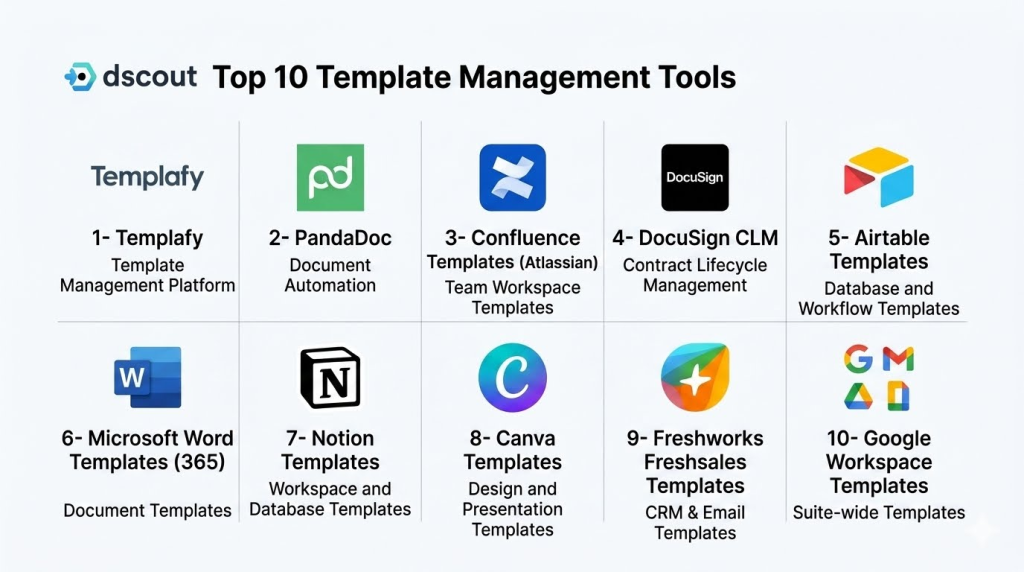
Top 10 Template Management Tools
1- Templafy
Short description:
Templafy is an enterprise-grade template management platform that helps organizations manage documents, presentations, and email templates at scale. It ensures brand consistency by centralizing approved templates and automating content creation workflows. Widely used by large enterprises, it integrates with Microsoft Office and Google Workspace. It provides dynamic content insertion and compliance control. Templafy is especially strong for regulated industries and global enterprises. It helps eliminate outdated or off-brand content.
Key Features
- Centralized template library
- Microsoft Office integration
- Dynamic content insertion
- Brand governance controls
- Document automation
- Approval workflows
- Version control
Pros
- Strong enterprise adoption
- Excellent brand governance
- Deep Office integration
Cons
- Complex implementation
- Higher enterprise cost
- Requires training for full use
Platforms / Deployment
- Web / Windows / macOS
- Cloud
Security & Compliance
- SSO/SAML
- MFA
- Encryption
- Audit logs
- RBAC
Integrations & Ecosystem
- Microsoft 365
- Google Workspace
- CRM systems
- DAM platforms
- APIs
- Enterprise identity providers
Support & Community
Strong enterprise support and onboarding services.
2- PandaDoc
Short description:
PandaDoc is a document automation and template management platform widely used for sales proposals, contracts, and agreements. It enables teams to create reusable templates with dynamic fields and e-signature capabilities. The platform is popular among sales and revenue teams. It helps speed up document workflows and approvals. PandaDoc is known for its ease of use and strong CRM integration. It is suitable for SMB and mid-market organizations.
Key Features
- Document templates
- E-signature support
- CRM integration
- Content library
- Workflow automation
- Real-time collaboration
- Analytics tracking
Pros
- Easy to use interface
- Strong sales workflow support
- Fast document creation
Cons
- Limited enterprise governance
- Advanced features require premium plans
- Not ideal for complex compliance needs
Platforms / Deployment
- Web / Mobile
- Cloud
Security & Compliance
- SSO
- Encryption
- Audit logs
- Compliance: Not publicly stated
Integrations & Ecosystem
- Salesforce
- HubSpot
- Zapier
- Google Workspace
- Microsoft 365
- APIs
Support & Community
Strong SMB and mid-market support.
3- Confluence Templates (Atlassian)
Short description:
Confluence is a collaboration platform that includes powerful template management capabilities for documentation, project planning, and knowledge sharing. It is widely used by engineering, product, and operations teams. Templates help standardize documentation across teams. It supports collaborative editing and version tracking. Confluence is especially strong in Agile environments. It integrates deeply with Jira and Atlassian tools.
Key Features
- Page templates
- Collaborative editing
- Version control
- Knowledge base creation
- Workflow integration
- Permission controls
- Content structuring
Pros
- Strong collaboration features
- Excellent for technical teams
- Deep Jira integration
Cons
- Can become cluttered
- Requires structure discipline
- Limited document automation
Platforms / Deployment
- Web / Mobile
- Cloud / On-prem
Security & Compliance
- SSO
- MFA
- Encryption
- Audit logs
Integrations & Ecosystem
- Jira
- Trello
- Slack
- Microsoft Teams
- APIs
- Dev tools ecosystem
Support & Community
Large global community and enterprise support.
4- DocuSign CLM
Short description:
DocuSign CLM is a contract lifecycle management platform with strong template management capabilities for legal and compliance workflows. It enables organizations to create standardized contract templates with automation and approval workflows. It is widely used in legal and procurement departments. It ensures compliance and reduces contract cycle time. DocuSign CLM integrates with e-signature workflows. It is ideal for enterprise contract governance.
Key Features
- Contract templates
- Workflow automation
- Approval routing
- Clause libraries
- Version control
- E-sign integration
- Compliance tracking
Pros
- Strong legal workflow support
- Excellent compliance controls
- Reduces contract cycle time
Cons
- Complex setup
- High enterprise cost
- Not suitable for SMBs
Platforms / Deployment
- Web
- Cloud
Security & Compliance
- SSO/SAML
- MFA
- Encryption
- Audit logs
- RBAC
Integrations & Ecosystem
- Salesforce
- SAP
- Microsoft 365
- ERP systems
- APIs
- Legal platforms
Support & Community
Strong enterprise legal support ecosystem.
5- Airtable Templates
Short description:
Airtable provides flexible template management for structured workflows, databases, and collaborative content systems. It allows teams to build reusable templates for project tracking, content management, and operational workflows. It is widely used by marketing, operations, and product teams. Airtable combines spreadsheets with database functionality. It supports automation and integrations. It is highly customizable for business use cases.
Key Features
- Template-based databases
- Workflow automation
- Collaboration tools
- Custom fields
- Views and dashboards
- API support
- Integration automation
Pros
- Highly flexible system
- Easy customization
- Strong collaboration
Cons
- Not specialized for documents
- Requires setup discipline
- Advanced scaling needs optimization
Platforms / Deployment
- Web / Mobile
- Cloud
Security & Compliance
- SSO
- MFA
- Encryption
- Audit logs
Integrations & Ecosystem
- Slack
- Google Workspace
- Zapier
- APIs
- CRM tools
- Productivity platforms
Support & Community
Strong community and documentation support.
6- Microsoft Word Templates (365)
Short description:
Microsoft Word Templates within Microsoft 365 provide enterprise-standard document template management for business documentation. It allows organizations to create standardized document formats with controlled branding and structure. It is widely used across enterprises globally. It integrates deeply with Microsoft ecosystems. It supports collaboration and cloud storage. It is a foundational tool for document standardization.
Key Features
- Document templates
- Brand controls
- Cloud synchronization
- Collaboration editing
- Version history
- Office integration
- Content controls
Pros
- Universal adoption
- Strong enterprise reliability
- Easy user familiarity
Cons
- Limited automation
- Basic governance features
- Manual template management
Platforms / Deployment
- Windows / macOS / Web
- Cloud / On-prem
Security & Compliance
- SSO/SAML
- MFA
- Encryption
- Audit logs
Integrations & Ecosystem
- Microsoft 365 suite
- SharePoint
- Teams
- OneDrive
- APIs
- Enterprise systems
Support & Community
Extensive enterprise support ecosystem.
7- Notion Templates
Short description:
Notion provides a flexible template system for knowledge management, project tracking, and collaborative documentation. It is widely used by startups, creators, and product teams. Templates allow users to standardize workflows and content structures. It supports databases, pages, and collaborative editing. Notion is highly customizable and easy to adopt. It is ideal for modern team workflows.
Key Features
- Page templates
- Database templates
- Collaboration tools
- Knowledge management
- Task tracking
- Custom workflows
- API integration
Pros
- Very flexible system
- Easy to use
- Strong collaboration features
Cons
- Limited enterprise governance
- Not specialized for formal documents
- Requires structure discipline
Platforms / Deployment
- Web / Desktop / Mobile
- Cloud
Security & Compliance
- Encryption
- SSO
- Access controls
Integrations & Ecosystem
- Slack
- Google Drive
- Zapier
- APIs
- Productivity tools
Support & Community
Strong global user community.
8- Canva Templates
Short description:
Canva provides template management for visual content such as presentations, marketing assets, and social media materials. It enables teams to create brand-consistent visual templates at scale. It is widely used by marketing and design teams. It supports collaboration and brand kits. Canva simplifies design workflows for non-designers. It is highly popular for marketing content creation.
Key Features
- Design templates
- Brand kits
- Collaboration tools
- Drag-and-drop editor
- Asset libraries
- Version control
- Multi-format export
Pros
- Very easy to use
- Strong design capabilities
- Great for marketing teams
Cons
- Limited enterprise governance
- Not suitable for complex documents
- Advanced features require premium plans
Platforms / Deployment
- Web / Mobile
- Cloud
Security & Compliance
- SSO
- MFA
- Encryption
- Audit logs
Integrations & Ecosystem
- Google Drive
- Slack
- Microsoft Teams
- APIs
- Marketing tools
- Social platforms
Support & Community
Large global design community.
9- Freshworks Freshsales Templates
Short description:
Freshsales provides template management for sales emails, CRM workflows, and customer communication. It allows teams to standardize sales outreach and engagement templates. It is widely used by SMB and mid-market sales teams. It improves consistency in customer communication. It integrates deeply with CRM workflows. It is ideal for sales-driven organizations.
Key Features
- Email templates
- Sales workflow templates
- CRM integration
- Automation rules
- Customer segmentation
- Analytics tracking
- Personalization fields
Pros
- Strong CRM integration
- Easy sales automation
- Good for SMB teams
Cons
- Limited enterprise governance
- Focused mainly on sales use cases
- Not suitable for document-heavy workflows
Platforms / Deployment
- Web / Mobile
- Cloud
Security & Compliance
- SSO
- MFA
- Encryption
- Audit logs
Integrations & Ecosystem
- Freshworks suite
- CRM tools
- Slack
- APIs
- Marketing tools
Support & Community
Good SMB-focused support.
10- Google Workspace Templates
Short description:
Google Workspace provides template capabilities across Docs, Sheets, and Slides for collaborative document creation. It is widely used across organizations for standardized content creation. Templates help teams maintain consistency in documents and presentations. It supports real-time collaboration and cloud access. Google Workspace is highly scalable for organizations of all sizes. It is a foundational productivity suite.
Key Features
- Document templates
- Presentation templates
- Spreadsheet templates
- Real-time collaboration
- Cloud storage integration
- Version history
- Sharing controls
Pros
- Easy collaboration
- Widely adopted
- Strong cloud ecosystem
Cons
- Limited governance features
- Basic template controls
- Not enterprise workflow-heavy
Platforms / Deployment
- Web / Mobile
- Cloud
Security & Compliance
- SSO
- MFA
- Encryption
- Audit logs
Integrations & Ecosystem
- Google Drive
- Slack
- APIs
- Third-party apps
- CRM tools
- Productivity platforms
Support & Community
Strong global support ecosystem.
Comparison Table
| Tool Name | Best For | Platform(s) Supported | Deployment | Standout Feature | Public Rating |
|---|---|---|---|---|---|
| Templafy | Enterprise branding | Web, Office | Cloud | Brand governance | N/A |
| PandaDoc | Sales teams | Web, Mobile | Cloud | Document automation | N/A |
| Confluence | Knowledge teams | Web | Cloud/On-prem | Documentation templates | N/A |
| DocuSign CLM | Legal teams | Web | Cloud | Contract automation | N/A |
| Airtable | Workflow teams | Web, Mobile | Cloud | Database templates | N/A |
| Microsoft Word | Enterprises | Web, Desktop | Cloud/On-prem | Office templates | N/A |
| Notion | Startups | Web, Mobile | Cloud | Flexible templates | N/A |
| Canva | Marketing teams | Web, Mobile | Cloud | Design templates | N/A |
| Freshsales | Sales teams | Web | Cloud | CRM templates | N/A |
| Google Workspace | General business | Web, Mobile | Cloud | Collaboration templates | N/A |
Evaluation & Scoring of Template Management Tools
| Tool Name | Core | Ease | Integrations | Security | Performance | Support | Value | Weighted Total |
|---|---|---|---|---|---|---|---|---|
| Templafy | 9.5 | 8.5 | 9.5 | 9.5 | 9.0 | 9.0 | 8.5 | 9.0 |
| PandaDoc | 9.0 | 9.0 | 9.0 | 9.0 | 8.5 | 8.5 | 9.0 | 8.8 |
| Confluence | 9.0 | 8.5 | 9.5 | 9.0 | 8.5 | 9.0 | 9.0 | 8.9 |
| DocuSign CLM | 9.5 | 8.0 | 9.5 | 9.5 | 9.0 | 9.0 | 8.0 | 8.9 |
| Airtable | 9.0 | 9.5 | 9.5 | 9.0 | 9.0 | 8.5 | 9.5 | 9.0 |
| Microsoft Word | 8.5 | 9.5 | 9.5 | 9.5 | 9.0 | 9.0 | 9.0 | 9.0 |
| Notion | 9.0 | 9.5 | 9.0 | 8.5 | 8.5 | 8.5 | 9.5 | 8.8 |
| Canva | 9.0 | 9.5 | 9.0 | 9.0 | 9.0 | 9.0 | 9.5 | 9.0 |
| Freshsales | 8.5 | 9.0 | 9.0 | 9.0 | 8.5 | 8.5 | 9.0 | 8.7 |
| Google Workspace | 9.0 | 9.5 | 9.5 | 9.5 | 9.0 | 9.0 | 9.5 | 9.1 |
These scores reflect differences between enterprise governance-heavy platforms and flexible collaboration tools. Enterprises benefit most from Templafy, DocuSign CLM, and Microsoft Word ecosystems, while SMB and agile teams perform better with Notion, Canva, and Airtable due to ease of use and flexibility.
Frequently Asked Questions (FAQs)
1. What is a template management tool?
It is software that helps organizations create, manage, and reuse standardized templates across documents, workflows, and content systems.
2. Why are templates important in business?
They ensure consistency, save time, and reduce errors across repetitive business processes.
3. Do these tools support collaboration?
Yes, most modern tools support real-time collaboration and shared editing.
4. Can templates be customized?
Yes, many tools support dynamic fields and personalization variables.
5. Are these tools secure?
Enterprise platforms include encryption, SSO, audit logs, and access controls.
6. Which industries use them most?
Sales, legal, HR, marketing, finance, and software development teams.
7. Can templates integrate with CRM systems?
Yes, many tools integrate with Salesforce, HubSpot, and similar platforms.
8. Do these tools support AI?
Yes, newer platforms are integrating AI for template generation and optimization.
9. Are they suitable for small teams?
Yes, tools like Canva, Notion, and Google Workspace are ideal for SMBs.
10. What is the biggest benefit?
The biggest benefit is improved efficiency and consistent, scalable content creation.
Conclusion
Template Management Tools are essential for organizations that rely on structured, repeatable content across departments. Platforms like Templafy, DocuSign CLM, Microsoft Word, and Google Workspace provide enterprise-grade governance, while Notion, Canva, and Airtable offer flexible and user-friendly solutions for modern teams. The right choice depends on workflow complexity, governance needs, and integration requirements. A practical next step is to shortlist , test template workflows, evaluate collaboration efficiency, and validate integration with your existing systems before full rollout.
