Introduction
Mobile Workforce Apps are digital platforms designed to help organizations manage employees who work outside traditional office environments. These tools connect field teams, remote workers, and deskless staff with office operations in real time, enabling communication, task assignment, scheduling, reporting, and performance tracking from mobile devices.
Mobile workforce platforms are becoming essential because organizations are increasingly decentralized and require real-time coordination between field and office teams. Businesses now expect instant updates, AI-assisted task allocation, GPS visibility, and seamless mobile execution across distributed operations.
Real-world use cases include:
- Field technicians receiving and completing service jobs in real time
- Logistics and delivery teams tracking routes and updates
- Construction teams managing site tasks and safety compliance
- Healthcare field staff accessing assignments and updating records
- Retail and franchise operations coordinating multi-location teams
What buyers should evaluate:
- Mobile app performance and offline capabilities
- Real-time task assignment and workforce visibility
- GPS tracking and location intelligence features
- Integration with FSM, CRM, ERP, and HR systems
- Communication and collaboration tools
- Workflow automation and task routing
- Security, encryption, and compliance readiness
- Ease of deployment across large teams
- Battery efficiency and device optimization
- Scalability for enterprise workforce operations
Best for: Enterprises, field service companies, logistics providers, healthcare organizations, construction firms, and retail chains with distributed workforce operations
Not ideal for: Fully office-based organizations with no field or mobile workforce requirements
Key Trends in Mobile Workforce Apps for 2026 and Beyond
- AI-powered task assignment based on skill, availability, and location
- Real-time GPS tracking with predictive route optimization
- Offline-first mobile applications for low-connectivity environments
- Integration with IoT devices and smart sensors
- Voice-enabled reporting and hands-free field updates
- Unified workforce platforms combining HR, FSM, and ERP systems
- Automated compliance and safety reporting workflows
- Hyper-personalized dashboards for field employees
- Low-code customization for workflows and mobile forms
- Embedded analytics for productivity and performance tracking
How We Selected These Tools (Methodology)
- Market adoption across mobile workforce and field operations industries
- Strength of mobile UX and field usability
- Real-time communication and coordination capabilities
- Integration ecosystem with enterprise systems
- Offline functionality and reliability in field conditions
- Security, compliance, and enterprise readiness
- Scalability for large distributed teams
- Workflow automation and task management capabilities
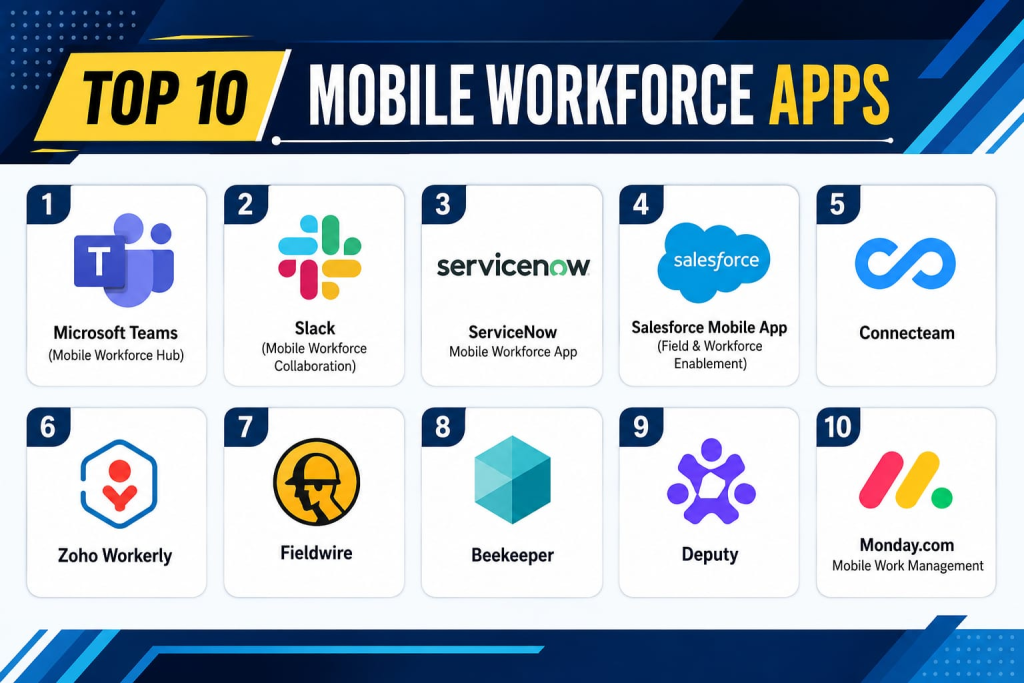
Top 10 Mobile Workforce Apps
1- Microsoft Teams
Short description:
Microsoft Teams is a leading enterprise communication platform widely used as a mobile workforce hub. It enables messaging, video calls, task coordination, and collaboration for distributed teams. It integrates deeply with Microsoft 365, making it central to enterprise operations. Field teams use it for real-time communication and updates. It supports structured collaboration through channels and teams. It is ideal for enterprises already using Microsoft ecosystems.
Key Features
- Real-time chat, voice, and video communication
- Team channels for structured collaboration
- File sharing and document collaboration
- Task integration with Microsoft Planner
- Mobile notifications and alerts
- Workflow automation via Power Platform
- Microsoft 365 integration
Pros
- Strong enterprise adoption
- Deep Microsoft ecosystem integration
- Reliable communication platform
Cons
- Can feel heavy for simple use cases
- Microsoft ecosystem dependency
- Performance issues in large deployments
Platforms / Deployment
- Web, Windows, macOS, iOS, Android
- Cloud
Security & Compliance
- SSO/SAML
- MFA
- Encryption
- RBAC
- Audit logs
- Enterprise compliance standards
Integrations & Ecosystem
Microsoft Teams integrates deeply with enterprise productivity systems:
- Microsoft 365 suite
- SharePoint
- Dynamics 365
- Power Automate
- Third-party apps
- APIs and connectors
Support & Community
Strong global enterprise support and documentation
2- Slack
Short description:
Slack is a mobile-first collaboration platform designed for real-time communication across distributed teams. It organizes communication into channels and integrates with hundreds of tools. It is widely used for fast coordination between field and office teams. It supports workflow automation and notifications. It is ideal for flexible workforce communication environments. It helps improve team responsiveness.
Key Features
- Channel-based messaging
- Direct and group chats
- Workflow automation builder
- File sharing and search
- App integrations marketplace
- Voice and video calls
- Mobile notifications
Pros
- Easy adoption
- Strong integration ecosystem
- Excellent mobile experience
Cons
- Can become noisy at scale
- Limited structured task management
- Requires discipline for organization
Platforms / Deployment
- Web, Windows, macOS, iOS, Android
- Cloud
Security & Compliance
- SSO/SAML
- MFA
- Encryption
- RBAC
- Audit logs
- Enterprise security features
Integrations & Ecosystem
- Google Workspace
- Microsoft 365
- Salesforce
- Jira
- Zapier
- APIs and marketplace
Support & Community
Strong documentation and active developer ecosystem
3- ServiceNow Mobile Workforce
Short description:
ServiceNow Mobile Workforce enables enterprise-grade workflow and task management for IT and field operations. It allows employees to manage incidents, tasks, and workflows from mobile devices. It is widely used in large enterprises for service operations. It supports advanced automation and real-time tracking. It is ideal for structured enterprise workflows. It ensures centralized operational control.
Key Features
- Mobile task and incident management
- Workflow automation engine
- Service request handling
- Real-time notifications
- Asset tracking
- AI-driven recommendations
- Offline support
Pros
- Strong enterprise automation
- Scalable workflow engine
- Deep operational control
Cons
- Complex implementation
- High cost
- Requires training
Platforms / Deployment
- Web, iOS, Android
- Cloud
Security & Compliance
- SSO/SAML
- MFA
- Encryption
- RBAC
- Audit logs
- Enterprise compliance frameworks
Integrations & Ecosystem
- ITSM tools
- ERP systems
- CRM platforms
- APIs
- IoT systems
- Enterprise applications
Support & Community
Strong enterprise support and ecosystem
4- Salesforce Mobile App
Short description:
Salesforce Mobile App provides CRM and workforce access for field teams and sales teams. It enables real-time access to customer data and workflows. It is widely used in sales-driven organizations. It supports AI-powered insights via Salesforce Einstein. It is ideal for Salesforce-centric enterprises. It enables mobile-first customer engagement.
Key Features
- CRM mobile access
- Task management
- AI insights (Einstein)
- Offline data access
- Notifications
- Dashboards
- Field service integration
Pros
- Deep CRM integration
- Strong AI capabilities
- Enterprise scalability
Cons
- Complex setup
- Requires Salesforce ecosystem
- High cost
Platforms / Deployment
- Web, iOS, Android
- Cloud
Security & Compliance
- SSO/SAML
- MFA
- Encryption
- RBAC
- Audit logs
- Salesforce security framework
Integrations & Ecosystem
- Salesforce CRM
- Slack
- ERP systems
- APIs
- AppExchange ecosystem
- IoT platforms
Support & Community
Strong global enterprise support
5- Connecteam
Short description:
Connecteam is a mobile-first workforce management app for deskless employees. It supports communication, scheduling, tasks, and time tracking in one platform. It is widely used in logistics, construction, and retail. It simplifies workforce coordination for frontline teams. It is ideal for SMB and mid-market businesses. It improves operational visibility.
Key Features
- Task management
- Scheduling tools
- Time tracking
- Communication hub
- Forms and checklists
- GPS tracking
- Workflow automation
Pros
- Easy mobile interface
- Strong frontline focus
- Affordable pricing
Cons
- Limited enterprise depth
- Basic analytics
- Fewer advanced integrations
Platforms / Deployment
- Web, iOS, Android
- Cloud
Security & Compliance
- SSO/SAML
- MFA
- Encryption
- RBAC
- Audit logs
- Not publicly stated certifications
Integrations & Ecosystem
- QuickBooks
- Google Workspace
- Slack
- APIs
- Zapier
- HR tools
Support & Community
Strong SMB support and onboarding
6- Zoho Workerly
Short description:
Zoho Workerly is designed for managing temporary and shift-based workforce operations. It enables scheduling, job assignment, and attendance tracking. It is widely used in staffing agencies. It integrates with Zoho ecosystem tools. It is ideal for SMB workforce scheduling needs. It improves shift coordination.
Key Features
- Shift scheduling
- Workforce tracking
- Job assignment
- Attendance management
- Notifications
- Timesheets
- Workforce database
Pros
- Strong Zoho integration
- Good scheduling tools
- Easy workforce coordination
Cons
- Limited enterprise scaling
- Ecosystem dependency
- UI less modern
Platforms / Deployment
- Web, iOS, Android
- Cloud
Security & Compliance
- SSO/SAML
- MFA
- Encryption
- RBAC
- Audit logs
- Zoho security framework
Integrations & Ecosystem
- Zoho CRM
- Zoho People
- Google Workspace
- Slack
- APIs
- Third-party tools
Support & Community
Strong Zoho ecosystem support
7- Fieldwire
Short description:
Fieldwire is a construction-focused mobile workforce app for task and blueprint management. It supports field coordination and real-time updates. It is widely used in construction and engineering. It enables offline field operations. It is ideal for construction teams. It improves site execution efficiency.
Key Features
- Task management
- Blueprint viewing
- Offline access
- Collaboration tools
- Photo documentation
- Reporting
- Field tracking
Pros
- Strong construction focus
- Excellent offline support
- Easy mobile use
Cons
- Industry-specific
- Limited enterprise scope
- Basic analytics
Platforms / Deployment
- Web, iOS, Android
- Cloud
Security & Compliance
- SSO/SAML
- MFA
- Encryption
- RBAC
- Audit logs
- Not publicly stated certifications
Integrations & Ecosystem
- Procore
- Dropbox
- Google Drive
- APIs
- BIM tools
- Construction systems
Support & Community
Good industry-focused support
8- Beekeeper
Short description:
Beekeeper is a frontline workforce communication platform for mobile teams. It enables real-time communication and task coordination. It is widely used in hospitality and retail. It improves employee engagement and communication. It is ideal for deskless workforce environments. It centralizes frontline operations.
Key Features
- Communication channels
- Task management
- Notifications
- Scheduling tools
- Engagement features
- File sharing
- Analytics
Pros
- Strong communication focus
- Easy adoption
- Good engagement tools
Cons
- Limited deep workflows
- Not full FSM system
- Advanced features require upgrades
Platforms / Deployment
- Web, iOS, Android
- Cloud
Security & Compliance
- SSO/SAML
- MFA
- Encryption
- RBAC
- Audit logs
- Enterprise compliance varies
Integrations & Ecosystem
- SAP SuccessFactors
- Microsoft Teams
- Slack
- APIs
- HR systems
- Workforce tools
Support & Community
Strong enterprise onboarding
9- Deputy
Short description:
Deputy is a workforce management app focused on scheduling and time tracking. It is widely used in retail and hospitality industries. It enables shift management and attendance tracking. It improves workforce planning efficiency. It is ideal for SMB and mid-market organizations. It simplifies labor coordination.
Key Features
- Scheduling system
- Time tracking
- Mobile app
- Shift swapping
- Task assignment
- Labor cost tracking
- Compliance reporting
Pros
- Easy scheduling
- Strong SMB focus
- Good usability
Cons
- Limited enterprise features
- Basic automation
- Not field-heavy
Platforms / Deployment
- Web, iOS, Android
- Cloud
Security & Compliance
- SSO/SAML
- MFA
- Encryption
- RBAC
- Audit logs
- Not publicly stated certifications
Integrations & Ecosystem
- POS systems
- Payroll tools
- Google Workspace
- APIs
- HR systems
- Accounting tools
Support & Community
Good SMB support
10- Monday.com Work Management
Short description:
Monday.com is a flexible work management platform with mobile workforce capabilities. It enables task tracking, workflow automation, and collaboration. It is widely used across operations and project teams. It supports customizable workflows for mobile users. It is ideal for teams needing flexible coordination. It improves visibility across distributed work.
Key Features
- Task management
- Workflow automation
- Dashboards
- Collaboration tools
- Forms
- Notifications
- Project tracking
Pros
- Highly flexible
- Easy interface
- Strong visualization
Cons
- Not workforce-specific
- Requires setup
- Can get expensive
Platforms / Deployment
- Web, iOS, Android
- Cloud
Security & Compliance
- SSO/SAML
- MFA
- Encryption
- RBAC
- Audit logs
- Enterprise compliance varies
Integrations & Ecosystem
- Slack
- Google Workspace
- Microsoft Teams
- Salesforce
- APIs
- Automation tools
Support & Community
Strong SMB and enterprise support
Comparison Table
| Tool Name | Best For | Platform(s) Supported | Deployment | Standout Feature | Public Rating |
|---|---|---|---|---|---|
| Microsoft Teams | Enterprise communication | Web, Mobile | Cloud | Unified collaboration | N/A |
| Slack | Team messaging | Web, Mobile | Cloud | App ecosystem | N/A |
| ServiceNow | Enterprise workflows | Web, Mobile | Cloud | Automation engine | N/A |
| Salesforce Mobile | CRM teams | Web, Mobile | Cloud | AI insights | N/A |
| Connecteam | Frontline workers | Web, Mobile | Cloud | All-in-one workforce tool | N/A |
| Zoho Workerly | Staffing teams | Web, Mobile | Cloud | Shift scheduling | N/A |
| Fieldwire | Construction teams | Web, Mobile | Cloud | Blueprint access | N/A |
| Beekeeper | Deskless communication | Web, Mobile | Cloud | Engagement platform | N/A |
| Deputy | Scheduling teams | Web, Mobile | Cloud | Shift management | N/A |
| Monday.com | Workflow teams | Web, Mobile | Cloud | Visual workflows | N/A |
Evaluation & Scoring of Mobile Workforce Apps
| Tool Name | Core | Ease | Integrations | Security | Performance | Support | Value | Total |
|---|---|---|---|---|---|---|---|---|
| Microsoft Teams | 10 | 9 | 10 | 10 | 9 | 9 | 9 | 9.4 |
| Slack | 9 | 10 | 10 | 9 | 9 | 9 | 9 | 9.2 |
| ServiceNow | 10 | 7 | 10 | 10 | 10 | 9 | 8 | 9.1 |
| Salesforce Mobile | 10 | 8 | 10 | 10 | 9 | 9 | 8 | 9.1 |
| Connecteam | 8 | 10 | 8 | 8 | 9 | 8 | 9 | 8.6 |
| Zoho Workerly | 8 | 9 | 9 | 8 | 8 | 8 | 9 | 8.5 |
| Fieldwire | 8 | 9 | 8 | 8 | 8 | 8 | 8 | 8.3 |
| Beekeeper | 8 | 9 | 8 | 8 | 8 | 8 | 8 | 8.3 |
| Deputy | 8 | 9 | 8 | 8 | 8 | 8 | 9 | 8.4 |
| Monday.com | 9 | 9 | 9 | 9 | 9 | 9 | 8 | 8.9 |
These scores are comparative and reflect communication strength, workflow depth, and field execution capability.
Frequently Asked Questions (FAQs)
1. What are Mobile Workforce Apps?
They are apps that help manage and coordinate employees working outside offices using mobile devices.
2. Who uses Mobile Workforce Apps?
Field service teams, logistics companies, healthcare providers, and retail chains commonly use them.
3. Do these apps work offline?
Yes, many tools offer offline mode for remote or low-connectivity environments.
4. Are Mobile Workforce Apps secure?
Yes, most use encryption, MFA, and enterprise access controls.
5. Can they track employee location?
Yes, many include GPS tracking for field workforce visibility.
6. Do they integrate with other systems?
Yes, they integrate with CRM, ERP, FSM, and HR platforms.
7. Are these tools suitable for small businesses?
Yes, SMB-focused tools like Connecteam and Deputy are designed for small teams.
8. What is the biggest benefit?
Improved coordination between field teams and office operations.
9. Do they support automation?
Yes, many include workflow automation and AI task assignment.
10. What industries benefit most?
Construction, logistics, healthcare, retail, and field services benefit the most.
Conclusion
Mobile Workforce Apps are essential for managing distributed teams in real time, improving coordination, and enabling efficient field operations. Platforms like Microsoft Teams, Slack, and ServiceNow dominate enterprise communication and workflow control, while Connecteam, Fieldwire, and Deputy provide strong solutions for frontline and SMB workforce management. The right tool depends on team size, industry, integration needs, and workflow complexity. Organizations should prioritize mobile usability, offline capability, and integration strength when selecting a solution.
