Introduction
Windows Management Tools are software solutions that help IT teams monitor, configure, secure, and optimize Windows devices across enterprise environments. They simplify tasks such as patching, software deployment, inventory management, and policy enforcement, ensuring devices remain compliant, secure, and productive.
With Windows being the dominant desktop OS in enterprises, effective management tools reduce downtime, enhance security, and provide insights into device usage. These tools are especially critical for organizations with large device fleets, remote workers, or hybrid IT environments.
Real-world use cases include:
- Deploying updates and patches across hundreds or thousands of Windows devices.
- Monitoring device health, performance, and compliance.
- Managing software installations and license usage.
- Automating configuration and policy enforcement.
- Detecting and remediating security vulnerabilities.
Evaluation criteria for buyers include:
- Patch and update management
- Device inventory and compliance reporting
- Automation capabilities for deployments and configurations
- Remote monitoring and troubleshooting
- Security and access control features
- Integration with ITSM and monitoring tools
- Scalability across locations and device fleets
- Reporting and analytics capabilities
- Ease of use and deployment
- Licensing and total cost of ownership
Best for: IT administrators, desktop support teams, and organizations managing large fleets of Windows devices.
Not ideal for: Very small environments or companies using primarily non-Windows platforms where simpler tools suffice.
Key Trends in Windows Management Tools
- AI-powered anomaly detection for endpoint performance
- Automated patch and update workflows
- Integration with cloud-based device management solutions
- Enhanced security compliance and vulnerability tracking
- Remote monitoring for hybrid and remote workforces
- Unified dashboards for IT operations visibility
- Low-code automation for repetitive tasks
- Mobile access for administrators
- Focus on user productivity and endpoint experience metrics
- Subscription and flexible licensing models
How We Selected These Tools
- Evaluated market adoption and enterprise mindshare
- Assessed feature completeness including patching, deployment, and monitoring
- Reviewed reliability and performance signals
- Considered security posture and compliance readiness
- Examined integrations with ITSM, monitoring, and cloud platforms
- Measured suitability across SMB, mid-market, and enterprise segments
- Verified scalability and support for remote and hybrid environments
- Evaluated vendor support, documentation, and community engagement
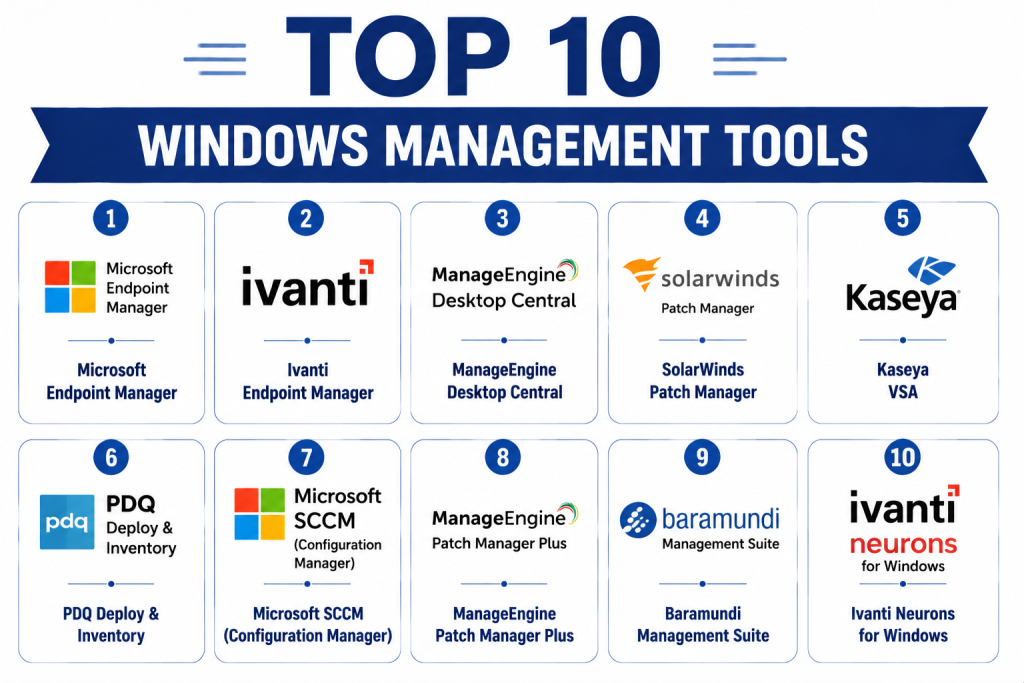
Top 10 Windows Management Tools
1- Microsoft Endpoint Manager
Short description: A unified endpoint management platform that handles Windows device deployment, patching, and compliance, designed for enterprise environments.
Key Features
- Device configuration and policy enforcement
- Patch management and software updates
- Endpoint security and compliance reporting
- Integration with Azure AD and Intune
- Remote monitoring and remote assistance
Pros
- Full integration with Microsoft ecosystem
- Strong security and compliance features
Cons
- Complex setup for large enterprises
- Learning curve for non-Microsoft admins
Platforms / Deployment
- Windows / macOS / iOS / Android
- Cloud / Hybrid
Security & Compliance
- SSO, MFA, encryption, audit logs
- SOC 2, ISO 27001, GDPR
Integrations & Ecosystem
- Azure Active Directory
- Office 365
- ITSM platforms
- APIs for automation
Support & Community
- Microsoft support tiers and extensive documentation
- Large enterprise community
2- Ivanti Endpoint Manager
Short description: Provides comprehensive Windows device management, including patching, software deployment, and compliance tracking.
Key Features
- Automated patch management
- Remote device control
- Software inventory and deployment
- Policy compliance and reporting
- Vulnerability remediation
Pros
- Flexible automation options
- Supports large enterprise fleets
Cons
- Higher cost for smaller deployments
- Interface may be complex
Platforms / Deployment
- Windows / macOS / Linux
- Cloud / On-premises
Security & Compliance
- SSO, encryption, audit logs
- Not publicly stated
Integrations & Ecosystem
- ITSM and monitoring tools
- Security platforms
- APIs for custom integrations
Support & Community
- Vendor support and knowledge base
- Active community forums
3- ManageEngine Desktop Central
Short description: Simplifies Windows management for IT teams with endpoint configuration, patching, and software deployment.
Key Features
- Patch management and automated updates
- Remote troubleshooting and control
- Software deployment and license management
- Asset and inventory tracking
- Policy enforcement
Pros
- Cost-effective for SMBs and mid-market
- User-friendly dashboards
Cons
- Limited AI analytics
- Fewer advanced automation features
Platforms / Deployment
- Windows / macOS / Linux / iOS / Android
- Cloud / On-premises
Security & Compliance
- SSO, encryption
- Not publicly stated
Integrations & Ecosystem
- ITSM tools
- Security software
- APIs
Support & Community
- Documentation, email support
- Moderate community
4- SolarWinds Patch Manager
Short description: Focused Windows patching and update management solution for endpoint and server environments.
Key Features
- Automated Windows patching
- Third-party software patching
- Reporting and compliance dashboards
- Integration with WSUS and SCCM
- Scheduled deployments
Pros
- Simplifies patch management
- Strong reporting and compliance
Cons
- Limited full device management
- Best used with existing SolarWinds ecosystem
Platforms / Deployment
- Windows
- On-premises / Cloud
Security & Compliance
- Not publicly stated
Integrations & Ecosystem
- WSUS / SCCM
- IT monitoring tools
- APIs
Support & Community
- Vendor support and knowledge base
5- Kaseya VSA
Short description: Offers remote monitoring, patching, and Windows device management for IT service providers and enterprises.
Key Features
- Remote monitoring and management
- Patch deployment automation
- Asset inventory and reporting
- Scripting and automation
- Security compliance monitoring
Pros
- Powerful RMM for MSPs
- Scalable for enterprise endpoints
Cons
- Can be complex to configure
- Premium pricing
Platforms / Deployment
- Windows / macOS / Linux / iOS / Android
- Cloud / Hybrid
Security & Compliance
- SSO, encryption
- Not publicly stated
Integrations & Ecosystem
- ITSM and monitoring tools
- Security platforms
- APIs for automation
Support & Community
- Vendor support tiers
- Documentation and forums
6- PDQ Deploy & Inventory
Short description: Simplifies software deployment and inventory tracking for Windows endpoints with automation capabilities.
Key Features
- Automated software deployment
- Patch management
- Hardware and software inventory
- Reporting and alerts
- Script execution
Pros
- Simple and fast deployment
- Affordable for SMBs
Cons
- Limited enterprise analytics
- Focused mainly on Windows
Platforms / Deployment
- Windows
- On-premises
Security & Compliance
- Not publicly stated
Integrations & Ecosystem
- Active Directory
- Remote monitoring tools
- APIs
Support & Community
- Vendor documentation and forums
7- Microsoft SCCM (Configuration Manager)
Short description: Enterprise-grade Windows management tool for deployment, patching, and configuration enforcement.
Key Features
- OS deployment and updates
- Patch management
- Software distribution
- Inventory and compliance tracking
- Remote control
Pros
- Deep integration with Windows environment
- Scales for large enterprises
Cons
- Complex setup and learning curve
- Requires dedicated admin resources
Platforms / Deployment
- Windows / macOS
- On-premises / Cloud (with Intune integration)
Security & Compliance
- SSO, encryption, RBAC
- Not publicly stated
Integrations & Ecosystem
- Microsoft ecosystem
- ITSM tools
- APIs
Support & Community
- Extensive documentation
- Large Microsoft admin community
8- ManageEngine Patch Manager Plus
Short description: Focused Windows patching and update tool with automation for SMB and enterprise devices.
Key Features
- Patch management for Microsoft and third-party apps
- Automated deployment and scheduling
- Compliance reporting
- Integration with desktop management tools
- Alerting
Pros
- Easy to deploy and use
- Affordable mid-market solution
Cons
- Limited full endpoint management
- Fewer analytics
Platforms / Deployment
- Windows / macOS / Linux
- Cloud / On-premises
Security & Compliance
- Not publicly stated
Integrations & Ecosystem
- ITSM and monitoring platforms
- APIs
Support & Community
- Vendor support portal
- Documentation
9- Baramundi Management Suite
Short description: Provides full Windows device lifecycle management, including deployment, patching, and compliance monitoring.
Key Features
- Software and OS deployment
- Patch and update management
- Remote control
- Inventory and compliance reporting
- Automation workflows
Pros
- Full lifecycle endpoint management
- Scalable for enterprise use
Cons
- Premium pricing
- Learning curve for smaller IT teams
Platforms / Deployment
- Windows / macOS / Linux / iOS / Android
- Cloud / Hybrid
Security & Compliance
- SSO, encryption
- Not publicly stated
Integrations & Ecosystem
- ITSM and monitoring platforms
- API support
Support & Community
- Enterprise support tiers
- Documentation and community
10- Ivanti Neurons for Windows
Short description: AI-driven endpoint management platform that provides patching, monitoring, and automation for Windows environments.
Key Features
- AI-powered patch deployment
- Endpoint monitoring and health checks
- Automation workflows
- Compliance and reporting
- Remote device management
Pros
- AI-assisted management
- Reduces administrative overhead
Cons
- Requires learning AI workflows
- Higher entry cost
Platforms / Deployment
- Windows / macOS / Linux / iOS / Android
- Cloud / Hybrid
Security & Compliance
- SSO, encryption, audit logs
- Not publicly stated
Integrations & Ecosystem
- ITSM platforms
- Security and monitoring tools
- APIs
Support & Community
- Vendor support
- Knowledge base and forums
Comparison Table (Top 10 Windows Management Tools)
| Tool Name | Best For | Platform(s) Supported | Deployment | Standout Feature | Public Rating |
|---|---|---|---|---|---|
| Microsoft Endpoint Manager | Enterprise IT | Windows / macOS / iOS / Android | Cloud / Hybrid | Unified endpoint management | N/A |
| Ivanti Endpoint Manager | Enterprise & SMB | Windows / macOS / Linux | Cloud / On-prem | Patch and compliance automation | N/A |
| ManageEngine Desktop Central | SMB / Mid-market IT | Windows / macOS / Linux / iOS / Android | Cloud / On-prem | Endpoint configuration | N/A |
| SolarWinds Patch Manager | Mid-market IT | Windows | On-prem / Cloud | Patch management focus | N/A |
| Kaseya VSA | MSPs and Enterprises | Windows / macOS / Linux / iOS / Android | Cloud / Hybrid | Remote monitoring & patching | N/A |
| PDQ Deploy & Inventory | SMB | Windows | On-prem | Fast software deployment | N/A |
| Microsoft SCCM | Enterprise IT | Windows / macOS | On-prem / Cloud | Enterprise-grade deployment | N/A |
| ManageEngine Patch Manager Plus | Mid-market IT | Windows / macOS / Linux | Cloud / On-prem | Automated patch management | N/A |
| Baramundi Management Suite | Enterprise IT | Windows / macOS / Linux / iOS / Android | Cloud / Hybrid | Full lifecycle management | N/A |
| Ivanti Neurons for Windows | Enterprise & Hybrid IT | Windows / macOS / Linux / iOS / Android | Cloud / Hybrid | AI-driven endpoint automation | N/A |
Evaluation & Scoring of Windows Management Tools
| Tool Name | Core (25%) | Ease (15%) | Integrations (15%) | Security (10%) | Performance (10%) | Support (10%) | Value (15%) | Weighted Total (0–10) |
|---|---|---|---|---|---|---|---|---|
| Microsoft Endpoint Manager | 9 | 7 | 9 | 9 | 9 | 8 | 7 | 8.6 |
| Ivanti Endpoint Manager | 8 | 7 | 8 | 7 | 8 | 8 | 7 | 7.8 |
| ManageEngine Desktop Central | 7 | 8 | 7 | 7 | 7 | 7 | 8 | 7.4 |
| SolarWinds Patch Manager | 7 | 8 | 6 | 7 | 7 | 7 | 7 | 7.0 |
| Kaseya VSA | 8 | 7 | 7 | 7 | 8 | 7 | 7 | 7.6 |
| PDQ Deploy & Inventory | 6 | 9 | 6 | 6 | 7 | 7 | 8 | 7.0 |
| Microsoft SCCM | 9 | 6 | 8 | 9 | 9 | 8 | 7 | 8.2 |
| ManageEngine Patch Manager Plus | 7 | 8 | 6 | 7 | 7 | 7 | 7 | 7.2 |
| Baramundi Management Suite | 8 | 7 | 7 | 8 | 8 | 7 | 7 | 7.8 |
| Ivanti Neurons for Windows | 8 | 7 | 8 | 8 | 8 | 7 | 7 | 7.8 |
Interpretation: Weighted totals provide a comparative overview of capabilities, usability, integration potential, and value. Higher scores indicate stronger overall Windows management solutions.
Which Windows Management Tool Is Right for You?
Solo / Freelancer
PDQ Deploy & Inventory or ManageEngine Desktop Central for simple Windows deployments and inventory management.
SMB
ManageEngine Patch Manager Plus or SolarWinds Patch Manager for cost-effective patching and configuration management.
Mid-Market
Kaseya VSA or Baramundi Management Suite for broader automation and device management.
Enterprise
Microsoft Endpoint Manager, SCCM, or Ivanti Neurons for AI-driven, scalable Windows management and compliance enforcement.
Budget vs Premium
Budget-conscious teams may prioritize PDQ Deploy & Inventory or ManageEngine Patch Manager Plus. Premium enterprises benefit from Microsoft Endpoint Manager, SCCM, or Ivanti Neurons.
Feature Depth vs Ease of Use
Complex enterprise environments suit Microsoft Endpoint Manager, SCCM, and Ivanti Neurons. SMB teams benefit from simpler solutions like PDQ or SolarWinds.
Integrations & Scalability
Microsoft Endpoint Manager, Kaseya VSA, and Ivanti Neurons provide extensive integrations and enterprise-level scalability.
Security & Compliance Needs
Enterprises requiring SOC 2, ISO 27001, or GDPR should prioritize Endpoint Manager, SCCM, or Ivanti Neurons.
Frequently Asked Questions (FAQs)
1- What is a Windows Management Tool?
It is software that enables IT teams to monitor, configure, secure, and manage Windows devices across enterprise networks.
2- How do these tools handle patching?
They automate OS and application patch deployment, track compliance, and schedule updates to reduce vulnerabilities.
3- Can these tools manage remote devices?
Yes. Most support remote monitoring, configuration, and troubleshooting for both on-premises and remote endpoints.
4- Do these tools integrate with other IT systems?
Yes, integrations with ITSM, monitoring, security, and endpoint analytics tools are common, varying by vendor.
5- How long does implementation take?
Cloud-native solutions can deploy in days, while enterprise platforms may take weeks to configure and integrate.
6- Are mobile management features included?
Many tools provide iOS and Android apps for remote monitoring, alerts, and management.
7- How do these tools enhance security?
They provide patching, policy enforcement, antivirus integration, access controls, and audit reporting.
8- Are these tools suitable for SMBs?
Yes, options like PDQ Deploy & Inventory or ManageEngine Patch Manager Plus offer simplified management at lower cost.
9- What are common challenges?
Challenges include complex configuration, integration limitations, administrative overhead, and scaling for large device fleets.
10- What are alternatives?
Small organizations may use native Windows tools, basic IT management suites, or cloud MDM platforms.
Conclusion
Windows Management Tools are essential for managing endpoints efficiently, securing devices, and maintaining compliance. Organizations should evaluate tool capabilities, integration potential, scalability, and ease of deployment. SMBs may focus on cost-effective and simple solutions, while enterprises require scalable, AI-driven, and fully integrated platforms. Recommended next steps include shortlisting 2–3 tools, piloting deployments, and validating integrations and security features.
