Introduction
Your team just missed a major customer drop, and nobody saw it coming. You spent hours looking at old charts, but the data only showed what already happened. You need a way to look ahead so you can fix problems before they hurt your business.
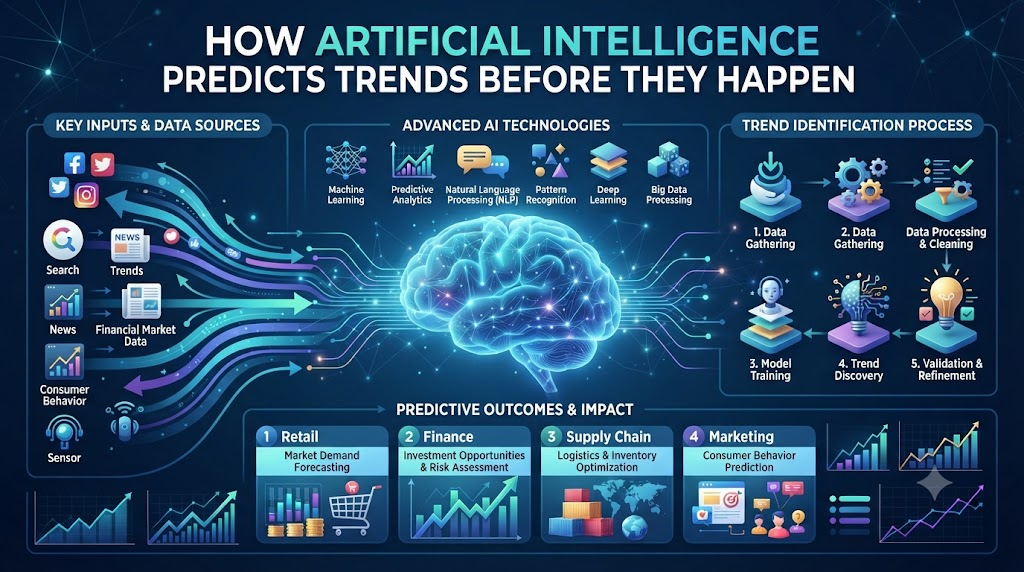
This is where smart predictive tools change the game. Instead of just storing old numbers, modern computer models look at your daily data and point out what will likely happen next. When you use systems like AIUniverse.xyz to guide your data work, you get clear warnings and smart ideas that keep your projects on track.
Smart software takes the guesswork out of your daily planning. It spots hidden patterns in seconds. You no longer have to waste time staring at messy spreadsheets. Let us look at how these tools work and how you can use them today.
What Is Predictive Analytics?
Predictive analytics is a fancy way to say “making smart guesses using past data.” Think about how you check the weather before you leave your house. You look at dark clouds and cold winds to decide if you need a jacket.
Smart software does the exact same thing for your business or tech projects. It takes old numbers, looks for repeating habits, and tells you what to expect tomorrow or next month.
You do not need a degree in math to understand this. The computer does the heavy lifting. It tests thousands of past outcomes to find out why things went right or wrong.
Why Old Data Tools Are Not Enough
Old data tools only show you what happened last week. They are like driving a car while only looking in the rear-view mirror. You can see where you have been, but you cannot see the big rock in front of you.
When a sudden spike hits your servers or your sales drop overnight, old charts do not tell you why. They just show the damage.
Smart predictive software changes this habit. It warns you when a trend starts to shift. You get time to fix small issues before they turn into huge disasters.
How Machine Learning Finds Hidden Patterns
Machine learning sounds complicated, but it is really just a computer learning from experience. Imagine teaching a child how to spot a cat. You show them fifty pictures of cats until they know what a cat looks like.
Smart software works the exact same way. You feed it years of old logs, sales records, or user clicks. The system studies those files until it knows what normal behavior looks like.
When something unusual happens, the system spots it right away. It does not wait for a human to check the dashboard. It sends an alert so you can act fast.
Turning Raw Data Into Clear Actions
Data is useless if you do not know what to do with it. Many teams collect millions of rows of data every single day. They store it in big folders and never look at it again.
Smart prediction tools fix this problem by turning messy numbers into clear, simple steps. Instead of giving you a massive chart with fifty lines, the software tells you what matters most.
For example, the tool might tell you that your website traffic will double on Friday. With that simple warning, you can add more server power before the rush starts.
Real-World Story About Server Crashes
- Server room fans started spinning fast on a quiet Tuesday morning because nobody noticed the slow memory leak happening over the weekend.
- The main checkout page froze right during a big holiday sale because the system could not handle the sudden rush of happy buyers.
- Engineers spent four hours guessing which code update caused the crash because they lacked a tool to track the real problem.
- Customer support lines filled up with angry callers who could not buy their items or check their account balances.
- The team finally fixed the bug, but the company lost thousands of dollars in sales during those four offline hours.
- Management decided to install a smart prediction tool to watch server health and spot memory leaks before things broke down.
- The new software analyzed past crash logs and learned the exact warning signs of a failing server component.
- Two weeks later, the smart tool sent a quiet alert about high memory use on server number four during a normal afternoon.
- The lead engineer checked the alert, rebooted the service in two minutes, and stopped the crash before any users noticed.
- The team saved hours of stress and kept the website running smoothly without any messy emergency fixes.
Comparing Old Methods and Smart Tools
| Feature | Old Data Charts | Smart Predictive Tools |
| Time Focus | Looks only at the past | Looks ahead to the future |
| Alert Speed | Only after a failure happens | Before the problem starts |
| Data Handling | Requires manual sorting | Uses automated pattern matching |
| Ease of Use | Hard to read for regular staff | Gives clear, simple next steps |
Common Mistakes and Pitfalls
- Mistake: Feeding messy or incomplete data into the system. Solution: Clean your data files and remove duplicate entries before letting the software study them.
- Mistake: Trusting the AI tool blindly without checking basic logic. Solution: Always review the predictions with your team to make sure they match real-world conditions.
- Mistake: Trying to track too many metrics at the same time. Solution: Pick three important goals, like server speed or sales numbers, and focus only on those first.
- Mistake: Forgetting to update the model with fresh daily data. Solution: Set up automated daily uploads so your software always learns from recent habits.
- Mistake: Ignoring small warning signs because the system is usually right. Solution: Treat every minor alert as a real hint and check it quickly.
- Mistake: Letting only one expert look at the analytics dashboard. Solution: Share the tool with your whole team so everyone learns how to read the insights.
- Mistake: Buying expensive software with features you do not need. Solution: Start with a simple tool that solves your current problem today.
- Mistake: Expecting 100 percent perfect forecasts every single time. Solution: Remember that AI gives strong probabilities, not magic guarantees about the future.
- Mistake: Skipping team training on how to read the reports. Solution: Spend one afternoon showing everyone how to use the dashboard buttons.
- Mistake: Keeping old habits instead of acting on the new insights. Solution: Build a weekly habit where your team acts on the top three AI recommendations.
Step-by-Step Implementation Roadmap
- Find Your Main Problem: Pick one painful issue you want to fix, like slow page loads or missed sales targets.
- Gather Your Old Data: Collect clean CSV files or logs from the last six months of your project work.
- Choose Your Tool: Select a reliable prediction software that fits your budget and technical skill level.
- Connect Your Data Sources: Link your databases or upload your files safely into the new prediction platform.
- Run Your First Test: Let the software study your old data and generate a baseline prediction for next week.
- Check the Results: Compare the AI forecast with what actually happened to see how accurate the model is.
- Set Up Alerts: Turn on email or chat notifications for important warnings and unusual spikes.
- Train Your Team: Show your coworkers how to open the dashboard and read the simple status updates.
- Act on Early Warnings: Make a rule that your team must check and fix every major alert within one hour.
- Review and Improve: Look at your results every month and tweak your goals to make your predictions even better.
Frequently Asked Questions
1. Do I need to know how to write code to use predictive analytics?
No, you do not need any coding skills. Most modern tools come with simple click-and-drag dashboards that anyone can learn in a few hours.
2. How much past data do I need to get started?
You should aim to have at least three to six months of clean, organized records. This gives the software enough patterns to learn from.
3. Are AI predictions always correct?
No, AI tools look at probabilities and past trends. They give you the most likely outcome, but unexpected real-world events can still change the results.
4. How long does it take to set up a prediction tool?
Basic setup usually takes a few hours. Getting accurate, fully customized predictions can take a few weeks as the model learns your specific habits.
5. Is my company data safe inside these cloud tools?
Yes, reputable platforms use strong security measures like encryption to keep your private files safe from outside hackers.
6. Can small businesses use predictive analytics?
Yes, many affordable tools are built specifically for small teams who want to plan better without spending a lot of money.
7. What is the difference between regular data charts and predictive models?
Regular charts show what already happened in the past. Predictive models use that history to guess what will happen tomorrow.
8. How often should I check my predictive analytics dashboard?
You should check your dashboard at least once a day, or turn on automated alerts so you only look when something unusual happens.
9. What should I do if the AI gives a false alarm?
Check your source data to make sure no messy files caused the error, and adjust the alert sensitivity settings if needed.
10. How do I get my team to trust the new software?
Start with small tests that solve everyday annoyances, and let your team see how the tool saves them time and effort.
Final Recommendation and Next Steps
Start small by picking one messy task that slows your team down every week. Gather your old logs, test a simple predictive tool, and see how fast you spot repeating patterns. Keep your data clean, listen to early warnings, and let smart automation handle the heavy lifting while you focus on growing your work.