Introduction
AWS Certified Solutions Architect – Associate is one of the most practical cloud certifications for engineers and managers who design, build, or review systems on AWS. It helps you understand how to create architectures that stay available during failures, run fast under load, stay secure by default, and remain cost-aware as usage grows. Instead of focusing on theory, this certification trains you to make real production decisions—like choosing the right compute, storage, networking, and database services for a given requirement. If you want a strong foundation in AWS architecture that is useful in DevOps, platform engineering, cloud engineering, and modern software delivery, this is a solid starting point.
What this certification is really about
This certification focuses on practical AWS architecture skills: designing resilient systems, improving performance, securing access and data, and keeping costs under control.
According to the official training outline on the program page, the learning is structured around four major domains:
- Design Resilient Architectures
- Design High-Performing Architectures
- Design Secure Applications and Architectures
- Design Cost-Optimized Architectures
Who should take AWS Certified Solutions Architect – Associate
This is a strong fit if you are:
- A software engineer who needs to design cloud-ready systems (not just write code)
- A DevOps / platform engineer supporting multi-service workloads
- A cloud engineer working on migration, networking, storage, compute, IAM, and operations
- An engineering manager who reviews architecture decisions and wants better technical judgment
The course page also clearly positions it for both developers and non-developers who want a deeper AWS understanding.
Prerequisites (what you should know before starting)
The program page states there are no mandatory prerequisites, but recommends:
- Basic familiarity with Linux and Windows
- Some exposure to AWS or another cloud platform (helpful, not required)
If you’re a complete beginner, you can still start—but you should spend a few days first getting comfortable with basic cloud ideas: regions, availability zones, IAM users/roles, VPC basics, and storage types.
What you’ll learn
Domain 1: Design Resilient Architectures
You learn how to design systems that remain available during failures and scale without drama:
- Multi-tier architectures (web/app/data layers)
- High availability patterns and fault tolerance
- Decoupling using managed services
- Choosing the right storage for durability and recovery
Domain 2: Design High-Performing Architectures
You learn how to keep systems fast and responsive:
- Elastic and scalable compute choices
- Storage performance decisions
- Networking choices that support performance needs
- Databases selected for workload patterns
Domain 3: Design Secure Applications and Architectures
You learn how to build secure-by-design systems:
- Secure access (users, groups, roles, policies)
- Securing application tiers (network segmentation, routing, VPC approach)
- Data protection at rest and in transit, encryption, keys
Domain 4: Design Cost-Optimized Architectures
You learn how to reduce cost without breaking reliability:
- Cost-effective storage decisions and lifecycle approaches
- Compute/database choices with cost awareness
- Network and data transfer cost thinking
Table: Certification roadmap (track, level, skills, order, link)
| Certification | Track | Level | Who it’s for | Prerequisites | Skills covered | Recommended order |
|---|---|---|---|---|---|---|
| AWS Certified Solutions Architect – Associate | Cloud | Associate | Cloud/DevOps/Software engineers | None required; basic OS + cloud helpful | Resilience, performance, security, cost optimization | 1 |
| AWS Foundations (Cloud Basics) | Cloud | Foundation | Beginners, managers | None | Regions/AZs, IAM basics, compute/storage overview | Before #1 if new |
| AWS Networking for Architects | Cloud | Associate | Platform/Cloud engineers | Basic VPC awareness | VPC design, segmentation, routing, secure connectivity | After #1 |
| Infrastructure as Code on AWS | Cloud/DevOps | Associate | DevOps/Platform engineers | CLI basics | Templates, repeatable infra, environment standardization | After #1 |
| AWS Security for Architects | Security | Associate | Security/Cloud engineers | IAM basics | IAM design, encryption, access patterns | After #1 |
| AWS Cost Optimization & FinOps | FinOps | Associate | FinOps/Managers/Cloud leads | Billing basics | Cost controls, sizing, usage strategy | After #1 |
| DevOps Fundamentals | DevOps | Foundation | Dev + Ops roles | None | CI/CD basics, automation mindset | Optional parallel |
| DevSecOps Fundamentals | DevSecOps | Foundation | Dev + Security | None | Secure SDLC, policy thinking | After DevOps basics |
| SRE Foundations | SRE | Foundation | SRE/Platform | Ops basics | Reliability, SLIs/SLOs, incident basics | After #1 |
| Observability & Monitoring | AIOps/SRE | Associate | SRE/AIOps roles | Basic metrics/logs | Monitoring design, alerting, dashboards | After #1 |
| DataOps Foundations | DataOps | Foundation | Data engineers | Data basics | Pipeline thinking, quality, automation | After #1 if data role |
| Cloud Architecture Leadership | Leadership | Manager | Leads/Managers | Architecture exposure | Governance, review, risk/cost decisions | After #1 + experience |
What it is
AWS Certified Solutions Architect – Associate validates your ability to design AWS solutions that are resilient, secure, high-performing, and cost-optimized. It focuses on real architecture decisions you make in production environments.
Who should take it
- DevOps Engineers and Platform Engineers who support AWS workloads
- Cloud Engineers handling AWS design and migration
- Software Engineers working on cloud-native or hybrid architectures
- Security Engineers who want better cloud architecture understanding
- Engineering Managers who review architecture trade-offs
Skills you’ll gain
- Designing multi-tier, highly available architectures
- Picking the right compute, storage, network, and database options for performance
- Building secure access patterns and secure network segmentation
- Cost optimization thinking (storage, compute, network strategy)
Real-world projects you should be able to do after it
- Design and deploy a multi-tier web application with strong availability patterns
- Build a secure VPC layout (public/private subnets, routing, access controls)
- Design a decoupled architecture using managed services (queue/event-driven style)
- Create a cost-optimized storage strategy with lifecycle + tiering decisions
- Build a high-performance data layer by matching database choice to workload patterns
Preparation plan (7–14 days / 30 days / 60 days)
7–14 days (fast-track, if you already use AWS)
- Day 1–2: Review core AWS services you touch daily (compute, storage, networking)
- Day 3–5: Domain 1 + Domain 2 deep focus (resilience + performance)
- Day 6–8: Domain 3 security focus (IAM, network boundaries, data protection)
- Day 9–11: Domain 4 cost focus (right-sizing thinking, storage tiers, network cost)
- Day 12–14: Mock tests + revise weak areas
30 days (balanced plan)
- Week 1: Cloud basics + AWS core building blocks
- Week 2: Resilience + performance architecture patterns
- Week 3: Security + identity + data protection
- Week 4: Cost optimization + full revision + mock tests
60 days (beginner-friendly, steady and safe)
- Weeks 1–2: Fundamentals (cloud concepts, networking basics, IAM basics)
- Weeks 3–4: Domain 1 resilience + hands-on architecture sketches
- Weeks 5–6: Domain 2 performance + database/storage selection practice
- Weeks 7–8: Domain 3 security + Domain 4 cost + mock tests + revision
Common mistakes
- Memorizing services instead of learning design decisions
- Ignoring VPC fundamentals and struggling with secure architecture questions
- Not practicing cost trade-offs (storage tiers, right-sizing thinking)
- Treating security as “add later” instead of building secure access patterns early
Best next certification after this
A strong next step is the professional-level architecture path (solution design for larger scale and complexity), after you’ve applied associate-level skills in real projects for a while.
Choose your path (6 learning paths)
1) DevOps path
Goal: ship faster with stable releases.
- Start: AWS Certified Solutions Architect – Associate
- Next: CI/CD + Infrastructure as Code + automation
- Outcome: repeatable environments, reliable releases, reduced manual work
2) DevSecOps path
Goal: build secure pipelines and secure cloud patterns.
- Start: AWS Certified Solutions Architect – Associate
- Next: IAM design, encryption approach, secure networking patterns
- Outcome: fewer security surprises, better governance-ready architectures
3) SRE path
Goal: reliability, monitoring, incident readiness.
- Start: AWS Certified Solutions Architect – Associate
- Next: SLIs/SLOs mindset, observability design, alert quality
- Outcome: fewer outages, better incident response, measurable reliability
4) AIOps / MLOps path
Goal: intelligent operations + data-driven automation.
- Start: AWS Certified Solutions Architect – Associate
- Next: monitoring + event patterns + automation triggers
- Outcome: faster detection, faster resolution, smarter ops workflows
5) DataOps path
Goal: reliable data platforms and pipelines.
- Start: AWS Certified Solutions Architect – Associate
- Next: data storage choices, performance decisions, security for data
- Outcome: stable pipelines, scalable data layers, better governance
6) FinOps path
Goal: cloud cost control with engineering reality.
- Start: AWS Certified Solutions Architect – Associate
- Next: cost-optimized design, sizing strategy, usage pattern analysis
- Outcome: lower cloud bills, better forecasting, fewer waste patterns
Role → Recommended certifications
| Role | Recommended certifications (order) |
|---|---|
| DevOps Engineer | AWS Certified Solutions Architect – Associate → Infrastructure as Code on AWS → DevOps Fundamentals |
| SRE | AWS Certified Solutions Architect – Associate → SRE Foundations → Observability & Monitoring |
| Platform Engineer | AWS Certified Solutions Architect – Associate → AWS Networking for Architects → Infrastructure as Code on AWS |
| Cloud Engineer | AWS Certified Solutions Architect – Associate → AWS Security for Architects → AWS Networking for Architects |
| Security Engineer | AWS Certified Solutions Architect – Associate → AWS Security for Architects → DevSecOps Fundamentals |
| Data Engineer | AWS Certified Solutions Architect – Associate → DataOps Foundations → High-performance storage/database design |
| FinOps Practitioner | AWS Certified Solutions Architect – Associate → AWS Cost Optimization & FinOps → Cloud Architecture Leadership |
| Engineering Manager | AWS Certified Solutions Architect – Associate → Cloud Architecture Leadership → FinOps fundamentals |
Next certifications to take (3 options)
Same track (deeper AWS architecture)
- Move toward professional-level architecture responsibilities after applying associate skills in projects
Cross-track (wider career options)
- Add DevOps/SRE/DevSecOps skills depending on your day-to-day work and team needs
Leadership (architecture reviews and governance)
- Add architecture leadership skills: decision frameworks, risk-based reviews, cost governance
Institutions that help with Training + Certifications
Below are popular institutions that support training and certification preparation. (You listed these, so I’m keeping the exact names.)
- DevOpsSchool
Known for structured certification-aligned learning, labs, and guided preparation. The official program page highlights an instructor-led format and structured agenda.
Good option if you want a clear roadmap plus practice structure. - Cotocus
Often positioned as a training ecosystem brand behind multiple learning initiatives.
Useful if you want wider program options beyond one certification. - ScmGalaxy
Typically focuses on hands-on DevOps and tooling learning.
Works well for learners who want job-focused skill building. - BestDevOps
Often preferred for practical learning and industry-style preparation.
Good if you want a clear learning plan and interview-style readiness. - devsecopsschool
Best suited if your goal is cloud security + secure delivery practices.
Strong fit when you want security-first thinking. - sreschool
Useful when you want to add reliability engineering and operational maturity to your cloud skills.
Good for engineers moving into SRE roles. - aiopsschool
Relevant if your target is intelligent operations and automation patterns.
Pairs well after you build a strong AWS architecture base. - dataopsschool
Good for data engineers building reliable data platforms on cloud.
Strong fit if your work includes pipelines, data storage, and governance. - finopsschool
Useful when your role includes cloud cost accountability and optimization.
Works well after you understand AWS architecture trade-offs.
FAQs — focused on difficulty, time, prerequisites, sequence, value
- Is this certification difficult?
It is manageable if you focus on architecture decisions instead of memorizing service names. The domains are clear and structured. - How much time do I need to prepare?
If you already work on AWS, 2–4 weeks is often enough. If you’re new, 6–8 weeks is safer. - Do I need real AWS experience before starting?
Not mandatory. The course page states no strict prerequisites, but basic OS + cloud familiarity helps. - Should software engineers take it, or only cloud engineers?
Software engineers benefit a lot because it improves system design thinking and production readiness. - What is the best order of learning?
Start with core AWS services, then do resilience/performance, then security, and finish with cost optimization. - Will this help in DevOps roles?
Yes. Strong architecture skills make CI/CD and operations work cleaner and more reliable. - Will this help in platform engineering roles?
Yes. Platform engineers need strong networking, security boundaries, scaling, and cost trade-offs. - What are the most important topics to master?
VPC basics, IAM access patterns, resilient architecture patterns, and cost-aware sizing decisions. - Is hands-on practice necessary?
Yes. The program emphasizes labs, projects, and practice-style learning. - How valuable is it for managers?
It helps managers review architecture trade-offs, ask better questions, and reduce delivery risk. - Can I prepare in 7–14 days?
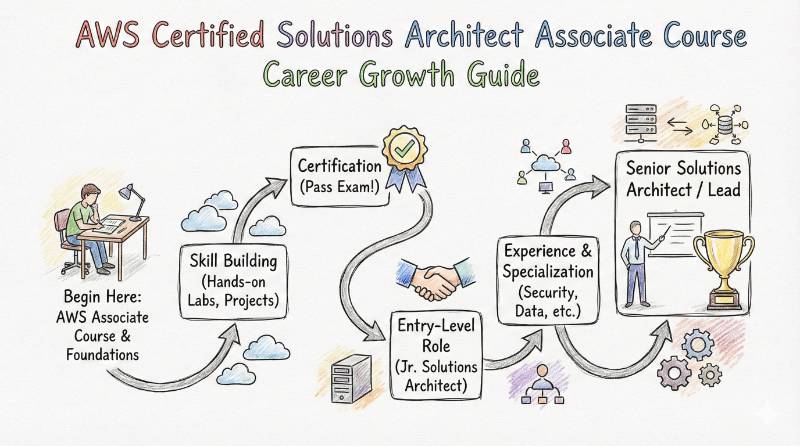
Yes, if you already build or support AWS systems and can study daily with mock tests. - What career outcomes does it support?
It supports cloud engineer, platform engineer, DevOps engineer, and solution-architecture growth because it builds real design judgment.
FAQs — AWS Certified Solutions Architect – Associate specific
- What does “resilient architecture” mean in AWS terms?
Designing systems that keep working during failures using availability patterns and fault tolerance approaches. - What does “cost-optimized architecture” mean practically?
Choosing storage/compute/network approaches that meet requirements without paying for unused capacity. - What security topics matter most?
Secure access patterns (users/groups/roles), network segmentation, and data protection choices. - Do I need deep networking knowledge?
Not deep, but you must understand VPC basics, subnets, routing, and access boundaries to answer architecture questions well. - How do I study the domains effectively?
Study each domain using a repeat cycle: concept → architecture pattern → small design scenario → revise mistakes. - What kind of projects should I build?
Multi-tier apps, secure VPC designs, cost optimization exercises, and decoupled architectures. - What is the biggest reason people fail?
They memorize service descriptions but cannot choose the right architecture for a real scenario. - What should I do after passing?
Pick a direction: deeper architecture, cross-track growth (DevOps/SRE/Security), or leadership-level architecture reviews.
Testimonials
- Amit (Cloud Engineer): “This guide helped me stop guessing and start designing. The domain-wise approach made my preparation clear and structured.”
- Neha (Platform Engineer): “I finally understood how to think about availability, security, and cost together—like real architecture, not theory.”
- Rahul (Engineering Manager): “It improved how I review designs with my team. I can spot risks earlier and ask better questions now.”
Conclusion
AWS Certified Solutions Architect – Associate is one of the most practical certifications for engineers and managers who want real cloud architecture confidence. It pushes you to think like someone responsible for uptime, security, performance, and cost—not just someone deploying resources. If you want to grow faster, don’t treat it as an exam goal. Treat it as an architecture mindset upgrade: learn the patterns, practice small designs, review mistakes, and build the habit of making clean trade-offs.