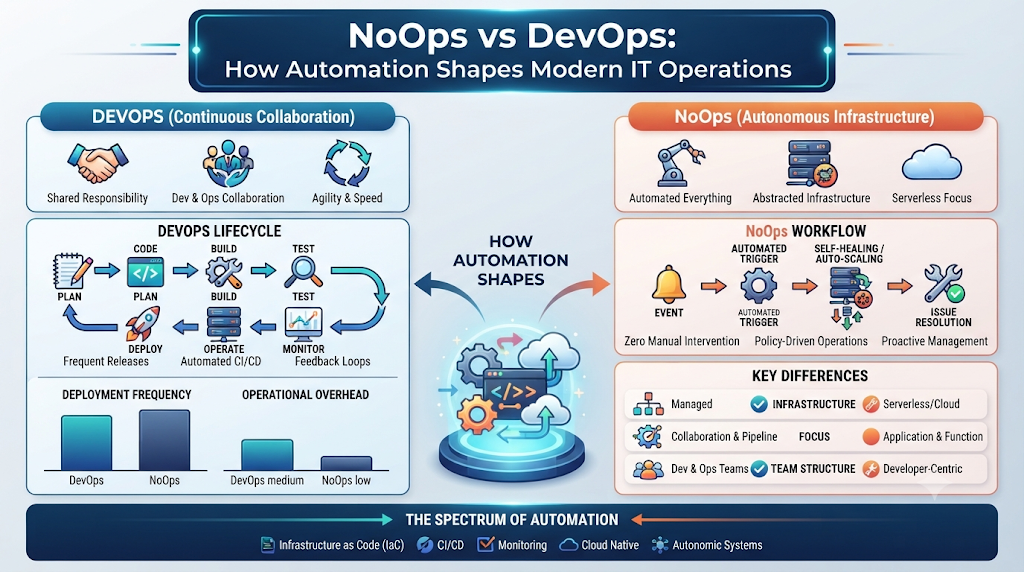
Modern software teams ship updates faster than ever, yet manual server tweaks, ticket queues, and repetitive deployment chores still slow many organizations down. Understanding what is NoOps—and how automation reshapes day-to-day infrastructure work—helps engineers, managers, and cloud leaders reduce routine operational toil without losing control over production systems.
At NoOpsSchool, we focus on practical education, professional certifications, and consulting around NoOps, cloud infrastructure automation, and modern delivery workflows. This guide walks through how automation-driven operations work in practice, how NoOps compares to DevOps, which tools support it, and how individuals and teams build relevant skills.
Understanding What NoOps Really Means
In plain terms, NoOps (“No Operations”) refers to an operational approach that uses automation, self-service platforms, and policy-driven infrastructure so engineering teams spend minimal time on repetitive, manual server management.
Despite the name, NoOps does not mean zero human responsibility or magical software that runs itself forever. Cloud environments still require architecture design, security guardrails, cost awareness, incident response, and clear ownership. Instead, NoOps shifts human effort away from routine ticket-handling toward designing resilient systems and improving automated workflows.
Why Teams Explore Automation-Driven Operations
As cloud architectures grow from a few virtual machines to distributed containers, microservices, and multi-region setups, manual operations become a bottleneck. Teams adopt automation-heavy practices to:
- Cut repetitive toil: Automate routine provisioning, patching, scaling, and deployment checks.
- Improve consistency: Use declarative code and pipelines so environments behave predictably across testing and production.
- Speed up delivery: Let developers ship changes through self-service workflows without waiting days for manual infrastructure tickets.
- Focus engineers on higher-value work: Free skilled engineers to solve architectural, reliability, and security problems rather than repeating manual clicks.
NoOps vs. DevOps and Traditional Operations
A common source of confusion is NoOps vs DevOps. They are not competing ideologies or rigid stages that automatically erase one another; rather, NoOps builds on DevOps automation, cloud-native platforms, and policy-driven tooling to push routine operational tasks further into automated workflows.
| Dimension | Traditional IT Operations | DevOps | NoOps Approach |
| Infrastructure Provisioning | Often manual tickets, scripts, and hand-configured servers | Infrastructure as Code (IaC) and automated pipelines | Declarative IaC, GitOps, and self-service automated provisioning |
| Deployment Flow | Scheduled release windows with manual steps | Continuous Integration / Continuous Deployment (CI/CD) | Automated, policy-checked delivery with automated rollbacks where safe |
| Monitoring & Recovery | Reactive alerts and manual human intervention | Shared observability, runbooks, and scripted responses | Automated telemetry, self-healing primitives, and AI-assisted anomaly detection |
| Human Involvement | Heavy day-to-day manual administration | Close collaboration between dev and ops engineers | Focus on architecture, governance, security, exceptions, and continuous improvement |
Core Architecture and NoOps Automation Tools
Automation-driven operations rely on a stack of cloud-native and infrastructure tools working together rather than a single magic product. Exploring NoOps automation tools helps clarify how code turns into running, observable infrastructure:
- Infrastructure as Code (Terraform and OpenTofu): Define cloud networks, compute instances, IAM roles, and managed databases declaratively in version-controlled files so changes are repeatable and auditable.
- Containers and Orchestration (Docker and Kubernetes): Package applications consistently in containers and let Kubernetes handle scheduling, scaling, health checks, and self-healing pod restarts.
- CI/CD and GitOps (GitHub Actions, GitLab CI/CD, Argo CD): Automate build, test, and release pipelines, while using GitOps controllers like Argo CD to reconcile live cluster state with desired configuration in Git.
- Observability and AIOps (Prometheus, Grafana, OpenTelemetry): Collect metrics, logs, and traces to spot bottlenecks early, and pair telemetry with intelligent automation or AIOps tooling to reduce alert noise.
- Cloud Platforms and Serverless: Use managed cloud services (such as AWS, Microsoft Azure, or Google Cloud) and serverless functions when appropriate so underlying host maintenance is offloaded to the provider.
Practical Example: Declarative Infrastructure and Self-Healing Workloads
Consider how Terraform and Kubernetes work together in an automated workflow. First, a declarative Terraform snippet provisions a managed network boundary and cluster resource cleanly:
Terraform
resource "aws_vpc" "app_vpc" {
  cidr_block           = "10.20.0.0/16"
  enable_dns_hostnames = true

  tags = {
    Name        = "noops-demo-vpc"
    Environment = "staging"
  }
}
Next, on Kubernetes, a Deployment with readiness and liveness probes allows the orchestrator to replace unhealthy containers automatically without manual SSH access:
YAML
apiVersion: apps/v1
kind: Deployment
metadata:
  name: checkout-service
spec:
  replicas: 3
  selector:
    matchLabels:
      app: checkout-service
  template:
    metadata:
      labels:
        app: checkout-service
    spec:
      containers:
        - name: api
          image: ghcr.io/example/checkout-service:1.2.0
          ports:
            - containerPort: 8080
          readinessProbe:
            httpGet:
              path: /ready
              port: 8080
            periodSeconds: 10
          livenessProbe:
            httpGet:
              path: /live
              port: 8080
            periodSeconds: 15
Step-by-Step Guide to Adopting Automation Safely
Jumping straight into heavy automation without clear foundations often automates broken processes. A steady, step-by-step rollout works much better:
- Audit Current Manual Work: List recurring operational tasks, ticket queues, and deployment steps to see where time is actually spent.
- Stabilize Foundations First: Put configurations in Git, standardize container builds, and establish basic version control before adding complex automation.
- Adopt Infrastructure as Code: Provision cloud resources via Terraform or OpenTofu with peer code reviews and state management.
- Automate Delivery and Rollbacks: Build CI/CD and GitOps workflows with automated testing and safe release guardrails.
- Instrument Observability: Add structured logs, metrics, and traces so you can verify whether automated changes behave as expected.
- Introduce Controlled Self-Healing and Governance: Enable automated scaling, health restarts, policy checks, and least-privilege security rules while keeping human review for high-risk changes.
- Measure and Iterate: Review deployment reliability, recovery times, and operational toil regularly to refine what to automate next.
Real-World Scenarios: How Automation Plays Out
- Automated Cloud Provisioning: Instead of waiting days for an IT ticket to spin up a test environment, an engineer merges a pull request that triggers Terraform and provisions isolated cloud resources with standard tags and security rules.
- Self-Healing Kubernetes Pods: When a container process deadlocks in production, Kubernetes detects a failing liveness probe and starts a fresh container automatically while keeping traffic routed to healthy replicas.
- Automated Incident Triage: Monitoring and observability pipelines correlate spikes in error rates with a recent deployment, alerting the right team with context instead of flooding engineers with ungrouped symptoms.
Benefits, Real-World Limitations, and Common Mistakes
Automation brings clear advantages—faster provisioning, fewer manual configuration typos, repeatable environments, and better scalability. Yet every engineering team should weigh its limits:
- Upfront Engineering Effort: Writing modules, pipelines, tests, and policies takes real time before payoffs compound.
- Security and Blast Radius: A misconfigured automated pipeline or over-privileged script can propagate bad changes quickly if guardrails and least-privilege access are missing.
- Ongoing Maintenance: Tools, cloud APIs, and dependencies evolve, requiring regular updates and human oversight.
Mistakes to Avoid
- Automating Unclear Processes: Fix broken workflows before automating them; otherwise you scale confusion faster.
- Treating NoOps as “Zero Accountability”: Someone still owns reliability, security, costs, and incident response.
- Skipping Observability: Unmonitored automation makes failures harder to diagnose when edge cases occur.
Skills, Roles, Training, Certifications, and Consulting
Building strong automation habits requires both hands-on technical skills—Linux, cloud fundamentals, IaC, containers, CI/CD, GitOps, observability, and cloud security—and clear role alignment across teams.
Different roles emphasize different responsibilities:
- Engineers: Focus on building IaC modules, CI/CD and GitOps pipelines, container orchestration, and automated operational workflows.
- Architects: Focus on system design, cloud-native patterns, automation strategy, reliability, security boundaries, and scalability.
- Managers: Focus on operational governance, team workflows, risk management, cost visibility, and continuous improvement planning.
For professionals and organizations looking to build structured capabilities around these areas, NoOpsSchool provides learning and support options across roles and stages:
- Training and Certification Tracks: Structured programs such as a NoOps training course, NoOps certification pathways, NoOps engineer certification, NoOps architect training, and NoOps manager certification help learners build practical skills and role-aligned knowledge—though training and certification support career growth rather than guaranteeing jobs, salaries, or specific exam outcomes.
- Consulting and Specialized Talent: Organizations seeking external guidance can explore NoOps consulting services for automation assessments, cloud modernization, and pipeline practices, or hire NoOps freelancers when they need targeted short-term help with Terraform, Kubernetes, or automation workflows.
Frequently Asked Questions (FAQs)
1. What is NoOps in simple terms?
NoOps is an operational approach centered on automation, self-service tooling, and infrastructure code so teams handle fewer routine, manual server tasks—while humans still design systems, govern security, and handle complex exceptions.
2. How does NoOps differ from DevOps in real practice?
DevOps emphasizes collaboration, continuous delivery, and shared ownership across development and operations, while NoOps focuses on pushing repetitive operational tasks into automated, self-service, and policy-driven workflows built on those practices.
3. Can NoOps completely eliminate IT operations or human engineers?
No. Even highly automated cloud platforms need engineers for architecture, security, cost control, troubleshooting unusual failures, and maintaining automation code.
4. Which NoOps automation tools do teams commonly start with?
Teams commonly start with version control (Git), Infrastructure as Code (Terraform or OpenTofu), containers (Docker and Kubernetes), CI/CD or GitOps tools (such as GitHub Actions or Argo CD), and monitoring stacks (such as Prometheus and Grafana).
5. What does a NoOps training course or NoOps certification help with?
They help professionals organize practical knowledge around cloud automation, IaC, containers, delivery pipelines, and operational governance, supporting skill development and career progression.
6. How do engineer, architect, and manager focus areas differ?
Engineers focus on hands-on automation and pipelines, architects focus on system design and automation strategy, and managers focus on governance, coordination, risk, and continuous improvement.
7. When should a company consider NoOps consulting services?
Organizations often look into consulting when planning cloud modernization, assessing operational bottlenecks, designing automation strategies, or establishing consistent CI/CD and security guardrails.
8. When might a team decide to hire NoOps freelancers?
Teams often bring in freelancers for targeted, time-bound needs—such as building specific Terraform modules, tuning Kubernetes deployments, or automating a particular pipeline—while maintaining internal oversight and security review.
9. What is the biggest risk when adopting heavy automation?
Moving too fast without testing, observability, least-privilege access, or rollback paths can spread configuration mistakes across environments quickly.
10. How can a beginner start learning NoOps concepts?
Start with Linux basics, Git, cloud fundamentals, and simple Infrastructure as Code or container exercises, then practice automating small, repeatable tasks end to end.
Conclusion
Automation-driven operations work best when they serve clear engineering goals: fewer repetitive manual chores, more consistent deployments, stronger observability, and clear human accountability where judgment matters most. Whether you are learning core automation tools, pursuing structured training, or planning organizational improvements, steady, well-governed steps win over rushed overhauls.
Explore NoOpsSchool to review available training programs, certifications, consulting options, and automation resources that match your current learning or operational goals.