Robots used to follow strict, boring rules. They did the exact same task over and over without thinking. If a box was out of place, the robot would crash or drop it.
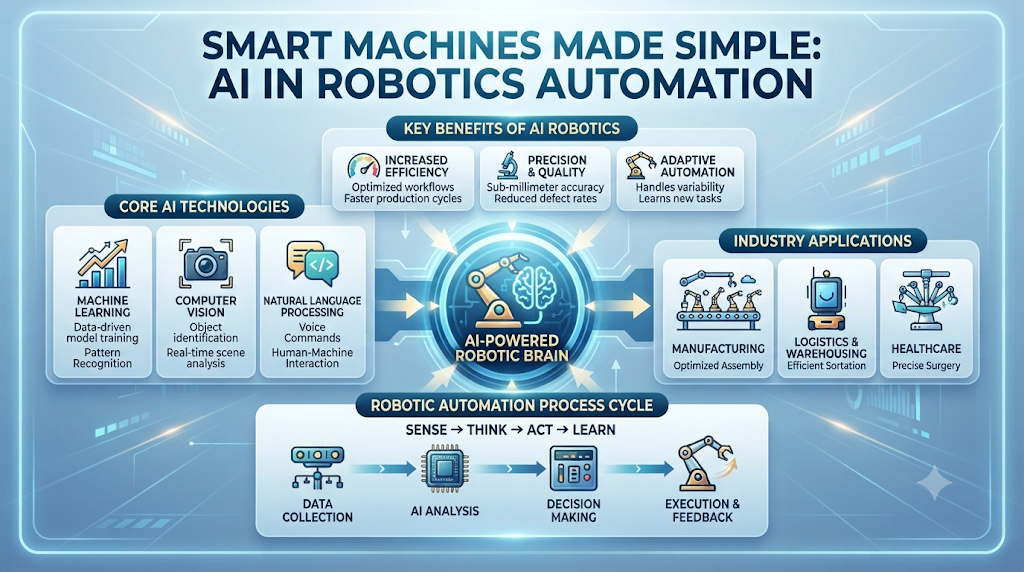
Today, smart machines use computer brains to see, learn, and adapt on the fly. This shift changes how factories build cars, how hospitals move supplies, and how warehouses ship boxes to your door.
To learn more about how smart tools and machine learning platforms change physical hardware, visit AIUniverse for deep technical insights and updates.
When you mix smart software with metal and gears, you get tools that make fewer errors and work faster alongside humans. Let us look at how this technology works and why it changes our daily work.
What Is AI in Robotics Automation?
At its core, combining computer intelligence with physical machines means giving metal arms and moving bases the ability to think. Traditional robots are like wind-up toys. They only move when you program every single inch of their path.
Smart machines use cameras and sensors to scan the room. They take in data, run it through step-by-step rules, and make real-time choices.
If a human walks in front of a smart robotic arm, the machine stops instantly. A dumb machine keeps moving and causes an accident. This makes modern workplaces much safer for everyone.
Why Traditional Robots Needed an Upgrade
Old factory machines were too rigid. Changing what a factory built took weeks of reprogramming code.
Companies lost money every time a machine sat idle during updates. Business owners needed tools that could adapt to new tasks quickly.
Adding smart software fixed this headache. Now, a machine can spot a new product shape and adjust its grip on the fly.
You save time, reduce waste, and keep your production lines moving without endless delays.
How Sensors and Cameras Help Machines See
Smart machines rely heavily on computer vision. Cameras act like human eyes, capturing thousands of pictures every second.
Software then analyzes those pictures to find objects, measure distances, and check for flaws. If a product has a scratch, the camera spots it immediately.
The machine then picks up the broken item and drops it into a reject bin. This high-speed inspection prevents faulty goods from reaching customers.
The Role of Machine Learning in Daily Tasks
Machine learning is a method where computers get better at a job by practicing. Instead of a human writing every rule, the software looks at thousands of past examples.
If a robotic arm drops an item, the system notes the failure and adjusts its grip pressure for the next try. Over time, the machine masters the task with high precision.
This self-improving loop means you spend less time fixing code and more time watching your systems run smoothly.
Real-World Story About Server Crashes and System Failures
- A large car plant lost power to its main control server during a busy shift, causing fifty robotic arms to freeze mid-motion and stall production.
- A warehouse management system crashed because too many automated guided vehicles tried to update their maps at the exact same time.
- A software update bug caused a fleet of sorting robots to read barcode labels backward, sending thousands of packages to the wrong shipping docks.
- A local storage facility suffered a database crash when a sensor network flooded the local server with millions of useless temperature logs.
- A heavy assembly robot shut down unexpectedly because a local network router overheated and dropped its connection to the main AI brain.
- A packaging line stopped for six hours when a corrupted cloud sync file locked the motion control software on every station.
- A food processing plant lost its sorting accuracy when a network glitch wiped out the trained machine learning weights for ripe fruit detection.
- A delivery robot fleet in a large hospital lost its Wi-Fi connection and stopped in the middle of busy hallways, blocking staff members.
- A manufacturing unit faced a massive delay because a security patch blocked the communication port between the vision system and the robot arm.
- A testing lab had to restart its entire hardware cluster after a power surge fried the main processing unit running the navigation models.
| Feature | Old Industrial Robots | Modern Smart Robots |
| Flexibility | Rigid and fixed tasks | Adapts to changing items |
| Programming | Manual line-by-line code | Learns from data and trials |
| Safety | Fences required | Works safely near humans |
| Error Handling | Stops or crashes on change | Adjusts and corrects errors |
Common Mistakes and Pitfalls
- Mistake: Buying expensive smart hardware without a clear plan for what task it needs to solve. Fix: Define your exact production bottleneck before shopping for tools.
- Mistake: Skipping data security checks when connecting physical machines to cloud servers. Fix: Use secure local networks and strong encryption keys for all data transfers.
- Mistake: Expecting machines to work perfectly on day one without any training data. Fix: Feed the system clean sample images and test cases during a quiet pilot phase.
- Mistake: Ignoring employee training and leaving staff feeling scared of losing their jobs. Fix: Teach your team how to manage and maintain the new equipment.
- Mistake: Relying solely on cloud connections without local backup controls. Fix: Ensure critical safety features run on local hardware chips for instant response.
- Mistake: Overloading sensors with too much data processing at once. Fix: Upgrade your local processors and filter out unnecessary background noise.
- Mistake: Skipping routine hardware cleaning and sensor calibration checks. Fix: Set up a weekly maintenance schedule to keep camera lenses clean and clear.
- Mistake: Trying to automate a messy, unorganized workspace right away. Fix: Clean up your physical layout and clear floor paths before adding moving units.
- Mistake: Buying closed software ecosystems that do not work with your current tools. Fix: Choose open platforms that integrate easily with your existing software stack.
- Mistake: Ignoring regular software updates and security patches. Fix: Schedule monthly update windows during off-peak hours to keep systems secure.
Step-by-Step Implementation Roadmap
- Audit your current workflow: Walk through your workspace and write down every repetitive, manual task that causes bottlenecks or worker fatigue.
- Define clear goals: Decide if you want to speed up packaging, reduce inspection errors, or improve workplace safety in high-risk zones.
- Choose the right hardware: Select robotic arms, sensors, or mobile carts that match the physical size and weight limits of your products.
- Prepare clean data: Gather clear photos, dimensions, and weight specs of the items your machines will handle every single day.
- Set up a test zone: Install your new equipment in a small, closed corner of your facility away from main production lines.
- Run initial trials: Let the machine practice sorting or moving items while your team watches for any glitches or safety risks.
- Train your staff: Teach your floor workers how to clear jams, reboot systems, and read basic error messages on the control screen.
- Scale up slowly: Move the tested equipment out of the test zone and into your main active production workflow.
- Monitor performance metrics: Track speed, error rates, and downtime weekly to make sure the investment pays off as expected.
- Refine and update: Use incoming performance data to tweak your rules and make your automated workflows even faster over time.
1. What makes modern smart machines different from old factory robots?
Old machines only followed strict, pre-written code without looking around. Modern systems use cameras and learning rules to adapt to changes in their environment.
2. Do I need cloud computing to run automated robots?
Not always. While cloud servers help train heavy models, many modern systems run decision rules on local chips inside the machine for instant safety responses.
3. How do cameras help robotic arms pick up random items?
Cameras capture high-speed images of objects. Software analyzes the shape, size, and position so the robot knows exactly where to grip.
4. Are smart automated machines safe for human workers?
Yes. Unlike old heavy machinery locked behind thick fences, modern units use sensors to detect people nearby and stop moving immediately.
5. How long does it take to set up an automated workstation?
Setup time varies based on project size, but a basic sorting or packaging setup usually takes a few weeks from testing to full launch.
6. What causes most system crashes in robotic automation?
Network drops, power surges, and corrupted software update files are the most common causes of unexpected robotic system freezes.
7. Do my workers need coding skills to manage these machines?
No. Most modern control panels use simple touch screens with visual menus, making it easy for floor staff to run daily operations.
8. How do machines learn from their mistakes?
When a machine fails a task, the software records the error data and adjusts its operating rules so it performs better on the next try.
9. Can small businesses afford automation tools today?
Yes. Modular robotic arms and mobile carts have become much cheaper and easier to rent or buy for growing companies.
10. How do I start automating my warehouse or factory floor?
Start by auditing your slowest manual task, setting a clear productivity goal, and testing a small automated unit in a safe zone.
Final Recommendation
Implementing smart automation does not have to be an overwhelming challenge. Start small by identifying one frustrating bottleneck in your daily operations, such as manual sorting or repetitive packing.
Set up a test environment, gather clean data, and involve your floor team in every step of the transition. Keep your systems secure, maintain your hardware regularly, and scale up your automation only after seeing proven results in your initial tests.
By taking a careful, step-by-step approach, you will build a faster, safer, and much more reliable workflow for your business.