
Upgrade & Secure Your Future with DevOps, SRE, DevSecOps, MLOps!

We spend hours on Instagram and YouTube and waste money on coffee and fast food, but won’t spend 30 minutes a day learning skills to boost our careers.
Master in DevOps, SRE, DevSecOps & MLOps!

Learn from Guru Rajesh Kumar and double your salary in just one year.

Get Started Now!

How to Easily Backup Your WordPress Site Using UpdraftPlus: A Step-by-Step Guide

To easily backup your WordPress site using UpdraftPlus, follow these step-by-step instructions:

  1. Install and activate the UpdraftPlus plugin on your WordPress site. You can do this by navigating to the “Plugins” section in your WordPress dashboard and clicking on “Add New.” Search for UpdraftPlus and click on “Install Now” followed by “Activate.”
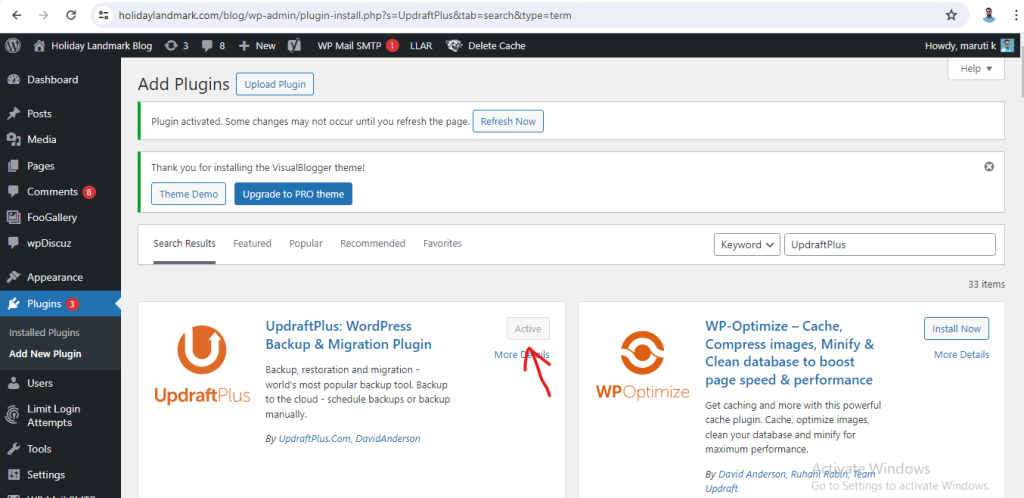
2. Once the plugin is activated, go to the UpdraftPlus settings by clicking on “Settings” > “UpdraftPlus Backups” in your WordPress dashboard.

3. In the UpdraftPlus settings, you can configure your backup settings such as how often you want to back up your site, where you want to store the backups, and what files you want to include in the backup.
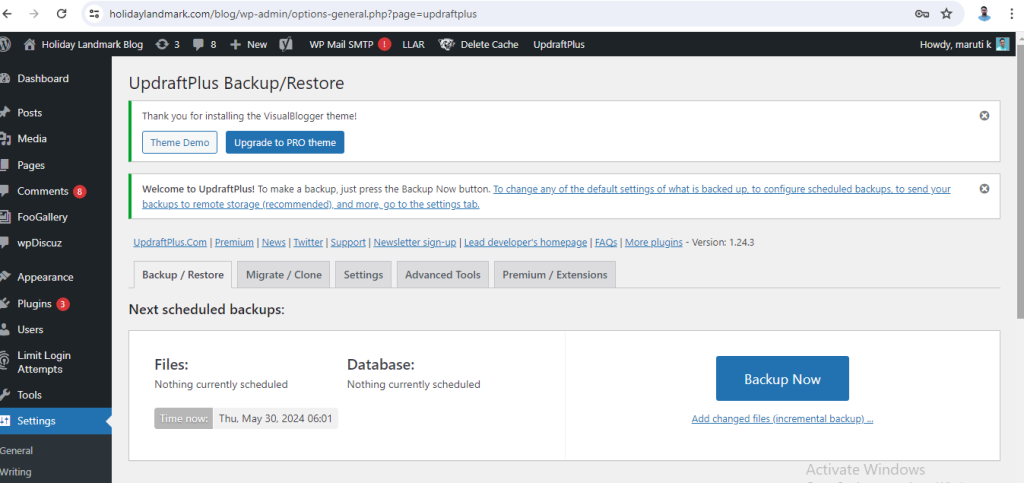
4. To manually back up your site, click on the “Backup Now” button. UpdraftPlus will then start backing up your site’s files and database.

5. You can also schedule automatic backups by setting the frequency of backups in the UpdraftPlus settings.

6. To restore your site from a backup, go to the “Existing Backups” tab in the UpdraftPlus settings and click on the “Restore” button next to the backup you want to restore from.

By following these steps, you can easily backup and restore your WordPress site using UpdraftPlus, ensuring that your site’s data is safe and secure.

Related Posts

Top 10 Federated Learning Platforms

Introduction Federated Learning Platforms enable organizations to collaboratively train AI and machine learning models across multiple decentralized data sources without moving or exposing raw data. In plain Read More

Read More

Comparing Heart Surgery Options, Costs, and Leading Hospitals

INTRODUCTION When dealing with complex cardiovascular conditions, choosing the right medical institution is one of the most critical health decisions you will ever make. The quality of Read More

Read More

Top 10 AI ESG Data Extraction Tools: Features, Pros, Cons & Comparison

Introduction AI ESG Data Extraction Tools use artificial intelligence, machine learning, natural language processing (NLP), document intelligence, and automation technologies to collect, extract, classify, and organize environmental, Read More

Read More

Top 10 AI Carbon Accounting Automation Tools: Features, Pros, Cons & Comparison

Introduction AI Carbon Accounting Automation Tools use artificial intelligence, machine learning, natural language processing, data automation, and sustainability analytics to help organizations measure, track, calculate, and report Read More

Read More

Top 10 AI Smart Meter Anomaly Detection Tools: Features, Pros, Cons & Comparison

Introduction AI Smart Meter Anomaly Detection Tools use artificial intelligence, machine learning, pattern recognition, and advanced analytics to identify unusual energy consumption behaviors, meter faults, fraud patterns, Read More

Read More

Top 10 AI Building Energy Optimization Tools: Features, Pros, Cons & Comparison

Introduction AI Building Energy Optimization Tools use artificial intelligence, machine learning, IoT sensors, predictive analytics, and automation to help buildings reduce energy consumption, improve operational efficiency, and Read More

Read More
Subscribe
Notify of
guest
0 Comments
Oldest
Newest Most Voted
0
Would love your thoughts, please comment.x
()
x