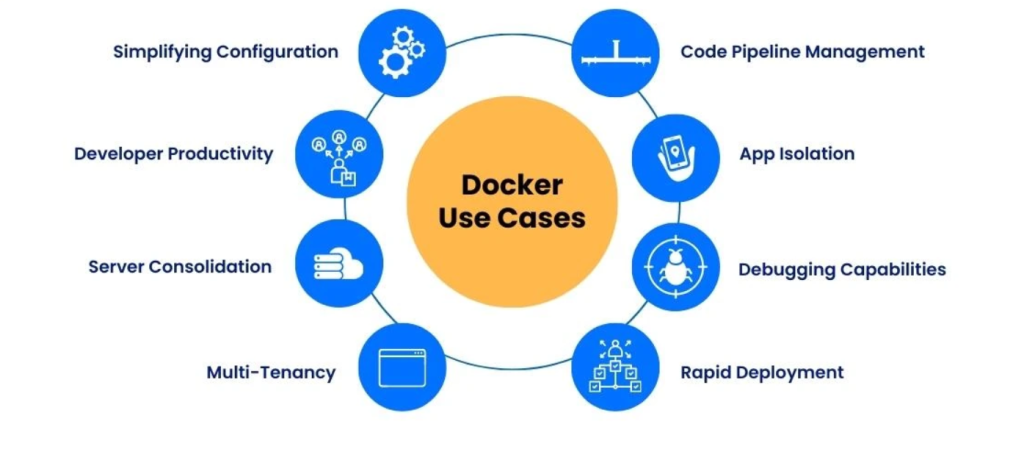
In today’s software development world, containerization has revolutionized the way applications are built, deployed, and managed. Docker is the most popular containerization platform, enabling developers and organizations to create, run, and manage applications in isolated environments. It eliminates the traditional “works on my machine” problem by ensuring consistency across multiple environments.
Docker is widely used in DevOps, CI/CD pipelines, microservices architectures, cloud-native development, and more. This blog will explore what Docker is, its top use cases, key features, architecture, installation process, and a step-by-step guide to getting started.
What is Docker?
Docker is an open-source platform that allows developers to build, package, and run applications in lightweight, portable containers. A Docker container is a standardized unit of software that includes everything needed to run an application: code, runtime, libraries, dependencies, and configurations.
Why Use Docker?
- Portability: Containers can run on any system with Docker installed.
- Consistency: Ensures identical application behavior across environments (development, testing, production).
- Isolation: Runs applications in isolated environments, avoiding conflicts.
- Efficiency: Uses fewer resources compared to traditional virtual machines (VMs).
How Docker is Different from Virtual Machines (VMs)?
| Feature | Virtual Machines (VMs) | Docker Containers |
|---|---|---|
| OS Overhead | Requires full OS | Shares host OS |
| Performance | More resource-intensive | Lightweight, fast |
| Boot Time | Minutes | Seconds |
| Portability | Limited | High (Runs anywhere) |
Docker makes application deployment faster, more scalable, and cost-effective by simplifying how software is packaged and shipped.
Top 10 Use Cases of Docker
1. Application Containerization
Docker encapsulates applications with all their dependencies, ensuring they run identically in any environment.
2. Microservices Architecture
Docker is ideal for breaking down monolithic applications into microservices, allowing teams to develop, deploy, and scale components independently.
3. Continuous Integration & Continuous Deployment (CI/CD)
Docker integrates seamlessly with Jenkins, GitHub Actions, GitLab CI/CD, enabling fast, automated software releases.
4. Cloud-Native Development
Docker works across AWS, Azure, Google Cloud, making it easy to deploy applications in hybrid, multi-cloud, and Kubernetes environments.
5. Simplified Development and Testing
Developers can use Docker Compose to create isolated development environments, reducing conflicts between dependencies.
6. Automated Scaling & Orchestration
With Docker Swarm or Kubernetes, applications can be automatically scaled up or down based on demand.
7. Big Data and Machine Learning
Docker simplifies the deployment of AI/ML frameworks like TensorFlow, PyTorch, and Apache Spark by packaging dependencies in containers.
8. Edge Computing and IoT
Docker runs lightweight containers on IoT devices and edge servers, optimizing compute resources.
9. Database Containerization
Databases like MySQL, PostgreSQL, and MongoDB can be containerized, making them easier to manage and scale.
10. Legacy Application Modernization
Organizations can move legacy applications into containers without rewriting the entire codebase, extending their lifespan.
What Are the Features of Docker?
1. Containerization
Docker provides an efficient way to package and isolate applications along with their dependencies.
2. Portability
Containers run consistently across different environments, from a developer’s laptop to production servers.
3. Version Control & Rollbacks
Docker allows versioning of images, enabling easy rollbacks to previous states.
4. Lightweight & Fast
Containers use less CPU and memory compared to traditional VMs.
5. Multi-Platform Support
Docker runs on Windows, macOS, Linux, and cloud environments.
6. Security & Isolation
Each container runs in its own isolated environment, improving security.
7. Docker Compose
Defines and runs multi-container applications using a simple YAML configuration file.
8. Built-in Networking
Docker allows seamless container-to-container communication.
9. Integration with DevOps Tools
Supports popular tools like Kubernetes, Terraform, Jenkins, GitHub Actions.
10. Scalable and Flexible
Works in both single-node setups and large-scale deployments with Kubernetes.
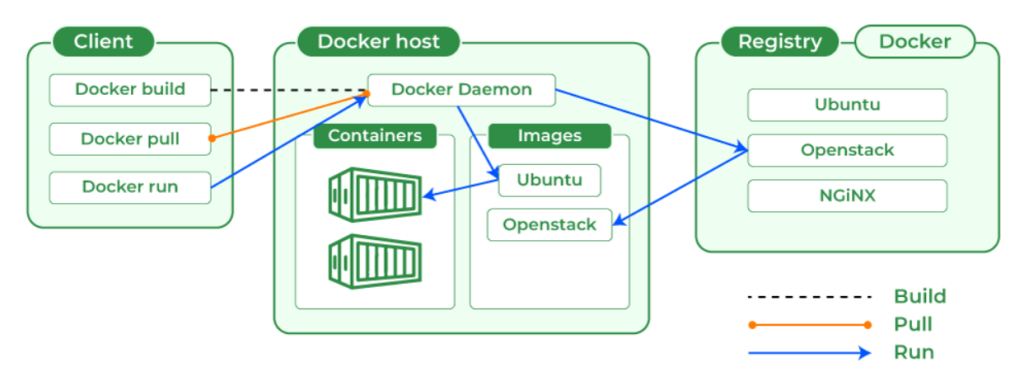
How Docker Works and Architecture
1. Docker Engine
- The core of Docker, is responsible for running containers.
- Consists of Docker Daemon, CLI, and REST API.
2. Docker Images
- Read-only templates that define how containers should run.
- Created using Dockerfiles.
3. Docker Containers
- Running instances of Docker Images.
4. Docker Hub
- Public/private registry to store and share Docker images.
5. Docker Compose
- Tool for managing multi-container applications.
6. Container Orchestration
- Docker Swarm and Kubernetes help manage large-scale container deployments.
How to Install Docker
Installing Docker on Linux
sudo apt update
sudo apt install docker.io -y
sudo systemctl start docker
sudo systemctl enable docker
Installing Docker on macOS (via Homebrew)
brew install --cask dockerInstalling Docker on Windows
- Download Docker Desktop from Docker’s official website.
- Follow the installation wizard and restart your system.
Verify Docker Installation
docker --version
docker run hello-world
Basic Tutorials of Docker: Getting Started
1. Running a Simple Container
docker run -d -p 8080:80 nginx- This pulls and runs an Nginx web server container on port 8080.
2. Listing Running Containers
docker ps3. Stopping a Running Container
docker stop <container_id>4. Removing a Container
docker rm <container_id>5. Pulling an Image from Docker Hub
docker pull mysql6. Creating a Custom Docker Image
- Create a Dockerfile:
FROM python:3.9 COPY app.py /app/app.py WORKDIR /app CMD ["python", "app.py"] - Build and run the image:
docker build -t my-python-app . docker run my-python-app
7. Running Multiple Containers with Docker Compose
- Create docker-compose.yml:
version: '3' services: web: image: nginx ports: - "8080:80" database: image: postgres - Run with:
docker-compose up -d
8. Viewing Container Logs
docker logs <container_id>9. Executing Commands Inside a Running Container
docker exec -it <container_id> bash10. Removing All Containers and Images
docker system prune -a