Introduction
Legal Hold Software is designed to help organizations preserve, manage, and track electronically stored information (ESI) when litigation, investigations, or regulatory actions are anticipated. A legal hold ensures that relevant data is not deleted, altered, or destroyed, maintaining compliance with legal and regulatory requirements.
In modern enterprises, data is spread across email systems, cloud storage, collaboration tools, devices, and SaaS applications. When a legal case arises, manually preserving data is risky, slow, and error-prone. Legal hold platforms automate notifications, tracking, acknowledgments, and data preservation across multiple systems.
These tools are critical for legal, compliance, and IT teams in ensuring defensible data governance and reducing litigation risk.
Real-world use cases include:
- Litigation data preservation and eDiscovery readiness
- Regulatory investigation support
- Internal HR investigations and misconduct cases
- Compliance audits and data retention enforcement
- Corporate risk management and governance
- Cross-border legal compliance data handling
What buyers should evaluate:
- Automated legal hold workflows and notifications
- Data source coverage (email, cloud, endpoints, SaaS)
- Audit trails and defensibility reporting
- Integration with eDiscovery platforms
- Ease of administration for legal teams
- Chain-of-custody tracking capabilities
- Scalability for enterprise environments
- Security and compliance certifications
- User acknowledgment tracking
- Preservation consistency across systems
Best for: Legal teams, compliance officers, enterprise IT governance teams, law firms, and regulated industries such as finance, healthcare, and government.
Not ideal for: Small businesses with minimal regulatory exposure or companies without structured data governance requirements.
Key Trends in Legal Hold Software
- Deep integration with eDiscovery and investigation platforms
- AI-assisted identification of custodians and relevant data sources
- Automated cross-platform data preservation across SaaS ecosystems
- Cloud-native legal hold workflows replacing on-prem systems
- Real-time compliance monitoring and alerts
- Increased use of AI for legal risk prediction
- Stronger encryption and zero-trust data governance models
- Expansion of mobile-first legal hold notifications
- Integration with collaboration tools like Teams and Slack
- Improved auditability for global regulatory compliance
How We Selected These Tools (Methodology)
- Market adoption in legal and enterprise compliance sectors
- Depth of legal hold workflow automation
- Integration with eDiscovery and data governance ecosystems
- Security, auditability, and defensibility strength
- Multi-source data coverage capability
- Ease of use for legal and compliance teams
- Scalability across enterprise environments
- Reliability in regulatory and litigation scenarios
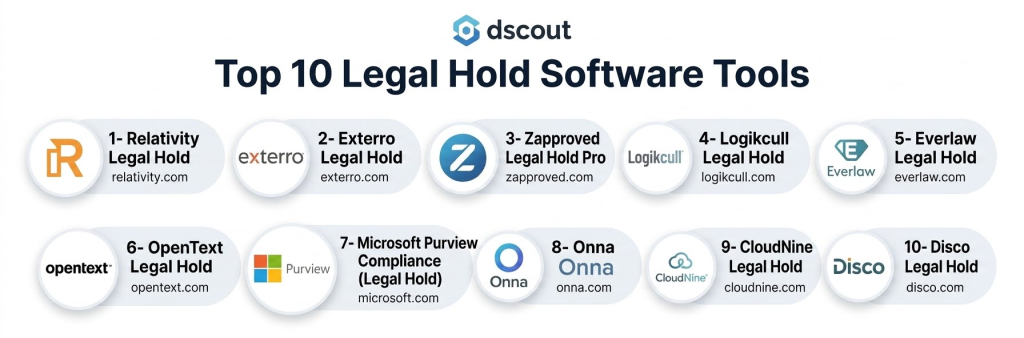
Top 10 Legal Hold Software Tools
1- Relativity Legal Hold
Short description:
Relativity Legal Hold is a leading enterprise legal hold platform designed to simplify preservation workflows and ensure defensible compliance during litigation. It allows legal teams to issue, track, and manage legal holds across custodians and data sources. The platform integrates closely with RelativityOne eDiscovery ecosystem. It is widely used by large enterprises and law firms. It supports automated notifications and acknowledgment tracking. It is especially strong in complex litigation environments.
Key Features
- Automated legal hold notifications
- Custodian management
- Acknowledgment tracking
- Audit trails and reporting
- Integration with eDiscovery workflows
- Data preservation workflows
- Compliance dashboards
Pros
- Strong enterprise legal ecosystem
- Highly defensible workflows
- Deep eDiscovery integration
Cons
- Complex setup for new users
- Enterprise-focused pricing
- Requires training for full use
Platforms / Deployment
- Web
- Cloud
Security & Compliance
- SSO/SAML
- MFA
- Encryption
- Audit logs
- RBAC
Integrations & Ecosystem
- RelativityOne
- Microsoft 365
- Google Workspace
- Slack
- APIs
- Enterprise data systems
Support & Community
Strong enterprise legal and compliance support ecosystem.
2- Exterro Legal Hold
Short description:
Exterro Legal Hold is part of a broader eDiscovery and information governance suite. It provides automated legal hold workflows, custodian tracking, and defensible preservation capabilities. The platform is widely used by corporate legal teams and law firms. It helps organizations manage litigation readiness and compliance obligations. Exterro is known for its strong integration across legal workflows. It is especially suited for mid-market and enterprise legal departments.
Key Features
- Legal hold automation
- Custodian management
- Workflow tracking
- Audit reporting
- Notification management
- Compliance dashboards
- Data preservation workflows
Pros
- Strong legal workflow integration
- Good for enterprise compliance
- Part of full eDiscovery suite
Cons
- Complex implementation
- Higher cost structure
- Requires training
Platforms / Deployment
- Web
- Cloud / On-prem
Security & Compliance
- SSO
- MFA
- Encryption
- Audit logs
- Compliance controls
Integrations & Ecosystem
- Microsoft 365
- Google Workspace
- eDiscovery tools
- HR systems
- APIs
- Enterprise storage systems
Support & Community
Strong legal and enterprise support services.
3- Zapproved Legal Hold Pro
Short description:
Zapproved Legal Hold Pro is a cloud-based legal hold solution designed to streamline litigation preservation workflows for corporate legal teams. It allows legal departments to issue holds, track responses, and maintain defensible records. The platform is widely used in mid-market and enterprise environments. It simplifies legal hold communication and compliance tracking. Zapproved is known for ease of use and fast deployment. It is especially strong for corporate legal operations.
Key Features
- Legal hold notifications
- Custodian tracking
- Acknowledgment management
- Workflow automation
- Audit trails
- Reporting dashboards
- Compliance tracking
Pros
- Easy to use interface
- Fast deployment
- Strong legal workflow focus
Cons
- Limited advanced eDiscovery features
- Less flexible for complex enterprises
- Premium pricing for scale
Platforms / Deployment
- Web
- Cloud
Security & Compliance
- SSO
- MFA
- Encryption
- Audit logs
Integrations & Ecosystem
- Microsoft 365
- Google Workspace
- Slack
- eDiscovery platforms
- APIs
- Enterprise systems
Support & Community
Good corporate legal support and onboarding assistance.
4- Logikcull Legal Hold
Short description:
Logikcull is an eDiscovery platform that includes legal hold capabilities for small and mid-sized legal teams. It simplifies data preservation and legal hold workflows through automation. The platform is widely used by law firms and corporate legal departments. It enables quick legal hold deployment and tracking. Logikcull is known for its simplicity and user-friendly interface. It is suitable for fast-moving legal teams.
Key Features
- Legal hold creation
- Automated notifications
- Custodian management
- Data preservation workflows
- Audit logs
- Searchable case data
- eDiscovery integration
Pros
- Very easy to use
- Fast setup
- Good for SMB legal teams
Cons
- Limited enterprise scalability
- Less advanced governance features
- Basic customization
Platforms / Deployment
- Web
- Cloud
Security & Compliance
- SSO
- Encryption
- Audit logs
- Access controls
Integrations & Ecosystem
- Microsoft 365
- Google Workspace
- Slack
- APIs
- Cloud storage systems
Support & Community
Strong support for legal professionals.
5- Everlaw Legal Hold
Short description:
Everlaw is a modern eDiscovery platform that includes legal hold functionality designed for litigation readiness and collaboration. It enables legal teams to manage holds, preserve data, and track custodian responses. The platform is widely used by law firms and corporate legal departments. It provides strong collaboration and analytics capabilities. Everlaw is known for its modern interface and speed. It is suitable for litigation-heavy organizations.
Key Features
- Legal hold workflows
- Custodian management
- Collaboration tools
- Audit trails
- Data preservation
- Case management integration
- Reporting dashboards
Pros
- Modern and intuitive UI
- Strong collaboration features
- Fast performance
Cons
- Enterprise pricing
- Limited standalone legal hold focus
- Requires onboarding
Platforms / Deployment
- Web
- Cloud
Security & Compliance
- SSO
- MFA
- Encryption
- Audit logs
Integrations & Ecosystem
- Microsoft 365
- Google Workspace
- Slack
- APIs
- eDiscovery tools
Support & Community
Strong enterprise legal support and training.
6- OpenText Legal Hold
Short description:
OpenText Legal Hold is part of the OpenText Information Governance suite designed for enterprise compliance and litigation support. It enables organizations to manage legal holds across large and complex data environments. The platform supports policy enforcement and preservation workflows. It is widely used in regulated industries and large enterprises. OpenText is known for its enterprise-grade governance capabilities. It is suitable for global organizations.
Key Features
- Legal hold automation
- Custodian tracking
- Compliance workflows
- Data preservation policies
- Audit reporting
- Enterprise governance
- Integration with archiving systems
Pros
- Strong enterprise governance
- Scalable architecture
- Good compliance coverage
Cons
- Complex deployment
- High cost
- Requires IT expertise
Platforms / Deployment
- Web
- On-prem / Cloud
Security & Compliance
- SSO
- MFA
- Encryption
- Audit logs
- Compliance controls
Integrations & Ecosystem
- Enterprise archiving systems
- Microsoft 365
- Google Workspace
- SAP
- APIs
- Data governance tools
Support & Community
Strong enterprise support and consulting services.
7- Microsoft Purview Compliance (Legal Hold)
Short description:
Microsoft Purview provides built-in legal hold capabilities within the Microsoft 365 compliance ecosystem. It enables organizations to preserve data across Exchange, SharePoint, Teams, and other Microsoft services. The platform is widely used by enterprises already using Microsoft 365. It supports eDiscovery and compliance workflows. Purview is especially strong for Microsoft-centric organizations. It simplifies legal hold management across Microsoft environments.
Key Features
- Legal hold in Microsoft 365
- eDiscovery integration
- Custodian management
- Data preservation policies
- Audit logs
- Compliance dashboards
- Retention workflows
Pros
- Deep Microsoft integration
- Easy for Microsoft users
- Strong compliance capabilities
Cons
- Limited outside Microsoft ecosystem
- Complex for advanced customization
- Requires licensing tiers
Platforms / Deployment
- Web
- Cloud
Security & Compliance
- SSO/SAML
- MFA
- Encryption
- Audit logs
- RBAC
Integrations & Ecosystem
- Microsoft 365
- Teams
- Exchange
- SharePoint
- Power Platform
- APIs
Support & Community
Strong enterprise Microsoft support ecosystem.
8- Onna
Short description:
Onna is a data integration and legal hold platform designed to collect, preserve, and manage data across multiple SaaS applications. It enables legal teams to place holds across collaboration tools and cloud systems. The platform is widely used for modern digital workplaces. It helps centralize unstructured data for legal readiness. Onna is especially strong in SaaS-heavy environments. It is suitable for distributed organizations.
Key Features
- Cross-platform data collection
- Legal hold workflows
- Data preservation
- SaaS integrations
- Search and indexing
- Compliance tracking
- Custodian management
Pros
- Strong SaaS data coverage
- Good integration capabilities
- Modern architecture
Cons
- Requires setup for integrations
- Premium pricing
- Not standalone eDiscovery tool
Platforms / Deployment
- Web
- Cloud
Security & Compliance
- SSO
- MFA
- Encryption
- Audit logs
Integrations & Ecosystem
- Slack
- Microsoft 365
- Google Workspace
- Salesforce
- Zoom
- APIs
Support & Community
Good enterprise onboarding and support.
9- CloudNine Legal Hold
Short description:
CloudNine offers legal hold capabilities as part of its eDiscovery and information governance solutions. It helps organizations preserve data and manage legal holds across custodians. The platform is widely used in legal and compliance teams. It provides structured workflows for litigation readiness. CloudNine is known for flexibility and hybrid deployment support. It is suitable for mid-market and enterprise use.
Key Features
- Legal hold workflows
- Custodian management
- Data preservation
- Audit logs
- eDiscovery integration
- Reporting dashboards
- Compliance tracking
Pros
- Flexible deployment options
- Strong eDiscovery integration
- Good mid-market fit
Cons
- Interface not modern
- Requires setup effort
- Limited AI capabilities
Platforms / Deployment
- Web
- Cloud / On-prem / Hybrid
Security & Compliance
- SSO
- MFA
- Encryption
- Audit logs
Integrations & Ecosystem
- Microsoft 365
- Google Workspace
- Enterprise storage systems
- APIs
- eDiscovery platforms
Support & Community
Good enterprise support and documentation.
10- Disco Legal Hold
Short description:
DISCO is a cloud-native legal technology platform that includes legal hold capabilities as part of its eDiscovery suite. It helps legal teams manage data preservation and litigation readiness efficiently. The platform is widely used by law firms and corporate legal departments. DISCO is known for its speed and AI-driven capabilities. It simplifies legal workflows for modern legal teams. It is especially suitable for fast-paced litigation environments.
Key Features
- Legal hold workflows
- AI-driven data processing
- Custodian management
- eDiscovery integration
- Audit logs
- Data preservation tools
- Collaboration features
Pros
- Fast and modern platform
- Strong AI capabilities
- Easy to use
Cons
- Premium pricing
- Limited customization for complex governance
- Best within DISCO ecosystem
Platforms / Deployment
- Web
- Cloud
Security & Compliance
- SSO
- MFA
- Encryption
- Audit logs
Integrations & Ecosystem
- Microsoft 365
- Google Workspace
- Slack
- APIs
- eDiscovery tools
Support & Community
Strong legal industry support and onboarding.
Comparison Table
| Tool Name | Best For | Platform(s) Supported | Deployment | Standout Feature | Public Rating |
|---|---|---|---|---|---|
| Relativity | Enterprise litigation | Web | Cloud | Deep eDiscovery integration | N/A |
| Exterro | Legal teams | Web | Cloud/On-prem | Legal workflow suite | N/A |
| Zapproved | Corporate legal teams | Web | Cloud | Simple legal holds | N/A |
| Logikcull | SMB legal teams | Web | Cloud | Easy eDiscovery + holds | N/A |
| Everlaw | Litigation teams | Web | Cloud | Collaboration + analytics | N/A |
| OpenText | Enterprises | Web | Cloud/On-prem | Governance at scale | N/A |
| Microsoft Purview | Microsoft users | Web | Cloud | Native M365 holds | N/A |
| Onna | SaaS environments | Web | Cloud | Cross-SaaS preservation | N/A |
| CloudNine | Mid-market legal | Web | Hybrid | Flexible deployment | N/A |
| DISCO | Modern legal teams | Web | Cloud | AI-driven legal workflows | N/A |
Evaluation & Scoring of Legal Hold Software
| Tool Name | Core | Ease | Integrations | Security | Performance | Support | Value | Weighted Total |
|---|---|---|---|---|---|---|---|---|
| Relativity | 9.5 | 8.0 | 9.5 | 9.5 | 9.0 | 9.0 | 8.0 | 8.9 |
| Exterro | 9.0 | 8.0 | 9.0 | 9.5 | 9.0 | 9.0 | 8.0 | 8.8 |
| Zapproved | 8.5 | 9.0 | 8.5 | 9.0 | 8.5 | 8.5 | 9.0 | 8.7 |
| Logikcull | 8.5 | 9.5 | 8.5 | 8.5 | 8.5 | 8.5 | 9.0 | 8.7 |
| Everlaw | 9.0 | 9.0 | 9.0 | 9.0 | 9.0 | 9.0 | 8.0 | 8.9 |
| OpenText | 9.5 | 7.5 | 9.0 | 9.5 | 9.0 | 9.0 | 8.0 | 8.8 |
| Microsoft Purview | 9.0 | 8.5 | 9.5 | 9.5 | 9.0 | 9.0 | 9.0 | 9.0 |
| Onna | 9.0 | 8.5 | 9.5 | 9.0 | 8.5 | 8.5 | 8.5 | 8.8 |
| CloudNine | 8.5 | 8.0 | 8.5 | 9.0 | 8.5 | 8.5 | 8.5 | 8.5 |
| DISCO | 9.0 | 9.0 | 9.0 | 9.0 | 9.0 | 9.0 | 8.5 | 8.9 |
These scores reflect differences between enterprise governance platforms and modern cloud-native legal tools. Microsoft Purview and Relativity lead in enterprise compliance depth, while DISCO and Everlaw stand out for modern usability and speed. Buyers should prioritize based on litigation complexity, data environment, and integration needs.
Frequently Asked Questions (FAQs)
1. What is legal hold software?
It is software that helps organizations preserve and protect data when litigation or investigations are expected.
2. Why is legal hold important?
It ensures compliance with legal obligations and prevents data destruction during legal proceedings.
3. What data sources do legal hold tools cover?
Email, cloud storage, collaboration tools, endpoints, and SaaS applications.
4. Are legal hold tools required by law?
They are not always mandatory, but they are essential for legal defensibility in litigation.
5. Do these tools integrate with eDiscovery platforms?
Yes, most legal hold tools integrate tightly with eDiscovery systems.
6. Can small companies use legal hold software?
Yes, but simpler tools like Logikcull or Zapproved are more suitable.
7. Are these tools secure?
Enterprise tools include encryption, SSO, audit logs, and compliance controls.
8. How long does implementation take?
It can range from a few days to several months depending on complexity.
9. What is a custodian in legal hold?
A custodian is a person whose data is subject to legal preservation.
10. What is the biggest challenge?
The biggest challenge is ensuring consistent data preservation across multiple systems.
Conclusion
Legal Hold Software is a critical component of enterprise legal and compliance infrastructure, ensuring organizations can preserve and manage data defensibly during litigation or investigations. Platforms like Relativity, Microsoft Purview, Exterro, Everlaw, and DISCO offer strong enterprise-grade capabilities, while Zapproved and Logikcull provide simpler solutions for smaller teams. The best choice depends on data complexity, regulatory exposure, and existing IT ecosystems. A practical next step is to shortlist 2–3 tools, evaluate integration with your data systems, test legal hold workflows, and validate audit and compliance reporting before full deployment.
