Introduction
As AI models become larger and more computationally demanding, GPU infrastructure has emerged as one of the most expensive components of AI operations. Large Language Models, multimodal AI systems, recommendation engines, computer vision applications, and AI agents all compete for limited GPU resources. Without efficient scheduling, organizations often face low GPU utilization, rising cloud costs, resource contention, and inconsistent application performance.
GPU Scheduling for Inference Platforms helps organizations allocate, manage, and optimize GPU resources across production AI workloads. These platforms intelligently distribute workloads, prioritize inference requests, support multi-tenant environments, enable autoscaling, and maximize GPU utilization. By improving scheduling efficiency, organizations can reduce infrastructure costs while maintaining low latency and high throughput.
Real-world use cases include:
- Managing shared GPU clusters across multiple AI teams
- Running production LLM inference workloads
- Optimizing GPU utilization for AI agents
- Supporting multimodal AI applications
- Reducing inference costs in cloud environments
- Scaling customer-facing AI services
Evaluation Criteria for Buyers
When evaluating GPU Scheduling for Inference Platforms, consider:
- GPU utilization efficiency
- Multi-tenant workload support
- Autoscaling capabilities
- Kubernetes integration
- Cost optimization features
- Resource isolation
- Monitoring and observability
- Multi-cloud deployment support
- Security controls
- Enterprise scalability
Best for: AI infrastructure teams, platform engineering teams, MLOps professionals, cloud architects, AI service providers, and enterprises running production AI workloads.
Not ideal for: Small AI projects, limited inference workloads, or teams without dedicated GPU infrastructure.
What’s Changed in GPU Scheduling for Inference Platforms
- GPU sharing technologies are becoming mainstream.
- LLM workloads are driving demand for advanced scheduling.
- Multi-tenant AI platforms are increasingly common.
- GPU scarcity has increased focus on utilization optimization.
- Dynamic workload prioritization is becoming more sophisticated.
- Kubernetes-based GPU scheduling continues to dominate.
- AI agents create unpredictable GPU demand patterns.
- Organizations increasingly combine cloud and on-prem GPUs.
- Fine-grained GPU allocation technologies are gaining adoption.
- Cost optimization is becoming a primary decision factor.
- GPU observability tools are integrating directly into schedulers.
- Enterprises are seeking unified GPU management platforms.
Quick Buyer Checklist
- Does the platform support GPU sharing?
- Can it optimize GPU utilization automatically?
- Is Kubernetes integration available?
- Does it support autoscaling?
- Can workloads be prioritized dynamically?
- Is multi-tenant support included?
- Does it provide cost analytics?
- Can it manage cloud and on-prem GPUs?
- Are observability tools integrated?
- Does it support enterprise security requirements?
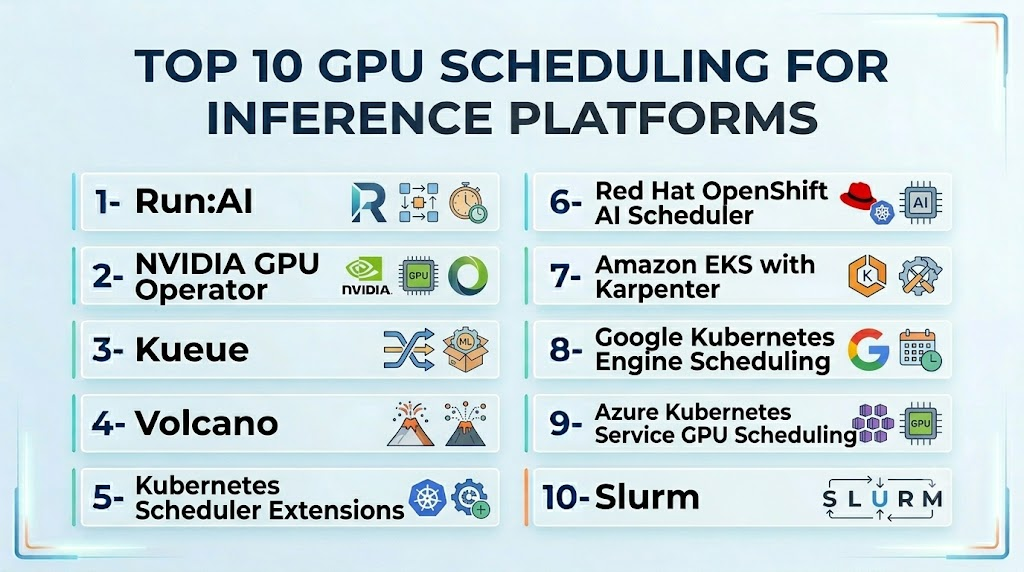
Top 10 GPU Scheduling for Inference Platforms
1- Run:AI
One-line verdict: Best overall platform for enterprise GPU scheduling and AI workload orchestration.
Short description:
Run:AI provides advanced GPU scheduling, workload orchestration, resource sharing, and infrastructure optimization capabilities for AI environments. It is widely adopted by enterprises seeking to maximize GPU utilization.
Standout Capabilities
- Dynamic GPU allocation
- GPU sharing
- Multi-tenant scheduling
- Kubernetes integration
- Resource quotas
- Workload prioritization
- Cluster optimization
AI-Specific Depth
- Model support: Framework-agnostic
- RAG / knowledge integration: N/A
- Evaluation: Infrastructure-focused
- Guardrails: Resource governance controls
- Observability: Strong utilization analytics
Pros
- Exceptional GPU utilization improvements
- Enterprise-grade management
- Strong multi-tenant support
Cons
- Enterprise-oriented complexity
- Requires Kubernetes expertise
- Licensing costs may vary
Security & Compliance
RBAC, quota controls, access management, audit logging, and enterprise governance features.
Deployment & Platforms
- Kubernetes
- Cloud
- Hybrid
- On-premises
Integrations & Ecosystem
Supports NVIDIA GPUs, Kubernetes, ML platforms, observability systems, and enterprise infrastructure tools.
Pricing Model
Enterprise licensing.
Best-Fit Scenarios
- Large GPU clusters
- Enterprise AI infrastructure
- Shared AI platforms
2- NVIDIA GPU Operator
One-line verdict: Best for organizations standardizing on NVIDIA GPU infrastructure.
Short description:
NVIDIA GPU Operator simplifies GPU lifecycle management and scheduling within Kubernetes environments while enabling advanced GPU utilization and infrastructure automation.
Standout Capabilities
- GPU lifecycle management
- Kubernetes integration
- Automated provisioning
- Driver management
- GPU monitoring
- Cluster automation
AI-Specific Depth
- Model support: Framework-independent
- RAG integration: N/A
- Evaluation: N/A
- Guardrails: Infrastructure-level controls
- Observability: Strong NVIDIA ecosystem integration
Pros
- Native NVIDIA support
- Simplified management
- Strong ecosystem adoption
Cons
- NVIDIA-centric
- Kubernetes expertise required
- Infrastructure complexity
Security & Compliance
Kubernetes RBAC and enterprise security integrations.
Deployment & Platforms
- Kubernetes
- Cloud
- Hybrid
- On-premises
Integrations & Ecosystem
NVIDIA ecosystem, Kubernetes, Prometheus, Grafana, OpenTelemetry.
Pricing Model
Open-source.
Best-Fit Scenarios
- NVIDIA GPU environments
- Kubernetes deployments
- Enterprise AI infrastructure
3- Kueue
One-line verdict: Best open-source Kubernetes-native workload scheduling framework.
Short description:
Kueue extends Kubernetes scheduling capabilities for AI and batch workloads, enabling fair resource allocation and queue management across shared infrastructure.
Standout Capabilities
- Queue-based scheduling
- Fair-share allocation
- Kubernetes-native architecture
- Resource management
- Batch workload optimization
- Cluster efficiency
AI-Specific Depth
- Model support: Infrastructure-level support
- RAG integration: N/A
- Evaluation: N/A
- Guardrails: Resource quotas
- Observability: Kubernetes ecosystem support
Pros
- Open-source
- Kubernetes-native
- Flexible scheduling policies
Cons
- Newer ecosystem
- Requires Kubernetes expertise
- Limited enterprise tooling
Pricing Model
Open-source.
Best-Fit Scenarios
- Shared Kubernetes clusters
- AI workload scheduling
- Open-source environments
4- Volcano
One-line verdict: Best for high-performance AI and batch workload scheduling.
Short description:
Volcano is a cloud-native batch scheduling platform built for AI, machine learning, and high-performance computing workloads.
Standout Capabilities
- Gang scheduling
- Batch workload support
- GPU scheduling
- Resource prioritization
- Queue management
- Cluster optimization
Pros
- Strong HPC capabilities
- AI workload optimization
- Open-source ecosystem
Cons
- Complex deployment
- Learning curve
- Enterprise support varies
Best-Fit Scenarios
- HPC environments
- Large AI training clusters
- Shared GPU resources
5- Kubernetes Scheduler Extensions
One-line verdict: Best for organizations building custom GPU scheduling strategies.
Short description:
Kubernetes scheduler extensions allow teams to customize resource allocation and scheduling decisions for specialized AI workloads.
Standout Capabilities
- Custom scheduling policies
- Extensibility
- Resource optimization
- Kubernetes-native deployment
- Flexible architecture
Pros
- Highly customizable
- Open-source
- Deep Kubernetes integration
Cons
- Engineering effort required
- Maintenance overhead
- Complex implementation
Best-Fit Scenarios
- Custom infrastructure
- Specialized scheduling requirements
- Advanced platform teams
6- Red Hat OpenShift AI Scheduler
One-line verdict: Best for enterprise hybrid-cloud GPU management.
Short description:
OpenShift AI provides workload orchestration and scheduling capabilities integrated into Red Hat’s enterprise Kubernetes platform.
Standout Capabilities
- Enterprise scheduling
- Governance controls
- Hybrid cloud support
- Resource management
- Multi-tenant capabilities
Pros
- Enterprise support
- Governance features
- Hybrid cloud flexibility
Cons
- Licensing costs
- Platform dependency
- Operational complexity
Best-Fit Scenarios
- Regulated industries
- Enterprise platforms
- Hybrid cloud deployments
7- Amazon EKS with Karpenter
One-line verdict: Best for AWS-native GPU autoscaling and scheduling.
Short description:
Karpenter provides intelligent node provisioning and workload placement capabilities for Kubernetes clusters running on AWS.
Standout Capabilities
- Dynamic node provisioning
- Cost optimization
- AWS integration
- GPU autoscaling
- Resource efficiency
Pros
- Strong AWS integration
- Cost-efficient scaling
- Modern architecture
Cons
- AWS dependency
- Cloud-specific optimization
- Vendor lock-in considerations
Best-Fit Scenarios
- AWS environments
- Kubernetes workloads
- GPU autoscaling
8- Google Kubernetes Engine Scheduling
One-line verdict: Best for GCP-based AI infrastructure.
Short description:
GKE provides advanced scheduling and resource management capabilities optimized for AI and machine learning workloads.
Standout Capabilities
- Managed Kubernetes
- GPU support
- Autoscaling
- Resource optimization
- Cloud-native operations
Pros
- Managed infrastructure
- Strong scalability
- Cloud integration
Cons
- GCP dependency
- Limited customization
- Vendor ecosystem reliance
Best-Fit Scenarios
- GCP customers
- Managed Kubernetes environments
- AI inference platforms
9- Azure Kubernetes Service GPU Scheduling
One-line verdict: Best for Microsoft-centric AI infrastructure teams.
Short description:
AKS provides GPU-enabled Kubernetes environments with autoscaling and scheduling capabilities optimized for enterprise AI workloads.
Standout Capabilities
- GPU node management
- Autoscaling
- Azure integration
- Enterprise governance
- Resource optimization
Pros
- Enterprise support
- Azure ecosystem integration
- Governance capabilities
Cons
- Azure dependency
- Platform complexity
- Licensing considerations
Best-Fit Scenarios
- Microsoft enterprises
- Regulated industries
- Enterprise AI platforms
10- Slurm
One-line verdict: Best for HPC environments and research-focused AI infrastructure.
Short description:
Slurm is a highly popular workload manager for high-performance computing clusters and large-scale GPU resource scheduling.
Standout Capabilities
- HPC scheduling
- Resource allocation
- Job prioritization
- Cluster management
- GPU support
- Queue management
Pros
- Mature ecosystem
- HPC scalability
- Extensive customization
Cons
- Not Kubernetes-native
- Operational complexity
- Enterprise AI integration may require additional tooling
Best-Fit Scenarios
- Research institutions
- HPC clusters
- Large-scale scientific AI workloads
Comparison Table
| Tool Name | Best For | Deployment | GPU Flexibility | Strength | Watch-Out | Public Rating |
|---|---|---|---|---|---|---|
| Run:AI | Enterprise scheduling | Hybrid | High | GPU utilization | Enterprise complexity | N/A |
| NVIDIA GPU Operator | NVIDIA environments | Hybrid | High | Native integration | NVIDIA dependency | N/A |
| Kueue | Open-source scheduling | Kubernetes | High | Fair resource allocation | New ecosystem | N/A |
| Volcano | HPC and AI | Kubernetes | High | Gang scheduling | Complexity | N/A |
| Scheduler Extensions | Custom platforms | Kubernetes | Very High | Customization | Engineering effort | N/A |
| OpenShift AI | Enterprise governance | Hybrid | High | Governance | Licensing | N/A |
| EKS + Karpenter | AWS workloads | Cloud | High | Cost optimization | AWS dependency | N/A |
| GKE Scheduling | GCP workloads | Cloud | High | Managed operations | GCP dependency | N/A |
| AKS Scheduling | Azure workloads | Cloud | High | Governance | Azure dependency | N/A |
| Slurm | HPC environments | On-prem/Hybrid | High | HPC scale | Not Kubernetes-native | N/A |
Scoring & Evaluation
| Tool | Core | Reliability/Eval | Guardrails | Integrations | Ease | Perf/Cost | Security/Admin | Support | Weighted Total |
|---|---|---|---|---|---|---|---|---|---|
| Run:AI | 10 | 8 | 9 | 9 | 7 | 10 | 9 | 8 | 9.0 |
| NVIDIA GPU Operator | 9 | 8 | 7 | 9 | 8 | 9 | 8 | 8 | 8.5 |
| Kueue | 8 | 7 | 7 | 8 | 7 | 9 | 7 | 7 | 7.8 |
| Volcano | 9 | 7 | 7 | 8 | 6 | 9 | 7 | 7 | 7.9 |
| Scheduler Extensions | 8 | 7 | 7 | 8 | 5 | 9 | 7 | 6 | 7.3 |
| OpenShift AI | 8 | 8 | 9 | 8 | 7 | 8 | 9 | 8 | 8.2 |
| EKS + Karpenter | 9 | 8 | 8 | 9 | 8 | 9 | 8 | 8 | 8.6 |
| GKE Scheduling | 8 | 8 | 8 | 8 | 9 | 8 | 8 | 8 | 8.1 |
| AKS Scheduling | 8 | 8 | 9 | 8 | 8 | 8 | 9 | 8 | 8.2 |
| Slurm | 9 | 8 | 7 | 7 | 6 | 9 | 8 | 8 | 8.0 |
Which GPU Scheduling Platform Is Right for You?
Solo / Freelancer
Most solo developers will not require dedicated GPU scheduling platforms. Managed cloud services are usually sufficient.
SMB
Kueue, GKE Scheduling, and NVIDIA GPU Operator offer strong capabilities with lower operational complexity.
Mid-Market
Volcano, EKS with Karpenter, and NVIDIA GPU Operator provide scalable scheduling and utilization optimization.
Enterprise
Run:AI, OpenShift AI, AKS, and EKS provide governance, scalability, and multi-tenant resource management.
Regulated Industries
Focus on governance, audit logging, RBAC, workload isolation, and hybrid-cloud deployment support.
Budget vs Premium
- Budget: Kueue, Volcano, NVIDIA GPU Operator
- Premium: Run:AI, OpenShift AI, AKS
Build vs Buy
Choose open-source scheduling frameworks when customization is critical. Select commercial platforms when governance, support, and operational simplicity are priorities.
Common Mistakes & How to Avoid Them
- Overprovisioning GPU resources
- Ignoring workload prioritization
- Poor queue management
- Lack of GPU utilization monitoring
- Missing autoscaling policies
- Overlooking multi-tenant requirements
- Ignoring governance controls
- Underestimating Kubernetes complexity
- Not planning for growth
- Failing to benchmark performance
- Vendor lock-in without evaluation
- Weak observability coverage
FAQs
1. What is GPU scheduling for inference?
GPU scheduling allocates and manages GPU resources across AI workloads to maximize utilization and performance.
2. Why is GPU scheduling important?
GPUs are expensive resources. Effective scheduling reduces waste and improves infrastructure efficiency.
3. Can GPU scheduling reduce cloud costs?
Yes. Better utilization often leads to significant infrastructure savings.
4. Is Kubernetes required?
Many modern GPU scheduling platforms are Kubernetes-based, though alternatives like Slurm exist.
5. What is GPU sharing?
GPU sharing allows multiple workloads to utilize the same GPU resources efficiently.
6. Which platform is best for enterprises?
Run:AI is widely recognized for enterprise GPU scheduling and utilization optimization.
7. Are open-source options available?
Yes. Kueue, Volcano, NVIDIA GPU Operator, and Slurm are popular open-source options.
8. Can these tools support LLM inference?
Yes. Modern GPU schedulers are commonly used for LLM serving workloads.
9. What role does autoscaling play?
Autoscaling dynamically adjusts infrastructure resources based on workload demand.
10. Can these tools work across multiple clouds?
Many enterprise platforms support hybrid and multi-cloud deployments.
11. How do they improve AI performance?
By reducing resource contention, improving utilization, and ensuring workloads receive adequate compute resources.
12. When should organizations invest in GPU scheduling platforms?
Organizations should consider them when GPU costs rise, utilization drops, or multiple AI teams begin sharing infrastructure.
Conclusion
GPU Scheduling for Inference Platforms has become a critical layer of modern AI infrastructure. As organizations deploy increasingly demanding LLMs, AI agents, and multimodal systems, efficient GPU allocation directly impacts both operational costs and user experience. Without proper scheduling, even large GPU investments can suffer from low utilization and poor performance.
The ideal platform depends on infrastructure strategy, operational expertise, and governance requirements. Open-source solutions such as Kueue, Volcano, and NVIDIA GPU Operator provide flexibility and control, while enterprise platforms like Run:AI and OpenShift AI deliver advanced governance, workload management, and support. Organizations running cloud-native environments may benefit from AWS, Azure, or Google Cloud scheduling capabilities.
