Introduction
Vector database platforms are specialized data systems designed to store, index, and search high-dimensional embeddings generated by machine learning models. These embeddings represent text, images, audio, or other unstructured data in numerical form, enabling semantic search instead of traditional keyword-based search.
vector databases have become a core infrastructure layer for RAG systems, AI agents, recommendation engines, and multimodal search applications. As LLMs increasingly rely on external memory, vector databases act as the “long-term memory” of AI systems.
They are widely used for:
- Retrieval-Augmented Generation (RAG) pipelines
- Semantic enterprise search systems
- AI copilots and chat assistants
- Recommendation engines
- Image and multimodal similarity search
- Agent memory storage systems
- Document intelligence platforms
- Knowledge base grounding for LLMs
To evaluate vector database platforms, buyers should consider:
- Indexing speed and retrieval latency
- Scalability for billions of vectors
- Hybrid search support (keyword + vector)
- Filtering and metadata capabilities
- Multi-tenancy and access control
- Integration with LLM frameworks (LangChain, LlamaIndex)
- Real-time ingestion capabilities
- Storage efficiency and cost optimization
- Multi-modal embedding support
- Observability and monitoring tools
Best for: AI engineers, ML platform teams, SaaS companies building RAG applications, and enterprises deploying semantic search systems.
Not ideal for: simple relational workloads, transactional databases, or small non-AI applications.
What’s Changed in Vector Databases
- Shift from pure vector search → hybrid semantic + keyword + graph search
- Native support for RAG pipelines and LLM memory layers
- Real-time ingestion with sub-second indexing
- Built-in reranking models for higher retrieval accuracy
- Support for multi-modal embeddings (text, image, audio, video)
- Tight integration with agent frameworks and tool calling systems
- Cost-aware vector compression and quantization techniques
- Distributed indexing across multi-cloud environments
- Strong focus on security-aware retrieval (RBAC filtering)
- Embedded evaluation metrics for retrieval quality
- Automatic caching layers for frequently used queries
- Integration with observability and LLMOps platforms
Quick Buyer Checklist
- Does it support high-scale vector indexing (millions to billions)?
- Is hybrid search (vector + keyword) available?
- Can it handle real-time ingestion?
- Does it support metadata filtering and faceted search?
- Is multi-modal embedding support available?
- Does it integrate with LangChain or LlamaIndex?
- What is the retrieval latency at scale?
- Does it support distributed or multi-region deployments?
- Are there built-in reranking or ranking models?
- Does it support RAG evaluation workflows?
- Is there role-based access control (RBAC)?
- What is the cost model (storage vs query-based)?
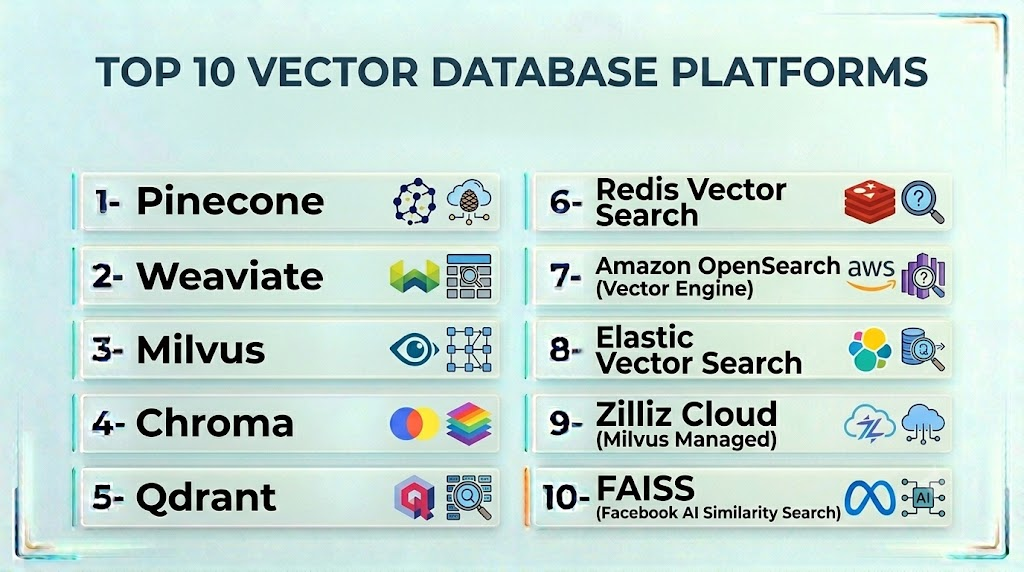
Top 10 Vector Database Platforms
1- Pinecone
One-line verdict: Best fully managed vector database for scalable production RAG systems.
Short description:
Pinecone is a high-performance managed vector database designed for semantic search and RAG applications. It provides low-latency retrieval and automatic scaling without infrastructure management.
Standout Capabilities
- Fully managed vector indexing
- Real-time similarity search
- High-speed query performance
- Metadata filtering support
- Auto-scaling infrastructure
- Multi-region deployment support
- Low operational overhead
AI-Specific Depth
- Model support: External embedding models
- RAG integration: Native compatibility with LangChain/LlamaIndex
- Evaluation: External tools required
- Guardrails: Not available
- Observability: Query metrics and logs
Pros
- Extremely fast and scalable
- Minimal infrastructure management
- Strong ecosystem integration
Cons
- Vendor lock-in risk
- Not open-source
Security & Compliance
Enterprise security features available; certifications vary by plan
Deployment & Platforms
Cloud-only managed service
Integrations & Ecosystem
- LangChain
- LlamaIndex
- OpenAI APIs
- Data pipelines
- RAG frameworks
Pricing Model
Usage-based pricing (storage + query volume)
Best-Fit Scenarios
- Production RAG applications
- SaaS AI products
- High-scale semantic search
2- Weaviate
One-line verdict: Best open-source vector database with built-in hybrid and multimodal search.
Short description:
Weaviate is an open-source vector database that supports semantic, keyword, and hybrid search with strong multimodal capabilities.
Standout Capabilities
- Hybrid search (vector + keyword)
- Built-in schema-based data modeling
- Multi-modal embeddings support
- Real-time indexing
- Graph-like relationships between data
- Modular plugin architecture
- RAG-ready architecture
AI-Specific Depth
- Model support: External embedding + LLM integration
- RAG integration: Native support
- Evaluation: External tools required
- Guardrails: Limited
- Observability: Query logs and metrics
Pros
- Flexible and open-source
- Strong hybrid search
- Multimodal support
Cons
- Requires tuning for performance
- Operational complexity at scale
Security & Compliance
Not publicly stated
Deployment & Platforms
Cloud + self-hosted + hybrid
Integrations & Ecosystem
- LangChain
- LlamaIndex
- OpenAI APIs
- Kubernetes
- RAG frameworks
Pricing Model
Open-source + managed cloud
Best-Fit Scenarios
- Custom RAG systems
- Multimodal AI apps
- Enterprise search engines
3- Milvus
One-line verdict: Best open-source vector database for large-scale distributed AI workloads.
Short description:
Milvus is a high-performance, distributed vector database built for massive-scale similarity search and AI applications.
Standout Capabilities
- Billion-scale vector support
- Distributed architecture
- GPU acceleration support
- Multiple indexing algorithms
- High-throughput ingestion
- Real-time search capabilities
- Cloud-native deployment
AI-Specific Depth
- Model support: External embedding models
- RAG integration: Strong compatibility
- Evaluation: External required
- Guardrails: Not available
- Observability: Basic metrics
Pros
- Extremely scalable
- Open-source flexibility
- High performance
Cons
- Complex setup
- Requires DevOps expertise
Security & Compliance
Varies / N/A
Deployment & Platforms
Self-hosted, cloud-native
Integrations & Ecosystem
- Kubernetes
- LangChain
- Spark
- Python ML stack
Pricing Model
Open-source + enterprise support
Best-Fit Scenarios
- Large-scale AI systems
- Research environments
- Enterprise semantic search
4- Chroma
One-line verdict: Best lightweight vector database for developers and prototyping RAG systems.
Short description:
Chroma is a developer-friendly vector database designed for quick setup and local-first AI development workflows.
Standout Capabilities
- Simple API-first design
- Local-first deployment
- Fast prototyping support
- Embedding storage and retrieval
- Easy LangChain integration
- Minimal configuration required
AI-Specific Depth
- Model support: External embeddings
- RAG integration: Strong for prototyping
- Evaluation: Not available
- Guardrails: Not available
- Observability: Minimal
Pros
- Extremely easy to use
- Great for prototyping
- Lightweight and fast
Cons
- Not enterprise-ready
- Limited scaling capabilities
Security & Compliance
Varies / N/A
Deployment & Platforms
Local + cloud optional
Integrations & Ecosystem
- LangChain
- LlamaIndex
- Python ML tools
Pricing Model
Open-source
Best-Fit Scenarios
- RAG prototyping
- Developer experiments
- Early-stage AI apps
5- Qdrant
One-line verdict: Best balance of performance, filtering, and production-ready vector search.
Short description:
Qdrant is a high-performance vector database with strong filtering, payload support, and production-grade scalability.
Standout Capabilities
- High-performance vector search
- Advanced filtering capabilities
- Payload-based metadata search
- Hybrid search support
- Fast indexing engine
- Cloud and self-host support
- RAG-ready architecture
AI-Specific Depth
- Model support: External embeddings
- RAG integration: Strong
- Evaluation: External required
- Guardrails: Limited
- Observability: Query metrics
Pros
- Excellent performance
- Strong filtering system
- Production-ready
Cons
- Smaller ecosystem than competitors
- Limited built-in AI tooling
Security & Compliance
Not publicly stated
Deployment & Platforms
Cloud + self-hosted
Integrations & Ecosystem
- LangChain
- LlamaIndex
- OpenAI APIs
- Kubernetes
Pricing Model
Open-source + managed cloud
Best-Fit Scenarios
- Production RAG systems
- Search-heavy applications
- Filtering-intensive workloads
6- Redis Vector Search
One-line verdict: Best for ultra-low latency vector search combined with caching workloads.
Short description:
Redis Vector Search extends Redis with vector similarity search capabilities for real-time applications.
Standout Capabilities
- Ultra-low latency retrieval
- In-memory vector search
- Hybrid data + vector storage
- Real-time updates
- High-throughput workloads
- Caching + search combined
AI-Specific Depth
- Model support: External embeddings
- RAG integration: Supported
- Evaluation: External tools required
- Guardrails: Not available
- Observability: Redis monitoring tools
Pros
- Extremely fast
- Real-time performance
- Simple architecture
Cons
- Memory-intensive
- Not suited for massive datasets
Security & Compliance
Enterprise Redis features vary
Deployment & Platforms
Cloud + self-hosted
Integrations & Ecosystem
- Redis Stack
- LangChain
- Python/Node APIs
Pricing Model
Open-source + enterprise tiers
Best-Fit Scenarios
- Real-time AI apps
- Recommendation systems
- Low-latency search
7- Amazon OpenSearch (Vector Engine)
One-line verdict: Best AWS-native hybrid search + vector database solution.
Short description:
OpenSearch provides full-text search and vector search capabilities for enterprise RAG systems within AWS ecosystems.
Standout Capabilities
- Hybrid keyword + vector search
- Scalable indexing
- Full-text search capabilities
- Security via IAM
- Real-time ingestion pipelines
- Managed AWS deployment
AI-Specific Depth
- Model support: External embeddings
- RAG integration: Native AWS support
- Evaluation: Limited
- Guardrails: AWS policies
- Observability: CloudWatch integration
Pros
- Strong AWS integration
- Hybrid search capability
- Enterprise security
Cons
- AWS lock-in
- Complex tuning
Security & Compliance
AWS IAM, encryption, audit logs
Deployment & Platforms
Cloud (AWS only)
Integrations & Ecosystem
- AWS Lambda
- S3
- Bedrock
- ML pipelines
Pricing Model
Usage-based
Best-Fit Scenarios
- AWS-native RAG systems
- Enterprise search
- Secure AI applications
8- Elastic Vector Search
One-line verdict: Best enterprise search engine with vector capabilities.
Short description:
Elastic Stack now supports vector search alongside traditional full-text search for hybrid AI applications.
Standout Capabilities
- Hybrid search (BM25 + vector)
- Enterprise search features
- Scalability for large datasets
- Security and access controls
- Logging and analytics integration
- Real-time indexing
AI-Specific Depth
- Model support: External embeddings
- RAG integration: Strong
- Evaluation: External tools required
- Guardrails: Not available
- Observability: Kibana dashboards
Pros
- Enterprise search leader
- Strong hybrid capabilities
- Mature ecosystem
Cons
- Complex setup
- Resource-heavy
Security & Compliance
Enterprise-grade security
Deployment & Platforms
Cloud + self-hosted
Integrations & Ecosystem
- Kibana
- Logstash
- Beats
- ML pipelines
Pricing Model
Subscription-based
Best-Fit Scenarios
- Enterprise search systems
- Log + AI search hybrid apps
- Large-scale RAG systems
9- Zilliz Cloud (Milvus Managed)
One-line verdict: Best managed Milvus-based vector database for enterprises.
Short description:
Zilliz Cloud is the managed version of Milvus, offering scalable vector search without operational overhead.
Standout Capabilities
- Managed Milvus infrastructure
- High-scale vector search
- Auto-scaling capabilities
- Real-time ingestion
- Hybrid search support
- Enterprise deployment options
AI-Specific Depth
- Model support: External embeddings
- RAG integration: Strong
- Evaluation: External required
- Guardrails: Not available
- Observability: Cloud metrics
Pros
- Enterprise scalability
- Managed infrastructure
- High performance
Cons
- Vendor dependency
- Cost at scale
Security & Compliance
Enterprise controls available (varies)
Deployment & Platforms
Cloud-managed
Integrations & Ecosystem
- Milvus ecosystem
- LangChain
- LlamaIndex
Pricing Model
Usage-based enterprise
Best-Fit Scenarios
- Enterprise vector workloads
- Large-scale RAG systems
- Production AI search
10- FAISS (Facebook AI Similarity Search)
One-line verdict: Best high-performance library for local vector similarity search.
Short description:
FAISS is an open-source library developed by Meta for efficient similarity search and clustering of dense vectors.
Standout Capabilities
- High-performance similarity search
- GPU acceleration support
- Lightweight library design
- Multiple indexing strategies
- Research-grade flexibility
- Local deployment
AI-Specific Depth
- Model support: External embeddings
- RAG integration: Manual integration required
- Evaluation: Not available
- Guardrails: Not available
- Observability: Not available
Pros
- Extremely fast
- Highly flexible
- Research-friendly
Cons
- Not a full database
- Requires engineering effort
Security & Compliance
Varies / N/A
Deployment & Platforms
Local library
Integrations & Ecosystem
- Python ML stack
- PyTorch
- TensorFlow
Pricing Model
Open-source
Best-Fit Scenarios
- Research projects
- Custom AI systems
- Embedded vector search
Comparison Table
| Tool Name | Best For | Deployment | Search Type | Strength | Watch-Out | Public Rating |
|---|---|---|---|---|---|---|
| Pinecone | Production RAG apps | Cloud | Vector | Fully managed | Lock-in | N/A |
| Weaviate | Hybrid search systems | Cloud/self-host | Hybrid | Flexibility | Complexity | N/A |
| Milvus | Large-scale AI systems | Self/cloud | Vector | Scalability | DevOps complexity | N/A |
| Chroma | Prototyping | Local/cloud | Vector | Simplicity | Not scalable | N/A |
| Qdrant | Production filtering | Cloud/self-host | Vector | Filtering power | Smaller ecosystem | N/A |
| Redis Vector | Real-time apps | Cloud/self-host | Vector | Speed | Memory usage | N/A |
| OpenSearch | AWS RAG systems | Cloud | Hybrid | Enterprise search | AWS lock-in | N/A |
| Elastic | Enterprise search | Cloud/self-host | Hybrid | Mature ecosystem | Resource-heavy | N/A |
| Zilliz Cloud | Managed Milvus | Cloud | Vector | Scalability | Cost | N/A |
| FAISS | Research & local apps | Local | Vector | Performance | Not a DB | N/A |
Scoring & Evaluation (Transparent Rubric)
| Tool | Core | Reliability/Eval | Guardrails | Integrations | Ease | Perf/Cost | Security/Admin | Support | Weighted Total |
|---|---|---|---|---|---|---|---|---|---|
| Pinecone | 9 | 8 | 6 | 9 | 9 | 9.5 | 9 | 8 | 8.6 |
| Weaviate | 8.5 | 8 | 7 | 9 | 8 | 9 | 8 | 8 | 8.3 |
| Milvus | 9 | 8 | 6 | 8.5 | 7 | 9 | 8 | 8 | 8.2 |
| Chroma | 7.5 | 7 | 5 | 8 | 9.5 | 9 | 7 | 7 | 7.5 |
| Qdrant | 8.5 | 8 | 6 | 8.5 | 8 | 9 | 8 | 8 | 8.2 |
| Redis Vector | 8 | 7.5 | 6 | 8 | 9 | 9.5 | 8 | 8 | 8.0 |
| OpenSearch | 9 | 8 | 7 | 9 | 7.5 | 8.5 | 9 | 8 | 8.4 |
| Elastic | 9 | 8 | 7 | 9 | 7 | 8.5 | 9 | 8 | 8.3 |
| Zilliz Cloud | 8.5 | 8 | 6 | 8.5 | 8 | 9 | 8 | 8 | 8.1 |
| FAISS | 8 | 7 | 5 | 7.5 | 9 | 9.5 | 7 | 7 | 7.7 |
Which Vector Database Is Right for You?
Solo / Freelancer
Chroma or FAISS for fast prototyping and experimentation.
SMB
Weaviate or Qdrant for scalable RAG applications without heavy infra.
Mid-Market
Pinecone or Redis Vector for production-grade performance and scalability.
Enterprise
OpenSearch, Elastic, or Zilliz Cloud for governance and scale.
Regulated industries (finance/healthcare/public sector)
OpenSearch and Elastic offer strongest security and compliance features.
Budget vs premium
- Budget: FAISS, Chroma, Qdrant
- Premium: Pinecone, Elastic, OpenSearch
Build vs buy
- Build: FAISS + Weaviate + custom pipeline
- Buy: Pinecone, Zilliz Cloud, Elastic Cloud
Common Mistakes & How to Avoid Them
- Poor embedding model selection
- Ignoring hybrid search benefits
- Not optimizing chunk sizes
- Overloading context with irrelevant data
- Not using metadata filters
- No caching layer for frequent queries
- Ignoring latency at scale
- Choosing wrong index type
- Not evaluating retrieval quality
- Missing access control on sensitive data
- Vendor lock-in without abstraction
- No observability for retrieval performance
- Treating vector DB as a simple storage system
FAQs
1. What is a vector database?
A vector database stores embeddings and enables semantic similarity search instead of keyword matching.
It is essential for modern AI and RAG systems.
2. Why are vector databases important in 2026?
Because LLMs rely on external memory systems for accurate and up-to-date responses.
Vector databases act as that memory layer.
3. What is embedding in vector databases?
An embedding is a numerical representation of text, images, or data used for similarity search.
Vector databases store and retrieve these efficiently.
4. What is hybrid search?
Hybrid search combines keyword-based search with vector similarity search.
It improves accuracy and recall.
5. Do vector databases support RAG?
Yes, they are a core component of RAG pipelines.
They retrieve context used by LLMs.
6. Which vector database is best for beginners?
Chroma and Weaviate are easiest for beginners.
They require minimal setup.
7. Which vector database is best for enterprise?
Pinecone, OpenSearch, and Elastic are leading enterprise solutions.
They offer scalability and governance.
8. Are vector databases expensive?
Costs vary based on scale and query volume.
Managed services are typically usage-based.
9. Can I self-host a vector database?
Yes, tools like Milvus, Qdrant, and FAISS support self-hosting.
This provides more control but requires infrastructure management.
10. What is the difference between FAISS and Pinecone?
FAISS is a local library, while Pinecone is a managed cloud database.
Pinecone is easier for production use.
11. Do vector databases support multimodal data?
Yes, modern systems support text, images, audio, and video embeddings.
This enables multimodal AI applications.
12. What is the biggest challenge in vector databases?
Ensuring retrieval accuracy and low latency at scale while maintaining cost efficiency.
Conclusion
Vector databases are now a foundational layer of modern AI infrastructure, powering everything from RAG systems to multimodal search and AI agents. As AI becomes more contextual and memory-driven, these systems are essential for delivering accurate and scalable intelligence.
The right choice depends on your needs: Chroma for prototyping, Weaviate or Qdrant for flexible production systems, Pinecone for managed scalability, and OpenSearch or Elastic for enterprise-grade deployments.
