Introduction
Every single day, trillions of megabytes of visual data are generated across the globe. From smartphone photos and traffic cameras to medical scans and satellite feeds, the world is saturated with pixels. For decades, this massive influx of information remained entirely opaque to computers. To a machine, an image was nothing more than a static grid of numbers. That reality has completely shifted. Today, machines are increasingly able to interpret visual information with unprecedented precision. The growing importance of image and video analysis has turned visual data from a passive storage requirement into an active engine for automated decision-making. At the center of this transformation is Computer Vision and Its Applications, a cornerstone branch of artificial intelligence (AI) that bridges the gap between digital images and human comprehension. Whether you are a student, a software professional, or a business leader, mastering this domain is key to unlocking the next generation of visual intelligence. Discover deeper insights on cutting-edge developments at AIUniverse.xyz.
What Is Computer Vision?
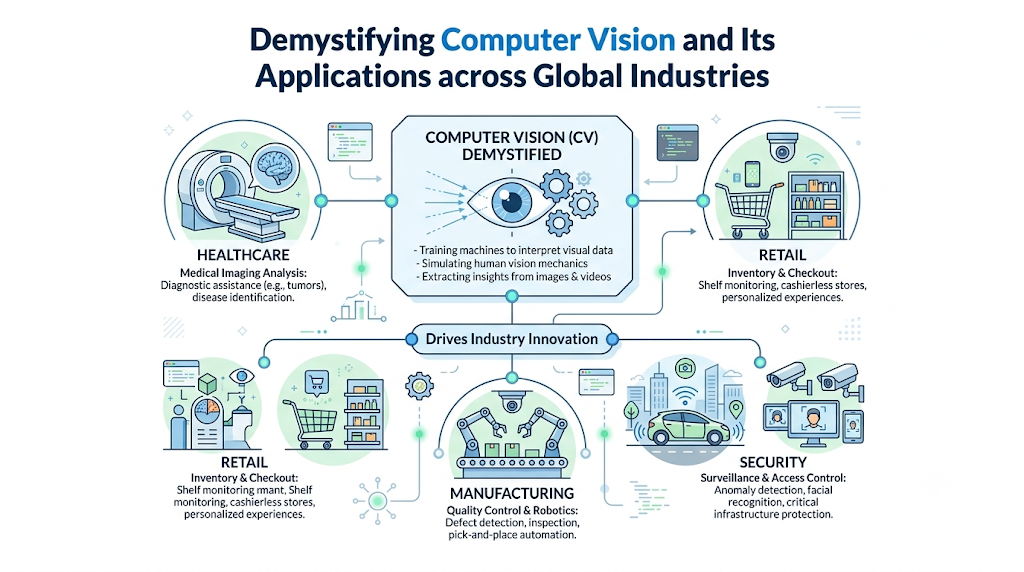
Computer vision is a dedicated subfield of artificial intelligence that trains computers to interpret, analyze, and understand the visual world. By replicating the complex mechanics of the human visual system, it enables software to identify objects, track movements, and extract meaningful context from digital images, videos, and live feeds.
Core Objectives
The fundamental goals of any artificial intelligence vision system can be broken down into three core actions:
- Acquisition: Capturing and representing visual data digitally.
- Interpretation: Recognizing patterns, edges, structures, and specific entities within that data.
- Action: Executing a practical decision or trigger based on the extracted context.
Relationship with AI and Machine Learning
Computer vision does not exist in isolation. It relies on a deeply integrated stack of modern computing architectures.
- Artificial Intelligence: The overarching umbrella focused on building intelligent systems.
- Machine Learning (ML): The subset of AI providing algorithms that learn patterns from data without manual, explicit programming.
- Computer Vision: The specialized domain that applies these ML algorithms specifically to visual datasets.
Evolution of the Technology
Early vision systems in the mid-to-late 20th century relied heavily on hardcoded rule sets. Engineers had to manually program rules to detect specific geometric lines or hard edges. This approach failed entirely when faced with real-world complexities like shifting shadows, angles, or complex backgrounds.
The true breakthrough came with the advent of deep learning computer vision. Instead of telling a machine what a car looks like, we now feed a model millions of labeled car photos. The network teaches itself to recognize a car by discovering underlying pixel patterns automatically.
Why Computer Vision Matters
Teaching software to “see” introduces structural improvements to modern workflows that human oversight alone cannot match.
Automation
Visual intelligence allows machines to take over high-volume, monotonous monitoring tasks. This frees human workers to focus on creative strategy, complex troubleshooting, and macro-level management.
Accuracy
While human fatigue can lead to missed details during long shifts, computerized systems maintain uniform vigilance. They process visual data with millimeter-level mathematical precision, identifying minuscule defects that are invisible to the naked eye.
Speed
A computer vision model can scan, process, and analyze thousands of images or video frames per second. This turns sluggish, retrospective manual reviews into automated, split-second workflows.
Scalability
Human sight is constrained by physical presence. An enterprise can scale machine vision systems across thousands of physical cameras and edge installations simultaneously, processing global visual streams without a corresponding spike in overhead.
Business Intelligence
Visual data contains massive troves of unstructured information. Computer vision converts raw video into clean, structured data points—such as counting foot traffic patterns or calculating shelf-space depletion—unlocking entirely new pipelines of operational intelligence.
How Computer Vision Works
Processing an image involves a structured pipeline that transforms raw light patterns into concrete logic. Let’s break down this sequence using the example of an autonomous delivery robot navigating a public sidewalk.
Phase 1: Image Acquisition
The system captures the physical world using digital sensors, such as an HD camera or a LiDAR setup on our delivery robot. The resulting image is stored as a vast matrix of pixel values representing brightness and color across red, green, and blue channels.
Phase 2: Data Processing
Raw images are rarely perfect. The robot’s software applies pre-processing techniques to clean the data. This involves converting images to grayscale to save processing power, normalizing brightness, or resizing the frame to match the inputs required by the underlying neural model.
Phase 3: Feature Extraction
The software analyzes pixel groups to find distinct visual landmarks. It starts with low-level features like horizontal lines, edges, and corners. As the data passes deeper into the architecture, the system combines these simple lines to identify high-level shapes, such as the circular contour of a bicycle wheel or the rectangular silhouette of a shipping box.
Phase 4: Model Training
Before deployment, the system undergoes extensive training. The mathematical model exposed to millions of curated images learns to associate specific spatial arrangements of features with correct descriptive labels (e.g., “pedestrian”, “stop sign”, “curb”).
Phase 5: Prediction and Decision Making
In real time, the trained model outputs a probability score for what it sees. If the model calculates a 98% probability that an object directly in the robot’s trajectory is a pedestrian, it sends a command to the braking mechanism, bringing the robot to a safe halt.
Core Technologies Behind Computer Vision
Modern visual processing relies on specific algorithmic engines designed to handle complex multi-dimensional data.
Machine Learning & Deep Learning
Traditional machine learning algorithms struggle with the sheer scale of image pixels. Deep learning solves this by using deep multi-layered neural networks that automatically construct hierarchical features from raw data inputs.
Convolutional Neural Networks (CNNs)
The absolute gold standard for image recognition is the Convolutional Neural Network (CNN). Unlike standard flat networks, a CNN preserves spatial relationships by processing small pixel neighborhoods at a time.
As seen in the architecture diagram above, a CNN uses distinct operations to digest an image:
- Convolution Layers: Small mathematical filters (kernels) slide across the image to create feature maps, isolating specific patterns like edges or curves.
- Pooling Layers: These layers downsample the feature maps, reducing dimensions to preserve memory while keeping the most critical visual cues intact.
- Fully Connected Layers: The final layers flatten the features and map them directly to predefined classification categories.
Image Processing Techniques
Before neural networks even look at an image, traditional mathematical processing techniques remain vital. Algorithms for edge detection (such as the Canny filter), histogram equalization for contrast enhancement, and morphological operations for noise removal provide the clean foundational inputs that modern AI visions systems require.
Key Computer Vision Tasks
“Seeing” can mean many things depending on the operational goal. Engineers break down computer vision into distinct functional capabilities.
- Image Classification: Determining what is in an image. The system assigns a single overall label to a photo, answering the question: “Is there a defect in this item?”
- Object Detection: Identifying what is in an image and exactly where it is located. The model draws localized bounding boxes around multiple distinct items within a single frame.
- Image Segmentation: A highly precise pixel-level analysis. Instead of rough boxes, it highlights every individual pixel belonging to an object, tracing its exact boundary.
- Facial Recognition: Identifying human faces and mapping facial features to verify identity against an authorized database.
- Optical Character Recognition (OCR): Locating, isolating, and converting written or printed alphanumeric text inside images into digital, searchable text strings.
- Pose Estimation: Tracking human joint points in digital space to map physical orientation, stance, and body language.
- Video Analysis: Applying all the above tasks across sequential video frames to track speed, trajectory, and behavioral anomalies over time.
Computer Vision and Its Applications Across Industries
The commercial footprint of image recognition extends into nearly every sector of the modern global economy.
Healthcare
- Use Case: Automated diagnostic assistance on medical imaging files.
- Benefits: Accelerates processing times, detects early-stage anomalies, and provides a highly reliable second opinion for clinical teams.
- Example: Radiologists deploy deep learning models to spot microscopic malignant nodules on chest X-rays long before they are clearly visible to casual observation.
Manufacturing
- Use Case: Automated assembly line quality control.
- Benefits: Stops defective parts instantly, lowers manual inspection costs, and ensures uniform production quality.
- Example: High-speed assembly lines use machine vision systems to scan computer microchips for microscopic micro-cracks or missing solder pins at a rate of hundreds of units per minute.
Retail
- Use Case: Frictionless autonomous checkout ecosystems and inventory monitoring.
- Benefits: Reduces customer checkout lines, cuts down on shrink, and automates stock reordering loops.
- Example: Smart retail spaces track shoppers as they pick items up off store shelves, automatically adding products to their virtual shopping carts and billing them without scanning barcode tags.
Transportation
- Use Case: Driver assistance packages, lane tracking, and autonomous self-driving fleets.
- Benefits: Drastically reduces collision rates, optimizes traffic routing, and improves overall passenger safety.
- Example: Electric vehicles process multi-camera visual inputs to detect lane markings, measure distance to surrounding traffic, and apply automatic emergency braking.
Agriculture
- Use Case: Precision drone crop tracking and autonomous weeding.
- Benefits: Minimizes chemical pesticide use, maximizes yield, and flags crop disease vectors early.
- Example: Smart farming rigs roll through rows of crops, visually identifying invasive weed variations and spraying localized micro-doses of herbicide strictly on the weeds, leaving the crop untouched.
Security and Surveillance
- Use Case: Intelligent perimeter security and automated anomaly flags.
- Benefits: Replaces reactive security logs with proactive alerts, reducing response times during critical incidents.
- Example: Logistics depots use automated cameras to scan commercial vehicles entering facilities, instantly logging license plates and container numbers into a central database.
Financial Services
- Use Case: Remote customer identity confirmation and physical check verification.
- Benefits: Prevents identity theft, reduces fraud, and cuts down on long manual verification steps.
- Example: Banking mobile apps use OCR and edge checking to allow customers to snap pictures of paper checks, instantly verifying and routing funds securely.
Media and Entertainment
- Use Case: Motion tracking for digital visual effects and automated content moderation.
- Benefits: Lowers post-production timelines and flags sensitive or copyrighted materials instantly.
- Example: Production companies use camera-driven pose estimation to track actors’ body movements, mapping their real-world actions directly onto animated digital characters.
Benefits of Computer Vision
Deploying dedicated visual intelligence infrastructure provides core competitive advantages:
- Improved Operational Efficiency: Machines handle tedious visual tracking tasks continuously, keeping operations moving without human intervention.
- Enhanced Accuracy: Eliminates human error caused by visual fatigue, low attention spans, or bad lighting conditions.
- Faster Decision-Making: Processes complex video information instantly, enabling immediate automated responses.
- Reduced Costs: Lowers long-term labor costs associated with manual inspections and cuts down on waste from defective materials.
- Better Customer Experiences: Powers smooth digital onboarding, fast self-checkouts, and personalized applications.
- Scalable Automation: Allows digital vision pipelines to scale effortlessly across different cameras, locations, and cloud clusters.
Challenges and Limitations
Despite its rapid advancement, computer vision technology faces structural bottlenecks that engineers continue to solve.
- Data Quality Issues: Models are heavily dependent on their inputs. Low-resolution images, heavy motion blur, or bad lighting can significantly drop accuracy metrics.
- Privacy Concerns: Facial recognition and public tracking networks raise valid data privacy questions. Balancing safety with personal privacy remains a major legislative hurdle.
- Bias and Fairness: If a training dataset lacks diversity, the resulting model will perform poorly on underrepresented demographics or environments.
- High Computational Requirements: Training complex deep learning architectures demands massive server infrastructure and expensive graphics processing processing units (GPUs).
- Environmental Variability: Shifting outdoor shadows, heavy downpours, or fog can confuse models that were trained primarily under clear, indoor studio conditions.
Popular Computer Vision Tools and Frameworks
Building visual intelligence systems requires using established, vetted software libraries. The following table compares the primary open-source and commercial toolsets used today.
| Tool / Framework | Core Type | Best Used For | Primary Strength |
| OpenCV | Open-Source Library | Real-time image processing, filtering, traditional ML | Highly optimized for speed, works across lightweight devices |
| PyTorch (TorchVision) | Deep Learning Framework | Researching and training advanced deep CNN models | Dynamic computation graphs, highly popular in academia |
| TensorFlow (Keras) | Deep Learning Framework | Large-scale corporate production deployments | Robust ecosystem tools like TensorFlow Serving |
| Roboflow | Data Platform | Image annotation, dataset curation, team management | Streamlines and simplifies the visual data prep stage |
Computer Vision vs. Human Vision
While machine learning models can process massive quantities of data, human biological sight still holds distinct conceptual advantages.
| Evaluation Attribute | Computer Vision Systems | Human Biological Vision |
| Processing Speed | Milliseconds per frame; scales across thousands of data streams simultaneously | Limited to one focus area; slower raw data processing speeds |
| Context Understanding | Struggles with abstract concepts; relies strictly on historical training data | Excellent; relies on a lifetime of abstract reasoning and common sense |
| Consistency | Perfect; never gets tired, loses focus, or alters its evaluation criteria | Subject to fatigue, mood shifts, distractions, and eye strain |
| Adaptability | Rigid; requires complete retraining if conditions or environments shift | High; instantly adapts to completely foreign visual scenarios |
| Accuracy | Higher than humans in narrow, highly specific tasks | Highly reliable in general everyday situations |
Future of Computer Vision
The next generation of computer vision will move away from isolated cloud servers and become more embedded, responsive, and contextual.
- Edge AI: Moving models out of distant server farms and running them directly on small devices, like smart cameras or wearable tech. This allows for zero-latency processing without needing constant internet access.
- Autonomous Systems: Self-driving delivery fleets, autonomous warehouse drones, and consumer vehicles will transition from assisted driving to true self-handling capabilities.
- Real-Time Analytics: Industrial facilities will monitor live operations to instantly spot safety issues, tool wear, and workflow blockages as they happen.
- AI-Powered Robotics: Factory and warehouse robots will use advanced depth-sensing cameras to safely grasp random, delicate, or moving objects in unpredictable settings.
- Smart Cities: Municipalities will integrate traffic cameras and crosswalk sensors to optimize traffic lights in real time, reducing gridlock and improving pedestrian safety.
- Advanced Healthcare Applications: High-resolution vision systems will assist surgeons during delicate operations by overlaying critical structural and vascular maps directly onto live surgical video feeds.
Career Opportunities in Computer Vision
The rapid growth of visual intelligence has created high demand for specialized technical talent across several key roles:
- Computer Vision Engineer: Specializes in building, deploying, and optimizing production-grade models that process video and image feeds.
- AI Engineer: Focuses on the broader software integration stack, embedding machine models cleanly into existing cloud apps and enterprise platforms.
- Machine Learning Engineer: Designs the foundational training pipelines, data loops, and model monitoring architectures.
- Data Scientist: Analyzes visual data trends, designs experiments, and ensures datasets are balanced and accurate.
- Robotics Engineer: Combines visual software with physical hardware, ensuring robots can accurately see and interact with their environments.
- Research Scientist: Pushes the boundaries of AI by developing new neural network architectures and advanced mathematical theories.
Common Misconceptions About Computer Vision
- Myth: Computer vision works exactly like the human brain.
- Reality: Models use statistical patterns and pixel math to identify objects. They lack actual conscious understanding, conceptual reasoning, and human common sense.
- Myth: A vision system trained for one task can easily handle another.
- Reality: Models are highly specialized. A system trained to spot micro-cracks on factory parts cannot detect lane markings on a highway without being completely retrained from scratch.
- Myth: Visual AI systems are completely accurate and unbiased out of the box.
- Reality: A model is only as good as its training data. If the initial dataset is limited, biased, or messy, the system’s real-world predictions will reflect those exact flaws.
Best Practices for Learning Computer Vision
For anyone looking to enter the field, following a structured learning path is essential:
The Learning Path
1.Build Strong AI Fundamentals:Prerequisite.
Master core programming languages like Python and build a solid foundation in linear algebra, calculus, and basic statistics.
2.Learn Classic Image Processing:Step 1.
Understand the fundamentals of digital images, matrix math, color models, and basic image filtering using libraries like OpenCV.
3.Grasp Deep Learning Basics:Step 2.
Learn how basic neural networks learn, calculate errors, and update weights using backpropagation.
4.Master Convolutional Architectures:Step 3.
Study CNN structures, pooling layers, and modern foundational models like ResNet, YOLO, and Vision Transformers.
5.Practice with Hands-On Projects:Step 4.
Build real projects using public datasets. Annotate custom images, train models locally, and deploy them on lightweight edge hardware.
FAQ Section
1. What is the main difference between computer vision and machine vision?
Computer vision refers to the broad software-based field of training computers to process and analyze visual data. Machine vision specifically refers to combining this software analysis with physical hardware components, like cameras, robotic arms, or sorting ejectors, in industrial settings.
2. Can computer vision models work completely offline?
Yes. By utilizing Edge AI techniques, engineers can compress and optimize trained models to run directly on local physical hardware like microcontrollers, smart cameras, or smartphones without requiring an active internet connection.
3. Do I need an advanced degree to get a job in computer vision?
No. While advanced degrees can be helpful for deep academic research roles, many software engineers transition into the field through strong portfolios, hands-on projects, contributions to open-source tools, and practical development experience.
4. What programming language is most popular for computer vision?
Python is the absolute industry standard due to its clean syntax and its massive ecosystem of mature frameworks, including PyTorch, TensorFlow, OpenCV, and NumPy.
5. How much data is required to train a usable model?
It depends on the task complexity. Simple classification tasks can perform well with a few hundred high-quality images per class using transfer learning, while training a highly accurate model from scratch for complex environments can require millions of diverse images.
6. What is transfer learning in computer vision?
Transfer learning is a highly efficient technique where an engineer takes a deep learning model already trained on a massive generic dataset and fine-tunes it on a smaller, highly specific dataset to save significant time and computing power.
7. How do variations in lighting affect computer vision models?
Severe lighting variations can drop accuracy if the model wasn’t trained on diverse data. Engineers combat this by using image preprocessing steps and data augmentation techniques like artificially adjusting contrast and shadows during training.
8. What are data augmentation techniques?
Data augmentation involves taking existing images in your training set and making random modifications—like rotating, cropping, flipping, or changing brightness levels—to artificially expand your dataset and build a more adaptable model.
9. Can computer vision models interpret emotions from human faces?
Models can map facial expressions to predefined emotional categories (like joy, sadness, or anger) by tracking key facial muscles, but they cannot interpret deep internal human feelings or psychological context.
10. What are the best free datasets to start practicing with?
Beginners can start with widely respected open-source datasets like MNIST (for handwritten digits), CIFAR-10 (for basic objects), ImageNet, and Microsoft COCO (for complex object detection tasks).
Final Summary
Computer vision has evolved from a theoretical research topic into a powerful, practical driver of modern industrial automation. By converting raw visual pixels into actionable data points, it allows modern enterprises across healthcare, manufacturing, and transportation to automate complex workflows with unprecedented accuracy, speed, and scale. As core architectures like Convolutional Neural Networks continue to merge with Edge AI and robotics, the demand for visual intelligence will only grow. Staying ahead of these technological shifts is essential for tech professionals and business leaders alike.
