A warehouse robot stops halfway through its delivery route. Another robot reports a battery warning, while a third struggles to navigate around an unexpected obstacle. The operations team needs to respond quickly, but nobody wants to inspect every robot manually.
This situation becomes more challenging when a business operates dozens or hundreds of robots. Each machine has software, sensors, hardware, and network dependencies. A small problem in one component can affect daily operations. So, how can teams manage these robots without creating unnecessary delays?
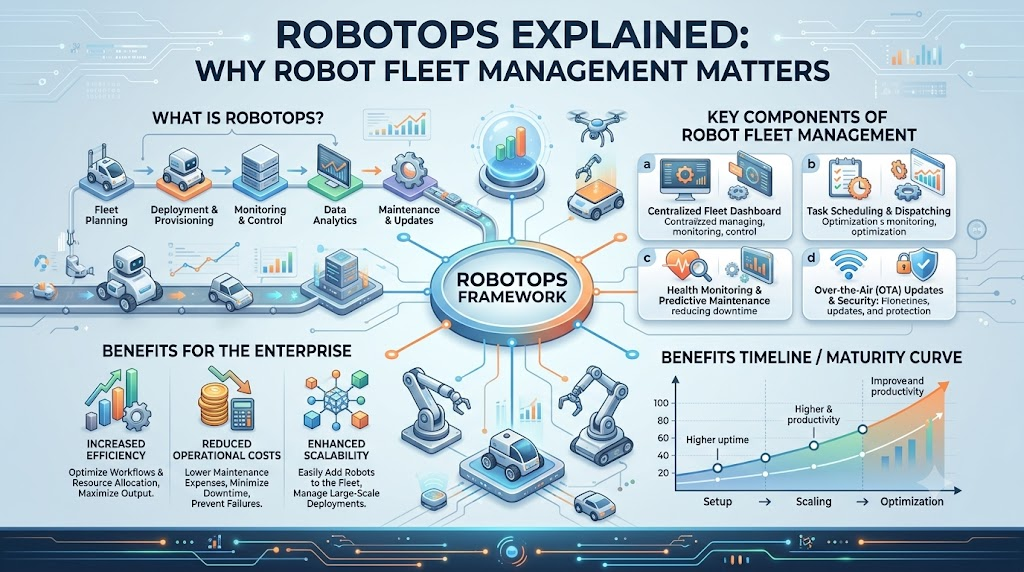
The answer starts with RobotOps. This approach connects robotics engineering with software deployment, monitoring, automation, and maintenance. It helps teams manage robots beyond the development stage and build processes for their ongoing operation. In this guide, you’ll learn how RobotOps works, why Robot Fleet Management matters, which skills you need, and how to create a practical robotics operations workflow.
What Does RobotOps Actually Mean?
RobotOps is an approach to developing, deploying, monitoring, and maintaining robotic systems using software engineering and operations practices.
It applies ideas from DevOps, automation, observability, and lifecycle management to robots and robotics software.
Traditional robotics projects often focus on making a robot perform a specific task. RobotOps expands that focus to include what happens after deployment.
Consider a mobile robot used in a distribution center. Its development team creates navigation software and tests movement. The operations team must then manage updates, monitor performance, investigate failures, and maintain the system.
These responsibilities become more complex as the fleet grows.
RobotOps Is More Than Robot Programming
RobotOps does not replace robotics engineering. Instead, it connects development work with real-world operations.
A robotics developer might ask:
Can this robot navigate to its destination?
A RobotOps engineer might ask:
How can we monitor 100 robots, identify navigation failures, and safely deploy improvements?
Both questions matter. A robot needs to perform its task, but the team also needs a way to operate and maintain it.
The RobotOps platform provides a starting point for exploring topics related to robotics software, automation, and operational practices.
Why Do Robotics Teams Need RobotOps?
Building a robot is only one part of the challenge. Keeping it functional in a changing environment requires continuous attention.
Robots can experience hardware wear, communication failures, software errors, and unexpected surroundings. Without a clear operational process, teams may spend too much time troubleshooting problems manually.
Let’s examine some common challenges.
Managing Unexpected Downtime
A robot that stops working can interrupt a larger workflow.
For instance, a warehouse robot may stop because its battery is low or its navigation system encounters an obstacle. If the team cannot identify the issue quickly, the delivery process may slow down.
Monitoring systems can provide information about the robot’s condition. Engineers can then investigate the issue and follow an appropriate recovery procedure.
Monitoring does not prevent every failure, but it can support faster and more organized responses.
Handling Software Changes
Robots depend on software for many activities, including navigation, communication, and task execution.
Now imagine releasing a new software version to 80 robots. Installing the update individually may require considerable time and coordination.
Teams must consider:
- Whether the software has been tested
- Which robots should receive the update
- Whether the update can be reversed
- How failures will be detected
- Whether the robots are in suitable operating conditions
RobotOps introduces practices that help teams manage software changes more consistently.
Moving Away From Manual Monitoring
Checking every robot separately becomes inefficient as the fleet expands.
A centralized monitoring solution can bring information into one operational view. Teams may be able to identify disconnected robots, review error messages, and check available health information.
Think of it as a building’s security control room. Instead of visiting every location, operators use a shared view to identify where attention may be needed.
Supporting Safe Robotics Operations
Robots often operate near people, equipment, and other machines.
A software update or sensor failure may introduce operational risks. For this reason, RobotOps workflows should include safety checks, access controls, and clear procedures.
Monitoring and automation support safety management, but they do not replace physical safeguards, risk assessments, or applicable safety requirements.
Robot Fleet Management: What Does It Involve?
Robot Fleet Management is the organized process of supervising, coordinating, updating, and maintaining multiple robots.
It is especially useful when robots perform related tasks in the same environment.
Instead of treating each robot as an isolated machine, fleet management provides a way to manage several robots through shared systems and processes.
Main Responsibilities
Depending on the platform, fleet management may include:
- Robot registration and identification
- Monitoring connectivity and operational status
- Managing software versions
- Tracking battery and charging information
- Coordinating tasks
- Supporting remote diagnostics
- Recording maintenance activities
- Managing user access
- Handling operational incidents
Not every fleet management platform provides the same features. The required capabilities depend on the robot’s design and operating environment.
A Simple Example
Imagine a logistics facility with 25 autonomous mobile robots.
An Autonomous Mobile Robot (AMR) is a robot that navigates its surroundings without continuous manual driving.
During a normal shift, the operations team may want to know:
- Which robots are available?
- Which machines are charging?
- Are any robots offline?
- Have any robots reported errors?
- Which machines need inspection?
A fleet management system can help bring these details together.
The team does not need to manually check every robot to understand the overall fleet situation.
Fleet Management and RobotOps Are Not the Same
These two terms are closely related, but they cover different areas.
Robot Fleet Management focuses on coordinating and supervising multiple robots.
RobotOps covers a wider range of activities, including development workflows, simulation, deployment, monitoring, maintenance, and lifecycle management.
Fleet management can therefore be one component of a broader RobotOps strategy.
Important RobotOps Concepts You Should Know
You do not need to learn every technical concept at once. Start by understanding how the different pieces support robot operations.
1. Telemetry: Information From the Robot
Telemetry is data collected from a robot and transmitted to another system for monitoring or analysis.
A robot might send information about:
- Battery level
- Motor temperature
- Position
- Speed
- Sensor readings
- System errors
Imagine looking at your vehicle’s dashboard. It shows useful information about fuel, speed, and warnings.
Robot telemetry serves a similar purpose, although the available data depends on the robot and its software.
Telemetry helps engineers understand robot behavior without always being physically present.
2. Observability: Understanding What Went Wrong
Observability helps engineers investigate a system’s internal condition through the information it produces.
This information may include logs, metrics, events, and other operational signals.
Suppose a robot stops moving. A monitoring system may show that the robot is offline. Its logs might reveal a communication failure, while telemetry could show an unusual battery reading.
Combining these signals can support troubleshooting.
Monitoring helps identify a potential problem. Observability provides information for understanding the problem.
3. Robot Lifecycle Management
Robot lifecycle management covers the different stages of a robot’s existence, from development to retirement.
A typical lifecycle may involve:
- Design and development
- Simulation
- Hardware testing
- Deployment
- Monitoring
- Maintenance
- Software updates
- Retirement
A robot’s requirements can change after deployment. Software may need improvements, components may wear out, and the operating environment may change.
Lifecycle management helps teams plan for these ongoing needs.
4. Predictive Maintenance
Predictive maintenance uses equipment data and analysis to identify signs that a failure may occur.
For example, repeated increases in a motor’s temperature could prompt an inspection.
Predictive maintenance depends on reliable data and suitable analysis methods. It cannot identify every possible failure or guarantee accurate predictions.
It should complement regular maintenance and safety procedures.
5. Incident Management
Incident management is a structured process for responding to operational problems.
A robotics incident could involve:
- Loss of network connectivity
- Navigation failures
- Sensor errors
- Software crashes
- Communication problems
A documented process helps teams determine how to detect, investigate, escalate, and resolve issues.
For example, the team might create separate procedures for a single disconnected robot and a fleet-wide communication problem.
What Skills Do You Need to Learn RobotOps?
RobotOps combines knowledge from robotics, software development, and IT operations.
The skills you need will depend on whether you work with mobile robots, industrial arms, research platforms, or another robotic system.
ROS 2 Fundamentals
ROS 2 (Robot Operating System 2) is a framework that provides tools and communication capabilities for developing robotics applications.
Despite its name, ROS 2 is not a conventional operating system like Windows.
It helps robotics software components communicate with each other.
For example, a navigation component may receive sensor information and send movement-related commands.
Start by learning:
- Nodes
- Topics
- Services
- Actions
- Messages
- ROS 2 tools
These concepts provide a useful foundation for many ROS 2-based projects.
Robotics Middleware
Middleware is software that helps different components communicate within an application or system.
In robotics, middleware supports communication between sensors, controllers, navigation modules, and other software components.
Understanding how data moves between components can help you investigate communication and integration problems.
Simulation and Testing
Robot simulation allows developers to test robot behavior in a virtual environment.
You can use simulation to explore navigation, obstacle avoidance, and selected software scenarios.
For example, you could test how a robot responds when an obstacle blocks its planned route.
Simulation has limitations. It may not accurately reproduce every hardware, sensor, network, or environmental condition.
Navigation and Perception
Navigation refers to how a robot plans and follows a route.
Perception involves interpreting information from sensors, such as cameras, lidar, or other sensing devices.
A mobile robot may use sensor data to detect obstacles and navigation software to select a suitable path.
DevOps and Automation Practices
Basic DevOps knowledge can support RobotOps work.
Useful areas include:
- Version control
- Automated testing
- Software deployment
- Configuration management
- Monitoring
- Troubleshooting
You can learn these skills gradually while working on a robotics project.
How to Create a Practical RobotOps Workflow
You do not need a large fleet to start practicing RobotOps. A small project can help you understand the operational process.
Here is a step-by-step approach.
Step 1: Define the Robot’s Job
Start by understanding what the robot must accomplish.
Ask yourself:
- What task does the robot perform?
- Where will it operate?
- Which sensors and software does it need?
- What could cause an interruption?
- Which information should the team monitor?
For example, a warehouse AMR may need navigation, obstacle detection, and battery monitoring.
An inspection robot may require camera data, route planning, and equipment-specific checks.
Your operational design should reflect the robot’s actual requirements.
Step 2: Build a Simulation Environment
Before testing every scenario on physical hardware, create a suitable simulation environment.
Try scenarios such as:
- An obstacle blocking a route
- A temporary communication failure
- Changes in the environment
- Different navigation settings
- Software configuration changes
Simulation helps test selected situations at lower physical cost.
However, it should be followed by appropriate real-world validation.
Step 3: Select Useful Monitoring Signals
Decide what information engineers need to understand robot health.
Depending on the system, you might monitor:
- Connectivity
- Battery status
- Navigation errors
- Software health
- Sensor warnings
- Task status
Avoid collecting data simply because it is available.
Start with information that answers practical questions, such as:
Why did this robot stop, and what should we check first?
Step 4: Establish Fleet Visibility
If your project includes multiple robots, create a shared view of their status.
Use consistent robot names or identifiers so the team can distinguish individual machines.
A useful fleet management workflow should help you identify affected robots and investigate issues without unnecessary manual steps.
Step 5: Plan Software Releases
Treat robot software updates as a controlled process.
Before deployment:
- Test the software.
- Identify affected robots.
- Review safety requirements.
- Plan the rollout.
- Define a recovery procedure.
- Monitor the results.
A staged rollout may be suitable for some environments, but the right approach depends on operational risks and system capabilities.
Step 6: Prepare for Incidents
Write down what the team should do when a problem occurs.
For example:
- Detect the incident.
- Identify the affected robot or fleet.
- Assess safety and operational impact.
- Investigate available information.
- Follow the approved response.
- Verify the outcome.
- Document the event.
This process helps turn troubleshooting into a repeatable team activity.
Tools and Platforms Used in RobotOps
RobotOps does not depend on one universal tool. Different robotics systems require different technologies.
The best choice depends on your project requirements, budget, integration needs, and team experience.
| Purpose | Examples | Main Use |
|---|---|---|
| Robot simulation | Gazebo, Webots | Testing robot behavior in virtual environments |
| Robotics middleware | ROS 2 | Communication between robotics software components |
| Navigation | Nav2 | Navigation capabilities for supported ROS 2 robots |
| Fleet management | Robot-specific fleet platforms and custom systems | Supervising and coordinating multiple robots |
| Telemetry | ROS 2 data pipelines and monitoring solutions | Collecting and reviewing operational data |
| Automation | CI/CD tools and scripts | Testing and deploying software changes |
These are example technologies, not a complete list of available solutions.
Before selecting a tool, check whether it supports your hardware, software architecture, and operational requirements.
You can visit Robotics Operations resources to explore related topics, including robot simulation, ROS 2, automation, and fleet operations.
Best Practices for Robot Fleet Management
A fleet becomes easier to manage when the team follows consistent operating procedures.
Here are several practices worth introducing.
Keep Monitoring Centralized
Use a shared operational view where practical.
Centralized monitoring can help teams identify affected robots and recognize patterns across the fleet.
Make sure the dashboard displays information that supports actual decisions.
Enable Secure Remote Diagnostics
Remote diagnostics can help engineers investigate problems without immediately visiting the robot.
However, remote access should use appropriate authentication, authorization, and security controls.
Physical inspection may still be necessary for hardware-related or safety-sensitive issues.
Maintain a Software Update Schedule
Software should not remain unchanged simply because the robots are currently working.
Plan regular reviews and updates based on operational requirements.
Test changes before deployment and maintain a recovery plan for unsuccessful updates.
Include Safety Checks
Safety should be part of the development and operational process.
Before deploying changes, review relevant safety conditions and ensure that the robot is in an appropriate state.
Software monitoring cannot replace physical emergency systems or established safety procedures.
Document Incident Responses
Create clear procedures for common problems.
For example, your team could document how to handle:
- A disconnected robot
- Repeated navigation failures
- A software crash
- A failed update
- A fleet-wide communication issue
Review these procedures periodically and update them based on real incidents.
Common RobotOps Mistakes
A good operational system can still fail when teams overlook basic planning.
Here are some mistakes to watch for.
Skipping Simulation Entirely
Testing every change directly on physical robots may increase cost and reduce testing flexibility.
Better approach: Use simulation for suitable scenarios, then validate important behaviors on physical hardware.
Managing Robots Without Shared Visibility
Separate dashboards and manual checks can make fleet-wide issues difficult to recognize.
Better approach: Build a centralized monitoring approach where it makes sense for your system.
Delaying Software Updates
Old software may continue running because the team lacks a clear update process.
Better approach: Track software versions, test releases, and plan updates according to operational needs.
Collecting Too Much Unused Data
A large amount of telemetry is not automatically useful.
Better approach: Define the questions your monitoring system must answer, then select the relevant data.
Blaming Every Failure on Software
Robotic problems can involve hardware, networking, sensors, environmental conditions, or software.
Better approach: Follow a troubleshooting process that examines the complete system.
Mini Case Study: A Robot Loses Network Connectivity
Let’s consider a simple warehouse scenario.
A facility uses 40 AMRs to transport goods between storage and packing areas. During a busy shift, one robot stops communicating with the fleet management system.
The operations team needs to determine whether the issue affects only one robot or several machines.
Without a Structured Process
A technician may need to locate the robot, inspect its condition, and manually investigate the connection.
The team may also struggle to determine whether similar problems occurred previously.
With a RobotOps Workflow
An appropriate monitoring system may report a connectivity problem and identify the affected robot.
The team could then:
- Confirm the robot’s identity and reported status.
- Check available network and system information.
- Assess the robot’s operating condition.
- Investigate possible causes.
- Follow the approved recovery procedure.
- Record the incident and relevant findings.
The workflow does not automatically fix every network problem.
Its purpose is to help the team respond in an organized way and learn from recurring issues.
This example highlights the connection between monitoring, fleet management, and incident response.
Centralized vs. Decentralized Fleet Management
Different fleet architectures can suit different operational environments.
| Centralized Management | Decentralized Management |
|---|---|
| Provides a shared management layer | Distributes responsibilities across systems |
| Can simplify fleet-wide visibility | May support local or independent operation |
| Requires suitable connectivity and infrastructure | Requires coordination between distributed components |
| Can create dependencies on central services | May introduce additional coordination complexity |
| Suitable design depends on operational needs | Suitable design depends on operational needs |
Neither approach is automatically appropriate for every robotics project.
The choice should consider network reliability, safety requirements, system architecture, scalability, and operational constraints.
FAQs
1. What is the main purpose of RobotOps?
RobotOps helps teams manage the development, deployment, monitoring, and maintenance of robotic systems.
It connects robotics engineering with operational practices.
2. Can RobotOps be used for industrial robots?
Yes. RobotOps concepts can support different robotic environments, including industrial automation.
The specific tools and processes depend on the robot’s hardware, software, and operational requirements.
3. What does Robot Fleet Management control?
Robot Fleet Management helps teams supervise and coordinate multiple robots.
Depending on the platform, it may include status monitoring, software management, task coordination, and diagnostics.
4. Does RobotOps require programming knowledge?
Programming knowledge is useful, particularly when working with robotics software and automation.
However, beginners can start with robotics fundamentals, monitoring concepts, and simple simulation projects.
5. How does ROS 2 support robotics operations?
ROS 2 provides communication tools and frameworks for developing robotics applications.
Its concepts can help engineers understand how different software components exchange information.
6. What is the difference between telemetry and observability?
Telemetry is the information collected from a system.
Observability involves using available information to understand the system’s internal condition and investigate problems.
7. Can simulation replace physical robot testing?
No. Simulation can help test selected behaviors and scenarios before physical deployment.
Real-world testing remains necessary for validating hardware, environmental behavior, and other physical conditions.
8. Why do robot software updates need planning?
Software changes can affect navigation, communication, and other robot functions.
Testing and controlled deployment help teams identify problems and prepare recovery procedures.
9. What should a robot monitoring dashboard display?
The dashboard should show information relevant to operations.
Examples include robot connectivity, battery status, errors, software health, and task information.
The exact data depends on the robot and monitoring system.
10. Where can beginners learn RobotOps?
Start with robotics fundamentals, ROS 2 where relevant, simulation, and basic automation practices.
Choose learning resources that include practical exercises, clear explanations, and projects involving robot operations.
Conclusion
RobotOps helps organizations approach robotics as an ongoing operational responsibility rather than a one-time development project. It connects simulation, software deployment, monitoring, maintenance, and incident response. Robot Fleet Management supports the supervision of multiple robots, while technologies such as ROS 2 and simulation tools help teams build and test robotics applications. As you develop your skills, focus on practical projects and reliable operational processes. Visit RobotsOps.com to explore more educational resources related to RobotOps and robotics operations.
