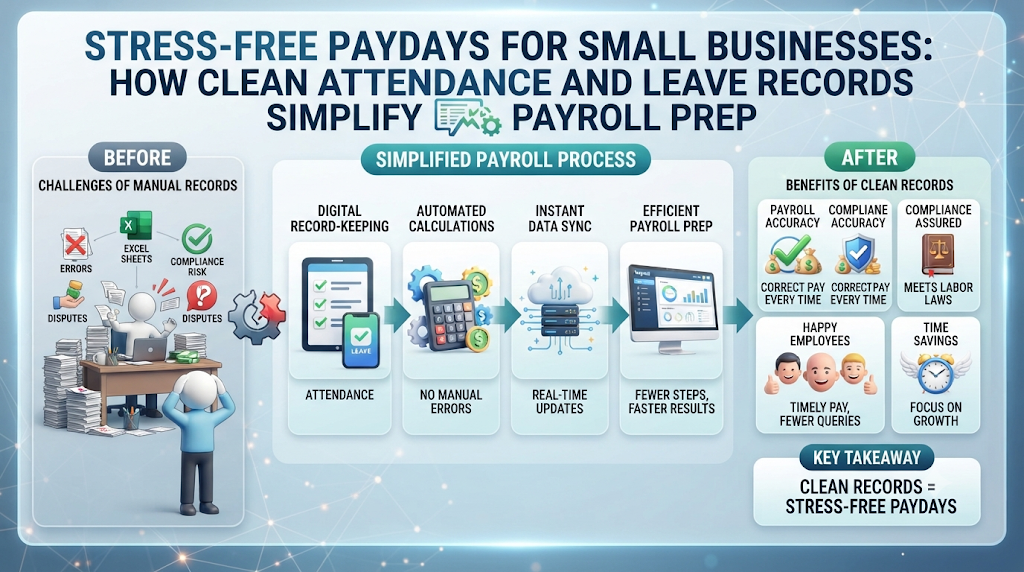
For most small business owners and HR teams, the hardest days of the month arrive right before payday. Missing check-out logs, unrecorded half-days, and conflicting spreadsheet versions turn a routine check into a stressful scramble. When daily time logs and time-off records stay organized all month long, month-end becomes calm and predictable. A cloud-based Attendance and Leave Management System like InOrOff keeps daily check-ins, leave approvals, and monthly summaries in one reliable workspace.
This guide looks at Employee Attendance Management Software through the lens of month-end accuracy and audit readiness. You will see how clean check-ins, clear PTO rules, reviewed corrections, and exportable reports keep small teams ready for payroll without last-minute panic.
Why Month-End Payroll Prep Gets Messy in Small Companies
Payday stress rarely starts on the last day of the month—it builds up from tiny tracking gaps during the first three weeks:
- Unlogged Breaks and Sign-Offs: Employees forget to record end-of-day times on busy afternoons, leaving blank rows in attendance sheets.
- Informal Time-Off Approvals: Managers approve a Friday off in a quick chat message, yet nobody updates the master calendar.
- Holiday and Half-Day Mix-Ups: Public holidays or half-day appointments get counted as full absences by mistake.
- Broken Spreadsheet Formulas: One accidental edit in a shared file throws off total working hours across the team.
Using Time and Attendance Software for Small Business teams prevents these small errors from piling up before payroll begins.
Building Accurate Daily Logs with Employee Check In Check Out Software
Clean month-end reports start with simple daily habits. Employee Check In Check Out Software gives staff a fast, consistent way to record when they start work, take breaks, and wrap up for the day.
Browser Check-Ins and Server-Verified Timestamps
Cloud tools let team members check in and check out directly through a standard web browser. Each action saves a server-verified timestamp, creating a clear log of working hours, breaks, late arrivals, and early departures.
It is helpful to keep timestamps in perspective. A timestamp shows when someone clicked check-in or check-out—it does not by itself verify physical presence at a specific desk. Clear expectations and open communication keep daily tracking honest and practical.
Settling Missed Punches with Correction Workflows
Even careful staff occasionally forget to click check-out after wrapping up a late call or client meeting. Instead of leaving an open gap, employees can submit an attendance correction request with a brief note. Managers or HR reviewers then approve or reject the update, keeping a clear audit trail for month-end checks.
Using an Optional Office IP Attendance System
For teams working on-site, an Office IP Attendance System allows administrators to restrict browser check-ins to approved office network IP addresses.
- Practical Purpose: It helps confirm that office check-ins happen while connected to the company’s workplace network.
- Things to Watch: Router resets, internet provider updates, or approved remote days can block check-ins if settings are too rigid.
- Privacy Respect: Network IP checks only verify the connection network—they are not GPS tracking or continuous employee surveillance.
Keeping Absence Records Clean with Employee Leave Management Software
Accurate working hours only tell half the story at payday. Vacations, sick days, and half-day absences directly affect monthly attendance totals. Pairing time logs with Employee Leave Management Software ensures every absence is accounted for properly.
Clear Decisions with Leave Approval Workflow Software
Pending leave requests left unapproved at month-end create confusion for payroll teams. Leave Approval Workflow Software gives employees and managers a fast, transparent routine:
- Submit a Request: The employee selects the leave category, start and end dates, and half-day option if needed.
- Check Team Overlap: The manager views who else is away on those dates before replying.
- Approve or Reject Promptly: The manager records a clear approval or rejection with instant status updates.
- Update Records Automatically: Approved absences appear on the team schedule and deduct days from the employee’s balance right away.
Applying Consistent Policies with PTO Tracking Software
Many growing companies combine vacation, sick leave, and personal days into one Paid Time Off (PTO) pool. PTO Tracking Software applies your written leave policy evenly across every employee.
Core policy settings to configure include:
- Accrual Rules: Decide whether staff receive their full annual allowance upfront or earn days gradually each month.
- Half-Day Tracking: Let employees take half-day leave for short appointments without losing a full day’s balance.
- Holiday Exclusions: Protect employee balances by excluding official public holidays from PTO deductions.
- Carry-Forward and Expiry: Spell out how many unused days roll into the next cycle and when those carried-over days expire.
Because labour laws vary across countries and states, businesses should always verify that their PTO rules match local employment regulations.
Preventing Balance Disputes with an Employee Leave Balance Tracker
Guessing remaining leave days at year-end or payday leads to awkward conversations. An Employee Leave Balance Tracker displays used, approved, pending, and remaining leave in real time.
When employees see their own numbers clearly, they plan vacations ahead and HR avoids manual balance recalculations.
Manual Spreadsheets vs. Audit-Ready Attendance and Leave Systems
Comparing manual tracking with a centralized digital platform shows why month-end becomes faster and cleaner.
| Month-End Task | Manual Spreadsheets & Messages | Audit-Ready Digital System |
|---|---|---|
| Daily Hour Totals | Manual summing across scattered sheets | Automated browser check-in and check-out logs |
| Leave Verification | Searching old emails and chat threads | Clear record of approved and rejected requests |
| Balance Accuracy | Error-prone manual formula updates | Live tracking of used, pending, and remaining days |
| Correction History | Unclear edits with no audit trail | Reviewed correction requests with notes |
| Payroll Handoff | Hours of copying and pasting data | Clean monthly summaries and file exports |
Illustrative Scenarios from Small-Business Teams
The examples below are hypothetical illustrations created to show how clean workflows simplify month-end checks. They do not represent actual customer data or guaranteed outcomes.
Scenario 1: Settling Weekly Corrections Before Payday
Karan leads a twelve-person operations team. Every Friday afternoon, he spends five minutes reviewing pending leave requests and two missed check-out corrections from the week. Because adjustments are settled weekly, there are zero mystery gaps left when the month ends.
Scenario 2: Exporting Clean Reports with Payroll Ready Attendance Software
On the final working day of the month, an HR coordinator opens Payroll Ready Attendance Software for a 24-person marketing firm. Public holidays are excluded from leave deductions, half-day absences are properly logged, and all attendance corrections are closed. The coordinator exports a versioned CSV and PDF summary to hand off to the external payroll accountant.
Note: Payroll-ready attendance exports support payroll preparation, but they do not calculate salaries, income taxes, or statutory deductions.
Common Mistakes That Delay Month-End Payroll Prep
Small businesses can avoid last-minute payday rushes by steering clear of four common traps:
- Leaving Leave Requests Unapproved Until Payday: Unresolved pending requests make it unclear whether an absence was approved PTO or unpaid time off.
- Forgetting Half-Day Deductions: Overlooking half-day absences skews monthly attendance totals and remaining leave balances.
- Ignoring Missed Check-Outs All Month: Letting forgotten sign-offs pile up forces HR to chase down memories weeks later.
- Treating Attendance Exports as Full Payroll: Attendance summaries track working hours and absences, while final paychecks require proper payroll and tax processing.
Four Best Practices for Calm, Audit-Ready HR Operations
Keep your attendance and leave system clean, fair, and easy to verify:
- Share a Plain-Language Policy: Explain check-in expectations, breaks, PTO accruals, holiday calendars, and carry-forward limits clearly to every team member.
- Protect Employee Privacy: Restrict access to attendance and leave records so only authorized HR staff, direct managers, and the employee themselves view personal data.
- Close Corrections Weekly: Encourage managers to review leave applications and attendance corrections every Friday.
- Archive Versioned Exports: Store monthly CSV and PDF attendance summaries securely for clean payroll records and future audits.
How InOrOff Helps Small Businesses Stay Payroll-Ready
InOrOff is a cloud-based employee attendance and leave management platform built for small and growing businesses. It combines browser-based employee check-in and check-out, server-verified timestamps, working-hour tracking, centralized leave requests, manager approval workflows, and employee leave balance visibility in one workspace.
Its advertised capabilities also include optional office IP attendance restrictions, PTO and half-day leave tracking, holiday exclusions, leave accrual and carry-forward policies, attendance correction workflows, and monthly attendance summaries with versioned CSV and PDF exports for external payroll processing. Businesses should confirm how each advertised feature aligns with their internal HR policies and local employment regulations before rollout.
Conclusion
Calm paydays are the natural result of clean daily habits. When check-ins, manager approvals, leave balances, and reviewed corrections live in one organized workspace all month long, HR teams prepare payroll summaries in minutes instead of hours.
Take a simple next step today by reviewing where your month-end checks slow down, documenting clear leave rules for your team, and exploring how a unified platform can keep your records audit-ready.
Frequently Asked Questions (FAQs)
1. What is Employee Attendance Management Software?
It is a digital tool that helps businesses log daily employee attendance, working hours, breaks, late arrivals, and check-in or check-out times in one organized system.
2. How does Employee Leave Management Software prevent month-end confusion?
It keeps every leave request, manager approval, holiday calendar, and leave allowance in one workspace so payroll teams never guess whether an absence was approved.
3. Why combine attendance and leave into one Attendance and Leave Management System?
Keeping attendance and leave together ensures that approved vacations or half-days automatically reflect in monthly summaries, preventing duplicate entry and manual errors.
4. Is Time and Attendance Software for Small Business teams helpful for small headcounts?
Yes. Small teams benefit right away from fewer spreadsheet mistakes, clear leave balance visibility, and faster month-end summaries as the company grows.
5. How does Employee Check In Check Out Software work in a web browser?
Employees sign in through a web browser to record their check-in and check-out actions, which the platform logs with server-verified timestamps and working-hour totals.
6. How does Leave Approval Workflow Software help managers and payroll teams?
Employees submit requests easily in one place, and managers can review team coverage, approve or reject requests promptly, and keep records updated automatically.
7. What does PTO Tracking Software manage for small companies?
PTO tracking software manages paid time off according to written company policies, including leave accruals, half-day requests, holiday exclusions, and carry-forward or expiry rules.
8. How does an Office IP Attendance System work, and does it track GPS location?
An office IP attendance system only checks whether a browser check-in comes from an approved office network IP address—it does not track continuous physical GPS coordinates.
9. What makes software qualify as Payroll Ready Attendance Software?
It summarizes monthly working hours, reviewed attendance corrections, and approved absences into clean CSV and PDF exports that support external payroll processing.
10. Why do employees appreciate an Employee Leave Balance Tracker?
It gives staff direct self-service visibility into their used, approved, pending, and remaining leave days so they can plan personal time off without repeatedly asking HR.
11. Does attendance software automatically calculate salaries and taxes?
No. Attendance software prepares accurate time and absence summaries, while salary calculations, tax deductions, and statutory filings require dedicated payroll processing.
12. How should small businesses protect employee attendance records?
Businesses should use role-based access controls, explain attendance rules clearly to staff, and store exported attendance files securely.