Introduction
Data Collection Mobile Apps are software tools that allow users to capture, store, validate, and transmit data directly from mobile devices such as smartphones and tablets. These apps replace traditional paper-based surveys and manual data entry processes with structured digital workflows that improve accuracy, speed, and scalability.
In and beyond, organizations rely heavily on real-time field data for decision-making. Whether it is surveys, inspections, healthcare fieldwork, logistics tracking, or market research, mobile-first data collection ensures faster reporting and higher data integrity across distributed environments.
These tools are especially important for industries operating in offline or remote environments where internet connectivity is unreliable but data accuracy is critical.
Real-world use cases include:
- Field surveys and market research data collection
- Healthcare and clinical field data capture
- Infrastructure inspection and audit reporting
- Agriculture and environmental monitoring
- Logistics and delivery tracking updates
- Government census and public data collection
What buyers should evaluate:
- Offline data collection capabilities
- Form builder flexibility and logic rules
- Data validation and quality controls
- GPS, image, and sensor data capture support
- Integration with cloud databases and APIs
- Security and encryption standards
- Ease of deployment for field teams
- Scalability for large survey programs
- Reporting and analytics capabilities
- Multi-device compatibility (Android/iOS)
Best for: NGOs, government agencies, research organizations, healthcare providers, logistics companies, and enterprises managing distributed field operations.
Not ideal for: Small teams with minimal field activity or organizations without structured data capture needs.
Key Trends in Data Collection Mobile Apps
- AI-assisted form creation and smart survey design
- Offline-first architecture becoming standard
- Real-time synchronization across cloud platforms
- Increased use of GPS, image, and sensor-based data capture
- Integration with data lakes and analytics platforms
- Low-code/no-code survey builders for non-technical users
- Stronger encryption and privacy-first data collection
- Automation of field reporting and dashboards
- Voice-to-data and multilingual survey support
- IoT-enabled data collection in industrial environments
How We Selected These Tools (Methodology)
- Market adoption in field data and survey ecosystems
- Offline functionality and mobile reliability
- Form-building flexibility and logic capabilities
- Integration with cloud storage and analytics systems
- Data validation and quality assurance features
- Security, encryption, and compliance readiness
- Ease of use for field workers and researchers
- Scalability for large-scale deployments
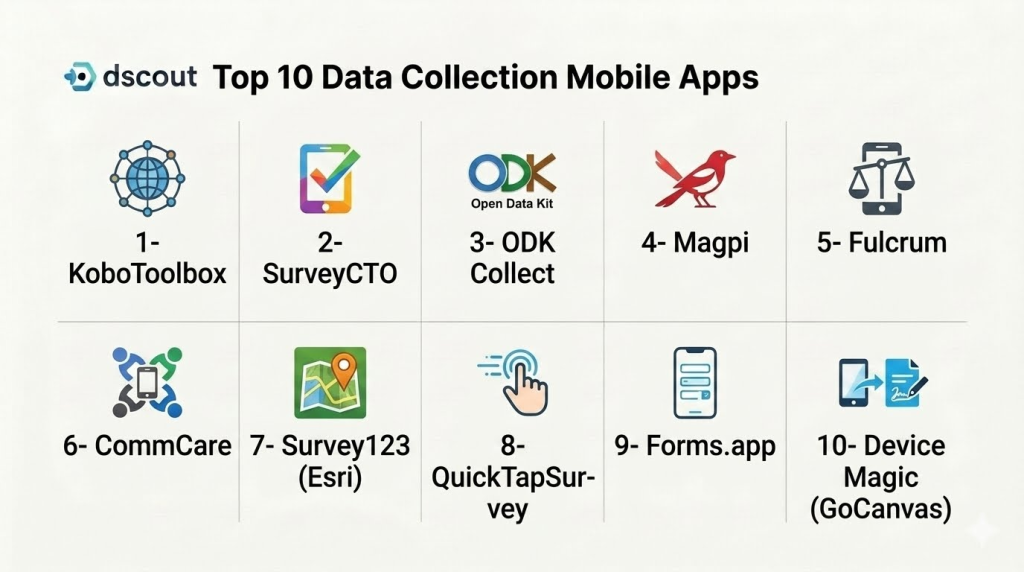
Top 10 Data Collection Mobile Apps
1- KoboToolbox
Short description:
KoboToolbox is one of the most widely used data collection platforms for humanitarian, research, and field-based data collection. It enables users to build surveys, collect data offline, and sync it when connectivity is available. It is widely used by NGOs, governments, and research institutions. The platform supports complex form logic and multilingual surveys. KoboToolbox is especially strong in offline-first environments. It is designed for large-scale field data operations.
Key Features
- Offline data collection support
- Advanced form builder
- GPS and media capture
- Multilingual survey support
- Data validation rules
- Cloud synchronization
- Reporting dashboards
Pros
- Strong offline capabilities
- Free and open-source foundation
- Widely used in global research
Cons
- UI feels technical
- Requires training for advanced features
- Limited enterprise customization
Platforms / Deployment
- Android / Web
- Cloud / Self-hosted
Security & Compliance
- Encryption
- Access controls
- Audit logs
- Compliance: Not publicly stated
Integrations & Ecosystem
- ODK ecosystem
- APIs
- Data export tools
- GIS platforms
- Cloud storage systems
Support & Community
Strong global NGO and research community support.
2- SurveyCTO
Short description:
SurveyCTO is a secure and enterprise-grade data collection platform designed for research and field surveys. It supports offline data collection, advanced validation, and encrypted data transfer. It is widely used in academic research and development projects. The platform ensures high data quality and compliance. SurveyCTO is known for its reliability in large-scale field studies. It is suitable for organizations requiring secure data workflows.
Key Features
- Offline survey collection
- Advanced form logic
- End-to-end encryption
- Data validation tools
- GPS and media capture
- Real-time sync
- Data export options
Pros
- Very strong data security
- High-quality data validation
- Reliable offline performance
Cons
- Premium pricing
- Requires technical setup
- Less beginner-friendly
Platforms / Deployment
- Android / Web / iOS
- Cloud
Security & Compliance
- Encryption end-to-end
- SSO/SAML
- MFA
- Audit logs
- RBAC
Integrations & Ecosystem
- Stata
- R
- Python
- APIs
- Cloud storage
- Data warehouses
Support & Community
Strong academic and enterprise support.
3- ODK Collect
Short description:
ODK Collect is an open-source mobile data collection app widely used for offline surveys and field research. It allows users to design forms and collect structured data in remote environments. It is one of the most trusted tools in humanitarian and research sectors. The platform supports multimedia and GPS data capture. ODK is highly flexible and developer-friendly. It is ideal for organizations needing open-source data collection.
Key Features
- Offline data collection
- Form-based surveys
- GPS and image capture
- Skip logic support
- Cloud sync capability
- Open-source architecture
- Data export tools
Pros
- Fully open-source
- Strong offline functionality
- Highly customizable
Cons
- Requires technical setup
- Limited UI polish
- No built-in enterprise support
Platforms / Deployment
- Android
- Self-hosted / Cloud
Security & Compliance
- Encryption (implementation dependent)
- Access control via server
- Audit logs
Integrations & Ecosystem
- ODK Central
- Kobo ecosystem
- APIs
- Data analysis tools
- GIS platforms
Support & Community
Large global open-source community.
4- Magpi
Short description:
Magpi is a mobile data collection platform designed for field surveys, healthcare data capture, and enterprise reporting. It supports offline data collection and real-time dashboards. The platform is widely used in public health and development sectors. It allows users to create mobile forms easily. Magpi is known for its simplicity and reliability. It is suitable for structured field operations.
Key Features
- Mobile form builder
- Offline data capture
- SMS and mobile reporting
- GPS tracking
- Real-time dashboards
- Data validation rules
- Cloud sync
Pros
- Easy to use interface
- Strong field usability
- Good reporting tools
Cons
- Limited advanced customization
- Enterprise features are basic
- Pricing varies
Platforms / Deployment
- Android / iOS / Web
- Cloud
Security & Compliance
- Encryption
- Access controls
- Audit logs
- Compliance: Not publicly stated
Integrations & Ecosystem
- APIs
- Excel export
- Cloud storage
- Third-party analytics tools
Support & Community
Good support for NGO and enterprise users.
5- Fulcrum
Short description:
Fulcrum is a powerful mobile data collection platform designed for geospatial field data capture. It is widely used in infrastructure inspection, utilities, and environmental monitoring. The platform supports advanced mapping and GIS integration. It enables offline data collection with rich media support. Fulcrum is known for its strong spatial data capabilities. It is ideal for field-heavy operations.
Key Features
- GIS-enabled data collection
- Offline mobile forms
- GPS mapping tools
- Image and media capture
- Workflow automation
- Data validation rules
- Cloud sync
Pros
- Excellent GIS support
- Strong offline performance
- Good for field operations
Cons
- Expensive for small teams
- Requires GIS knowledge
- Complex setup for beginners
Platforms / Deployment
- Android / iOS / Web
- Cloud
Security & Compliance
- SSO/SAML
- MFA
- Encryption
- Audit logs
Integrations & Ecosystem
- ArcGIS
- QGIS
- APIs
- Cloud storage
- Data analytics tools
Support & Community
Strong enterprise and GIS-focused support.
6- CommCare
Short description:
CommCare is a mobile data collection platform designed specifically for healthcare, social services, and case management. It enables structured data collection with offline support. It is widely used in global health programs. The platform supports longitudinal case tracking. CommCare is known for its strong healthcare workflow capabilities. It is ideal for complex field service programs.
Key Features
- Case management workflows
- Offline data collection
- Mobile forms
- Multimedia capture
- Data validation rules
- Workflow automation
- Reporting dashboards
Pros
- Strong healthcare focus
- Excellent offline support
- Case tracking capabilities
Cons
- Complex for beginners
- Limited general-purpose use
- Requires training
Platforms / Deployment
- Android / Web
- Cloud
Security & Compliance
- Encryption
- Access controls
- Audit logs
- Compliance: Not publicly stated
Integrations & Ecosystem
- APIs
- Health systems
- Data warehouses
- Reporting tools
- Cloud platforms
Support & Community
Strong global health organization support.
7- Survey123 (Esri)
Short description:
Survey123 is a GIS-integrated data collection app developed by Esri for spatial data collection and analysis. It allows users to collect structured survey data linked with maps and geographic systems. It is widely used in environmental monitoring, urban planning, and utilities. The platform integrates deeply with ArcGIS. Survey123 is known for its strong mapping capabilities. It is ideal for geospatial workflows.
Key Features
- GIS-based surveys
- Offline data collection
- Map integration
- GPS tracking
- Form builder
- Data validation
- Real-time sync
Pros
- Strong GIS integration
- Excellent mapping features
- Enterprise-grade reliability
Cons
- Requires ArcGIS ecosystem
- Expensive licensing
- Learning curve for GIS tools
Platforms / Deployment
- Android / iOS / Web
- Cloud
Security & Compliance
- SSO/SAML
- MFA
- Encryption
- Audit logs
Integrations & Ecosystem
- ArcGIS platform
- APIs
- Data warehouses
- GIS tools
- Cloud storage
Support & Community
Strong enterprise GIS support.
8- QuickTapSurvey
Short description:
QuickTapSurvey is a mobile-first data collection tool designed for offline surveys, events, and field research. It enables users to collect responses quickly using tablets and mobile devices. The platform is widely used in events, retail, and marketing research. It supports offline data capture and instant syncing. QuickTapSurvey is known for simplicity and speed. It is suitable for fast data collection scenarios.
Key Features
- Offline survey collection
- Mobile-first design
- Real-time syncing
- Custom survey forms
- Data export tools
- Analytics dashboard
- QR code surveys
Pros
- Very easy to use
- Fast deployment
- Good for events and surveys
Cons
- Limited enterprise features
- Basic customization
- Not suitable for complex workflows
Platforms / Deployment
- Android / iOS
- Cloud
Security & Compliance
- Encryption
- Access controls
- Audit logs
Integrations & Ecosystem
- Excel
- APIs
- CRM tools
- Analytics platforms
- Cloud storage
Support & Community
Good SMB and event-focused support.
9- Forms.app
Short description:
Forms.app is a no-code form and data collection tool that allows users to create surveys and collect data via mobile-friendly interfaces. It is widely used by SMBs, marketers, and educators. The platform supports conditional logic and real-time analytics. It is easy to deploy and use. Forms.app is known for its simplicity and flexibility. It is suitable for lightweight data collection needs.
Key Features
- Drag-and-drop form builder
- Conditional logic
- Mobile-friendly forms
- Real-time analytics
- Data export tools
- Templates library
- Integration automation
Pros
- Very easy to use
- Fast setup
- Good for SMBs
Cons
- Limited offline capability
- Not enterprise-grade
- Basic advanced features
Platforms / Deployment
- Web / Mobile
- Cloud
Security & Compliance
- Encryption
- Access controls
- Audit logs
Integrations & Ecosystem
- Google Sheets
- Zapier
- APIs
- CRM tools
- Email platforms
Support & Community
Good SMB-focused support.
10- Device Magic (GoCanvas)
Short description:
Device Magic, now part of GoCanvas, is a mobile data collection platform designed for field operations and business workflows. It allows organizations to create digital forms for inspections, reporting, and field data capture. It is widely used in construction, logistics, and field services. The platform supports offline data collection and workflow automation. It is known for strong operational use cases. It is suitable for enterprise field teams.
Key Features
- Mobile form builder
- Offline data capture
- Workflow automation
- GPS tracking
- Image capture
- Data validation
- Cloud sync
Pros
- Strong field service support
- Reliable offline performance
- Good workflow automation
Cons
- Requires setup effort
- Pricing varies
- Limited analytics depth
Platforms / Deployment
- Android / iOS / Web
- Cloud
Security & Compliance
- SSO
- MFA
- Encryption
- Audit logs
Integrations & Ecosystem
- APIs
- ERP systems
- CRM tools
- Cloud storage
- Analytics platforms
Support & Community
Strong enterprise support through GoCanvas ecosystem.
Comparison Table
| Tool Name | Best For | Platform(s) Supported | Deployment | Standout Feature | Public Rating |
|---|---|---|---|---|---|
| KoboToolbox | NGO research | Android/Web | Cloud/Self-hosted | Offline surveys | N/A |
| SurveyCTO | Secure research | Android/Web | Cloud | Encryption + validation | N/A |
| ODK Collect | Open-source field data | Android | Self-hosted | Offline flexibility | N/A |
| Magpi | Public health | Mobile/Web | Cloud | Simple mobile forms | N/A |
| Fulcrum | GIS fieldwork | Mobile/Web | Cloud | Geospatial data capture | N/A |
| CommCare | Healthcare programs | Android/Web | Cloud | Case management | N/A |
| Survey123 | GIS analytics | Mobile/Web | Cloud | ArcGIS integration | N/A |
| QuickTapSurvey | Events & surveys | Mobile | Cloud | Fast offline surveys | N/A |
| Forms.app | SMB surveys | Web/Mobile | Cloud | No-code forms | N/A |
| GoCanvas | Field operations | Mobile/Web | Cloud | Workflow automation | N/A |
Evaluation & Scoring of Data Collection Mobile Apps
| Tool Name | Core | Ease | Integrations | Security | Performance | Support | Value | Weighted Total |
|---|---|---|---|---|---|---|---|---|
| KoboToolbox | 9.5 | 8.5 | 9.0 | 9.0 | 9.0 | 8.5 | 9.5 | 8.9 |
| SurveyCTO | 9.5 | 8.0 | 9.0 | 9.5 | 9.0 | 9.0 | 8.5 | 8.9 |
| ODK | 9.0 | 8.5 | 9.0 | 8.5 | 9.0 | 8.5 | 9.5 | 8.7 |
| Magpi | 8.5 | 9.0 | 8.5 | 8.5 | 8.5 | 8.5 | 9.0 | 8.6 |
| Fulcrum | 9.5 | 8.0 | 9.5 | 9.0 | 9.0 | 8.5 | 8.5 | 8.9 |
| CommCare | 9.5 | 8.0 | 9.0 | 9.0 | 9.0 | 9.0 | 8.5 | 8.9 |
| Survey123 | 9.5 | 8.0 | 9.5 | 9.5 | 9.0 | 9.0 | 8.0 | 8.9 |
| QuickTapSurvey | 8.5 | 9.5 | 8.5 | 8.5 | 8.5 | 8.5 | 9.0 | 8.6 |
| Forms.app | 8.0 | 9.5 | 8.5 | 8.5 | 8.5 | 8.5 | 9.5 | 8.6 |
| GoCanvas | 9.0 | 8.5 | 9.0 | 9.0 | 9.0 | 9.0 | 8.5 | 8.8 |
These scores highlight a clear split between enterprise-grade field platforms (SurveyCTO, Fulcrum, CommCare) and lightweight survey tools (Forms.app, QuickTapSurvey). Organizations should choose based on offline requirements, data complexity, and integration needs.
Frequently Asked Questions (FAQs)
1. What is a data collection mobile app?
It is an application that allows users to collect structured data using mobile devices, often in offline environments.
2. Why are these apps important?
They improve data accuracy, speed, and accessibility in field operations.
3. Do these apps work offline?
Yes, most enterprise-grade tools support offline data collection.
4. Can they capture images and GPS data?
Yes, many apps support multimedia and location-based data capture.
5. Are they secure?
Yes, enterprise tools include encryption, access controls, and audit logs.
6. Who uses these apps?
NGOs, governments, researchers, healthcare providers, and logistics companies.
7. Can they integrate with analytics tools?
Yes, most platforms integrate with data warehouses and analytics systems.
8. Are they easy to use?
Some are simple for beginners, while others require training for advanced use.
9. Do they support real-time sync?
Yes, most apps sync data when internet connectivity is available.
10. What is the biggest advantage?
The biggest advantage is real-time, accurate, and scalable field data collection.
Conclusion
Data Collection Mobile Apps are essential tools for organizations that rely on field data, surveys, inspections, or remote operations. Platforms like SurveyCTO, KoboToolbox, Fulcrum, and CommCare provide robust offline and enterprise-grade capabilities, while Forms.app and QuickTapSurvey offer simple and fast deployment for lightweight use cases. The right choice depends on data complexity, field environment, and integration needs. A practical next step is to shortlist , run pilot field tests, evaluate offline performance, and validate integration with your analytics or data systems before scaling.
