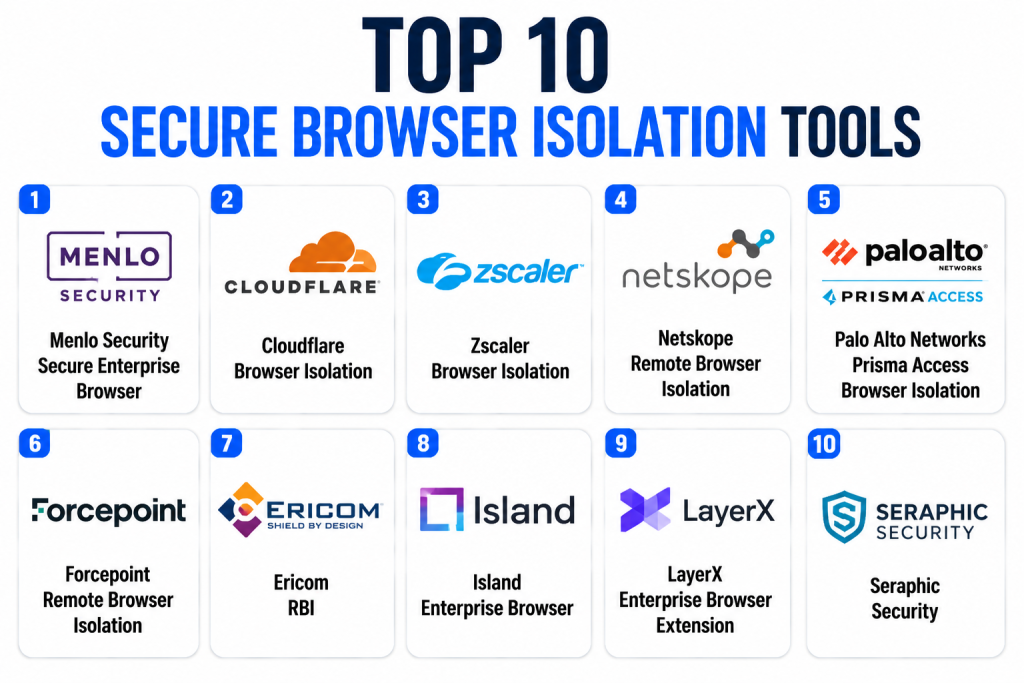
Introduction
Secure Browser Isolation Tools protect users by opening websites, web apps, links, files, and risky content in a controlled isolated environment instead of directly on the user’s endpoint. In simple English, the user can browse normally, but malicious code, suspicious scripts, drive-by downloads, phishing pages, and unknown web threats are kept away from the local device.
Secure browser isolation matters now because employees rely heavily on browsers for SaaS apps, email links, collaboration tools, AI tools, cloud documents, and remote work. Attackers increasingly target browsers through phishing, credential theft, malicious ads, compromised websites, browser exploits, and unsafe downloads.
Real-world use cases include:
- Isolating risky or unknown websites
- Protecting users from phishing links in email
- Safely opening suspicious documents and web content
- Securing contractor and unmanaged device access
- Reducing malware exposure from browsing sessions
Evaluation Criteria for Buyers:
- Isolation technology and browsing performance
- User experience and page compatibility
- Policy controls and risk-based isolation
- Integration with SSE, SWG, CASB, ZTNA, and identity tools
- Data loss prevention controls
- File download inspection and sanitization
- Browser extension and SaaS app controls
- Admin reporting and audit visibility
- Deployment flexibility
- Support, pricing, and scalability
Best for: Secure Browser Isolation Tools are best for security teams, IT teams, CISOs, SOC teams, compliance teams, remote-work organizations, financial services, healthcare, government, education, SaaS-heavy enterprises, and businesses that need to reduce browser-based attack risk without blocking employee productivity.
Not ideal for: These tools may not be ideal for very small teams with low web risk, organizations that only need basic web filtering, or companies with simple endpoint and email security needs. In those cases, secure web gateways, DNS filtering, endpoint protection, MFA, and email security may be enough before investing in dedicated browser isolation.
Key Trends in Secure Browser Isolation Tools
- Browser security is becoming a board-level concern: The browser is now the main workspace for SaaS, cloud files, email links, collaboration apps, and AI tools, making it a major attack surface.
- Secure Enterprise Browsers and Browser Isolation are converging: Some vendors now combine managed enterprise browsers, extension control, SaaS policy enforcement, and isolation into one secure browsing strategy.
- SSE and SASE platforms are adding isolation: Secure Web Gateway, CASB, ZTNA, and DLP vendors increasingly include browser isolation as part of broader cloud-delivered security.
- Risk-based isolation is replacing always-on isolation: Instead of isolating every website, modern tools isolate only risky categories, unknown sites, suspicious links, unmanaged devices, or high-risk sessions.
- Data protection is becoming as important as malware protection: Buyers want controls for copy, paste, upload, download, screenshot, printing, watermarking, and sensitive data movement in web apps.
- AI and shadow SaaS usage are creating new browser risks: Employees may use unsanctioned AI tools, browser extensions, and web apps that expose confidential data if policies are not enforced.
- Performance and user experience remain critical: Browser isolation must feel close to normal browsing, or users may bypass controls and create new risk.
- Unmanaged device access is driving adoption: Contractors, BYOD users, partners, and third-party workers often need SaaS access without full device management.
- Phishing protection is becoming more interactive: Isolation can let users view suspicious sites safely while blocking credential entry, file download, or data submission.
- Policy orchestration is gaining importance: Enterprises want isolation policies connected to identity, device posture, user risk, location, app sensitivity, and threat intelligence.
How We Selected These Tools Methodology
- Selected tools with strong recognition in Remote Browser Isolation, Secure Enterprise Browser, SSE, SASE, ZTNA, SWG, or browser-based security.
- Prioritized platforms that support web isolation, risky site rendering, secure browsing, or isolated access to SaaS and web applications.
- Considered fit across SMB, mid-market, enterprise, regulated industries, remote work, and unmanaged device access.
- Evaluated feature completeness across isolation, policy control, DLP, file handling, phishing defense, browser control, and reporting.
- Considered integration strength with identity providers, Microsoft 365, Google Workspace, SWG, CASB, ZTNA, SIEM, EDR, and cloud security platforms.
- Reviewed practical usability, including page compatibility, latency, admin control, rollout complexity, and end-user friction.
- Considered security posture signals such as encryption, auditability, access control, tenant controls, and enterprise policy management.
- Avoided invented ratings, unsupported certifications, and unverified compliance claims.
Top 10 Secure Browser Isolation Tools
1- Menlo Security Secure Enterprise Browser
Short description: Menlo Security Secure Enterprise Browser is a secure browsing and isolation platform designed to protect users from web, email, and browser-based threats. It is widely associated with remote browser isolation and is used by enterprises that want to keep malicious web content away from endpoints. Menlo is suitable for organizations facing phishing, malware, ransomware, malicious downloads, and risky browsing behavior. The platform can support safe web access, document isolation, and policy-based controls for users working across cloud apps and the open internet. It is especially relevant for regulated industries, large enterprises, and organizations with heavy browser exposure. Buyers should evaluate performance, integration with existing security stack, and policy management needs.
Key Features
- Remote browser isolation for risky web content
- Secure enterprise browser controls
- Email link and web threat isolation
- File and document isolation workflows
- Policy-based access controls
- DLP and data protection support
- Reporting and threat visibility dashboards
Pros
- Strong focus on browser isolation and web threat prevention
- Useful for enterprises with high browser-based risk
- Can reduce exposure to phishing, malware, and risky websites
Cons
- May overlap with existing SSE or SWG tools
- Enterprise setup may require policy planning
- Smaller organizations may find it more advanced than needed
Platforms / Deployment
Web
Cloud / Hybrid / Varies by enterprise setup
Security & Compliance
Menlo Security operates in enterprise browser and web security environments. Buyers should verify current certifications, access controls, encryption, audit logs, and compliance documentation directly.
SOC 2: Not publicly stated
ISO 27001: Not publicly stated
GDPR: Relevant in applicable regions
SSO/SAML: Varies / N/A
MFA: Varies / N/A
RBAC and audit logs: Varies / N/A
Integrations & Ecosystem
Menlo Security integrates with identity, email, web security, and enterprise access environments to isolate risky browsing sessions and reduce web threats.
- Identity provider integrations
- Email security workflows
- Secure web gateway workflows
- SIEM and security operations integrations
- Cloud app access policies
- Enterprise policy management tools
Support & Community
Menlo Security provides enterprise documentation, onboarding support, and customer success resources. Support depth may vary by contract and deployment model. Buyers should confirm implementation assistance, policy design support, and escalation options before rollout.
2- Cloudflare Browser Isolation
Short description: Cloudflare Browser Isolation is a remote browser isolation solution within Cloudflare’s broader Zero Trust platform. It runs web content away from the endpoint and streams a safe browsing experience to the user. The tool is useful for organizations already using Cloudflare Zero Trust, Gateway, Access, or Secure Web Gateway capabilities. It can help protect users from risky websites, phishing pages, malicious scripts, and unknown web threats while keeping browsing fast and manageable. Cloudflare Browser Isolation is especially attractive for teams that want browser isolation inside a cloud-native security platform. Buyers should validate feature fit, user experience, and policy controls for their web and SaaS usage.
Key Features
- Remote browser isolation
- Cloud-delivered browsing protection
- Integration with Cloudflare Zero Trust
- Policy-based isolation for risky sites
- Protection from malicious scripts and web threats
- Web access control and security filtering
- Admin visibility and security reporting
Pros
- Strong fit for Cloudflare Zero Trust customers
- Cloud-native deployment model
- Useful for combining isolation with SWG and access policies
Cons
- Less attractive for teams outside Cloudflare’s ecosystem
- Advanced policy design may require Zero Trust planning
- Buyers should test compatibility with complex web apps
Platforms / Deployment
Web
Cloud
Security & Compliance
Cloudflare provides enterprise cloud security infrastructure with access controls, encryption, and policy management. Buyers should verify Browser Isolation-specific controls and compliance coverage directly.
SOC 2: Not publicly stated for this specific product
ISO 27001: Not publicly stated for this specific product
GDPR: Relevant in applicable regions
SSO/SAML: Supported through identity integrations depending on setup
MFA: Varies by identity provider
RBAC and audit logs: Varies / N/A
Integrations & Ecosystem
Cloudflare Browser Isolation fits best inside Cloudflare’s broader Zero Trust and edge security ecosystem.
- Cloudflare Zero Trust
- Cloudflare Gateway
- Cloudflare Access
- Identity provider integrations
- Secure web gateway policies
- Security logs and analytics workflows
Support & Community
Cloudflare provides documentation, enterprise support, developer resources, and customer success options. Support depth depends on plan and contract. Organizations should confirm onboarding support and policy design assistance for large deployments.
3- Zscaler Browser Isolation
Short description: Zscaler Browser Isolation is part of the Zscaler cloud security ecosystem and helps isolate risky web browsing from endpoints. It is designed for organizations using Zscaler Internet Access, SSE, or secure web gateway capabilities. The platform can protect users from malicious websites, phishing links, drive-by downloads, and unknown browser-based threats. Zscaler Browser Isolation is especially useful for enterprises that want web isolation integrated with web filtering, cloud security, DLP, and Zero Trust policies. It can support remote work, branch offices, and users accessing risky or uncategorized websites. Buyers should evaluate licensing, policy design, and user experience across normal browsing and complex web apps.
Key Features
- Remote browser isolation
- Integration with Zscaler cloud security
- Risk-based isolation policies
- Secure Web Gateway alignment
- Data protection controls
- Threat protection for web browsing
- Reporting and policy analytics
Pros
- Strong fit for Zscaler customers
- Useful inside broader SSE and SASE programs
- Supports risk-based web isolation at enterprise scale
Cons
- Less practical for organizations not using Zscaler
- Policy setup may require security architecture planning
- Licensing and feature packaging should be reviewed carefully
Platforms / Deployment
Web
Cloud
Security & Compliance
Zscaler provides enterprise cloud security infrastructure with policy controls, encryption, and identity integrations. Buyers should verify Browser Isolation-specific certifications and security documentation directly.
SOC 2: Not publicly stated for this specific product
ISO 27001: Not publicly stated for this specific product
GDPR: Relevant in applicable regions
SSO/SAML: Varies by identity integration
MFA: Varies by identity provider
RBAC and audit logs: Varies / N/A
Integrations & Ecosystem
Zscaler Browser Isolation works within the Zscaler ecosystem and can connect with broader cloud security and access workflows.
- Zscaler Internet Access
- Secure Web Gateway policies
- CASB and DLP workflows
- Identity provider integrations
- SIEM and log export workflows
- Zero Trust security architecture
Support & Community
Zscaler provides enterprise documentation, support, account management, and professional services options. Buyers should confirm support tiers, deployment guidance, and policy tuning help before adoption.
4- Netskope Remote Browser Isolation
Short description: Netskope Remote Browser Isolation is part of the Netskope Security Service Edge platform and helps isolate risky or uncategorized websites while allowing safe user access. It is useful for organizations that want browser isolation integrated with SWG, CASB, DLP, cloud app controls, and Zero Trust access. Netskope RBI can help protect users from unknown web threats, malicious sites, phishing pages, and unsafe browsing sessions. It is especially relevant for SaaS-heavy enterprises that need both secure browsing and data protection. The platform is strong when isolation policies must work together with cloud app visibility and DLP. Buyers should assess policy complexity, user experience, and integration with their existing Netskope deployment.
Key Features
- Remote browser isolation for risky websites
- Integration with Netskope SSE
- Secure web gateway alignment
- Cloud app and SaaS visibility
- DLP and data movement controls
- Risk-based policy enforcement
- Reporting and user activity visibility
Pros
- Strong fit for Netskope SSE customers
- Useful for combining isolation with CASB and DLP
- Good option for SaaS-heavy organizations
Cons
- Less attractive outside Netskope ecosystem
- Policy design can become complex in large environments
- Buyers should validate performance for business-critical web apps
Platforms / Deployment
Web
Cloud
Security & Compliance
Netskope provides enterprise cloud security and data protection controls. Buyers should verify product-specific certifications, access controls, and compliance documentation directly.
SOC 2: Not publicly stated for this specific product
ISO 27001: Not publicly stated for this specific product
GDPR: Relevant in applicable regions
SSO/SAML: Varies by identity provider
MFA: Varies by identity provider
RBAC and audit logs: Varies / N/A
Integrations & Ecosystem
Netskope RBI works best within Netskope’s broader SSE, CASB, SWG, and DLP ecosystem.
- Netskope SSE
- Secure Web Gateway
- CASB workflows
- DLP policies
- Identity provider integrations
- SIEM and security analytics workflows
Support & Community
Netskope provides enterprise documentation, support, professional services, and customer success resources. Buyers should confirm deployment support, policy design assistance, and integration planning before rollout.
5- Palo Alto Networks Prisma Access Browser Isolation
Short description: Palo Alto Networks Prisma Access Browser Isolation extends secure web access by isolating risky browsing activity inside the Prisma Access security platform. It is designed for enterprises already using or evaluating Palo Alto Networks SASE and Prisma Access capabilities. The solution helps reduce browser-based risk from malicious websites, phishing pages, drive-by downloads, and suspicious web content. It can support secure access for remote users, branch users, and SaaS-heavy workforces. The biggest advantage is alignment with Prisma Access and Palo Alto’s broader security ecosystem. Buyers should evaluate licensing, policy workflows, and fit with existing Palo Alto Networks architecture.
Key Features
- Browser isolation inside Prisma Access
- Risk-based web isolation policies
- Secure web gateway alignment
- Protection from browser-based threats
- Cloud-delivered SASE integration
- Centralized policy management
- Security analytics and reporting workflows
Pros
- Strong fit for Palo Alto Networks customers
- Useful for SASE and Prisma Access programs
- Centralizes browser isolation with broader web security
Cons
- Less relevant for organizations outside Palo Alto ecosystem
- Enterprise configuration may require security expertise
- Buyers should validate licensing and feature availability
Platforms / Deployment
Web
Cloud
Security & Compliance
Palo Alto Networks provides enterprise security infrastructure. Buyers should verify Prisma Access Browser Isolation-specific security controls, compliance documentation, and logging capabilities directly.
SOC 2: Not publicly stated for this specific product
ISO 27001: Not publicly stated for this specific product
GDPR: Relevant in applicable regions
SSO/SAML: Varies by identity integration
MFA: Varies by identity provider
RBAC and audit logs: Varies / N/A
Integrations & Ecosystem
Prisma Access Browser Isolation fits into Palo Alto Networks SASE, secure web access, and security operations workflows.
- Prisma Access
- Secure Web Gateway policies
- SASE architecture
- Identity provider integrations
- Security analytics
- SIEM and SOC workflows where supported
Support & Community
Palo Alto Networks offers enterprise support, documentation, partner services, and professional services options. Buyers should confirm deployment guidance, policy migration support, and support tiers based on contract.
6- Forcepoint Remote Browser Isolation
Short description: Forcepoint Remote Browser Isolation helps organizations safely access risky or unknown web content by rendering web sessions away from endpoints. It is useful for businesses that need web security, data protection, and user productivity without exposing local devices to malicious content. Forcepoint is especially relevant for organizations that already use Forcepoint security products or need browsing protection alongside DLP and secure access controls. The tool can support threat isolation, file handling, and policy-based browsing decisions. It is a good fit for regulated industries, government, financial services, and security-conscious enterprises. Buyers should evaluate ecosystem fit, deployment model, and policy administration needs.
Key Features
- Remote browser isolation
- Safe browsing for risky and unknown sites
- Policy-based web access controls
- Data protection support
- File download risk reduction
- Integration with broader Forcepoint security workflows
- Admin reporting and visibility
Pros
- Strong fit for organizations using Forcepoint security tools
- Useful for data protection-focused environments
- Supports safe access to risky web content
Cons
- May overlap with other SWG or SSE platforms
- Best value depends on Forcepoint ecosystem fit
- Setup may require policy and architecture planning
Platforms / Deployment
Web
Cloud / Hybrid / Varies by setup
Security & Compliance
Forcepoint provides enterprise security and data protection technologies. Buyers should verify RBI-specific certifications, controls, access management, and compliance documentation directly.
SOC 2: Not publicly stated for this specific product
ISO 27001: Not publicly stated for this specific product
GDPR: Relevant in applicable regions
SSO/SAML: Varies / N/A
MFA: Varies / N/A
RBAC and audit logs: Varies / N/A
Integrations & Ecosystem
Forcepoint Remote Browser Isolation can align with secure web access, data protection, and enterprise security workflows.
- Forcepoint security ecosystem
- Web security policies
- DLP workflows
- Identity provider integrations
- Security reporting
- Enterprise policy management
Support & Community
Forcepoint provides enterprise support, documentation, and implementation resources. Buyers should confirm support model, deployment assistance, and integration planning before choosing it.
7- Ericom RBI
Short description: Ericom RBI is a remote browser isolation solution designed to protect users from web-based threats by executing browsing activity in an isolated environment. It can help prevent malware, ransomware, malicious scripts, and phishing-related web risks from reaching endpoints. Ericom is often considered by organizations that want focused isolation capabilities for secure internet access, email links, and risky web content. It can serve enterprises, government agencies, education, healthcare, and security-conscious mid-market organizations. The platform is useful when teams want isolation as a dedicated security control rather than only as part of a broader SSE stack. Buyers should assess current product ownership, support structure, and roadmap fit during evaluation.
Key Features
- Remote browser isolation
- Web malware and phishing risk reduction
- Email link isolation support
- File download controls
- Policy-based browsing decisions
- Cloud and hybrid deployment options
- Admin reporting and visibility
Pros
- Focused RBI capabilities
- Useful for organizations wanting dedicated isolation controls
- Can support high-risk browsing and email link protection
Cons
- Buyers should validate current product packaging and roadmap
- May need integration with existing SWG or identity systems
- Smaller teams may prefer bundled SSE tools
Platforms / Deployment
Web
Cloud / Hybrid / Varies by setup
Security & Compliance
Ericom RBI handles isolated browsing and security policy workflows. Buyers should verify current security documentation, access controls, encryption, and compliance coverage directly.
SOC 2: Not publicly stated
ISO 27001: Not publicly stated
GDPR: Relevant in applicable regions
SSO/SAML: Varies / N/A
MFA: Varies / N/A
RBAC and audit logs: Varies / N/A
Integrations & Ecosystem
Ericom RBI integrates into secure browsing, email link, and enterprise web access workflows.
- Identity provider integrations
- Secure web gateway workflows
- Email security workflows
- File handling policies
- Admin dashboards
- Security operations workflows where supported
Support & Community
Ericom provides documentation and support resources. Buyers should confirm current support channels, implementation assistance, and long-term product roadmap before adoption.
8- Island Enterprise Browser
Short description: Island Enterprise Browser is a secure enterprise browser designed to give organizations deeper control over web and SaaS usage directly inside the browser. While it is not only a traditional remote browser isolation tool, it belongs in the secure browsing category because it helps control data movement, access, extensions, and user actions within enterprise web sessions. Island is especially relevant for SaaS-heavy organizations, remote workforces, contractors, BYOD use cases, and regulated teams that need stronger browser governance. It can help enforce policies for copy, paste, downloads, uploads, screenshots, and sensitive app access. The platform is best for organizations that want a managed enterprise browser strategy rather than isolated rendering alone. Buyers should compare it against RBI and SSE tools based on use case.
Key Features
- Secure enterprise browser controls
- SaaS and web app policy enforcement
- Data loss prevention support
- Extension and browser governance
- User action controls
- Access policy management
- Visibility into browser-based work
Pros
- Strong fit for SaaS-heavy enterprise environments
- Useful for unmanaged device and contractor access
- Provides browser-native policy enforcement
Cons
- Not a pure remote browser isolation platform
- Requires adoption of a managed enterprise browser model
- User change management may be needed
Platforms / Deployment
Web / Windows / macOS
Cloud
Security & Compliance
Island operates as an enterprise browser security platform handling user, device, app, and policy data. Buyers should verify current certifications, access controls, encryption, and compliance documentation directly.
SOC 2: Not publicly stated
ISO 27001: Not publicly stated
GDPR: Relevant in applicable regions
SSO/SAML: Varies by identity integration
MFA: Varies by identity provider
RBAC and audit logs: Varies / N/A
Integrations & Ecosystem
Island integrates with enterprise identity, SaaS, security, and data protection workflows to control browser-based work.
- Identity provider integrations
- SaaS application access workflows
- DLP and policy controls
- SIEM and security logging
- Endpoint and device posture workflows
- Admin management console
Support & Community
Island provides enterprise onboarding, documentation, account support, and deployment assistance. Buyers should plan for change management, user rollout, and browser governance policies.
9- LayerX Enterprise Browser Extension
Short description: LayerX is a browser security platform focused on protecting users, SaaS apps, browser sessions, extensions, and risky web activity through a browser extension-based approach. It is relevant for organizations that want browser-layer visibility and control without replacing the entire browser. LayerX can help detect risky browsing, malicious extensions, phishing attempts, SaaS misuse, data leakage, and suspicious browser behavior. It is useful for SaaS-heavy teams, remote workforces, and security teams that want fast deployment through browser extensions. While not always positioned as traditional RBI, it competes in the secure browser and browser protection space. Buyers should evaluate whether extension-based protection is sufficient for their risk model.
Key Features
- Browser session security controls
- Browser extension risk visibility
- SaaS app protection
- Phishing and risky site detection
- Data leakage controls
- Browser-layer policy enforcement
- User and activity visibility
Pros
- Lightweight browser extension deployment model
- Useful for SaaS and browser risk visibility
- Good fit for teams not ready to replace browsers
Cons
- Not a traditional full remote browser isolation tool
- Browser and extension coverage should be validated
- May need complementary SWG, DLP, or endpoint tools
Platforms / Deployment
Web / Windows / macOS / Linux
Cloud
Security & Compliance
LayerX processes browser activity and security telemetry. Buyers should verify current security documentation, privacy controls, compliance coverage, and access management directly.
SOC 2: Not publicly stated
ISO 27001: Not publicly stated
GDPR: Relevant in applicable regions
SSO/SAML: Varies / N/A
MFA: Varies / N/A
RBAC and audit logs: Varies / N/A
Integrations & Ecosystem
LayerX integrates into browser, SaaS, identity, and security operations workflows.
- Browser extension deployment
- SaaS app visibility
- Identity provider workflows
- SIEM and security analytics
- DLP-related controls
- Security admin console
Support & Community
LayerX provides documentation, onboarding guidance, and business support resources. Buyers should confirm browser support, deployment assistance, policy design help, and support tiers before rollout.
10- Seraphic Security
Short description: Seraphic Security is a browser security platform designed to protect enterprise browsing across managed and unmanaged devices. It focuses on browser-layer protection, safe access, data controls, phishing defense, SaaS security, and session governance. Seraphic is relevant for organizations that need browser protection without forcing every user into a single new browser. It can support remote work, contractor access, BYOD scenarios, and SaaS-heavy environments where the browser is the primary work interface. While it is broader than traditional RBI, it fits the secure browser isolation and protection category because it helps contain and control risky browser activity. Buyers should evaluate deployment approach, compatibility, and policy depth.
Key Features
- Browser-layer security controls
- Protection for managed and unmanaged devices
- SaaS session governance
- Phishing and risky site protection
- Data movement controls
- Browser policy enforcement
- Visibility into browser-based activity
Pros
- Useful for BYOD and unmanaged device scenarios
- Does not necessarily require replacing the user’s browser
- Strong fit for SaaS-heavy secure access use cases
Cons
- Not a classic remote browser isolation-only tool
- Buyers should validate coverage across target browsers
- May require integration planning with identity and access tools
Platforms / Deployment
Web / Windows / macOS
Cloud
Security & Compliance
Seraphic Security handles browser security telemetry and policy enforcement data. Buyers should verify current security documentation, compliance coverage, access controls, encryption, and audit capabilities directly.
SOC 2: Not publicly stated
ISO 27001: Not publicly stated
GDPR: Relevant in applicable regions
SSO/SAML: Varies / N/A
MFA: Varies / N/A
RBAC and audit logs: Varies / N/A
Integrations & Ecosystem
Seraphic integrates with browser, identity, SaaS access, and enterprise security workflows.
- Browser security deployment
- Identity provider integrations
- SaaS access policies
- DLP-related workflows
- Security logging
- Admin policy console
Support & Community
Seraphic Security provides onboarding, documentation, and business support resources. Buyers should confirm deployment support, compatibility testing, policy design assistance, and support tiers before adoption.
Comparison Table Top 10
| Tool Name | Best For | Platform Supported | Deployment | Standout Feature | Public Rating |
|---|---|---|---|---|---|
| Menlo Security Secure Enterprise Browser | Enterprise web and email isolation | Web | Cloud / Hybrid | Dedicated browser isolation and secure browsing | N/A |
| Cloudflare Browser Isolation | Cloudflare Zero Trust customers | Web | Cloud | Isolation within Cloudflare Zero Trust | N/A |
| Zscaler Browser Isolation | Zscaler SSE and SWG environments | Web | Cloud | Risk-based isolation inside Zscaler ecosystem | N/A |
| Netskope Remote Browser Isolation | SaaS-heavy SSE and DLP programs | Web | Cloud | Isolation combined with CASB and DLP policies | N/A |
| Palo Alto Networks Prisma Access Browser Isolation | Palo Alto SASE customers | Web | Cloud | Browser isolation inside Prisma Access | N/A |
| Forcepoint Remote Browser Isolation | Data protection-focused enterprises | Web | Cloud / Hybrid | Safe browsing aligned with Forcepoint security | N/A |
| Ericom RBI | Dedicated remote browser isolation use cases | Web | Cloud / Hybrid | Focused RBI for risky web access | N/A |
| Island Enterprise Browser | Enterprise browser governance | Web, Windows, macOS | Cloud | Managed secure browser for SaaS work | N/A |
| LayerX Enterprise Browser Extension | Browser risk visibility and extension-based controls | Web, Windows, macOS, Linux | Cloud | Browser extension-based security layer | N/A |
| Seraphic Security | BYOD and unmanaged device browser protection | Web, Windows, macOS | Cloud | Browser protection without full browser replacement | N/A |
Evaluation & Scoring of Secure Browser Isolation Tools
| Tool Name | Core 25% | Ease 15% | Integrations 15% | Security 10% | Performance 10% | Support 10% | Value 15% | Weighted Total 0–10 |
| Menlo Security Secure Enterprise Browser | 9 | 7 | 8 | 9 | 8 | 8 | 7 | 8.10 |
| Cloudflare Browser Isolation | 8 | 8 | 9 | 8 | 9 | 8 | 8 | 8.30 |
| Zscaler Browser Isolation | 8 | 8 | 9 | 8 | 8 | 8 | 8 | 8.15 |
| Netskope Remote Browser Isolation | 8 | 8 | 9 | 8 | 8 | 8 | 8 | 8.15 |
| Palo Alto Networks Prisma Access Browser Isolation | 8 | 7 | 9 | 8 | 8 | 8 | 7 | 7.90 |
| Forcepoint Remote Browser Isolation | 8 | 7 | 8 | 8 | 8 | 8 | 7 | 7.75 |
| Ericom RBI | 8 | 7 | 7 | 8 | 8 | 7 | 7 | 7.50 |
| Island Enterprise Browser | 8 | 8 | 8 | 8 | 8 | 8 | 8 | 8.00 |
| LayerX Enterprise Browser Extension | 7 | 8 | 8 | 8 | 8 | 7 | 8 | 7.65 |
| Seraphic Security | 7 | 8 | 8 | 8 | 8 | 7 | 8 | 7.65 |
These scores are comparative and designed for shortlisting, not final vendor ranking. A higher score means stronger general fit across common browser isolation and secure browsing needs, but your best option depends on your current stack, risk profile, user base, SaaS usage, and deployment model. Organizations already using Cloudflare, Zscaler, Netskope, or Palo Alto may prefer native isolation in that ecosystem, while teams needing a focused isolation platform may compare Menlo or Ericom. SaaS-heavy businesses may also evaluate secure enterprise browsers and browser extensions such as Island, LayerX, and Seraphic.
Which Secure Browser Isolation Tool Is Right for You?
Solo / Freelancer
Solo users and freelancers usually do not need enterprise-grade browser isolation unless they frequently handle suspicious links, client files, or high-risk research. A VPN, strong endpoint protection, password manager, MFA, secure DNS, and careful browsing habits may be enough. If isolation is needed, a consumer or lightweight secure browsing option may be more practical than an enterprise platform. The focus should be reducing risk without adding unnecessary cost or complexity.
SMB
SMBs should prioritize simple deployment, strong phishing protection, easy policy setup, and low operational overhead. Cloudflare Browser Isolation can be attractive if the SMB already uses Cloudflare Zero Trust. Microsoft-focused SMBs may also rely on email security, endpoint protection, and web filtering before adding RBI. If the business handles sensitive data or frequent risky links, a focused isolation tool can reduce malware and phishing exposure.
Mid-Market
Mid-market organizations often need browser isolation for remote users, risky websites, unmanaged devices, and SaaS access. Zscaler, Netskope, Cloudflare, Forcepoint, and Menlo Security are strong candidates depending on the current security stack. If the company is SaaS-heavy and wants more browser-native controls, Island, LayerX, or Seraphic may also be worth evaluating. The best choice depends on whether the priority is threat isolation, data protection, SaaS governance, or BYOD access.
Enterprise
Enterprises should evaluate secure browser isolation as part of Zero Trust, SSE, SASE, DLP, and endpoint security strategy. Menlo, Cloudflare, Zscaler, Netskope, Palo Alto Networks, Forcepoint, and Ericom can support isolation-heavy use cases. Island, LayerX, and Seraphic can support secure enterprise browser or browser-layer control strategies. Enterprise buyers should validate scalability, identity integration, policy granularity, audit logs, admin delegation, and performance at global scale.
Budget vs Premium
Budget-focused buyers should first review isolation or secure browsing features already available in their SWG, SSE, endpoint, or email security stack. Premium platforms are more valuable when the organization needs advanced isolation, low-latency browsing, unmanaged device access, DLP controls, detailed reporting, and enterprise support. The right decision should compare tool cost against reduced malware exposure, phishing risk, incident response workload, and data leakage risk.
Feature Depth vs Ease of Use
Cloudflare, Zscaler, Netskope, and Palo Alto are easier choices when the organization already uses their broader security platforms. Menlo Security may be stronger for teams prioritizing dedicated browser isolation depth. Island offers a more complete secure browser model, while LayerX and Seraphic offer browser-layer controls without necessarily replacing the browser. The best fit depends on whether you want isolation, browser governance, or both.
Integrations & Scalability
Secure Browser Isolation Tools should integrate with identity providers, endpoint posture, SWG, CASB, DLP, SIEM, EDR, email security, and ZTNA systems. Buyers should test performance across business-critical apps, video meetings, file downloads, SaaS dashboards, and complex web interfaces. Scalability also includes policy management, global latency, logging volume, and admin delegation. A tool that breaks key web apps will face user resistance.
Security & Compliance Needs
Regulated organizations should review data handling, encryption, access controls, audit logs, retention, regional data processing, and policy enforcement. Isolation can support compliance by reducing malware exposure and controlling data movement, but it does not automatically solve all compliance requirements. Buyers should verify vendor documentation, contractual terms, and integration with existing governance processes. Sensitive industries may also need download controls, watermarking, and session recording policies.
Frequently Asked Questions FAQs
1- What is secure browser isolation?
Secure browser isolation is a security method that runs web content away from the user’s local device. The user sees and interacts with the website, but risky scripts, malware, and unknown content stay inside an isolated environment. This reduces the chance of browser-based attacks reaching endpoints.
2- What is the difference between RBI and a secure enterprise browser?
Remote Browser Isolation executes web sessions remotely or in an isolated environment. A Secure Enterprise Browser is a managed browser with built-in enterprise controls for access, data movement, extensions, and SaaS usage. Some organizations use both approaches depending on risk and user needs.
3- Does browser isolation stop phishing?
Browser isolation can reduce phishing risk by opening suspicious sites safely and limiting dangerous actions such as credential entry, downloads, or data submission. However, it should be combined with email security, MFA, user training, identity controls, and phishing reporting. It is one layer of defense, not a complete solution alone.
4- What pricing models do browser isolation tools use?
Pricing may be based on users, sessions, protected traffic, platform tier, modules, or enterprise contracts. Some vendors bundle isolation with SSE, SWG, CASB, DLP, or Zero Trust access. Buyers should compare total cost against security value, performance, and existing platform overlap.
5- How long does implementation take?
Implementation can be quick if browser isolation is part of an existing SSE or Zero Trust platform. Larger deployments may require identity integration, policy design, user groups, traffic routing, app testing, and logging setup. Enterprises should pilot with specific user groups before full rollout.
6- What are common mistakes when choosing browser isolation tools?
Common mistakes include ignoring user experience, isolating too much traffic, failing to test key SaaS apps, and duplicating features already available in the security stack. Some teams also forget to define download, upload, copy-paste, and credential-entry policies. A good rollout balances protection with productivity.
7- Does browser isolation slow down browsing?
It can affect performance if the technology, routing, or policy setup is poorly matched to user needs. Modern tools are designed to reduce latency and preserve usability, but buyers should still test page loading, video, file handling, and complex web apps. User experience testing is essential.
8- Can browser isolation protect unmanaged devices?
Yes, many secure browser and isolation approaches are useful for contractors, partners, BYOD users, and unmanaged devices. Policies can limit data movement, isolate sessions, and reduce endpoint exposure. This is especially useful when full device management is not practical.
9- What integrations matter most?
Important integrations include identity providers, MFA, SWG, CASB, DLP, SIEM, endpoint security, email security, and ZTNA platforms. These integrations help apply risk-based policies and centralize visibility. The best tool should fit your existing security architecture rather than create a separate silo.
10- Is browser isolation better than endpoint protection?
Browser isolation and endpoint protection solve different problems. Endpoint protection detects and responds to threats on devices, while isolation reduces the chance of web threats reaching the device in the first place. The strongest approach combines endpoint security, email security, web filtering, Zero Trust access, and isolation.
Conclusion
Secure Browser Isolation Tools help organizations reduce browser-based threats by keeping risky web content away from endpoints while allowing users to work normally. Menlo Security is strong for dedicated browser isolation, Cloudflare, Zscaler, Netskope, Palo Alto Networks, and Forcepoint are strong for organizations that want isolation inside broader SSE or SASE platforms, and Ericom remains relevant for focused RBI use cases. Island, LayerX, and Seraphic show how the category is expanding toward secure enterprise browsers and browser-layer protection for SaaS-heavy workforces. There is no single best tool for every business because the right choice depends on your security stack, user behavior, unmanaged device needs, SaaS usage, compliance requirements, and budget. A practical is to shortlist two or three tools, run a pilot with real web and SaaS workflows, validate performance and data controls, then scale isolation policies based on risk rather than applying them blindly to every browsing session.
