Introduction
User Onboarding Tools are platforms designed to help businesses guide new users through products and services efficiently. They enable product teams to create interactive walkthroughs, tutorials, tooltips, checklists, and in-app messaging to ensure users understand the product’s value and adopt it quickly. These tools help reduce churn, improve feature adoption, and enhance overall user satisfaction.
In , user onboarding has become more critical as SaaS products and digital services increase in complexity. Modern tools integrate analytics, personalization, and AI-driven guidance to optimize the onboarding experience. They allow product teams to track user behavior, segment users, and automate onboarding flows, ensuring a smooth and scalable experience for both new and existing users.
Real-world use cases include:
- Creating in-app tours for new users on web and mobile apps.
- Building interactive checklists and task flows for feature adoption.
- Triggering contextual tooltips based on user behavior.
- Automating onboarding emails and messages.
- Tracking user engagement and retention through analytics dashboards.
What buyers should evaluate:
- Ability to create interactive, in-app walkthroughs
- Multi-platform support (web, iOS, Android)
- Analytics and user behavior tracking
- AI-driven personalization and guidance
- Integration with CRM, product analytics, and support tools
- Automation of emails and notifications
- Collaboration features for product teams
- Security and compliance standards
- Scalability for large user bases
- Ease of use and onboarding for product teams
Best for: Product teams, UX/UI designers, and growth teams managing web and mobile apps.
Not ideal for: Small projects with minimal onboarding needs or products with very low user churn.
Key Trends in User Onboarding Tools
- AI-powered onboarding: Personalized guidance and recommendations based on user behavior.
- Contextual in-app messaging: Tooltips, modals, and walkthroughs triggered by user actions.
- Cross-platform onboarding: Seamless experience across web, mobile, and tablet.
- Behavioral analytics: Tracking feature usage, task completion, and drop-offs.
- Gamification of onboarding: Rewards, progress bars, and achievements to boost engagement.
- Self-service onboarding libraries: Templates and pre-built flows for rapid deployment.
- Automated emails and push notifications: Integrated lifecycle onboarding.
- A/B testing onboarding flows: Optimize content and guidance strategies.
- Design system integration: Consistent UI across onboarding flows.
- Security and privacy compliance: GDPR, SOC 2, and secure in-app data handling.
How We Selected These Tools (Methodology)
- Market adoption among SaaS and mobile product teams.
- Feature completeness: in-app guidance, analytics, automation.
- Reliability and performance in real-world deployments.
- Security posture and compliance with regulations.
- Integration with analytics, CRM, and support tools.
- Scalability for large user bases and multiple products.
- Community support, documentation, and onboarding resources.
- Ease of implementation and maintenance.
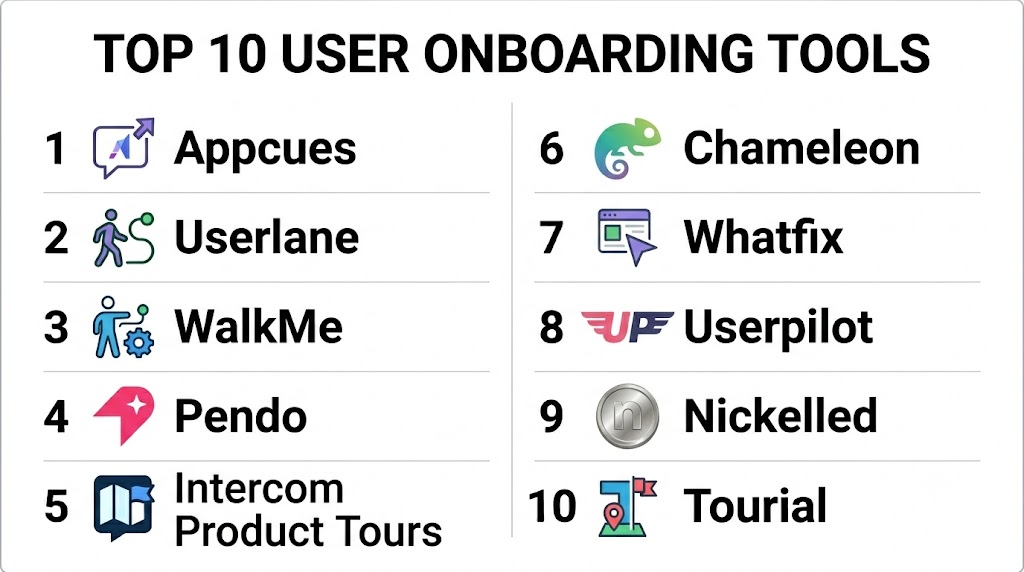
Top 10 User Onboarding Tools
1- Appcues
Short description:
Appcues allows product teams to create in-app onboarding flows, tooltips, modals, and checklists without coding. It is designed for SaaS products to improve user adoption and retention.
Key Features
- Drag-and-drop flow builder
- Custom modals and tooltips
- Segmentation and targeting
- Analytics dashboard for engagement
- Integration with CRM and analytics
- Multi-platform support
- A/B testing for onboarding flows
Pros
- Rapid implementation without engineering
- Highly customizable flows
- Real-time analytics
Cons
- Advanced analytics require higher-tier plans
- Some mobile features may require SDK integration
Platforms / Deployment
Web / iOS / Android / Cloud
Security & Compliance
SSO, encryption, GDPR compliant
Integrations & Ecosystem
- Salesforce, HubSpot, Mixpanel
- Segment, Google Analytics
- REST APIs for custom workflows
Support & Community
Documentation, tutorials, customer success support
2- Userlane
Short description:
Userlane provides interactive guidance overlays and step-by-step workflows. It helps enterprise applications onboard users faster and reduces training costs.
Key Features
- Interactive in-app guidance
- Step-by-step workflow creation
- User segmentation
- Analytics and reporting
- Multi-language support
- Integration with enterprise software
- Centralized management of onboarding flows
Pros
- Enterprise-grade security
- Supports complex workflows
- Multi-language guidance
Cons
- Can be complex for smaller teams
- Subscription costs are higher for small businesses
Platforms / Deployment
Web / Cloud
Security & Compliance
SSO, MFA, encryption, GDPR
Integrations & Ecosystem
- Salesforce, SAP
- Analytics tools
- REST API
Support & Community
Documentation, training, dedicated support
3- WalkMe
Short description:
WalkMe is a digital adoption platform that provides in-app guidance, automation, and analytics to improve onboarding, adoption, and training for web and enterprise apps.
Key Features
- Interactive walkthroughs
- Task automation
- Engagement analytics
- Segmentation and personalization
- Multi-platform support
- Integration with enterprise apps
- Compliance tracking
Pros
- Enterprise-grade platform
- Highly customizable flows
- Automation capabilities
Cons
- Steep learning curve
- Premium pricing
Platforms / Deployment
Web / iOS / Android / Cloud
Security & Compliance
SSO, MFA, encryption, SOC 2, GDPR
Integrations & Ecosystem
- Salesforce, Workday, SAP
- Analytics platforms
- API integrations
Support & Community
Documentation, webinars, customer success managers
4- Pendo
Short description:
Pendo provides product analytics, in-app guides, and feedback collection. It helps teams onboard users, improve feature adoption, and understand user behavior.
Key Features
- In-app guides and walkthroughs
- Product usage analytics
- Feedback and surveys
- Segmentation and targeting
- Multi-platform support
- Integration with CRM and analytics
- A/B testing of flows
Pros
- Combines analytics with onboarding
- Strong reporting dashboards
- Supports complex SaaS products
Cons
- Limited custom styling without advanced plans
- Pricing scales with active users
Platforms / Deployment
Web / iOS / Android / Cloud
Security & Compliance
SSO, encryption, GDPR compliant
Integrations & Ecosystem
- Salesforce, HubSpot, Segment
- Mixpanel, Google Analytics
- API access for custom integrations
Support & Community
Documentation, webinars, customer support
5- Intercom Product Tours
Short description:
Intercom Product Tours provides interactive walkthroughs, tooltips, and in-app messaging for new and existing users. It helps SaaS teams onboard users quickly and efficiently.
Key Features
- Step-by-step product tours
- Contextual tooltips
- Segmentation and personalization
- Multi-platform support
- Analytics and engagement tracking
- Integration with messaging tools
- Customizable UI
Pros
- Seamless integration with Intercom messaging
- Easy to set up for web and mobile apps
- Track onboarding completion metrics
Cons
- Best features require paid plan
- Limited advanced analytics compared to dedicated platforms
Platforms / Deployment
Web / iOS / Android / Cloud
Security & Compliance
SSO, encryption, GDPR
Integrations & Ecosystem
- Salesforce, HubSpot
- Segment, Mixpanel
- API for custom workflows
Support & Community
Documentation, tutorials, customer support
6- Chameleon
Short description:
Chameleon allows teams to create in-app tours, tooltips, and onboarding checklists. It is focused on product adoption and user engagement optimization.
Key Features
- In-app guides and tooltips
- Custom checklists and flows
- Segmentation and personalization
- Analytics dashboards
- Multi-platform support
- Integration with analytics tools
- A/B testing
Pros
- Highly customizable flows
- Focused on product adoption
- Lightweight and fast to deploy
Cons
- Some advanced integrations require coding
- Limited enterprise-level automation
Platforms / Deployment
Web / iOS / Android / Cloud
Security & Compliance
SSO, encryption, GDPR compliant
Integrations & Ecosystem
- Segment, HubSpot, Salesforce
- Analytics dashboards
- API access
Support & Community
Documentation, customer support, community forum
7- Whatfix
Short description:
Whatfix provides interactive walkthroughs, onboarding flows, and performance support for web and enterprise apps. It helps reduce training time and improves adoption.
Key Features
- Step-by-step interactive guides
- Multi-channel onboarding (web, mobile)
- Analytics for adoption metrics
- Integration with LMS and CRM
- Segmentation and targeting
- Automation of repetitive tasks
- Multi-language support
Pros
- Enterprise-scale deployment
- Supports complex enterprise apps
- Analytics and adoption insights
Cons
- Premium pricing
- Learning curve for setup
Platforms / Deployment
Web / iOS / Android / Cloud
Security & Compliance
SSO, MFA, encryption, GDPR
Integrations & Ecosystem
- Salesforce, Workday, SAP
- Google Analytics
- API integrations
Support & Community
Documentation, training, customer success
8- Userpilot
Short description:
Userpilot allows product teams to create interactive onboarding experiences without coding. It supports tooltips, checklists, modals, and analytics for user adoption.
Key Features
- In-app onboarding and tooltips
- Custom checklists and flows
- Segmentation by user behavior
- Analytics dashboard
- Multi-platform support
- Integration with product and marketing tools
- A/B testing
Pros
- No coding required
- Rapid implementation for product teams
- Behavioral segmentation
Cons
- Some features only in higher tiers
- Limited advanced automation
Platforms / Deployment
Web / iOS / Android / Cloud
Security & Compliance
SSO, encryption, GDPR compliant
Integrations & Ecosystem
- Segment, HubSpot, Intercom
- Google Analytics, Mixpanel
- API access
Support & Community
Documentation, tutorials, webinars
9- Nickelled
Short description:
Nickelled provides onboarding tours and interactive guidance for web applications. It focuses on simple, low-friction onboarding experiences for new users.
Key Features
- Interactive walkthroughs and tours
- Contextual help and tooltips
- Analytics dashboards
- Segmentation
- Multi-language support
- Integration with CRMs
- Cloud-based deployment
Pros
- Quick and easy to implement
- Focus on low-friction onboarding
- Real-time analytics
Cons
- Limited advanced automation
- Less suitable for enterprise-scale apps
Platforms / Deployment
Web / Cloud
Security & Compliance
SSO, encryption, GDPR
Integrations & Ecosystem
- Salesforce, HubSpot
- Google Analytics
- API access
Support & Community
Documentation, customer support
10- Tourial
Short description:
Tourial enables interactive product walkthroughs and demo experiences. It helps SaaS companies onboard new users while reducing support requests.
Key Features
- Interactive walkthroughs
- Demo experiences for onboarding
- Analytics for engagement
- Segmentation
- Multi-platform support
- Integration with CRM and analytics
- Customizable UI
Pros
- Ideal for SaaS onboarding
- Reduces support tickets
- Analytics to optimize flows
Cons
- Premium pricing
- Some advanced features limited
Platforms / Deployment
Web / Cloud
Security & Compliance
SSO, encryption, GDPR
Integrations & Ecosystem
- Salesforce, HubSpot
- Google Analytics, Mixpanel
- API integrations
Support & Community
Documentation, tutorials, support team
Comparison Table (Top 10)
| Tool Name | Best For | Platform(s) Supported | Deployment | Standout Feature | Public Rating |
|---|---|---|---|---|---|
| Appcues | SaaS product onboarding | Web/iOS/Android | Cloud | Drag-and-drop flows | N/A |
| Userlane | Enterprise software onboarding | Web | Cloud | Step-by-step workflow | N/A |
| WalkMe | Digital adoption | Web/iOS/Android | Cloud | Automation + analytics | N/A |
| Pendo | Product usage analytics | Web/iOS/Android | Cloud | In-app guides + analytics | N/A |
| Intercom Product Tours | SaaS onboarding | Web/iOS/Android | Cloud | Integrated messaging | N/A |
| Chameleon | Product adoption | Web/iOS/Android | Cloud | Custom checklists & tooltips | N/A |
| Whatfix | Enterprise apps | Web/iOS/Android | Cloud | Multi-channel onboarding | N/A |
| Userpilot | Product feature adoption | Web/iOS/Android | Cloud | Behavioral segmentation | N/A |
| Nickelled | Low-friction onboarding | Web | Cloud | Quick interactive tours | N/A |
| Tourial | SaaS demo onboarding | Web | Cloud | Interactive walkthrough demos | N/A |
Evaluation & Scoring of User Onboarding Tools
| Tool Name | Core (25%) | Ease (15%) | Integrations (15%) | Security (10%) | Performance (10%) | Support (10%) | Value (15%) | Weighted Total |
|---|---|---|---|---|---|---|---|---|
| Appcues | 9.0 | 8.5 | 8.5 | 8.0 | 8.5 | 8.0 | 8.0 | 8.45 |
| Userlane | 8.5 | 8.0 | 8.0 | 8.0 | 8.0 | 7.5 | 7.5 | 8.05 |
| WalkMe | 9.0 | 7.5 | 8.5 | 8.0 | 8.5 | 7.5 | 7.5 | 8.20 |
| Pendo | 8.5 | 8.0 | 8.0 | 7.5 | 8.0 | 7.5 | 7.5 | 8.00 |
| Intercom Product Tours | 8.0 | 8.5 | 7.5 | 7.5 | 7.5 | 7.5 | 7.5 | 7.80 |
| Chameleon | 8.0 | 8.0 | 7.5 | 7.5 | 7.5 | 7.5 | 7.5 | 7.80 |
| Whatfix | 8.5 | 7.5 | 8.0 | 7.5 | 8.0 | 7.5 | 7.5 | 7.95 |
| Userpilot | 8.0 | 8.0 | 7.5 | 7.5 | 7.5 | 7.5 | 7.5 | 7.85 |
| Nickelled | 7.5 | 8.0 | 7.0 | 7.0 | 7.5 | 7.0 | 7.5 | 7.55 |
| Tourial | 8.0 | 7.5 | 7.5 | 7.5 | 7.5 | 7.5 | 7.5 | 7.80 |
Which User Onboarding Tool Is Right for You?
Solo / Freelancer
Nickelled, Userpilot, Appcues — lightweight, easy to deploy for small SaaS products.
SMB
Chameleon, Intercom Product Tours, Pendo — multi-platform support and analytics dashboards.
Mid-Market
Appcues, Whatfix, Userpilot — behavioral segmentation and workflow automation.
Enterprise
WalkMe, Userlane, Pendo — advanced onboarding analytics, automation, and multi-language support.
Budget vs Premium
Nickelled and Userpilot for cost-effective onboarding; WalkMe, Appcues, and Userlane for enterprise-grade automation.
Feature Depth vs Ease of Use
Advanced workflows: WalkMe, Userlane, Pendo.
Rapid, simple setup: Nickelled, Chameleon, Userpilot.
Integrations & Scalability
For teams needing CRM, analytics, and lifecycle automation, prioritize Appcues, Pendo, and WalkMe.
Security & Compliance Needs
Enterprise tools like WalkMe, Userlane, and Pendo offer SSO, MFA, encryption, and GDPR compliance.
Frequently Asked Questions (FAQs)
1. What is a user onboarding tool?
A software platform that guides new users through product features, improving adoption and retention.
2. Are these tools cloud-based?
Most provide cloud-based platforms with web, iOS, and Android support.
3. Can onboarding flows be personalized?
Yes, tools like Appcues and Userpilot provide behavioral segmentation for personalized guidance.
4. Do they support analytics?
Yes, all major platforms track engagement, task completion, and drop-offs.
5. Can these tools integrate with CRM or analytics?
Yes, most integrate with Salesforce, HubSpot, Google Analytics, and product analytics tools.
6. Are in-app tutorials included?
Yes, these tools support interactive walkthroughs, tooltips, modals, and checklists.
7. Can onboarding be automated?
Yes, many platforms automate sequences, reminders, and triggered guides.
8. Are these tools suitable for mobile apps?
Yes, Appcues, Userpilot, WalkMe, and Pendo support iOS and Android devices.
9. How secure are these platforms?
Enterprise tools provide encryption, SSO, MFA, and GDPR compliance; smaller tools rely on secure cloud hosting.
10. How often should onboarding flows be updated?
Continuously during product updates, feature launches, or after analyzing user behavior.
Conclusion
User Onboarding Tools accelerate product adoption, enhance user engagement, and reduce churn. Appcues and WalkMe excel in enterprise-level onboarding with automation and analytics, while Userpilot, Chameleon, and Intercom Product Tours offer lightweight, easy-to-implement solutions. Teams should evaluate integrations, analytics, and scalability, pilot 2–3 platforms, and ensure compliance to optimize onboarding and improve overall user experience. Implementing the right tool improves activation, engagement, and retention across all digital products
