Introduction
Wireframing Tools are software platforms that enable designers, product managers, and developers to create low-fidelity representations of digital products. They allow teams to plan layouts, map user flows, and validate functionality before high-fidelity design or development begins. Wireframes act as a blueprint, helping stakeholders understand the structure, navigation, and content hierarchy of web and mobile applications.
In , wireframing remains a critical part of the UX design process. With the rapid expansion of digital products and multi-platform applications, teams need tools that allow quick iteration, collaboration, and seamless integration with prototyping and UI design platforms. Modern wireframing tools now incorporate AI-assisted suggestions, collaborative editing, and design system integration, making them indispensable for product teams.
Real-world use cases include:
- Planning the layout and structure of websites and mobile apps.
- Mapping user flows and navigation for better usability.
- Early validation with stakeholders and users before investing in high-fidelity designs.
- Collaborating remotely on design iterations.
- Integrating wireframes into design and prototyping workflows.
What buyers should evaluate:
- Ease of creating low-fidelity wireframes.
- Collaboration features for multiple users.
- Integration with prototyping and UI design tools.
- Pre-built components and templates.
- Cross-platform support (web, mobile, tablet).
- Version control and iteration tracking.
- Commenting and annotation tools.
- AI-assisted layout suggestions.
- Security and enterprise compliance.
- Cost and scalability for team size.
Best for: UX/UI designers, product teams, and agencies building digital products across multiple platforms.
Not ideal for: Small projects without iterative design needs, or teams already working exclusively with high-fidelity prototypes.
Key Trends in Wireframing Tools
- AI-assisted layouts and suggestions: Automatically proposes component arrangements and flow improvements.
- Real-time collaboration: Multiple designers can work simultaneously with commenting and version tracking.
- Cloud-based platforms: Accessible from any device with secure cloud storage.
- Integration with UI design and prototyping tools: Seamless handoff to Figma, Adobe XD, or InVision.
- Pre-built component libraries and templates: Accelerates wireframe creation.
- Cross-platform preview: Test wireframes on web, mobile, and tablet.
- Annotation and feedback tools: Collect input from stakeholders and team members efficiently.
- Versioning and rollback: Track iterations and revert changes as needed.
- Rapid iteration workflows: Allow faster pivoting during the design process.
- Accessibility-focused frameworks: Support WCAG compliance and accessible navigation planning.
How We Selected These Tools (Methodology)
- Market adoption among UX/UI designers and agencies.
- Feature completeness including wireframe creation, collaboration, and integrations.
- Reliability and performance signals from real-world teams.
- Security posture, access controls, and compliance measures.
- Integration capabilities with UI design, prototyping, and project management tools.
- Scalability for multiple teams and projects.
- Community support, documentation, and onboarding resources.
- Workflow flexibility for iterative design processes.
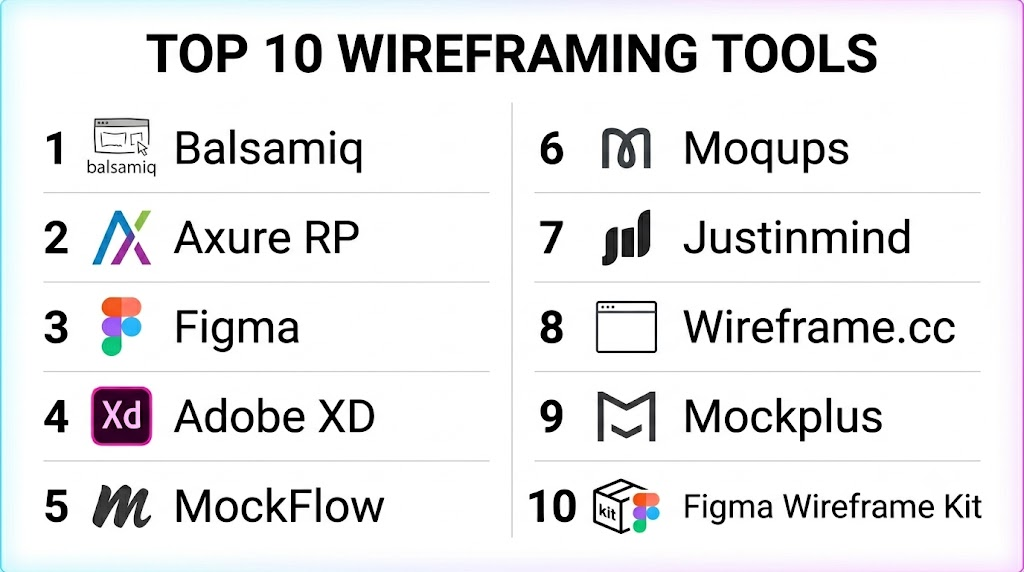
Top 10 Wireframing Tools
1- Balsamiq
Short description:
Balsamiq is a low-fidelity wireframing tool that allows designers to quickly sketch interface layouts using pre-built components. It emphasizes speed and simplicity, enabling rapid idea visualization for web and mobile apps.
Key Features
- Drag-and-drop wireframing
- Pre-built UI components
- Interactive linking for flows
- Collaboration and commenting
- Export to PDF/PNG
- Version control
- Cloud and desktop deployment
Pros
- Fast and easy for beginners
- Rapid iteration of layouts
- Lightweight with minimal learning curve
Cons
- Limited high-fidelity prototyping
- No interactive animations
Platforms / Deployment
Web / Windows / macOS / Cloud
Security & Compliance
Varies / N/A
Integrations & Ecosystem
- Jira, Confluence
- Export to PDFs and PNGs
- Collaboration features
Support & Community
Documentation, tutorials, community forums
2- Axure RP
Short description:
Axure RP enables designers to create detailed wireframes and high-fidelity interactive prototypes. It supports logic, conditional interactions, and dynamic content for complex UX workflows.
Key Features
- Interactive wireframes with logic
- Conditional flows and variables
- Team collaboration
- Component libraries
- Version control
- Cross-platform preview
- Developer handoff
Pros
- Supports complex interactions
- Enterprise-ready for usability testing
- Comprehensive component management
Cons
- Steep learning curve
- Less suited for simple wireframes
Platforms / Deployment
Windows / macOS / Cloud
Security & Compliance
Varies / N/A
Integrations & Ecosystem
- Jira, Slack
- Sketch/Photoshop import
- Versioning plugins
Support & Community
Documentation, webinars, community forums
3- Figma
Short description:
Figma is a cloud-based platform for design and wireframing. It allows teams to create interactive wireframes, collaborate in real time, and integrate with prototyping and UI design workflows.
Key Features
- Vector-based wireframes and prototypes
- Real-time collaboration
- Component libraries and design tokens
- Cross-platform preview
- Version control and history
- Plugin ecosystem
- Integration with analytics and project management tools
Pros
- Cloud-based with seamless collaboration
- Supports multi-device previews
- Integrated design system management
Cons
- Large files can affect performance
- Some advanced features require subscription
Platforms / Deployment
Web / macOS / Windows / Cloud
Security & Compliance
SSO, MFA, encryption, GDPR compliant
Integrations & Ecosystem
- Jira, Slack, GitHub
- CI/CD pipelines for design tokens
- Third-party plugins
Support & Community
Documentation, tutorials, community forums
4- Adobe XD
Short description:
Adobe XD provides wireframing, UI design, and interactive prototyping in one platform. It integrates with the Adobe Creative Cloud, making it suitable for professional design teams.
Key Features
- Vector-based wireframes
- Interactive prototypes
- Auto-animate transitions
- Shared component libraries
- Cloud collaboration
- Version history
- Plugin support
Pros
- Strong integration with Adobe ecosystem
- Supports interactive flows and animations
- Cloud collaboration and file sharing
Cons
- Requires Creative Cloud subscription
- Smaller plugin ecosystem than Figma
Platforms / Deployment
macOS / Windows / Cloud
Security & Compliance
SSO, encryption, audit logs
Integrations & Ecosystem
- Adobe Creative Cloud
- Jira, Slack
- Third-party plugins
Support & Community
Documentation, tutorials, community
5- MockFlow
Short description:
MockFlow is a wireframing suite that allows users to create website and mobile app wireframes quickly with pre-built templates, UI components, and collaboration tools.
Key Features
- Drag-and-drop wireframing
- Pre-built UI libraries
- Flowcharts and sitemaps
- Cloud collaboration
- Versioning
- Export to images and PDFs
Pros
- Quick low-fidelity wireframing
- Collaborative editing
- Simple interface for beginners
Cons
- Limited high-fidelity prototyping
- Less integration with advanced design systems
Platforms / Deployment
Web / Cloud
Security & Compliance
SSO, encryption
Integrations & Ecosystem
- Google Drive
- Slack integration
- Export to design tools
Support & Community
Documentation, tutorials, forums
6- Moqups
Short description:
Moqups provides an all-in-one online wireframing and mockup tool. It allows teams to create wireframes, diagrams, and prototypes with cloud-based collaboration.
Key Features
- Wireframes and mockups
- Interactive flows
- Pre-built components
- Real-time collaboration
- Version control
- Cloud deployment
Pros
- Cloud-based for team collaboration
- Supports multiple types of visual planning
- Intuitive interface
Cons
- Limited high-fidelity interactivity
- Premium plans required for advanced features
Platforms / Deployment
Web / Cloud
Security & Compliance
SSO, encryption, GDPR compliant
Integrations & Ecosystem
- Jira, Slack
- Google Drive
- Export to PDFs and images
Support & Community
Documentation, webinars, tutorials
7- Justinmind
Short description:
Justinmind enables users to create wireframes and interactive prototypes for web and mobile apps. It supports dynamic content, conditional logic, and collaboration.
Key Features
- Interactive wireframes
- Conditional logic and variables
- Component libraries
- Team collaboration
- Cross-platform preview
- Version control
- Export to HTML/CSS
Pros
- Supports advanced interactions
- Enterprise-ready for usability testing
- Multi-device preview
Cons
- Steeper learning curve
- Desktop-centric workflow
Platforms / Deployment
Windows / macOS / Cloud
Security & Compliance
Varies / N/A
Integrations & Ecosystem
- Jira, Confluence
- Slack
- Developer handoff plugins
Support & Community
Documentation, community forum
8- Wireframe.cc
Short description:
Wireframe.cc is a minimalist web-based wireframing tool designed for quick sketches of web and mobile interfaces. It emphasizes simplicity and speed for brainstorming sessions.
Key Features
- Minimalist drag-and-drop interface
- Single-page wireframes
- Commenting and annotation
- Export to PNG or PDF
- Cloud storage
Pros
- Extremely fast and simple
- Low learning curve
- Ideal for brainstorming
Cons
- Very low fidelity
- Limited collaboration features
Platforms / Deployment
Web / Cloud
Security & Compliance
Varies / N/A
Integrations & Ecosystem
- Export to design tools
- Simple annotation sharing
Support & Community
Basic documentation
9- Mockplus
Short description:
Mockplus allows designers to quickly create wireframes, interactive prototypes, and collaborate with teams using pre-built components and drag-and-drop functionality.
Key Features
- Interactive wireframes and prototypes
- Pre-built UI libraries
- Real-time collaboration
- Cross-platform preview
- Version control
- Cloud and offline support
Pros
- Quick prototyping with minimal learning curve
- Supports team collaboration
- Cross-platform previews
Cons
- Limited advanced animations
- Requires subscription for full features
Platforms / Deployment
Web / Windows / macOS / Cloud
Security & Compliance
SSO, encryption
Integrations & Ecosystem
- Jira, Slack
- Google Drive
- Export to images/PDFs
Support & Community
Documentation, tutorials, webinars
10- Figma Wireframe Kit
Short description:
Figma Wireframe Kit is a dedicated Figma library for rapid wireframe creation. It offers pre-designed components, templates, and flows for quick UX planning.
Key Features
- Pre-built wireframe components
- Drag-and-drop layouts
- Interactive linking for flows
- Cloud-based collaboration
- Version history
- Integration with Figma prototyping
Pros
- Rapid creation using ready-made components
- Real-time collaboration
- Integrates with Figma design workflow
Cons
- Requires Figma subscription
- Limited standalone functionality
Platforms / Deployment
Web / macOS / Windows / Cloud
Security & Compliance
SSO, encryption, GDPR compliant
Integrations & Ecosystem
- Figma
- Slack integration
- Export to PDF or PNG
Support & Community
Documentation, Figma community forum
Comparison Table (Top 10)
| Tool Name | Best For | Platform(s) Supported | Deployment | Standout Feature | Public Rating |
|---|---|---|---|---|---|
| Balsamiq | Rapid low-fidelity wireframes | Web/Windows/macOS | Cloud | Drag-and-drop components | N/A |
| Axure RP | Complex interactive wireframes | Windows/macOS | Cloud | Conditional logic & dynamic content | N/A |
| Figma | Collaborative UX workflows | Web/macOS/Windows | Cloud | Real-time collaboration | N/A |
| Adobe XD | Integrated wireframes & prototypes | macOS/Windows | Cloud | Interactive flows | N/A |
| MockFlow | Quick website/mobile wireframes | Web | Cloud | Pre-built UI libraries | N/A |
| Moqups | Multi-type visual planning | Web | Cloud | Diagrams + wireframes | N/A |
| Justinmind | Interactive prototypes | Windows/macOS | Cloud | Conditional logic & dynamic content | N/A |
| Wireframe.cc | Minimalist brainstorming | Web | Cloud | Ultra-simple interface | N/A |
| Mockplus | Team prototyping & wireframes | Web/Windows/macOS | Cloud | Drag-and-drop & pre-built components | N/A |
| Figma Wireframe Kit | Rapid wireframe templates | Web/macOS/Windows | Cloud | Pre-built components | N/A |
Evaluation & Scoring of Wireframing Tools
| Tool Name | Core (25%) | Ease (15%) | Integrations (15%) | Security (10%) | Performance (10%) | Support (10%) | Value (15%) | Weighted Total |
|---|---|---|---|---|---|---|---|---|
| Balsamiq | 8.0 | 9.0 | 7.0 | 7.0 | 7.5 | 7.5 | 8.0 | 7.85 |
| Axure RP | 8.5 | 7.5 | 8.0 | 7.5 | 8.0 | 7.5 | 7.5 | 7.95 |
| Figma | 9.5 | 8.5 | 9.0 | 8.5 | 9.0 | 8.5 | 8.0 | 8.80 |
| Adobe XD | 8.5 | 8.0 | 8.5 | 8.0 | 8.5 | 8.0 | 7.5 | 8.15 |
| MockFlow | 7.5 | 8.0 | 7.0 | 7.0 | 7.5 | 7.0 | 7.5 | 7.55 |
| Moqups | 7.5 | 8.0 | 7.0 | 7.0 | 7.5 | 7.0 | 7.5 | 7.55 |
| Justinmind | 8.0 | 7.5 | 7.5 | 7.5 | 7.5 | 7.5 | 7.5 | 7.80 |
| Wireframe.cc | 7.0 | 9.0 | 6.5 | 6.5 | 7.0 | 6.5 | 7.0 | 7.20 |
| Mockplus | 7.5 | 8.0 | 7.0 | 7.0 | 7.5 | 7.0 | 7.5 | 7.55 |
| Figma Wireframe Kit | 8.0 | 8.5 | 8.0 | 8.0 | 8.0 | 8.0 | 7.5 | 8.05 |
Interpretation: Scores above 8.0 indicate strong, collaborative wireframing solutions; 7.5–8.0 suit mid-market and SMB teams; below 7.5 are best for solo designers or quick brainstorming.
Which Wireframing Tool Is Right for You?
Solo / Freelancer
Balsamiq, Wireframe.cc, and MockFlow are ideal for individual designers or small teams needing fast, low-fidelity wireframes.
SMB
Figma, Adobe XD, Mockplus provide collaborative workflows, version control, and component libraries.
Mid-Market
Justinmind, Figma Wireframe Kit, and Moqups offer cross-team collaboration and integration with design systems.
Enterprise
Figma, Axure RP, Adobe XD for large-scale workflows, complex prototypes, and multi-team collaboration.
Budget vs Premium
Balsamiq, Wireframe.cc, and MockFlow are cost-effective; Figma, Axure RP, and Adobe XD deliver enterprise-grade features.
Feature Depth vs Ease of Use
Advanced interactivity: Axure RP, Justinmind.
Rapid wireframe creation: Balsamiq, Wireframe.cc, MockFlow.
Integrations & Scalability
Enterprise teams requiring integrations with UI design, prototyping, and analytics should consider Figma, Axure RP, and Adobe XD.
Security & Compliance Needs
Teams needing SSO, MFA, and GDPR-compliance should prioritize cloud-based enterprise solutions like Figma and Adobe XD.
Frequently Asked Questions (FAQs)
1. What is a wireframing tool?
It is a software platform that allows teams to design low-fidelity prototypes to visualize structure and user flows.
2. Are these tools cloud-based?
Most modern wireframing tools provide cloud access with real-time collaboration; some offer desktop apps.
3. Can prototypes be tested on multiple devices?
Yes, top tools allow web, mobile, and tablet previews to validate responsive design.
4. Do these tools support collaboration?
Yes, Figma, Mockplus, Adobe XD, and Moqups enable multiple users to edit and comment simultaneously.
5. Can wireframes be exported to design tools?
Most platforms allow export to Sketch, Figma, Adobe XD, or PDF/PNG for further development.
6. Are there AI-assisted features?
Some tools suggest layouts, components, and interactions automatically to accelerate prototyping.
7. Are these tools suitable for small teams?
Yes, Balsamiq, Wireframe.cc, and MockFlow are ideal for small teams or solo designers.
8. Can wireframes be interactive?
High-fidelity tools like Axure RP and Figma support interactive elements, navigation flows, and animations.
9. How secure are wireframing tools?
Enterprise platforms offer SSO, encryption, MFA, and GDPR compliance; open-source or lightweight tools rely on deployment security.
10. How often should wireframes be updated?
Wireframes should be updated continuously during design sprints and prior to usability testing.
Conclusion
Wireframing Tools are essential for planning, visualizing, and validating digital product interfaces. Figma and Adobe XD excel in collaborative, high-fidelity workflows, while Axure RP supports complex interactions. Balsamiq and Wireframe.cc offer fast low-fidelity solutions for small teams. Platforms like Mockplus and Moqups combine collaboration and templates for rapid iteration. Teams should evaluate integration, collaboration, scalability, and budget, then pilot 2–3 tools to identify the best fit. Implementing the right wireframing tool ensures efficient
