To perform CRUD (Create, Read, Update, Delete) operations using PHP, Bootstrap 5, and MySQL, you will need to follow the steps below:
Create a database in MySQL and create a table in it.
For example, let’s create a database named “blog” and a table named “students” with the following fields:
- id (primary key, auto-increment)
- name
- phone
- course
Create your database and create the table as shown below to get start with CRUD app using php mysql.
CREATE TABLE students (
    id INT(255) AUTO_INCREMENT PRIMARY KEY,
    name VARCHAR(255) NOT NULL,
    email VARCHAR(255) NOT NULL,
    phone VARCHAR(255) NOT NULL,
    course VARCHAR(255) NOT NULL
)
Step 1: Create a file named student-create.php and paste the form code to save the data:
<?php
session_start();
?>

<!doctype html>
<html lang="en">

<head>
    <!-- Required meta tags -->
    <meta charset="utf-8">
    <meta name="viewport" content="width=device-width, initial-scale=1">

    <!-- Bootstrap CSS -->
    <link href="https://cdn.jsdelivr.net/npm/bootstrap@5.1.3/dist/css/bootstrap.min.css" rel="stylesheet">

    <title>Student Create</title>
</head>

<body>

    <div class="container mt-5">

        <?php include('message.php'); ?>

        <div class="row">
            <div class="col-md-12">
                <div class="card">
                    <div class="card-header">
                        <h4>Student Add
                            <a href="index.php" class="btn btn-danger float-end">BACK</a>
                        </h4>
                    </div>
                    <div class="card-body">
                        <form action="code.php" method="POST">

                            <div class="mb-3">
                                <label>Student Name</label>
                                <input type="text" name="name" class="form-control">
                            </div>
                            <div class="mb-3">
                                <label>Student Email</label>
                                <input type="email" name="email" class="form-control">
                            </div>
                            <div class="mb-3">
                                <label>Student Phone</label>
                                <input type="text" name="phone" class="form-control">
                            </div>
                            <div class="mb-3">
                                <label>Student Course</label>
                                <input type="text" name="course" class="form-control">
                            </div>
                            <div class="mb-3">
                                <button type="submit" name="save_student" class="btn btn-primary">Save Student</button>
                            </div>

                        </form>
                    </div>
                </div>
            </div>
        </div>
    </div>

    <script src="https://cdn.jsdelivr.net/npm/bootstrap@5.1.3/dist/js/bootstrap.bundle.min.js"></script>
</body>

</html>
Output:
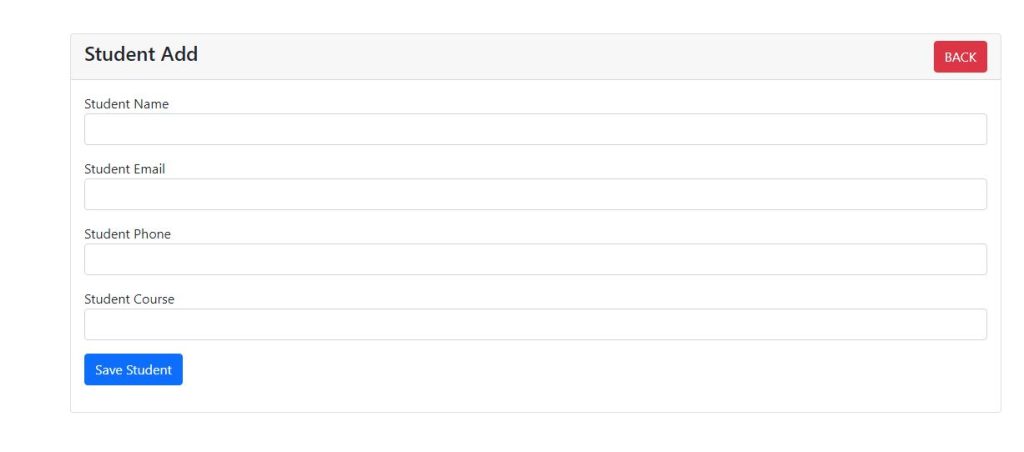
Step 2: Create a file dbcon.php for the Database Connection in PHP MySQL.
<?php

$con = mysqli_connect("localhost","root","","blog");

if(!$con){
    die('Connection Failed'. mysqli_connect_error());
}

?>
Step 3: Create a file named message.php file and this file will be used to display the message in every file where ever is required.
<?php
    if(isset($_SESSION['message'])) :
?>

    <div class="alert alert-warning alert-dismissible fade show" role="alert">
        <strong>Hey!</strong> <?= $_SESSION['message']; ?>
        <button type="button" class="btn-close" data-bs-dismiss="alert" aria-label="Close"></button>
    </div>

<?php
    unset($_SESSION['message']);
    endif;
?>
Step 4: Create a file named index.php and fetch data from database as given below code:
<?php
    session_start();
    require 'dbcon.php';
?>
<!doctype html>
<html lang="en">

<head>
    <!-- Required meta tags -->
    <meta charset="utf-8">
    <meta name="viewport" content="width=device-width, initial-scale=1">

    <!-- Bootstrap CSS -->
    <link href="https://cdn.jsdelivr.net/npm/bootstrap@5.1.3/dist/css/bootstrap.min.css" rel="stylesheet">

    <title>Student CRUD</title>
</head>

<body>

    <div class="container mt-4">

        <?php include('message.php'); ?>

        <div class="row">
            <div class="col-md-12">
                <div class="card">
                    <div class="card-header">
                        <h4>Student Details
                            <a href="create-student.php" class="btn btn-primary float-end">Add Students</a>
                        </h4>
                    </div>
                    <div class="card-body">

                        <table class="table table-bordered table-striped">
                            <thead>
                                <tr>
                                    <th>ID</th>
                                    <th>Student Name</th>
                                    <th>Email</th>
                                    <th>Phone</th>
                                    <th>Course</th>
                                    <th>Action</th>
                                </tr>
                            </thead>
                            <tbody>
                                <?php
                                    $query = "SELECT * FROM students";
                                    $query_run = mysqli_query($con, $query);

                                    if(mysqli_num_rows($query_run) > 0)
                                    {
                                        foreach($query_run as $student)
                                        {
                                            ?>
                                <tr>
                                    <td>
                                        <?= $student['id']; ?>
                                    </td>
                                    <td>
                                        <?= $student['name']; ?>
                                    </td>
                                    <td>
                                        <?= $student['email']; ?>
                                    </td>
                                    <td>
                                        <?= $student['phone']; ?>
                                    </td>
                                    <td>
                                        <?= $student['course']; ?>
                                    </td>
                                    <td>
                                        <a href="student-view.php?id=<?= $student['id']; ?>"
                                            class="btn btn-info btn-sm">View</a>
                                        <a href="student-edit.php?id=<?= $student['id']; ?>"
                                            class="btn btn-success btn-sm">Edit</a>
                                        <form action="code.php" method="POST" class="d-inline">
                                            <button type="submit" name="delete_student" value="<?=$student['id'];?>"
                                                class="btn btn-danger btn-sm">Delete</button>
                                        </form>
                                    </td>
                                </tr>
                                <?php
                                        }
                                    }
                                    else
                                    {
                                        echo "<h5> No Record Found </h5>";
                                    }
                                ?>

                            </tbody>
                        </table>

                    </div>
                </div>
            </div>
        </div>
    </div>

    <script src="https://cdn.jsdelivr.net/npm/bootstrap@5.1.3/dist/js/bootstrap.bundle.min.js"></script>

</body>

</html>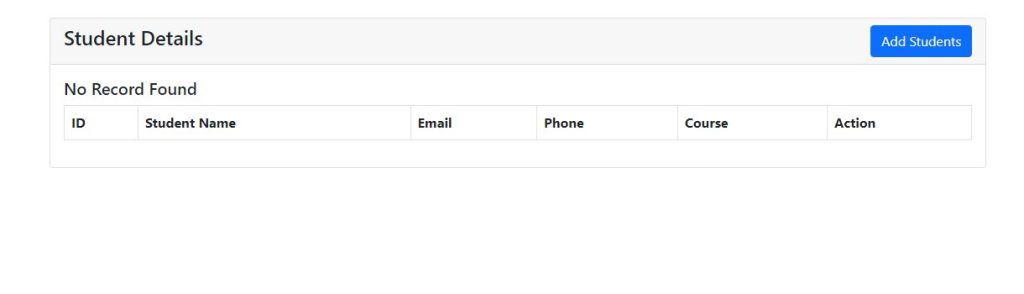
Step 5: Create a file named sudent-edit.php for edit and update data in php:
<?php
session_start();
require 'dbcon.php';
?>

<!doctype html>
<html lang="en">
  <head>
    <!-- Required meta tags -->
    <meta charset="utf-8">
    <meta name="viewport" content="width=device-width, initial-scale=1">

    <!-- Bootstrap CSS -->
    <link href="https://cdn.jsdelivr.net/npm/bootstrap@5.1.3/dist/css/bootstrap.min.css" rel="stylesheet">

    <title>Student Edit</title>
</head>
<body>

    <div class="container mt-5">

        <?php include('message.php'); ?>

        <div class="row">
            <div class="col-md-12">
                <div class="card">
                    <div class="card-header">
                        <h4>Student Edit
                            <a href="index.php" class="btn btn-danger float-end">BACK</a>
                        </h4>
                    </div>
                    <div class="card-body">

                        <?php
                        if(isset($_GET['id']))
                        {
                            $student_id = mysqli_real_escape_string($con, $_GET['id']);
                            $query = "SELECT * FROM students WHERE id='$student_id' ";
                            $query_run = mysqli_query($con, $query);

                            if(mysqli_num_rows($query_run) > 0)
                            {
                                $student = mysqli_fetch_array($query_run);
                                ?>
                                <form action="code.php" method="POST">
                                    <input type="hidden" name="student_id" value="<?= $student['id']; ?>">

                                    <div class="mb-3">
                                        <label>Student Name</label>
                                        <input type="text" name="name" value="<?=$student['name'];?>" class="form-control">
                                    </div>
                                    <div class="mb-3">
                                        <label>Student Email</label>
                                        <input type="email" name="email" value="<?=$student['email'];?>" class="form-control">
                                    </div>
                                    <div class="mb-3">
                                        <label>Student Phone</label>
                                        <input type="text" name="phone" value="<?=$student['phone'];?>" class="form-control">
                                    </div>
                                    <div class="mb-3">
                                        <label>Student Course</label>
                                        <input type="text" name="course" value="<?=$student['course'];?>" class="form-control">
                                    </div>
                                    <div class="mb-3">
                                        <button type="submit" name="update_student" class="btn btn-primary">
                                            Update Student
                                        </button>
                                    </div>

                                </form>
                                <?php
                            }
                            else
                            {
                                echo "<h4>No Such Id Found</h4>";
                            }
                        }
                        ?>
                    </div>
                </div>
            </div>
        </div>
    </div>

    <script src="https://cdn.jsdelivr.net/npm/bootstrap@5.1.3/dist/js/bootstrap.bundle.min.js"></script>
</body>
</html>
Output:

Step 6: Create a file named student-view.php and display data by specific id.
<?php
require 'dbcon.php';
?>
<!doctype html>
<html lang="en">
  <head>
    <!-- Required meta tags -->
    <meta charset="utf-8">
    <meta name="viewport" content="width=device-width, initial-scale=1">

    <!-- Bootstrap CSS -->
    <link href="https://cdn.jsdelivr.net/npm/bootstrap@5.1.3/dist/css/bootstrap.min.css" rel="stylesheet">

    <title>Student View</title>
</head>
<body>

    <div class="container mt-5">

        <div class="row">
            <div class="col-md-12">
                <div class="card">
                    <div class="card-header">
                        <h4>Student View Details
                            <a href="index.php" class="btn btn-danger float-end">BACK</a>
                        </h4>
                    </div>
                    <div class="card-body">

                        <?php
                        if(isset($_GET['id']))
                        {
                            $student_id = mysqli_real_escape_string($con, $_GET['id']);
                            $query = "SELECT * FROM students WHERE id='$student_id' ";
                            $query_run = mysqli_query($con, $query);

                            if(mysqli_num_rows($query_run) > 0)
                            {
                                $student = mysqli_fetch_array($query_run);
                                ?>

                                    <div class="mb-3">
                                        <label>Student Name</label>
                                        <p class="form-control">
                                            <?=$student['name'];?>
                                        </p>
                                    </div>
                                    <div class="mb-3">
                                        <label>Student Email</label>
                                        <p class="form-control">
                                            <?=$student['email'];?>
                                        </p>
                                    </div>
                                    <div class="mb-3">
                                        <label>Student Phone</label>
                                        <p class="form-control">
                                            <?=$student['phone'];?>
                                        </p>
                                    </div>
                                    <div class="mb-3">
                                        <label>Student Course</label>
                                        <p class="form-control">
                                            <?=$student['course'];?>
                                        </p>
                                    </div>

                                <?php
                            }
                            else
                            {
                                echo "<h4>No Such Id Found</h4>";
                            }
                        }
                        ?>
                    </div>
                </div>
            </div>
        </div>
    </div>

    <script src="https://cdn.jsdelivr.net/npm/bootstrap@5.1.3/dist/js/bootstrap.bundle.min.js"></script>
</body>
</html>
Output:

Step 7: Create a file named code.php and paste the below code.
<?php
session_start();
require 'dbcon.php';

if(isset($_POST['save_student']))
{
    $name = mysqli_real_escape_string($con, $_POST['name']);
    $email = mysqli_real_escape_string($con, $_POST['email']);
    $phone = mysqli_real_escape_string($con, $_POST['phone']);
    $course = mysqli_real_escape_string($con, $_POST['course']);

    $query = "INSERT INTO students (name,email,phone,course) VALUES ('$name','$email','$phone','$course')";

    $query_run = mysqli_query($con, $query);
    if($query_run)
    {
        $_SESSION['message'] = "Student Created Successfully";
        header("Location: index.php");
        exit(0);
    }
    else
    {
        $_SESSION['message'] = "Student Not Created";
        header("Location: index.php");
        exit(0);
    }
}

if(isset($_POST['delete_student']))
{
    $student_id = mysqli_real_escape_string($con, $_POST['delete_student']);

    $query = "DELETE FROM students WHERE id='$student_id' ";
    $query_run = mysqli_query($con, $query);

    if($query_run)
    {
        $_SESSION['message'] = "Student Deleted Successfully";
        header("Location: index.php");
        exit(0);
    }
    else
    {
        $_SESSION['message'] = "Student Not Deleted";
        header("Location: index.php");
        exit(0);
    }
}

if(isset($_POST['update_student']))
{
    $student_id = mysqli_real_escape_string($con, $_POST['student_id']);

    $name = mysqli_real_escape_string($con, $_POST['name']);
    $email = mysqli_real_escape_string($con, $_POST['email']);
    $phone = mysqli_real_escape_string($con, $_POST['phone']);
    $course = mysqli_real_escape_string($con, $_POST['course']);

    $query = "UPDATE students SET name='$name', email='$email', phone='$phone', course='$course' WHERE id='$student_id' ";
    $query_run = mysqli_query($con, $query);

    if($query_run)
    {
        $_SESSION['message'] = "Student Updated Successfully";
        header("Location: index.php");
        exit(0);
    }
    else
    {
        $_SESSION['message'] = "Student Not Updated";
        header("Location: index.php");
        exit(0);
    }

}


?>
Thanks for Visiting
