Upgrade & Secure Your Future with DevOps, SRE, DevSecOps, MLOps!

We spend hours on Instagram and YouTube and waste money on coffee and fast food, but won’t spend 30 minutes a day learning skills to boost our careers.
Master in DevOps, SRE, DevSecOps & MLOps!

Learn from Guru Rajesh Kumar and double your salary in just one year.

Get Started Now!

How to Install GD Graphics Library on Your Local XAMPP Server

  1. Stop XAMPP Server: Make sure your XAMPP server is stopped before you proceed with the installation.
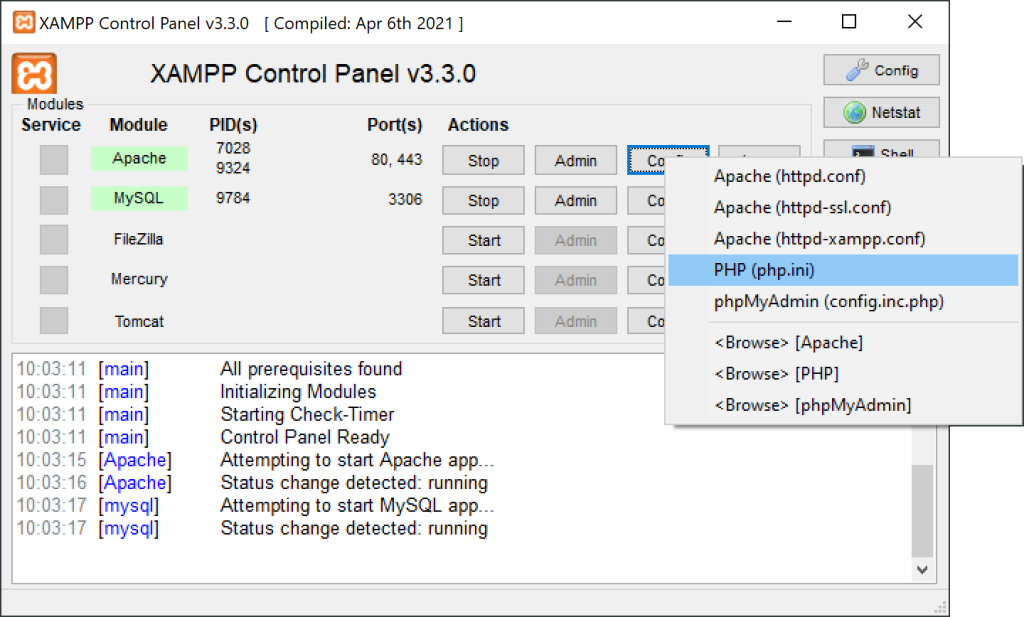
  2. Locate PHP.ini File: Locate the php.ini configuration file for your XAMPP server. The file is usually located in the xampp\php directory. Open it in a text editor.
  3. Enable GD Extension: Find the following line in the php.ini file and remove the semicolon (;) at the beginning to uncomment it:
;extension=gd

After removing the semicolon, it should look like:

extension=gd

4. Save Changes: Save the changes you made to the php.ini file.

5. Restart XAMPP: Start your XAMPP server again to apply the changes.

6. Verify Installation: You can verify if the GD library is successfully installed by creating a PHP file with the following content:

<?php
phpinfo();
?>

Save this file in your XAMPP htdocs directory with a .php extension, for example, gd_test.php. Open this file in your web browser (e.g., http://localhost/gd_test.php) and search for the GD section in the PHP information. If the GD library is installed, you should see relevant information about the GD module.

Additionally, you can create a simple image manipulation script to test GD functionality. For example:

<?php
// Create a blank image with dimensions 200x200
$image = imagecreatetruecolor(200, 200);

// Set the background color to white
$white = imagecolorallocate($image, 255, 255, 255);
imagefill($image, 0, 0, $white);

// Set the text color to black
$black = imagecolorallocate($image, 0, 0, 0);

// Add text to the image
imagestring($image, 5, 50, 90, 'GD Library Test', $black);

// Display the image
header('Content-Type: image/png');
imagepng($image);

// Free up memory
imagedestroy($image);
?>

Save this script in your htdocs directory and open it in your browser. If the GD library is working correctly, it should generate and display an image with text.

That’s it! You have successfully installed and configured the GD graphics library on your local XAMPP server.

Related Posts

Advance Your IT Career with Certified AIOps Manager Certification

Introduction The transition toward automated IT operations is a significant shift for modern businesses. If you want to lead this change, the Certified AIOps Manager program at Read More

Read More

Strategic Proven AIOps Certification Plan for Strong IT Career Growth Opportunities

Introduction The tech world is changing fast and moving toward automation driven by artificial intelligence. A Certified AIOps Architect is a professional who knows how to use Read More

Read More

Strategic career growth starts with becoming a dedicated certified AIOps professional

Introduction The world of IT operations is changing very fast. Keeping up with thousands of logs and alerts is no longer possible for humans alone. This is Read More

Read More

Certified AIOps Engineer: Learn AI-Driven IT Operations Fast

Introduction The Certified AIOps Engineer program is a highly specialized learning path designed for technical professionals who want to lead the next generation of IT operations. This Read More

Read More

Elevate your career with the professional AIOps Foundation Certification guide

Introduction The AIOps Foundation Certification represents a critical shift in how engineering teams manage the growing complexity of modern, distributed systems. As environments move toward hyper-scale, manual Read More

Read More

Strategic Certified Site Reliability Manager Certification Guide for Technical Managers

Introduction The Certified Site Reliability Manager program is recognized by DevOpsSchool as a primary standard for leadership in modern infrastructure. This guide is crafted for professionals who are tasked Read More

Read More
Subscribe
Notify of
guest
0 Comments
Oldest
Newest Most Voted
Inline Feedbacks
View all comments
0
Would love your thoughts, please comment.x
()
x