Introduction
Text‑to‑Speech (TTS) platforms convert written text into spoken audio using synthetic voices. Modern TTS solutions are powered by advanced neural networks and AI that produce highly natural, expressive, and human‑like speech. These tools are widely used across industries — from accessibility support and audiobooks to customer service automation, voice assistants, e‑learning, and global content localization. As digital experiences increasingly demand voice interactions, TTS platforms empower businesses and creators to engage audiences with scalable and personalized voice output.
With rising consumption of audio content and voice‑driven interfaces, TTS platforms help bridge the gap between written content and spoken word. They improve accessibility for users with visual impairments or reading difficulties, enhance engagement in e‑learning, power chatbots and IVR systems, and streamline content delivery at scale. TTS technology transforms static text into immersive audio experiences while reducing dependency on traditional recording studios and voice actors.
Real World Use Cases
- Accessibility & Compliance: Voice narration for visually impaired audiences.
- Virtual Assistants & IVR: Conversational voice responses in chatbots and call systems.
- E‑Learning & Training: Audio narration for lessons, tutorials, and courses.
- Content Localization: Producing spoken audio in multiple languages.
- Podcasts & Audiobooks: Automated narration workflows.
Evaluation Criteria for Buyers
- Naturalness & Voice Quality: How realistic and expressive the speech sounds.
- Language & Accent Support: Coverage of languages, dialects, and regional variations.
- Customization Options: Control over pitch, speed, tone, emotion, and pronunciation.
- API & Integration: Developer support for embedding TTS into apps and workflows.
- Scalability & Performance: Ability to handle large volumes and realtime use.
- Security & Compliance: Data privacy and enterprise controls.
- Pricing & Value: Cost per character/minute and overall affordability.
Best for
Developers, enterprises, content creators, educators, accessibility teams, and anyone needing scalable voice generation.
Not ideal for
Users who only need occasional, rudimentary voice generation with no quality or customization requirements.
Key Trends
- Neural TTS models yielding highly natural speech with emotional nuance.
- Multi‑language and localized accent support for global audiences.
- Real‑time TTS for voice assistants and interactive bots.
- Cloud and edge deployment options for performance optimization.
- Custom voice model training and voice cloning.
Methodology
We evaluated platforms based on voice naturalness, language support, customization options, API & developer tools, scalability, security, pricing, and ease of use.
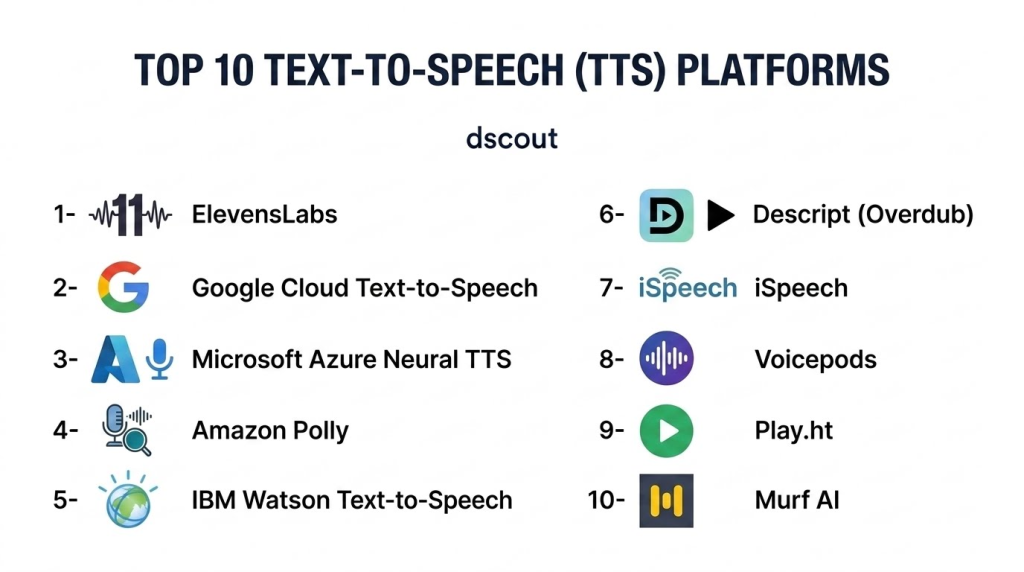
Top 10 Text‑to‑Speech (TTS) Platforms
1‑ ElevenLabs
Short description: ElevenLabs offers state‑of‑the‑art neural TTS with extremely natural, expressive voices and strong customization options for developers and creators.
Key Features:
- Ultra‑natural neural voices
- Voice cloning and timbre adjustment
- API & SDK support
- Batch generation
- Multilingual capabilities
Pros:
- Exceptional voice realism
- Flexible customization
- Developer‑friendly APIs
Cons:
- Advanced features require subscription
Platforms / Deployment: Cloud / Web / API
Security & Compliance: Enterprise data protection
Integrations & Ecosystem: API, workflow plugins
Support & Community: Documentation and community
2‑ Google Cloud Text‑to‑Speech
Short description: Google Cloud TTS leverages powerful neural models from Google with broad language support, scalable APIs, and integration into cloud workflows.
Key Features:
- Wide language and voice selection
- WaveNet neural voices
- Real‑time generation
- Cloud APIs and SDKs
Pros:
- Enterprise‑grade scale
- Strong language coverage
Cons:
- Requires cloud expertise
Platforms / Deployment: Google Cloud
Security & Compliance: Google Cloud security standards
Integrations & Ecosystem: Cloud suite, APIs
Support & Community: Google support channels
3‑ Microsoft Azure Neural TTS
Short description: Azure Neural TTS offers expressive voice synthesis with emotional and style controls, deep integration with Azure services, and enterprise support.
Key Features:
- Neural voices with emotion
- Custom voice models
- SDKs and APIs
- Real‑time streaming
Pros:
- Strong enterprise support
- Flexible voice customization
Cons:
- Cloud pricing complexity
Platforms / Deployment: Azure Cloud
Security & Compliance: Azure security
Integrations & Ecosystem: Azure ecosystem
Support & Community: Azure support tiers
4‑ Amazon Polly
Short description: Amazon Polly is AWS’s TTS service designed for scalable, low‑latency voice generation across applications and devices.
Key Features:
- Neural TTS voices
- SSML support for fine control
- Streaming APIs
- Multi‑language voices
Pros:
- Well‑integrated with AWS
- Excellent streaming performance
Cons:
- Usage cost can grow with scale
Platforms / Deployment: AWS Cloud
Security & Compliance: AWS security standards
Integrations & Ecosystem: AWS services
Support & Community: AWS support
5‑ IBM Watson Text‑to‑Speech
Short description: IBM Watson TTS delivers AI‑driven voice synthesis with strong enterprise controls, customization, and integration with Watson AI tools.
Key Features:
- Neural voices with customization
- SSML support
- Enterprise APIs
- Language variety
Pros:
- Enterprise‑focused features
- Secure data handling
Cons:
- Pricing tiers
Platforms / Deployment: IBM Cloud
Security & Compliance: Enterprise compliance
Integrations & Ecosystem: Watson suite
Support & Community: Enterprise support
6‑ Descript (Overdub)
Short description: Descript’s Overdub uses AI to create custom voices and generate TTS within a broader audio/video editing platform.
Key Features:
- Custom voice creation
- Text‑based editing
- TTS generation
- Export options
Pros:
- Easy for creators
- Works well within media workflows
Cons:
- Not core TTS platform
Platforms / Deployment: Web, Windows, macOS
Security & Compliance: Team controls
Integrations & Ecosystem: Editing exports
Support & Community: Tutorials
7‑ iSpeech
Short description: iSpeech offers TTS solutions for developers and enterprises with mobile SDKs and cloud APIs for real‑time generation.
Key Features:
- Mobile & web SDKs
- Multiple voices and languages
- API for automation
Pros:
- Developer‑friendly
- Good cross‑platform support
Cons:
- Voice naturalness varies
Platforms / Deployment: Web / Mobile / SDK
Security & Compliance: Standard practices
Integrations & Ecosystem: SDKs
Support & Community: Developer guides
8‑ Voicepods
Short description: Voicepods provides web‑based TTS with easy exports and embedding tools for voice generation in websites and applications.
Key Features:
- Simple web interface
- Embeddable player
- Voice style options
- Multiple languages
Pros:
- User‑friendly
- Great for web content
Cons:
- Limited advanced customization
Platforms / Deployment: Web
Security & Compliance: Standard
Integrations & Ecosystem: Web embeds
Support & Community: FAQs and guides
9‑ Play.ht
Short description: Play.ht offers realistic AI‑generated voices with a focus on content creators, blogs, and narration with easy export and embed options.
Key Features:
- Diverse voice library
- Speed & pitch controls
- API access
- Browser interface
Pros:
- Simple for non‑technical users
- Good voice selection
Cons:
- Less suited for enterprise scale
Platforms / Deployment: Web
Security & Compliance: Secure cloud
Integrations & Ecosystem: API, CMS plugins
Support & Community: Knowledge base
10‑ Murf AI
Short description: Murf AI combines TTS with AI voice customization and a studio‑like editor that’s great for presentations, e‑learning, and videos.
Key Features:
- AI voice customization
- Studio‑style editor
- Multiple languages
- Export options
Pros:
- Great UI
- Easy voice adjustment
Cons:
- Subscription required
Platforms / Deployment: Web
Security & Compliance: Cloud security
Integrations & Ecosystem: Media exports
Support & Community: Tutorials and support
Comparison Table
| Platform | Voice Naturalness | Languages / Accents | Customization | API Integration | Real‑Time | Enterprise Ready |
|---|---|---|---|---|---|---|
| ElevenLabs | Excellent | Many | High | Yes | Yes | Medium |
| Google Cloud TTS | Very Good | Very Many | Medium | Yes | Yes | High |
| Azure Neural TTS | Very Good | Very Many | High | Yes | Yes | High |
| Amazon Polly | Very Good | Many | Medium | Yes | Yes | High |
| IBM Watson TTS | Very Good | Many | Medium | Yes | No | High |
| Descript | Good | Many | Medium | No | No | Low |
| iSpeech | Good | Many | Low | Yes | Yes | Medium |
| Voicepods | Good | Many | Low | No | No | Low |
| Play.ht | Very Good | Many | Medium | Yes | No | Medium |
| Murf AI | Good | Many | High | No | No | Medium |
Evaluation & Scoring Table
| Platform | Naturalness 30% | Language Support 20% | Customization 15% | API/Dev Tools 15% | Ease of Use 10% | Enterprise 10% | Total |
|---|---|---|---|---|---|---|---|
| ElevenLabs | 29 | 18 | 14 | 14 | 9 | 7 | 91 |
| Google Cloud TTS | 27 | 20 | 13 | 15 | 8 | 8 | 91 |
| Azure Neural TTS | 27 | 20 | 14 | 14 | 8 | 8 | 91 |
| Amazon Polly | 26 | 18 | 13 | 15 | 8 | 8 | 88 |
| IBM Watson TTS | 26 | 18 | 13 | 14 | 8 | 9 | 88 |
| Play.ht | 25 | 17 | 12 | 12 | 9 | 7 | 82 |
| Murf AI | 24 | 17 | 13 | 10 | 9 | 7 | 80 |
| iSpeech | 23 | 16 | 10 | 11 | 9 | 7 | 76 |
| Voicepods | 22 | 15 | 10 | 8 | 9 | 6 | 70 |
| Descript | 22 | 15 | 11 | 8 | 9 | 6 | 71 |
Which Text‑to‑Speech Platform Is Right for You?
- Enterprise & Scale: Google Cloud TTS, Azure Neural TTS, or Amazon Polly for global, realtime use cases.
- Best Voice Quality: ElevenLabs for highly natural, expressive speech.
- Creator‑Friendly: Play.ht and Murf AI for easy workflows and voice customization.
- Simple Web Embeds: Voicepods for lightweight web TTS needs.
- Editing + TTS Integration: Descript for creators working with audio/video projects.
Implementation Playbook
30 Days:
- Define language, voice quality, and runtime requirements.
- Prototype with 2–3 candidate platforms.
- Evaluate API integration and output quality.
60 Days:
- Build TTS integration into your app, site, or content workflows.
- Create voice presets and performance testing.
- Monitor usage and optimize cost models.
90 Days:
- Standardize voice profiles and accents.
- Implement monitoring and scaling mechanisms.
- Document best practices and refine logic for dynamic content.
Common Mistakes
- Prioritizing price over voice naturalness.
- Ignoring language coverage for global audiences.
- Failing to test voices across different contexts (dialogue vs narration).
- Skipping performance and latency testing for realtime use.
- Not planning for cost management in high‑volume use cases.
Frequently Asked Questions
- What makes neural TTS better than older TTS?
Neural TTS uses deep learning to generate more natural, expressive speech than traditional concatenative or parametric systems. - Can TTS handle multiple languages?
Yes — top platforms support dozens of languages with accents and regional variations. - Is TTS suitable for realtime applications?
Many cloud platforms provide low latency APIs for realtime voice responses. - Do I need an API key to use TTS in my app?
Yes — most platforms require API keys for authentication and billing. - Can I customize voices?
Many platforms allow pitch, speed, and style controls; some offer custom voice creation. - How do I choose a TTS platform?
Consider naturalness, languages, API capabilities, pricing, and scale. - Is TTS secure for sensitive text?
Platforms with enterprise compliance and strong data policies ensure secure processing. - Can TTS be used offline?
Some solutions offer edge deployment for offline use, though cloud is more common. - Is TTS expensive?
Costs vary by usage; enterprise and neural voices are typically higher. - Can TTS output multiple file formats?
Yes — most platforms support MP3, WAV, and other standard audio formats.
Conclusion
Text‑to‑Speech platforms are essential tools for modern digital experiences — powering accessibility, interactive voice systems, global content delivery, and audio‑first engagement. From enterprise cloud services like Google Cloud TTS, Azure Neural TTS, and Amazon Polly to highly realistic neural voices from ElevenLabs and creator‑friendly solutions like Play.ht, each platform offers unique strengths. Start by evaluating voice quality, language coverage, integration needs, and pricing, then pilot your top choices to build scalable voice workflows that enhance engagement and accessibility. With the right TTS platform in place, your content can speak to audiences around the world — literally and effectively.
