Introduction
Picture a factory floor on a busy Monday. One machine stops without warning. A batch comes out with tiny defects. Orders pile up, and everyone is asking why the schedule slipped again. Most plant teams know this feeling well. The good news is that AI can help you see these problems before they hurt your output. It looks at the data your machines already produce and turns it into clear, useful signals. If you want to explore more about how AI is used across industries, you can visit aiuniverse.xyz. In this guide, I will explain things the way I would to a smart new intern on the shop floor. No fancy words, just what works.
What Is AI in Manufacturing?
AI in manufacturing means using computer software that learns from data to help run a factory better.
Your machines already create a lot of information. They record temperature, speed, vibration, pressure, and output counts. Cameras capture images of products. Workers log downtime and quality checks. Most of this data sits unused in files and systems.
AI reads all of it, finds patterns that people would miss, and tells you what is likely to happen next.
Why AI Helps Optimize Production
Production runs smoothly when four things go right: machines stay up, quality stays high, materials arrive on time, and the schedule makes sense.
A human can watch a few machines closely. Nobody can watch hundreds of signals across an entire plant, all day and all night. AI can.
Here is what that gives you:
- Fewer surprise breakdowns
- Fewer defective products
- Less wasted material and energy
- Better schedules and faster delivery
- Smarter use of your workers’ time
How It Works in Real Life
The basic idea is simple. Let us walk through it.
Step 1: Collect the Data
Sensors on machines, cameras on lines, and your existing software feed data into one place.
Step 2: Learn What Normal Looks Like
The AI studies weeks or months of data. It learns how a healthy machine sounds, shakes, and heats up.
Step 3: Spot Small Changes
When something drifts from normal, even slightly, the AI notices. A motor that runs a little hotter every day is a good example.
Step 4: Give a Clear Suggestion
The system tells your team what it found and what to do, such as “Check bearing on Line 3 within two days.”
Step 5: Learn From the Result
When your team acts and confirms the result, the AI gets smarter for next time.
Real Examples From the Factory Floor
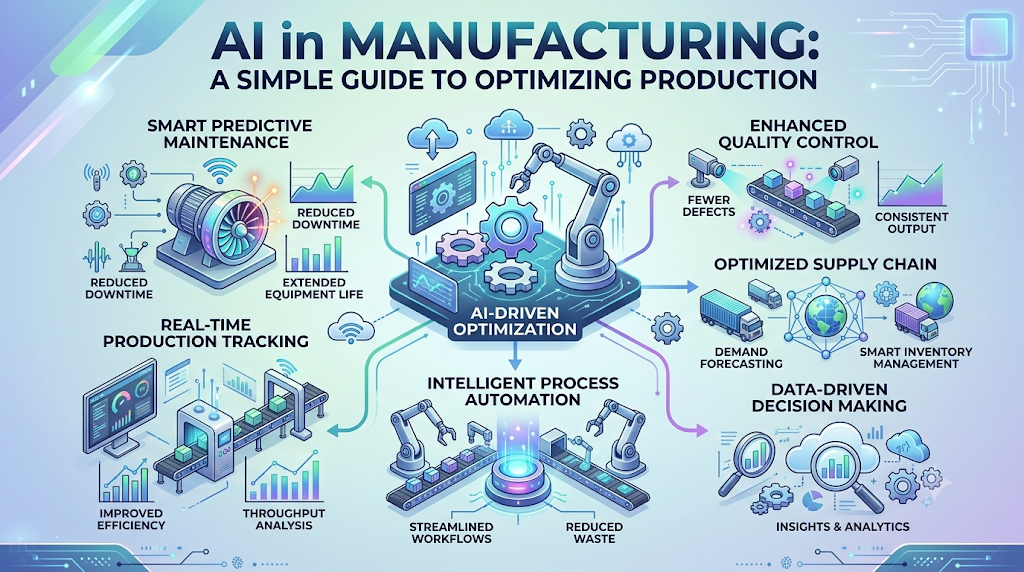
Predictive Maintenance
Instead of fixing a machine after it breaks or on a fixed calendar, AI watches for early warning signs. Say a pump starts vibrating slightly more each week. The AI flags it. Your team replaces a small part during a planned break, and you avoid a full-day shutdown.
Quality Inspection With Cameras
A camera checks every product on the line, not just a sample. It spots scratches, cracks, or wrong colors in a split second. This catches defects early, before bad products travel down the line or reach customers.
Smarter Production Scheduling
AI looks at orders, machine availability, worker shifts, and material stock. Then it suggests a schedule that reduces waiting time and rush jobs.
Energy and Waste Control
AI can find the settings that use less power or less raw material while keeping quality steady. Small savings on every batch add up quickly over a year.
Traditional vs AI-Driven Manufacturing
| Area | Traditional Way | AI-Driven Way |
|---|---|---|
| Machine repair | Fix after it breaks or on a fixed calendar | Fix when data shows it is needed |
| Quality checks | Sample checks by people | Every item checked by cameras |
| Scheduling | Manual plans in spreadsheets | Auto-suggested plans that adjust quickly |
| Decisions | Based on experience and gut feeling | Based on data, backed by experience |
| Downtime | Often a surprise | Often predicted in advance |
| Waste | Found after the fact | Spotted while it is happening |
Notice that AI does not remove experience from the picture. The best results come when experienced people and smart tools work together.
How to Get Started: Simple Steps
- Pick one clear problem. Choose something that costs you money today, like frequent downtime on one key machine.
- Check your data. Find out what your machines already record and whether it is reliable.
- Start with a small pilot. Try it on one line or one machine, not the whole plant.
- Involve your operators early. They know the machines better than anyone.
- Measure the before and after. Track downtime, defects, and costs so you can prove the value.
- Expand step by step. Once the pilot works, roll it out to other areas.
What Can Go Wrong, and How to Prevent It
| Challenge | Why It Happens | Simple Fix |
|---|---|---|
| High starting cost | Sensors, software, and setup all cost money | Start with one small project and show results first |
| Poor or missing data | Old machines may not record much | Add low-cost sensors and clean your records |
| Staff pushback | People fear losing their jobs | Explain that AI helps them, and train them early |
| Skill gaps | Few people know how to run these tools | Train current staff and use simple tools |
| Too much trust in AI | Teams follow suggestions without thinking | Keep humans in charge of final decisions |
| Trying to do too much | Big plans lead to slow, messy projects | Keep the first project small and focused |
From my experience, the biggest failures come from people, not technology. A tool that operators do not trust will sit unused, no matter how smart it is.
FAQs
1. What does AI in manufacturing mean?
It means using software that learns from factory data to help improve production, quality, maintenance, and planning.
2. Is AI only for large factories?
No. Small and mid-sized plants can start with one simple project, like watching a single key machine, and grow from there.
3. How does AI reduce machine downtime?
It spots early warning signs, such as rising heat or vibration, so your team can fix the problem before the machine stops.
4. Will AI replace factory workers?
It takes over repetitive checking and watching tasks. Workers move toward higher-value jobs like problem solving, repairs, and improvement work.
5. What kind of data does AI need?
Mostly machine data like temperature, speed, and vibration, plus quality records, downtime logs, and production counts.
6. How much does it cost to start?
It depends on your setup. A small pilot with a few sensors and basic software costs far less than a full plant rollout, so starting small is the smart move.
7. How long before I see results?
Many plants see early benefits in a few months, such as fewer surprise stops. Bigger gains build up as the system learns more.
8. Can AI work with old machines?
Yes. You can add affordable sensors to older machines so they can share the data that AI needs.
9. What is the biggest mistake companies make?
Trying to do too much at once, or ignoring the people who run the machines. Small pilots with operator support work much better.
10. How can I begin learning about AI in manufacturing?
Start by understanding your own plant’s data and problems. Then learn the basics of predictive maintenance and quality inspection, and try a small test project.
Conclusion
Optimizing production has always been about the same things: keeping machines running, keeping quality high, and using time and materials wisely. AI simply gives you sharper eyes and earlier warnings. You do not need to rebuild your factory or hire a team of experts. Pick one problem, start small, listen to your operators, and let the results guide your next step. Plants that do this steadily end up with smoother production, fewer surprises, and better profits.
