Introduction
Ad blocking tools are software applications or browser extensions that prevent unwanted advertisements from appearing during browsing or within apps. By filtering out banners, pop‑ups, video ads, and tracking scripts, these tools create a cleaner, faster, and more private online experience. Ads can slow page loading, consume bandwidth, and expose users to privacy risks. Ad blockers help users take back control of their digital environment.
Common ad blocking use cases include:
- Eliminating intrusive ads across web pages
- Blocking auto‑play video ads and pop‑ups
- Reducing bandwidth usage and speeding up browsing
- Preventing tracking and profiling by advertisers
- Protecting against malicious ad content
Best for: Individual users, privacy‑conscious consumers, and professionals seeking distraction‑free browsing or performance improvements.
Not ideal for: Users who rely on ad‑supported content, require enterprise‑level content filtering, or need highly specific network‑wide ad blocking via hardware firewalls.
Key Trends in Ad Blocking Tools
- Native ad blocking integrated into browsers
- AI‑assisted ad recognition and blocking
- Protection against tracking and fingerprinting
- Custom filter lists for granular control
- Cross‑platform sync of filter preferences
- Blocking of video and social media ads
- Built‑in privacy protection and anti‑tracker measures
- Integration with VPNs and secure browsing tools
- Open source and community‑maintained filters
- Subscription tiers for enhanced feature sets
How We Selected These Tools (Methodology)
- Evaluated market adoption and user base
- Assessed feature completeness for blocking scope and customization
- Reviewed performance and reliability including speed impact
- Considered security and privacy protection protocols
- Tested integration ecosystem with browsers, OSs, and devices
- Measured ease of use and user interface clarity
- Compared pricing models and value
- Checked support channels and community engagement
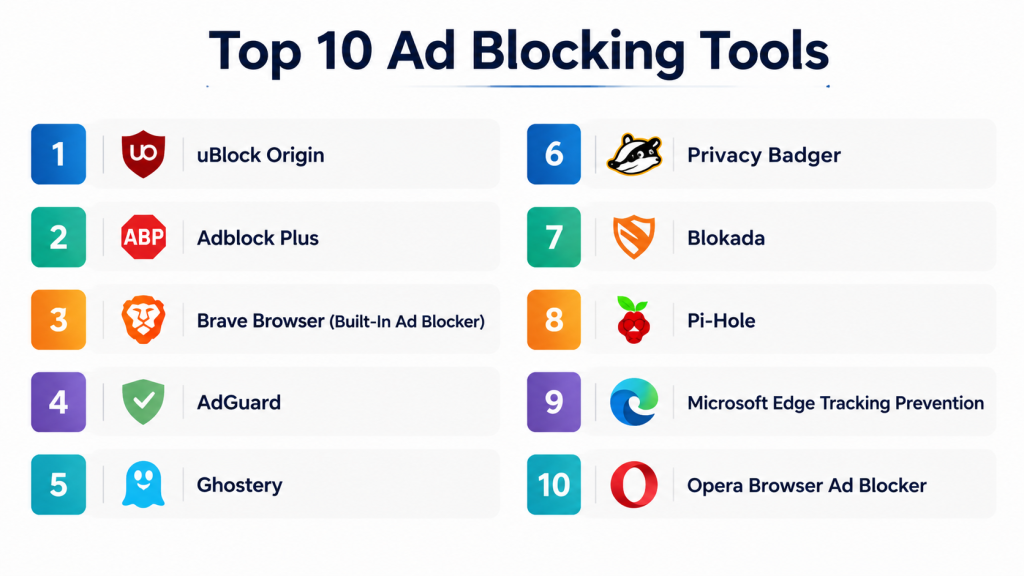
Top 10 Ad Blocking Tools
#1 — uBlock Origin
Short description: uBlock Origin is a lightweight, open‑source ad blocker that uses filter lists to block ads, trackers, and malware domains. Ideal for users seeking a powerful, resource‑efficient solution with customization.
Key Features
- Open‑source content blocking
- Uses multiple community filter lists
- Low memory and CPU footprint
- Custom rule definitions
- Blocks ads, trackers, and malware domains
Pros
- Resource‑efficient
- Supports advanced custom filters
- No subscription required
Cons
- Customization can be advanced for beginners
- Requires manual list management
- No native mobile app (browser support only)
Platforms / Deployment
- Browser extension (Chrome, Firefox, Edge, Opera)
- Cloud
Security & Compliance
- Open‑source transparency
- No telemetry
Integrations & Ecosystem
- Supports EasyList, MalwareDomains, and custom lists
- Works with major modern browsers
- Can integrate with privacy extensions
Support & Community
- Community‑driven support
- Documentation and forums
- Active development community
#2 — Adblock Plus
Short description: Adblock Plus is a popular ad blocker with customizable filter lists and acceptable ad preferences. It blocks most ads and includes privacy protection features.
Key Features
- Block banners, pop‑ups, and video ads
- Custom filter subscriptions
- “Acceptable ads” optional setting
- Anti‑tracking features
- Whitelisting of specific sites
Pros
- User‑friendly for non‑technical users
- Custom rule support
- Large filter list ecosystem
Cons
- “Acceptable ads” default may let some ads through
- Can consume more memory
- Occasional conflicts with page scripts
Platforms / Deployment
- Browser extension (Chrome, Firefox, Edge, Safari)
- Android app
Security & Compliance
- Ad blocking and script filtering
- Privacy guard settings
Integrations & Ecosystem
- Filterlist subscriptions
- Works across major browsers
- Custom domain list support
Support & Community
- Official help articles
- Email support
- Community forum
#3 — Brave Browser (Built‑In Ad Blocker)
Short description: Brave Browser integrates an ad blocker directly into the browser, blocking ads and trackers by default. It also offers privacy‑first browsing features such as HTTPS upgrades and anti‑fingerprinting.
Key Features
- Default ad and tracker blocking
- HTTPS upgrades
- Anti‑fingerprinting
- Cookie blocking
- Rewards system for opt‑in ads
Pros
- Built‑in — no extension required
- Strong privacy protections
- Speed and performance optimization
Cons
- Some users may not prefer native browser ecosystem
- Limited extension ecosystem compared to standard browsers
- Rewards system optional
Platforms / Deployment
- Windows / macOS / Linux / iOS / Android
- Cloud sync
Security & Compliance
- Privacy protections
- Anti‑tracking
Integrations & Ecosystem
- Built‑in privacy features
- Shields dashboard
- Sync across devices
Support & Community
- Help center
- Community forums
- Email support
#4 — AdGuard
Short description: AdGuard is a comprehensive ad blocking solution available as both browser extension and system‑wide app. It blocks ads, tracking, and phishing threats across browsers and apps.
Key Features
- Browser and system‑wide ad blocking
- Tracking and phishing protection
- Custom filters
- Parental control options
- Stealth mode and privacy guard
Pros
- Works beyond browser — system‑wide
- Strong privacy features
- Customizable filters
Cons
- Subscription required for full features
- Setup can be advanced
- Mobile OS restrictions limit system‑wide features
Platforms / Deployment
- Windows / macOS / Android / iOS / Browser extensions
- Cloud
Security & Compliance
- Encryption and privacy guard
- Anti‑tracking
Integrations & Ecosystem
- Works with major browsers
- Custom filter support
- App‑level blocking
Support & Community
- Email and chat support
- Knowledge base
- User community
#5 — Ghostery
Short description: Ghostery provides ad and tracker blocking focused on privacy enhancements. It also includes tracker analytics and anonymization features.
Key Features
- Ad and tracker blocker
- Tracker analytics dashboard
- Anonymization features
- Custom blocking lists
- Script blocking
Pros
- Privacy‑centric
- Insight into tracker networks
- Easy to use
Cons
- Not as aggressive in some ad blocking cases
- Tracker analytics may be overwhelming
- Some features premium only
Platforms / Deployment
- Browser extension (Chrome, Firefox, Edge, Opera)
- Mobile apps
Security & Compliance
- Privacy protection
- Script blocking
Integrations & Ecosystem
- Custom filter lists
- Tracker analytics tools
- Works across major browsers
Support & Community
- Help articles
- Email support
- User forums
#6 — Privacy Badger
Short description: Privacy Badger is a tracker‑blocking extension developed by a privacy‑focused organization. It blocks trackers based on behavior rather than filter lists.
Key Features
- Behavior‑based tracker blocking
- Automatic learning of trackers to block
- No configuration needed
- Script and cookie blocking
- Works silently in background
Pros
- Easy — no filter lists to manage
- Focused on privacy
- Minimal setup
Cons
- Not strictly ad blocker — more tracker‑focused
- Ads served without trackers may not be blocked
- No native app
Platforms / Deployment
- Browser extension (Chrome, Firefox, Edge)
- Cloud
Security & Compliance
- Privacy‑first design
- Tracker blocking
Integrations & Ecosystem
- Works with extension ecosystem
- Compatible with other privacy tools
Support & Community
- Documentation
- Community support
- Privacy organization backing
#7 — Blokada
Short description: Blokada is a system‑wide ad and tracker blocker for mobile devices. It filters traffic through a local VPN to block ads and trackers across all apps.
Key Features
- System‑wide ad blocking
- Tracker protection
- Local VPN filtering
- DNS control
- Custom filter lists
Pros
- Filters ads beyond browsers
- Works on mobile apps
- No root required
Cons
- VPN‑based — may conflict with other VPNs
- Setup can be technical
- Some filters require configuration
Platforms / Deployment
- Android / iOS / Desktop
- Cloud
Security & Compliance
- Local VPN filtering
- Blocking of trackers
Integrations & Ecosystem
- Custom DNS support
- Filter list subscriptions
- Works across apps
Support & Community
- Documentation
- Email support
- Community forum
#8 — Pi‑Hole
Short description: Pi‑Hole is a network‑wide ad blocker installed on local hardware (often a small server or router). It blocks ads and trackers for all devices on a network.
Key Features
- Network‑wide ad blocking
- DNS filtering
- Custom blocklists
- Dashboard analytics
- Device filtering rules
Pros
- Blocks ads across all devices
- Highly customizable
- No per‑device installations
Cons
- Requires hardware or network setup
- Not beginner‑friendly
- Maintenance required
Platforms / Deployment
- Network hardware (local server / router)
- Cloud (optional)
Security & Compliance
- Local network control
- DNS‑level blocking
Integrations & Ecosystem
- Works with routers
- Custom DNS setups
- Blocklists from community
Support & Community
- Community documentation
- Forums
- Open‑source community
#9 — Microsoft Edge Tracking Prevention
Short description: Built into the Microsoft Edge browser, this feature prevents trackers and blocks some ad-related scripts natively. Ideal for users who want integrated blocking without extensions.
Key Features
- Integrated tracking prevention
- Block third‑party cookies
- Level‑based blocking
- Smart screen protection
- Browser performance optimization
Pros
- Built‑in — no extension needed
- Works well for Microsoft ecosystem
- Simple to enable
Cons
- Not a full ad blocker — tracker focus
- Limited customization
- Only for Edge users
Platforms / Deployment
- Windows / macOS / iOS / Android (Edge browser)
- Cloud
Security & Compliance
- Tracking prevention
- Cookie management
Integrations & Ecosystem
- Edge browser ecosystem
- Sync with Microsoft accounts
Support & Community
- Official help center
- Microsoft community
#10 — Opera Browser Ad Blocker
Short description: Opera Browser includes a built‑in ad blocker that works without extensions. It blocks ads and some trackers, speeding up browsing.
Key Features
- Integrated ad blocking
- Tracker blocking
- Pop‑up prevention
- Battery and performance optimization
- Crypto and cookie controls
Pros
- Built‑in — no extension needed
- Improves performance
- Simple toggle UI
Cons
- Not as customizable as add‑ons
- Limited beyond browser
- Only within Opera environment
Platforms / Deployment
- Windows / macOS / Linux / iOS / Android
- Cloud sync
Security & Compliance
- Ad and tracker blocking
- Browser security suite
Integrations & Ecosystem
- Opera browser features
- Sync across devices
Support & Community
- Official help resources
- Opera community
Comparison Table (Top 10)
| Tool Name | Best For | Platforms Supported | Deployment | Standout Feature | Public Rating |
|---|---|---|---|---|---|
| uBlock Origin | Power users | Browsers (Chrome, Firefox, Edge) | Cloud | Lightweight, customizable filters | N/A |
| Adblock Plus | Beginner users | Browsers + Android | Cloud | Large filter lists | N/A |
| Brave Browser Ad Blocker | Integrated browser | Desktop & Mobile | Cloud | Built‑in blocking | N/A |
| AdGuard | System‑wide | Windows, macOS, Android, iOS | Cloud | System and browser blocking | N/A |
| Ghostery | Privacy‑centric | Browser & Mobile | Cloud | Tracker analytics | N/A |
| Privacy Badger | Privacy blockers | Browser extensions | Cloud | Behavior‑based blocking | N/A |
| Blokada | Mobile wide | Android, iOS | Cloud | VPN‑based system blocking | N/A |
| Pi‑Hole | Network wide | Network hardware | Cloud/Local | DNS‑level blocking | N/A |
| Microsoft Edge Tracking Prevention | Integrated blocker | Edge browser | Cloud | Tracker prevention | N/A |
| Opera Browser Ad Blocker | Integrated blocker | Opera browser | Cloud | Built‑in ad blocking | N/A |
Evaluation & Scoring of Ad Blocking Tools
| Tool Name | Core (25%) | Ease (15%) | Integrations (15%) | Security (10%) | Performance (10%) | Support (10%) | Value (15%) | Weighted Total |
|---|---|---|---|---|---|---|---|---|
| uBlock Origin | 9 | 8 | 8 | 9 | 9 | 8 | 9 | 8.7 |
| Adblock Plus | 8 | 9 | 8 | 8 | 8 | 8 | 8 | 8.2 |
| Brave | 9 | 8 | 8 | 9 | 9 | 8 | 9 | 8.7 |
| AdGuard | 9 | 8 | 9 | 9 | 9 | 8 | 8 | 8.6 |
| Ghostery | 8 | 9 | 8 | 9 | 8 | 8 | 8 | 8.2 |
| Privacy Badger | 7 | 9 | 7 | 9 | 8 | 7 | 8 | 8.0 |
| Blokada | 8 | 8 | 7 | 8 | 8 | 7 | 8 | 7.8 |
| Pi‑Hole | 9 | 7 | 9 | 9 | 8 | 7 | 9 | 8.3 |
| Edge Tracking | 7 | 9 | 7 | 8 | 7 | 7 | 8 | 7.6 |
| Opera Ad Blocker | 7 | 9 | 7 | 8 | 7 | 7 | 8 | 7.6 |
Which Ad Blocking Tool Is Right for You?
Solo / Freelancer
- uBlock Origin, Adblock Plus, Brave Browser: Easy to install and effective at blocking ads in browsing.
SMB / Small Office
- AdGuard, Pi‑Hole: System and network‑wide solutions for broader protection.
Mid‑Market
- AdGuard, Pi‑Hole, Brave Browser: Balanced features with privacy and performance.
Enterprise / Professional
- Pi‑Hole, AdGuard: Network‑wide and system‑wide blocking with customizable policies.
Budget vs Premium
- Free options: uBlock Origin, Privacy Badger, Microsoft Edge Tracking, Opera Ad Blocker
- Premium: AdGuard, Pi‑Hole (when hosted on paid hardware)
Feature Depth vs Ease of Use
- Depth: Pi‑Hole, AdGuard
- Ease: uBlock Origin, Brave, Adblock Plus
Integrations & Scalability
- Network‑wide: Pi‑Hole, OpenDNS integrations
- System‑wide: AdGuard, Blokada
- Browser‑only: uBlock Origin, Adblock Plus, Ghostery
Security & Compliance Needs
- Look for strong tracking prevention and anti‑malware blocking; browser protection is standard across top tools.
Frequently Asked Questions (FAQs)
1. What types of ads can these tools block?
Most tools block banners, pop‑ups, video ads, and some script‑based ads. System‑wide blockers extend this beyond browsers.
2. Do ad blockers protect privacy?
Yes. Many tools also block tracking scripts, cookies, and fingerprinting activities to protect privacy.
3. Are ad blockers safe to use?
Reputable blockers use safe filter lists and privacy protections. Open‑source tools offer transparent operations.
4. Can ad blockers slow down browsing?
No — usually they improve page load times by preventing ads and tracking scripts.
5. Do system‑wide blockers work on all apps?
VPN‑based and system‑wide blockers (like Blokada) filter across apps, but may conflict with parallel VPNs.
6. Do browsers have built‑in ad blocking?
Some browsers (Brave, Edge, Opera) include integrated ad or tracking blockers.
7. Can I customize blocking rules?
Yes. Advanced tools like uBlock Origin and Pi‑Hole allow extensive custom rules and blocklists.
8. Do ad blockers block malicious ads?
Many tools block domains known for malware and phishing as part of their filter lists.
9. Are mobile ad blockers effective?
Yes. System‑wide mobile blockers and browser addons reduce ads across apps and browsers.
10. What’s a common mistake using ad blockers?
Over‑blocking can disrupt site functionality. Whitelisting trusted sites is recommended.
Conclusion
Ad blocking tools enhance browsing speed, protect privacy, and eliminate intrusive ads. Browser extensions like uBlock Origin and Adblock Plus are excellent for everyday use, while system‑wide solutions like AdGuard or network‑wide blockers like Pi‑Hole are ideal for deeper protection. The best choice depends on browsing habits, desired control level, and platform needs. Shortlist a few tools, test configurations, and refine filters for optimal online experience.
