Introduction
Push Notification Platforms help businesses send timely messages directly to users across mobile apps, web browsers, desktop apps, and connected devices. These notifications can include product updates, order alerts, payment reminders, breaking news, cart recovery messages, onboarding nudges, security alerts, and personalized engagement campaigns. Unlike email or SMS, push notifications appear directly on a user’s device or browser, making them powerful for real-time engagement when used responsibly.
Push notification platforms matter because digital users expect instant updates, personalized experiences, and smooth communication across channels. For SaaS companies, eCommerce brands, media apps, fintech products, gaming apps, marketplaces, and consumer apps, push notifications can improve retention, activation, conversion, and customer communication. A good platform does more than send messages. It helps teams segment audiences, automate journeys, personalize content, test campaigns, track engagement, manage permissions, and coordinate push with email, SMS, in-app messaging, and customer data.
Real-world use cases include:
- User onboarding: Send welcome messages, feature tips, activation reminders, and setup prompts.
- eCommerce recovery: Notify users about abandoned carts, price drops, order confirmations, and delivery updates.
- SaaS product engagement: Trigger reminders for incomplete workflows, usage milestones, reports, approvals, and product alerts.
- Media and content updates: Send breaking news, new article alerts, live event updates, and personalized content recommendations.
- Fintech and security alerts: Notify users about payments, account changes, login attempts, fraud alerts, and transaction updates.
- Gaming and entertainment: Send reward alerts, event reminders, multiplayer invites, and re-engagement campaigns.
- Marketplace communication: Notify buyers, sellers, drivers, hosts, guests, or service providers about status changes and actions needed.
Evaluation Criteria for Buyers:
- Platform coverage: Support for iOS, Android, web push, desktop, and other device ecosystems.
- Segmentation: Ability to create audiences based on behavior, attributes, location, lifecycle stage, or preferences.
- Automation: Triggered campaigns, journeys, lifecycle flows, and event-based messaging.
- Personalization: Dynamic content, user attributes, language, recommendations, and contextual targeting.
- Analytics: Delivery, open rate, click rate, conversion tracking, uninstall impact, opt-in trends, and journey performance.
- A/B testing: Message, timing, content, audience, and channel testing.
- Integrations: SDKs, APIs, CDPs, CRMs, analytics tools, data warehouses, marketing automation, and product systems.
- Security and compliance: Consent controls, data privacy, access management, encryption, audit logs, and regional compliance needs.
- Scalability: Ability to handle small campaigns, high-volume sends, real-time triggers, and enterprise workloads.
- Ease of use: Marketer-friendly campaign creation, developer-friendly SDKs, documentation, and support quality.
Best for: Push notification platforms are best for mobile app teams, SaaS companies, eCommerce brands, media publishers, fintech platforms, gaming companies, marketplaces, digital product teams, growth marketers, CRM teams, and enterprises that need real-time customer engagement.
Not ideal for: Push notification platforms are not ideal for businesses without apps, websites, or user permission-based channels. They are also not a replacement for good product experience, email strategy, SMS, customer support, or consent-based marketing. If users have not opted in or if messages are irrelevant, frequent, or intrusive, push notifications can increase opt-outs and harm trust.
Key Trends in Push Notification Platforms
- Omnichannel orchestration is becoming standard: Push notifications are increasingly managed alongside email, SMS, WhatsApp, in-app messaging, webhooks, and live activities.
- Personalization is now a baseline expectation: Generic blasts are less effective. Teams are using user behavior, preferences, lifecycle stage, and predicted intent to personalize messages.
- AI-assisted engagement is growing: Platforms are adding smarter send-time optimization, predictive segmentation, content recommendations, and automated campaign suggestions.
- Mobile and web push strategies are converging: Businesses increasingly want one platform that can support app push, web push, desktop notifications, and cross-device campaigns.
- Consent and preference management are more important: Users expect control over notification types, frequency, and channels. Poor consent practices can increase opt-outs.
- Real-time event triggers are becoming essential: Product and commerce teams want notifications based on live user actions, transactions, inventory changes, and workflow events.
- Deep linking is critical for conversion: Strong platforms help route users to the exact app screen, product page, message, cart, or workflow after tapping a notification.
- Analytics is moving beyond opens: Teams now track conversion, retention, revenue, user journeys, churn reduction, and long-term engagement impact.
- Developer-friendly SDKs remain important: Even marketer-friendly platforms require reliable SDKs, APIs, data events, and implementation support.
- Enterprise governance is increasing: Large teams need role-based access, approval workflows, localization, audit logs, data privacy controls, and multi-brand management.
How We Selected These Tools Methodology
The platforms in this list were selected based on practical usefulness for mobile, web, and omnichannel push notification use cases. The goal is to provide a balanced list for startups, SMBs, developers, product teams, marketers, agencies, and enterprises.
- Market recognition: Platforms widely recognized by mobile app teams, marketers, developers, and customer engagement teams were prioritized.
- Push notification depth: Mobile push, web push, segmentation, automation, personalization, analytics, and testing were evaluated.
- Omnichannel capability: Tools with support for email, SMS, in-app, WhatsApp, or broader customer engagement workflows were considered.
- Developer experience: SDKs, APIs, documentation, event tracking, and implementation workflows were reviewed.
- Marketing usability: Campaign builders, journeys, templates, testing, reporting, and non-technical workflows were considered.
- Scalability: Tools suitable for small apps, growing SaaS products, and enterprise-scale engagement programs were included.
- Security and compliance posture: Access controls, privacy features, data handling, consent management, and governance were considered.
- Customer fit: The list includes developer-first, marketer-friendly, enterprise, product-led, and budget-conscious options.
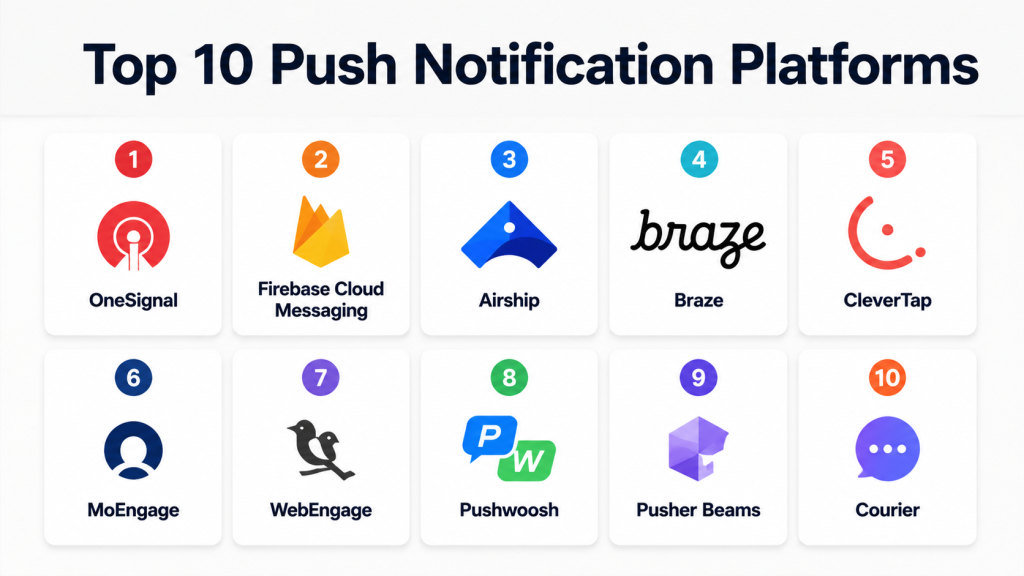
Top 10 Push Notification Platforms
1- OneSignal
Short description:
OneSignal is a widely used customer engagement platform known for push notifications across mobile apps, web browsers, and other digital channels. It is popular with startups, developers, publishers, SaaS teams, eCommerce brands, and app businesses that need a practical way to send targeted messages. OneSignal supports mobile push, web push, in-app messaging, email, SMS, segmentation, automation, and analytics. It is especially useful for teams that want both developer-friendly setup and marketer-friendly campaign controls. The platform is often chosen by teams that need quick implementation, cross-platform push support, and audience targeting without building their own notification infrastructure.
Key Features
- Mobile push notifications for iOS and Android
- Web push notification support
- Audience segmentation and targeting
- In-app messaging
- Journey automation and triggered messaging
- A/B testing and analytics
- SDKs, APIs, and developer documentation
Pros
- Strong fit for startups, apps, publishers, and SMBs.
- Supports both technical and marketing workflows.
- Good balance of push, in-app, email, and SMS capabilities.
Cons
- Advanced enterprise needs may require higher plans.
- Teams still need proper SDK implementation and event tracking.
- Heavy personalization may require clean customer data setup.
Platforms / Deployment
Web / Cloud-based platform / iOS / Android / Web Push
Security & Compliance
Supports account security controls, user permissions, data handling settings, and privacy-related workflows. Specific compliance details should be validated based on plan and business requirements.
Integrations & Ecosystem
OneSignal integrates with application stacks, analytics tools, CMS platforms, and customer engagement workflows. It is useful for teams that need to trigger push notifications from product events, website actions, and marketing campaigns.
- Mobile SDKs
- Web SDKs
- REST API
- CMS and website workflows
- Analytics tools
- CRM and automation workflows
- Webhook-based systems
Support & Community
OneSignal provides documentation, developer guides, help resources, onboarding material, and support options. It has broad adoption among developers, app owners, and growth teams.
2- Firebase Cloud Messaging
Short description:
Firebase Cloud Messaging, also known as FCM, is Google’s cross-platform messaging service for sending notifications and data messages to Android, iOS, and web applications. It is commonly used by developers who want a reliable push notification foundation inside the Firebase and Google Cloud ecosystem. FCM is especially strong for app teams already using Firebase Authentication, Firestore, Analytics, Cloud Functions, or Google Cloud services. It is more infrastructure-oriented than full marketing automation platforms, so teams may need additional tools for advanced segmentation, journeys, and campaign management. For developer-led products, FCM is a practical and widely adopted option.
Key Features
- Cross-platform push messaging
- Android, iOS, and web push support
- Notification and data message support
- Firebase ecosystem integration
- Topic-based messaging
- Device token management
- API and backend integration support
Pros
- Strong fit for Firebase and Google Cloud users.
- Practical for developer-led application messaging.
- Good foundation for app notifications and real-time alerts.
Cons
- Less marketer-friendly than full engagement platforms.
- Advanced journeys and segmentation may require additional tooling.
- Requires developer setup and backend integration.
Platforms / Deployment
Cloud / Firebase / Google Cloud / iOS / Android / Web
Security & Compliance
Uses Google account security, Firebase project permissions, service accounts, and cloud-based access controls. Specific compliance alignment depends on Firebase and Google Cloud configuration.
Integrations & Ecosystem
FCM works closely with Firebase and Google Cloud services, making it useful for apps that already rely on that ecosystem.
- Firebase Analytics
- Firebase Authentication
- Cloud Functions
- Firestore
- Google Cloud services
- Mobile app backends
- Custom APIs
Support & Community
Firebase Cloud Messaging has official documentation, SDK guides, developer examples, Google Cloud resources, and a large developer community.
3- Airship
Short description:
Airship is an enterprise customer engagement platform with strong roots in mobile push notifications and app engagement. It is designed for brands that need advanced mobile messaging, journey automation, personalization, in-app experiences, wallet passes, and cross-channel engagement. Airship is commonly used by retail, media, travel, finance, and enterprise consumer brands that need sophisticated audience targeting and lifecycle campaigns. The platform supports push notifications along with broader app experience and customer engagement capabilities. It is a strong choice for larger teams that need advanced campaign orchestration and mobile-first engagement.
Key Features
- Mobile push notifications
- Web notifications and in-app messaging
- Customer journey automation
- Audience segmentation and personalization
- Message testing and optimization
- Mobile wallet and app experience tools
- Analytics and lifecycle reporting
Pros
- Strong enterprise mobile engagement capabilities.
- Good fit for large consumer brands and app-first businesses.
- Advanced journey and personalization features.
Cons
- May be too advanced or costly for small teams.
- Implementation may require planning and technical support.
- Best value comes from broader engagement use cases.
Platforms / Deployment
Web / Cloud-based platform / iOS / Android / Web Push
Security & Compliance
Supports enterprise access controls, privacy workflows, and security-focused customer engagement processes. Specific compliance details should be validated based on plan and industry requirements.
Integrations & Ecosystem
Airship integrates with customer data, marketing, analytics, mobile app, and enterprise engagement workflows.
- Mobile SDKs
- Web SDKs
- Customer data platforms
- Analytics tools
- Marketing automation systems
- APIs and webhooks
- App experience workflows
Support & Community
Airship provides enterprise support, documentation, onboarding resources, strategic guidance, and professional services for larger customer engagement teams.
4- Braze
Short description:
Braze is a customer engagement platform used by consumer brands, SaaS companies, mobile apps, and enterprises to orchestrate personalized messages across push, email, SMS, in-app messaging, and other channels. It is not only a push notification tool, but push is a major part of its engagement ecosystem. Braze is useful for teams that want advanced lifecycle campaigns, real-time segmentation, personalization, experimentation, and cross-channel journeys. It is especially strong for businesses with mature customer data and engagement operations. For teams needing enterprise-grade campaign orchestration, Braze is a powerful option.
Key Features
- Mobile and web push notifications
- Cross-channel journey orchestration
- Real-time segmentation
- Personalization and dynamic content
- In-app messaging and content cards
- A/B testing and experimentation
- Analytics and customer engagement reporting
Pros
- Strong enterprise customer engagement capabilities.
- Excellent fit for lifecycle and cross-channel campaigns.
- Powerful segmentation and personalization workflows.
Cons
- May be too complex for simple push-only needs.
- Requires clean data and implementation planning.
- Pricing may not suit small teams.
Platforms / Deployment
Web / Cloud-based platform / iOS / Android / Web Push
Security & Compliance
Supports enterprise-grade security workflows, access controls, data governance features, and privacy-related settings. Specific compliance details should be validated with the vendor based on plan and region.
Integrations & Ecosystem
Braze integrates with customer data, analytics, marketing, product, and data warehouse workflows.
- Mobile SDKs
- Web SDKs
- CDPs
- Data warehouses
- Analytics tools
- Marketing systems
- APIs and webhooks
Support & Community
Braze provides enterprise support, documentation, onboarding, partner ecosystem resources, and customer success support for mature engagement teams.
5- CleverTap
Short description:
CleverTap is a customer engagement and retention platform that supports push notifications, in-app messaging, email, SMS, WhatsApp, user analytics, segmentation, and lifecycle campaigns. It is popular with mobile-first businesses, consumer apps, fintech, media, gaming, and eCommerce companies that need strong engagement and retention workflows. CleverTap combines analytics and messaging so teams can understand user behavior and trigger relevant push campaigns. It is especially useful for teams that want to connect segmentation, automation, and retention analysis in one platform. Push notifications are a core part of its broader customer engagement suite.
Key Features
- Mobile and web push notifications
- Behavioral segmentation
- User analytics and cohort analysis
- Journey automation
- In-app messaging
- Campaign personalization
- Multi-channel engagement support
Pros
- Strong fit for mobile-first retention teams.
- Combines analytics and engagement workflows.
- Good for lifecycle campaigns and behavioral targeting.
Cons
- May require planning to implement events correctly.
- Feature depth can feel complex for smaller teams.
- Best results depend on quality user data.
Platforms / Deployment
Web / Cloud-based platform / iOS / Android / Web Push
Security & Compliance
Supports account access controls, customer data handling workflows, and privacy-related features. Specific compliance details should be validated based on plan and region.
Integrations & Ecosystem
CleverTap integrates with app analytics, marketing, customer data, and communication workflows.
- Mobile SDKs
- Web SDKs
- Data platforms
- Marketing channels
- Webhooks
- APIs
- Analytics workflows
Support & Community
CleverTap provides documentation, onboarding resources, support options, customer success guidance, and learning materials for engagement teams.
6- MoEngage
Short description:
MoEngage is a customer engagement platform focused on personalized, insight-led communication across push notifications, email, SMS, WhatsApp, in-app messaging, and other channels. It is commonly used by consumer brands, eCommerce companies, fintech apps, media platforms, and subscription businesses. MoEngage helps teams build customer journeys, segment audiences, analyze behavior, and optimize engagement campaigns. Push notifications are part of its broader engagement ecosystem, making it useful for lifecycle marketing and retention programs. It is a strong choice for teams that want personalization, automation, and analytics in one platform.
Key Features
- Mobile and web push notifications
- Customer journey automation
- Behavior-based segmentation
- In-app messaging
- Campaign analytics
- AI-assisted engagement features
- Multi-channel messaging
Pros
- Strong customer engagement and personalization capabilities.
- Good fit for lifecycle marketing and retention teams.
- Useful analytics for customer behavior and campaigns.
Cons
- May be more than needed for push-only use cases.
- Implementation requires event and data planning.
- Pricing and feature access should be validated.
Platforms / Deployment
Web / Cloud-based platform / iOS / Android / Web Push
Security & Compliance
Supports access controls, data handling features, and enterprise security workflows. Specific compliance details should be validated based on plan, region, and customer needs.
Integrations & Ecosystem
MoEngage integrates with customer data, analytics, commerce, and messaging workflows.
- Mobile SDKs
- Web SDKs
- CDPs
- Analytics tools
- Marketing systems
- APIs
- Webhooks
Support & Community
MoEngage provides documentation, onboarding resources, customer success support, strategic guidance, and educational content for customer engagement teams.
7- WebEngage
Short description:
WebEngage is a customer engagement and retention platform that supports push notifications, in-app messaging, email, SMS, WhatsApp, web messages, segmentation, and journey automation. It is commonly used by eCommerce, travel, fintech, education, media, and subscription businesses. WebEngage is useful for teams that want to build lifecycle campaigns across multiple customer channels. Push notifications can be triggered by user behavior, lifecycle stage, cart activity, product usage, and campaign rules. It is a strong fit for brands that want a retention-focused platform rather than a basic push sending tool.
Key Features
- Mobile and web push notifications
- Journey designer and automation
- Audience segmentation
- In-app and web messaging
- Email, SMS, and WhatsApp support
- Campaign analytics
- Personalization workflows
Pros
- Strong fit for retention and lifecycle marketing.
- Good multi-channel engagement capabilities.
- Useful for eCommerce and app-based customer journeys.
Cons
- May be complex for teams needing only simple push.
- Requires clean event tracking and customer data.
- Enterprise features may depend on plan.
Platforms / Deployment
Web / Cloud-based platform / iOS / Android / Web Push
Security & Compliance
Supports account controls, data handling workflows, and privacy-oriented configuration. Specific compliance details should be validated with the vendor.
Integrations & Ecosystem
WebEngage integrates with commerce, analytics, marketing, and customer data workflows.
- Mobile SDKs
- Web SDKs
- eCommerce platforms
- CRM systems
- Analytics tools
- APIs
- Webhooks
Support & Community
WebEngage provides documentation, onboarding support, customer success resources, and campaign strategy guidance.
8- Pushwoosh
Short description:
Pushwoosh is a push notification and customer engagement platform designed for mobile apps, websites, and cross-channel messaging. It supports mobile push, web push, in-app messaging, email, segmentation, automation, and analytics. Pushwoosh is useful for product teams, marketers, and app owners that want a dedicated push-focused platform with broader engagement features. It is especially practical for teams that need audience targeting, messaging automation, and push analytics without building custom notification infrastructure. Pushwoosh can serve both smaller teams and growing apps that need flexible push campaigns.
Key Features
- Mobile push notifications
- Web push notifications
- In-app messaging
- Audience segmentation
- Campaign automation
- A/B testing
- Analytics and reporting
Pros
- Strong push notification focus.
- Supports both app and web push use cases.
- Practical automation and segmentation features.
Cons
- Enterprise-level engagement depth may vary by plan.
- Advanced integrations may require technical setup.
- Teams should validate analytics depth for complex campaigns.
Platforms / Deployment
Web / Cloud-based platform / iOS / Android / Web Push
Security & Compliance
Supports account controls, data handling workflows, and privacy-related settings. Specific compliance details are not publicly stated for all use cases.
Integrations & Ecosystem
Pushwoosh integrates with mobile apps, websites, marketing workflows, and event-driven messaging systems.
- Mobile SDKs
- Web SDKs
- APIs
- Webhooks
- In-app messaging
- Email workflows
- Analytics tools
Support & Community
Pushwoosh provides documentation, help resources, SDK guides, support options, and user education materials.
9- Pusher Beams
Short description:
Pusher Beams is a developer-friendly push notification platform designed to simplify push delivery for mobile and web applications. It is useful for engineering teams that want to add push notifications without building token management, delivery infrastructure, and device routing from scratch. Pusher Beams is especially suitable for transactional and event-driven notifications such as chat alerts, activity updates, reminders, and app events. It is more developer-focused than marketer-focused, so it works best when the product team already owns segmentation, targeting, and user logic inside the application. It is a practical building block for app notification infrastructure.
Key Features
- Push notification API
- iOS and Android support
- Web push support
- Device token management
- Interest-based notification routing
- SDKs for app integration
- Event-driven notification workflows
Pros
- Strong fit for developer-led push implementation.
- Reduces infrastructure work for push delivery.
- Useful for transactional and product-triggered notifications.
Cons
- Less marketer-friendly than customer engagement suites.
- Advanced journey orchestration may require other tools.
- Best suited for teams with developer resources.
Platforms / Deployment
Web / Cloud-based API / iOS / Android / Web Push
Security & Compliance
Supports secure API-based workflows and application-level push delivery controls. Specific compliance details should be validated based on business requirements.
Integrations & Ecosystem
Pusher Beams integrates with application backends, mobile apps, web apps, and event-driven systems.
- Mobile SDKs
- Web SDKs
- Backend APIs
- Event systems
- Chat and activity feeds
- Product notification workflows
- Server-side applications
Support & Community
Pusher Beams provides developer documentation, SDK guides, API resources, and support options. It is known among engineering teams building real-time app features.
10- Courier
Short description:
Courier is a notification infrastructure platform that helps product and engineering teams manage messages across push, email, SMS, chat, and in-app channels. Rather than focusing only on push notifications, Courier provides a unified notification layer for routing, templates, preferences, and multi-channel delivery. It is useful for SaaS companies, marketplaces, developer platforms, and product teams that need transactional and lifecycle notifications from one system. Courier is especially practical when teams want to centralize notification logic instead of managing separate integrations for every channel. Push notifications are part of its broader notification orchestration approach.
Key Features
- Multi-channel notification orchestration
- Push notification routing
- Email, SMS, chat, and in-app support
- Notification templates
- User preferences
- APIs and developer workflows
- Event-based notification automation
Pros
- Strong fit for product and engineering teams.
- Helps centralize notification logic across channels.
- Useful for transactional and lifecycle messaging.
Cons
- Not a pure marketing push platform.
- Campaign analytics depth may differ from engagement suites.
- Requires technical implementation for best results.
Platforms / Deployment
Web / Cloud-based platform / API / Multi-channel notification infrastructure
Security & Compliance
Supports secure API workflows, account access controls, and notification management features. Specific compliance details should be validated based on plan and business requirements.
Integrations & Ecosystem
Courier integrates with many product, engineering, and communication workflows where notifications need to be routed across multiple channels.
- Push providers
- Email providers
- SMS providers
- Chat tools
- APIs
- Webhooks
- Product event systems
Support & Community
Courier provides documentation, developer guides, API references, onboarding resources, and support options for product and engineering teams.
Comparison Table Top 10
| Tool Name | Best For | Platforms Supported | Deployment | Standout Feature | Public Rating |
|---|---|---|---|---|---|
| OneSignal | SMBs, apps, publishers, growth teams | Web / iOS / Android / Web Push | Cloud | Easy cross-platform push and engagement | N/A |
| Firebase Cloud Messaging | Developer-led apps using Firebase | iOS / Android / Web | Cloud | Google-backed messaging infrastructure | N/A |
| Airship | Enterprise mobile engagement | iOS / Android / Web / In-app | Cloud | Advanced mobile-first journeys | N/A |
| Braze | Enterprise cross-channel engagement | iOS / Android / Web / Multi-channel | Cloud | Real-time personalization and orchestration | N/A |
| CleverTap | Mobile-first retention teams | iOS / Android / Web / Multi-channel | Cloud | Analytics plus engagement automation | N/A |
| MoEngage | Lifecycle marketing and retention | iOS / Android / Web / Multi-channel | Cloud | Insight-led customer engagement | N/A |
| WebEngage | eCommerce and retention campaigns | iOS / Android / Web / Multi-channel | Cloud | Journey automation for lifecycle messaging | N/A |
| Pushwoosh | Dedicated push and app messaging | iOS / Android / Web Push | Cloud | Push-focused segmentation and automation | N/A |
| Pusher Beams | Developer-led product notifications | iOS / Android / Web Push | Cloud API | Push infrastructure for applications | N/A |
| Courier | Product notification orchestration | API / Multi-channel / Push | Cloud | Unified notification routing layer | N/A |
Evaluation & Scoring of Push Notification Platforms
The scoring below is comparative and designed to help buyers shortlist platforms based on practical needs such as core push features, ease of use, integrations, security, performance, support, and value. A higher score does not mean one universal winner. Developer teams may prefer Firebase Cloud Messaging, Pusher Beams, or Courier. Marketers may prefer OneSignal, Pushwoosh, WebEngage, or MoEngage. Enterprises may prefer Airship, Braze, or CleverTap depending on data maturity, scale, and customer engagement requirements.
| Tool Name | Core 25% | Ease 15% | Integrations 15% | Security 10% | Performance 10% | Support 10% | Value 15% | Weighted Total 0–10 |
| OneSignal | 9.0 | 9.0 | 8.5 | 8.0 | 8.5 | 8.0 | 9.0 | 8.65 |
| Firebase Cloud Messaging | 8.5 | 7.5 | 9.0 | 8.5 | 9.0 | 8.0 | 9.0 | 8.45 |
| Airship | 9.0 | 7.5 | 8.5 | 8.5 | 9.0 | 8.5 | 7.5 | 8.40 |
| Braze | 9.5 | 7.5 | 9.0 | 8.5 | 9.0 | 8.5 | 7.0 | 8.45 |
| CleverTap | 9.0 | 8.0 | 8.5 | 8.0 | 8.5 | 8.0 | 8.0 | 8.45 |
| MoEngage | 9.0 | 8.0 | 8.5 | 8.0 | 8.5 | 8.0 | 8.0 | 8.45 |
| WebEngage | 8.5 | 8.0 | 8.0 | 8.0 | 8.0 | 8.0 | 8.0 | 8.15 |
| Pushwoosh | 8.5 | 8.5 | 8.0 | 7.5 | 8.0 | 8.0 | 8.5 | 8.25 |
| Pusher Beams | 8.0 | 8.0 | 8.0 | 8.0 | 8.5 | 8.0 | 8.0 | 8.10 |
| Courier | 8.0 | 8.0 | 9.0 | 8.0 | 8.0 | 8.0 | 8.0 | 8.25 |
How to interpret the scores:
- 8.5 and above: Strong platforms for broad push notification and customer engagement needs.
- 8.0 to 8.4: Good tools with clear strengths for specific teams or workflows.
- 7.5 to 7.9: Practical choices when matched to the right use case and budget.
- Below 7.5: May still work for narrow use cases, but should be tested carefully.
- Always run a pilot with your own app events, opt-in strategy, segmentation, and conversion goals.
Which Push Notification Platform Is Right for You?
Solo / Freelancer
Solo creators, small app builders, bloggers, and independent developers usually need simple setup, basic segmentation, and low-cost push delivery. OneSignal is a strong choice for ease of use and cross-platform push. Firebase Cloud Messaging is practical if you are already building inside Firebase. Pushwoosh can also work well for users who want a dedicated push platform with campaign features.
SMB
Small and mid-sized businesses need a balance of usability, automation, targeting, and value. OneSignal, Pushwoosh, WebEngage, and MoEngage can be strong options depending on whether the business needs simple push, lifecycle campaigns, or broader customer engagement. SMBs should prioritize opt-in management, segmentation, analytics, and message frequency controls.
Mid-Market
Mid-market companies often need push notifications connected with customer journeys, product events, customer data, and multi-channel messaging. CleverTap, MoEngage, WebEngage, OneSignal, and Courier are practical choices. Teams should evaluate event tracking, journey automation, campaign testing, personalization, and integration with their existing analytics and CRM systems.
Enterprise
Enterprises should focus on scalability, governance, security, data controls, multi-brand management, localization, approvals, and advanced personalization. Braze, Airship, CleverTap, and MoEngage are strong enterprise-capable platforms. Large product and engineering teams that want notification infrastructure across many channels may also consider Courier for centralized notification orchestration.
Budget vs Premium
Budget-focused teams should consider OneSignal, Firebase Cloud Messaging, Pushwoosh, or Pusher Beams depending on technical needs. Premium buyers should evaluate Braze, Airship, CleverTap, and MoEngage for stronger lifecycle automation, analytics, customer data workflows, and enterprise support. The right choice should be based on business impact, not only message cost.
Feature Depth vs Ease of Use
If ease of use matters most, OneSignal and Pushwoosh are practical options. If developer control matters most, Firebase Cloud Messaging, Pusher Beams, and Courier are stronger fits. If deep customer engagement and journey orchestration matter most, Braze, Airship, CleverTap, MoEngage, and WebEngage are better suited.
Integrations & Scalability
For Firebase-based apps, Firebase Cloud Messaging is a natural fit. For customer data and lifecycle engagement, Braze, CleverTap, MoEngage, and WebEngage provide stronger segmentation and journey tools. For centralized notification routing across push, email, SMS, and chat, Courier is useful. For app-first teams needing simple cross-platform push, OneSignal is often practical.
Security & Compliance Needs
Security-focused buyers should review role-based access, audit logs, data processing controls, consent management, encryption, regional data handling, and user permission workflows. Enterprises should also validate vendor security documentation, SSO support, access controls, data retention policies, and privacy compliance before selecting a platform.
Frequently Asked Questions FAQs
1. What is a push notification platform?
A push notification platform helps businesses send messages to users through mobile apps, web browsers, desktop apps, or connected devices. It usually includes targeting, segmentation, automation, analytics, SDKs, and campaign management tools.
2. How are push notifications different from SMS and email?
Push notifications appear directly on a user’s device or browser after the user has granted permission. SMS uses phone numbers, while email uses inboxes. Push is often faster and more app-focused, but it depends heavily on opt-in consent and relevance.
3. What is the difference between mobile push and web push?
Mobile push is sent through mobile apps on iOS or Android devices. Web push is sent through supported browsers to users who have opted in through a website. Many platforms support both, but setup and permission flows are different.
4. Do users need to opt in for push notifications?
Yes, users generally need to grant permission before receiving push notifications. Permission rules vary by platform and device. Businesses should ask at the right moment and explain the value clearly to improve opt-in rates.
5. What features should I look for in a push notification platform?
Important features include platform coverage, segmentation, automation, personalization, A/B testing, analytics, SDKs, APIs, consent management, deep linking, and integration with customer data or product events.
6. Which push platform is best for developers?
Firebase Cloud Messaging, Pusher Beams, Courier, and OneSignal are strong developer-friendly options. The best choice depends on whether the team needs infrastructure-level messaging, multi-channel routing, or marketer-friendly campaign tools.
7. Which push platform is best for marketers?
OneSignal, Braze, Airship, CleverTap, MoEngage, WebEngage, and Pushwoosh are useful for marketers. Teams should choose based on campaign automation, segmentation, personalization, analytics, and multi-channel needs.
8. Can push notifications improve retention?
Yes, push notifications can improve retention when messages are timely, useful, personalized, and connected to user behavior. Poorly timed or irrelevant notifications can increase opt-outs, so strategy matters as much as the platform.
9. What are common mistakes with push notifications?
Common mistakes include sending too many notifications, using generic messages, ignoring user preferences, poor timing, weak segmentation, missing deep links, and not measuring conversions beyond opens or clicks.
10. Can push notifications be personalized?
Yes, most modern platforms support personalization using user attributes, behavior, lifecycle stage, location, language, preferences, and past activity. Personalization usually works best when customer data and event tracking are properly configured.
Conclusion
Push notification platforms help businesses deliver timely, personalized, and action-oriented messages across mobile apps, web browsers, and multi-channel customer journeys. OneSignal is a strong all-around option for many startups, apps, and growth teams, while Firebase Cloud Messaging is ideal for developer-led Firebase and Google Cloud apps. Airship, Braze, CleverTap, and MoEngage are better suited for enterprise and lifecycle engagement teams that need advanced personalization and orchestration. WebEngage and Pushwoosh are practical for retention-focused campaigns, while Pusher Beams and Courier are strong for product and engineering-led notification infrastructure. The best next step is to shortlist two or three platforms, test SDK setup, define opt-in strategy, connect real product events, run a small campaign, measure engagement and opt-outs, and then scale the platform that fits your customer journey and business goals.
