Introduction
UX Prototyping Tools are software platforms that enable designers, product managers, and developers to create interactive prototypes of websites, mobile apps, and other digital products. These tools help visualize user flows, test functionality, validate interactions, and gather early feedback from stakeholders or end-users before full-scale development. By simulating real user behavior, teams can reduce design errors, optimize usability, and improve the overall user experience.
In , prototyping has become a critical step in agile and product-driven workflows. With multi-device usage, rapid iteration cycles, and increasing design complexity, UX prototyping tools help organizations accelerate development while ensuring user satisfaction. Modern tools now integrate AI for predictive suggestions, interactive animations, and automated usability insights, making them indispensable for product teams.
Real-world use cases include:
- Rapidly building and iterating mobile and web app prototypes.
- Testing user flows and interaction design before development.
- Validating design concepts with stakeholders or end-users.
- Managing cross-platform prototypes and responsive designs.
- Collecting early usability feedback to inform product decisions.
What buyers should evaluate:
- Fidelity and interactivity support (low, medium, high).
- Collaboration features for multi-team projects.
- Integration with design systems and development tools.
- Cross-platform device previews.
- Versioning and iteration tracking.
- AI-assisted prototyping capabilities.
- Analytics and feedback collection.
- Security and compliance.
- Scalability for enterprise teams.
- Ease of onboarding and use.
Best for: UX/UI designers, product teams, and developers in enterprises, SMBs, and agencies managing multi-platform products.
Not ideal for: Solo projects with static mockups or organizations that rarely require interactive design validation.
Key Trends in UX Prototyping Tools
- AI-assisted prototyping: Predicts interactions, suggests flows, and recommends components.
- Real-time multi-user collaboration: Multiple designers and stakeholders can edit and comment simultaneously.
- Cross-device previews: Allows testing on iOS, Android, web, and tablet devices.
- Design system integration: Centralized libraries and reusable components for consistency.
- Accessibility-first features: Automated WCAG compliance checks and assistive technology support.
- Animation and micro-interactions: Realistic interactions to simulate user behavior.
- Cloud-native deployment: Secure access and storage across distributed teams.
- Version control and rollback: Track and revert changes for iterative design cycles.
- Plugin ecosystems: Extend capabilities through automation, analytics, and third-party integrations.
- Embedded user feedback: Collect real-time responses from test participants within prototypes.
How We Selected These Tools (Methodology)
- Market adoption and recognition across enterprises, SMBs, and agencies.
- Feature completeness covering prototyping, interactivity, and collaboration.
- Reliability and performance signals from real-world deployments.
- Security posture, access control, and compliance support.
- Integrations with design systems, analytics, and developer tools.
- Ecosystem support for plugins, automation, and extensibility.
- Scalability for multi-team, multi-product projects.
- Community support, documentation, and onboarding quality.
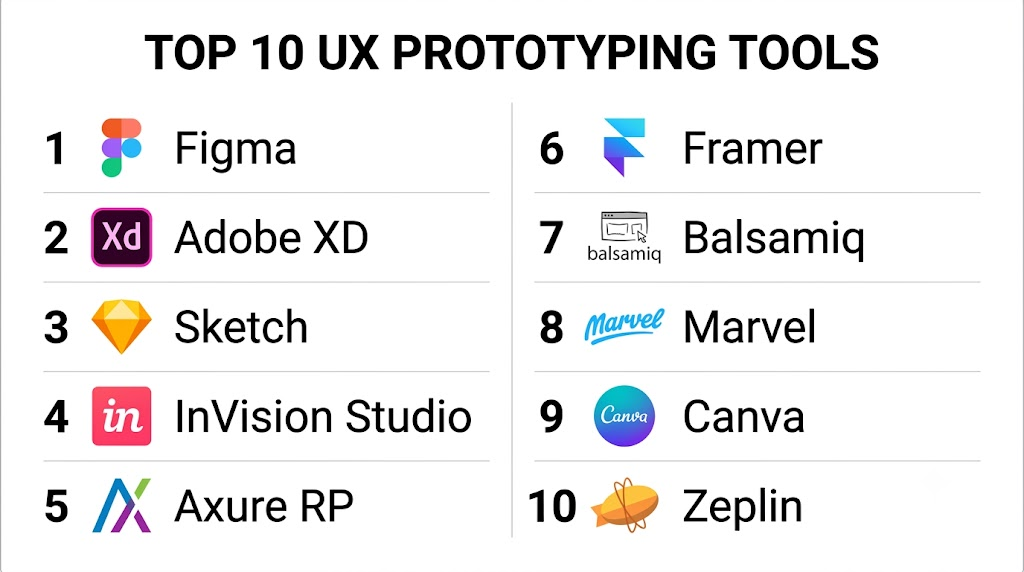
Top 10 UX Prototyping Tools
1- Figma
Short description:
Figma is a cloud-based design and prototyping tool enabling real-time collaboration. Teams can build interactive prototypes, maintain component libraries, and preview designs across multiple devices. It is ideal for designers, product managers, and developers.
Key Features
- Vector-based design and interactive prototyping
- Real-time collaboration and commenting
- Component libraries and design tokens
- Cross-platform previews
- Version control and history
- Plugin ecosystem
- Integration with analytics and project management tools
Pros
- Cloud-based with seamless collaboration
- Strong component and design system support
- Multi-device preview for rapid testing
Cons
- Performance may lag with very large files
- Advanced features require subscription plans
Platforms / Deployment
Web / macOS / Windows / Cloud
Security & Compliance
SSO, MFA, encryption, GDPR compliant
Integrations & Ecosystem
- Jira, Slack, GitHub
- CI/CD pipelines for design tokens
- Third-party plugins
Support & Community
Extensive documentation, tutorials, and community forums
2- Adobe XD
Short description:
Adobe XD provides vector-based design, interactive prototypes, and component libraries. It integrates with Adobe Creative Cloud, allowing teams to create, share, and iterate prototypes efficiently.
Key Features
- Interactive prototypes and auto-animate transitions
- Shared component libraries
- Responsive design and grid layouts
- Cloud-based collaboration
- Version history tracking
- Plugin ecosystem
- Integration with other Adobe tools
Pros
- Strong ecosystem integration
- Supports interactive animations and micro-interactions
- Cloud collaboration and file sharing
Cons
- Requires Creative Cloud subscription for advanced features
- Smaller plugin marketplace than Figma
Platforms / Deployment
macOS / Windows / Cloud
Security & Compliance
SSO, encryption, audit logs
Integrations & Ecosystem
- Adobe Creative Cloud
- Jira, Slack
- Third-party plugins
Support & Community
Documentation, tutorials, forums
3- Sketch
Short description:
Sketch is a vector-based design tool for macOS, focusing on UI/UX design and prototyping. It offers reusable components, symbol libraries, and integration with developer tools.
Key Features
- Shared symbols and component libraries
- Vector design tools
- Basic interactive prototyping
- Plugin ecosystem for extended capabilities
- Version control and collaboration
- Cross-platform export options
- Developer handoff integrations
Pros
- Efficient component management
- Mature plugin ecosystem
- Popular among macOS designers
Cons
- Limited native collaboration without third-party tools
- macOS-only
Platforms / Deployment
macOS / Cloud
Security & Compliance
Varies / N/A
Integrations & Ecosystem
- Zeplin, Abstract
- Jira, Slack
- Plugin ecosystem
Support & Community
Documentation, community forums
4- InVision Studio
Short description:
InVision Studio provides advanced prototyping with animations, component reuse, and responsive layouts. It integrates with InVision Cloud for collaboration and feedback.
Key Features
- High-fidelity interactive prototypes
- Advanced animations and transitions
- Component library management
- Cross-platform previews
- Version control
- Developer handoff tools
- Collaboration and feedback tools
Pros
- Rich animation support
- Collaborative prototyping
- Strong design system integration
Cons
- Learning curve for advanced features
- Resource-intensive for large projects
Platforms / Deployment
macOS / Windows / Cloud
Security & Compliance
SSO, MFA, encryption
Integrations & Ecosystem
- Jira, Slack
- GitHub for developer handoff
- Plugin marketplace
Support & Community
Documentation, onboarding guides, community forums
5- Axure RP
Short description:
Axure RP supports high-fidelity, interactive prototypes with conditional logic, variables, and dynamic content, ideal for complex workflows and enterprise UX testing.
Key Features
- Conditional logic and dynamic interactions
- High-fidelity interactive prototypes
- Component libraries
- Team collaboration tools
- Version control and rollback
- Cross-device preview
- Developer handoff
Pros
- Supports complex workflows
- Enterprise-grade prototyping
- Comprehensive component management
Cons
- Steep learning curve
- Less suitable for lightweight prototypes
Platforms / Deployment
Windows / macOS / Cloud
Security & Compliance
Varies / N/A
Integrations & Ecosystem
- Jira, Slack
- Sketch/Photoshop import
- Versioning plugins
Support & Community
Documentation, webinars, community forums
6- Framer
Short description:
Framer allows designers to create interactive prototypes with React integration, advanced animations, and real-time collaboration. It supports component libraries and design system integration.
Key Features
- Interactive prototyping with animations
- React component integration
- Real-time collaboration
- Version control
- Cross-device preview
- Plugin ecosystem
- Component libraries
Pros
- High-quality animations and interactions
- Developer-friendly for React-based workflows
- Rapid iteration
Cons
- Learning curve for advanced features
- Cloud-based collaboration dependency
Platforms / Deployment
Web / macOS / Windows / Cloud
Security & Compliance
SSO, encryption, MFA
Integrations & Ecosystem
- GitHub
- Figma import
- Design system libraries
Support & Community
Tutorials, documentation, community forums
7- Balsamiq
Short description:
Balsamiq provides low-fidelity wireframing for rapid UX prototyping, enabling teams to visualize ideas and gather feedback quickly before development.
Key Features
- Drag-and-drop wireframes
- Pre-built UI components
- Collaboration and commenting
- Export and sharing tools
- Version control
- Cloud and desktop deployment
Pros
- Rapid low-fidelity prototyping
- Easy for beginners and non-designers
- Lightweight and fast
Cons
- Limited high-fidelity support
- No advanced interactions or animations
Platforms / Deployment
Web / Windows / macOS / Cloud
Security & Compliance
Varies / N/A
Integrations & Ecosystem
- Jira, Confluence
- Export to PDF/PNG
- Team collaboration features
Support & Community
Documentation, tutorials, customer support
8- Marvel
Short description:
Marvel enables designers to create interactive prototypes and manage design systems, providing collaboration, versioning, and responsive testing.
Key Features
- Interactive prototyping
- Component libraries and design tokens
- Real-time collaboration
- Developer handoff
- Versioning and history
- Responsive previews
- User testing integration
Pros
- Intuitive interface
- Rapid prototyping and iteration
- Design system support
Cons
- Limited advanced animation capabilities
- Paid plans required for full features
Platforms / Deployment
Web / macOS / Windows / Cloud
Security & Compliance
SSO, MFA, encryption
Integrations & Ecosystem
- Jira, Slack
- Figma import/export
- User testing tools
Support & Community
Tutorials, documentation, forums
9- Canva
Short description:
Canva is a simple UI prototyping tool ideal for small teams or non-designers, offering templates, brand kits, and cloud-based collaboration for rapid prototypes.
Key Features
- Drag-and-drop UI design
- Component templates and reusable assets
- Branding kits and style guides
- Real-time collaboration
- Version control and history
- Export options
Pros
- Easy to use for beginners
- Fast template-based prototyping
- Cloud-based collaboration
Cons
- Limited interactivity and high-fidelity features
- Not ideal for complex UX workflows
Platforms / Deployment
Web / iOS / Android / Cloud
Security & Compliance
SSO, encryption, GDPR compliance
Integrations & Ecosystem
- Slack, Google Workspace
- Cloud storage
- Figma/Sketch import
Support & Community
Documentation, tutorials, community
10- Zeplin
Short description:
Zeplin bridges the gap between designers and developers by generating specifications, style guides, and assets from interactive prototypes.
Key Features
- Design-to-code handoff
- Style guides and component documentation
- Versioning and project management
- Team collaboration
- Integration with Figma, Sketch, Adobe XD
- Asset export tools
Pros
- Smooth developer handoff
- Clear component specifications
- Multi-platform support
Cons
- Not a design creation tool
- Paid subscription for teams
Platforms / Deployment
Web / macOS / Windows / Cloud
Security & Compliance
SSO, MFA, encryption
Integrations & Ecosystem
- Figma, Sketch, Adobe XD
- Slack, Jira
- CI/CD workflows
Support & Community
Documentation, onboarding, forums
Comparison Table (Top 10)
| Tool Name | Best For | Platform(s) Supported | Deployment | Standout Feature | Public Rating |
|---|---|---|---|---|---|
| Figma | Collaborative prototyping | Web/macOS/Windows | Cloud | Real-time component libraries | N/A |
| Adobe XD | Adobe ecosystem | macOS/Windows | Cloud | Interactive prototypes | N/A |
| Sketch | macOS design teams | macOS | Cloud/Self-hosted | Symbol & component management | N/A |
| InVision Studio | Animations & prototypes | macOS/Windows | Cloud | High-fidelity interactions | N/A |
| Axure RP | Complex workflows | Windows/macOS | Cloud | Conditional logic & dynamic content | N/A |
| Framer | React-based prototypes | Web/macOS/Windows | Cloud | Interactive components | N/A |
| Balsamiq | Low-fidelity wireframes | Web/Windows/macOS | Cloud | Rapid prototyping | N/A |
| Marvel | Design system & prototyping | Web/macOS/Windows | Cloud | Responsive previews & user testing | N/A |
| Canva | Template-based prototypes | Web/iOS/Android | Cloud | Easy drag-and-drop design | N/A |
| Zeplin | Developer handoff | Web/macOS/Windows | Cloud | Design-to-code workflow | N/A |
Evaluation & Scoring of UX Prototyping Tools
| Tool Name | Core (25%) | Ease (15%) | Integrations (15%) | Security (10%) | Performance (10%) | Support (10%) | Value (15%) | Weighted Total |
|---|---|---|---|---|---|---|---|---|
| Figma | 9.5 | 8.5 | 9.0 | 8.5 | 9.0 | 8.5 | 8.0 | 8.80 |
| Adobe XD | 8.5 | 8.0 | 8.5 | 8.0 | 8.5 | 8.0 | 7.5 | 8.15 |
| Sketch | 8.0 | 8.0 | 7.5 | 7.5 | 8.0 | 7.5 | 7.5 | 7.80 |
| InVision Studio | 8.0 | 7.5 | 8.0 | 7.5 | 8.0 | 7.5 | 7.5 | 7.80 |
| Axure RP | 8.5 | 7.5 | 8.0 | 7.5 | 8.0 | 7.5 | 7.5 | 7.95 |
| Framer | 8.0 | 7.5 | 8.0 | 7.5 | 7.5 | 7.5 | 8.0 | 7.85 |
| Balsamiq | 7.5 | 8.5 | 7.0 | 7.0 | 7.5 | 7.0 | 8.0 | 7.65 |
| Marvel | 8.0 | 8.0 | 7.5 | 7.5 | 7.5 | 7.5 | 8.0 | 7.85 |
| Canva | 7.5 | 9.0 | 7.0 | 7.5 | 7.5 | 7.5 | 8.0 | 7.75 |
| Zeplin | 7.5 | 8.0 | 7.5 | 7.5 | 7.5 | 7.5 | 7.5 | 7.70 |
Interpretation: Scores above 8.5 are excellent for enterprise teams; 8.0–8.4 are strong mid-market solutions; below 8.0 suit small teams or specialized workflows.
Which UX Prototyping Tool Is Right for You?
Solo / Freelancer
Balsamiq, Canva, Framer for lightweight, fast prototyping.
SMB
Figma, Adobe XD, Marvel for collaboration and design system management.
Mid-Market
Figma, Zeplin, Framer for scalable libraries and multi-team workflows.
Enterprise
Figma, Adobe XD, InVision Studio for large-scale collaboration, governance, and complex prototypes.
Budget vs Premium
Balsamiq and Canva for cost-effective solutions; Figma, Adobe XD, and Zeplin for premium enterprise features.
Feature Depth vs Ease of Use
Advanced interactions: Axure RP, Framer, InVision Studio.
Rapid low-fidelity prototypes: Balsamiq, Canva, Marvel.
Integrations & Scalability
Enterprise teams should prioritize Figma, Zeplin, and Adobe XD for CI/CD, design system integration, and multi-project scalability.
Security & Compliance Needs
Enterprise tools like Figma Org Libraries, Zeplin, and InVision Studio offer SSO, MFA, and audit logs for secure access.
Frequently Asked Questions (FAQs)
1. What is a UX prototyping tool?
It is a platform that allows teams to create interactive prototypes to validate user flows and design concepts before full development.
2. Are these tools cloud-based?
Most offer cloud access with collaboration features; desktop apps are available for Sketch, Axure, and InVision Studio.
3. Can prototypes be tested across devices?
Yes, top tools allow previews on mobile, tablet, and desktop, supporting responsive design validation.
4. Do they support version control?
Yes, Figma, Adobe XD, Axure RP, and Zeplin track changes and allow rollback to previous versions.
5. Can these tools integrate with developer workflows?
Tools like Figma, Zeplin, Framer, and Axure integrate with GitHub, Jira, and CI/CD pipelines for seamless handoff.
6. Are AI features available?
Yes, modern tools offer AI-assisted suggestions for layouts, components, and interaction patterns.
7. Are they suitable for small teams?
Yes, Balsamiq, Canva, and Marvel are ideal for solo designers or small teams needing quick prototyping.
8. Can prototypes be interactive?
Figma, Adobe XD, Framer, and InVision Studio support interactive, high-fidelity prototypes with transitions and animations.
9. How secure are these platforms?
Enterprise-grade tools provide SSO, encryption, MFA, and GDPR compliance; open-source solutions depend on deployment security.
10. How often should prototypes be updated?
Prototypes should be continuously updated during design sprints and prior to user testing.
Conclusion
UX Prototyping Tools are critical for accelerating design validation, ensuring usability, and improving product outcomes. Figma and Adobe XD lead in collaborative, interactive prototyping, while Framer and InVision Studio offer advanced animations. Balsamiq and Canva provide fast low-fidelity solutions, and Zeplin ensures smooth handoff to developers. Teams should evaluate their scale, collaboration requirements, and integrations, then pilot 2–3 platforms to determine the best fit. Selecting the right UX prototyping tool ensures efficient design workflows, consistent user experiences, and faster time-to-market.
