What is Chef and Its Use Cases?
In the world of DevOps and IT automation, Chef stands out as a powerful tool for managing infrastructure as code (IaC). It simplifies the automation of complex processes like configuration management, application deployment, and infrastructure provisioning, ensuring consistency and reliability across environments. Chef’s robust architecture and flexibility make it a go-to solution for organizations looking to scale their IT operations effectively.
Chef enables IT teams to codify infrastructure configurations, allowing them to manage resources programmatically. With its declarative and procedural approaches, Chef helps organizations bridge the gap between development and operations.
What is Chef?
Chef is an open-source automation platform designed to manage and configure IT infrastructure through code. It provides a framework for defining infrastructure resources, such as servers, networks, and storage, using a domain-specific language (DSL) based on Ruby.
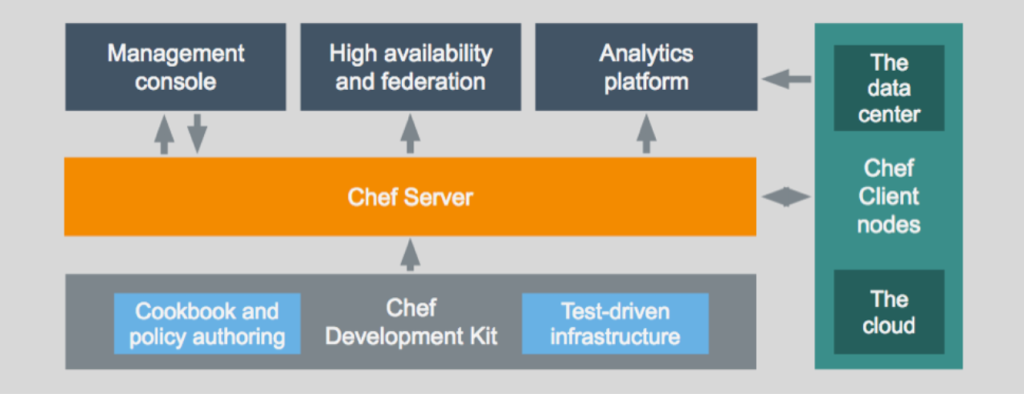
Chef’s client-server architecture ensures that configurations are consistently applied across environments, whether on-premises, in the cloud, or in hybrid setups. Its flexibility and scalability make it ideal for modern, dynamic IT infrastructures.
Top 10 Use Cases of Chef
- Configuration Management
Automate the setup and configuration of servers, ensuring consistent environments across development, testing, and production. - Infrastructure as Code (IaC)
Define and manage infrastructure programmatically, enabling reproducibility and scalability. - Application Deployment
Automate complex application deployments, including dependency management and configuration. - Continuous Delivery (CD)
Integrate Chef with CI/CD pipelines to automate testing, deployments, and rollbacks. - Cloud Resource Management
Manage and provision cloud resources across platforms like AWS, Azure, and Google Cloud. - Compliance Automation
Enforce compliance with security and operational standards by continuously monitoring and remediating configurations. - Patch Management
Automate the application of security patches and updates to systems, reducing vulnerabilities. - Hybrid Cloud Management
Orchestrate resources across hybrid cloud environments, maintaining consistency and performance. - DevOps Integration
Integrate Chef with tools like Jenkins, Docker, and Kubernetes to streamline DevOps workflows. - Disaster Recovery
Automate backup processes and ensure rapid recovery with reproducible infrastructure configurations.
What Are the Features of Chef?
- Infrastructure as Code
Use Chef recipes and cookbooks to define infrastructure resources programmatically. - Idempotency
Ensures configurations are applied only when needed, preventing redundant changes. - Platform Independence
Supports multiple operating systems, including Linux, Windows, and macOS, as well as cloud platforms. - Extensible Cookbooks
Access a vast library of pre-built cookbooks on the Chef Supermarket to simplify automation tasks. - Node Management
Manage thousands of nodes efficiently with Chef’s client-server architecture. - Customizable Workflows
Combine declarative and procedural programming styles to tailor workflows to specific needs. - Integration Ecosystem
Integrates seamlessly with popular DevOps and IT tools, including Jenkins, Ansible, and Terraform. - Automation Policies
Define policies for enforcing compliance, security, and operational standards. - Real-Time Reporting
Monitor infrastructure changes and configurations with Chef Automate’s reporting features. - Scalability
Built to handle large-scale infrastructures, making it suitable for enterprises.
How Chef Works and Architecture
How It Works:
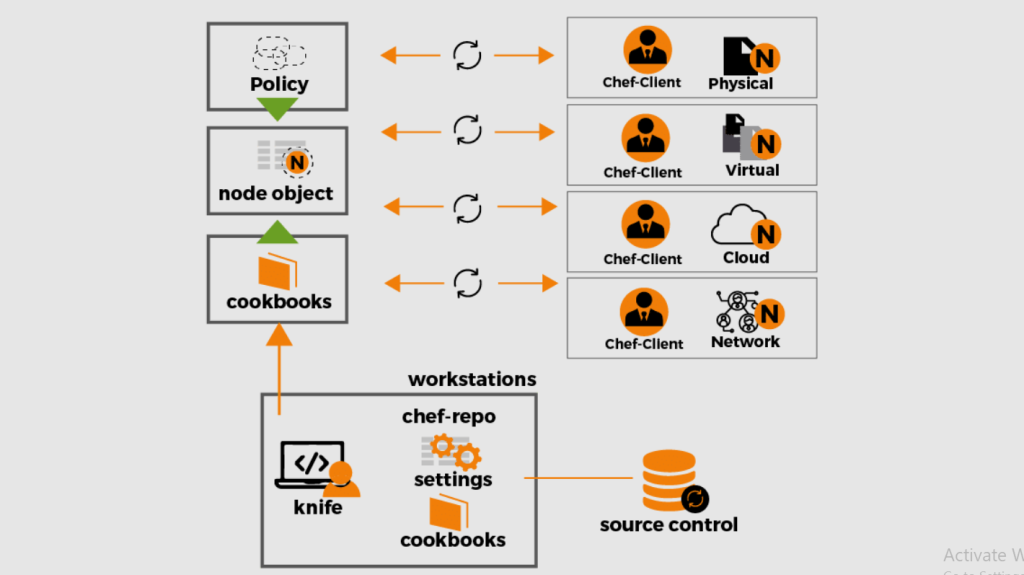
Chef operates on a client-server model, where a central Chef server stores cookbooks and policies, and Chef clients on managed nodes apply these configurations. A workstation is used for creating and testing cookbooks before deploying them to the server.
Architecture Overview:
- Workstation:
The environment where infrastructure code (cookbooks and recipes) is written, tested, and uploaded to the Chef server. - Chef Server:
Acts as the central repository for cookbooks, policies, and metadata, managing communication with nodes. - Chef Client:
Installed on managed nodes to fetch configurations from the Chef server and apply them. - Cookbooks and Recipes:
Define the desired state of infrastructure resources in reusable units of code. - Knife Command Line Tool:
Used for interacting with the Chef server, managing nodes, and automating tasks.
How to Install Chef
Steps to Install Chef on Linux:
1. Download the Chef Workstation:
Visit the Chef website and download the workstation package.
curl -L https://omnitruck.chef.io/install.sh | sudo bash2. Install the Chef Client:
Use the same installer to set up the Chef client on managed nodes.
3. Set Up the Chef Server:
Download and install the Chef server package, then configure it with the necessary SSL certificates and admin users.
4. Bootstrap a Node:
Use the knife tool to connect a node to the Chef server.
knife bootstrap <node_ip> -x <username> -P <password> --sudo5. Upload Cookbooks:
Create and upload your cookbooks to the Chef server.
knife cookbook upload <cookbook_name>Basic Tutorials of Chef: Getting Started
1. Creating Your First Cookbook
Generate a cookbook:
chef generate cookbook <cookbook_name>Define a recipe to install a package:
package 'apache2' do
  action :install
end
2. Uploading the Cookbook to the Server
Upload the cookbook to the Chef server:
knife cookbook upload <cookbook_name>3. Running the Recipe on a Node
Apply the cookbook to a node:
knife node run_list add <node_name> "recipe[<cookbook_name>]"
chef-client
4. Using Pre-Built Cookbooks
Download a cookbook from Chef Supermarket and integrate it into your workflow.
5. Monitoring Changes
Use Chef Automate to track changes and generate reports on configurations.
