Introduction
Sleep tracking apps are tools that help individuals monitor, analyze, and improve their sleep patterns by using phone sensors, wearable integration, or bedtime routines to record sleep duration, cycles, interruptions, and quality metrics. In , with growing awareness of sleep’s critical role in mental health, productivity, chronic disease prevention, and overall wellbeing, these apps are widespread across consumer, clinical, and lifestyle contexts. They often pair with wearables to provide actionable insights, coaching, and personalized recommendations that support healthier sleep behaviors.
Real‑world use cases include:
- Individuals with erratic sleep schedules identifying patterns and causes of sleep disruption.
- Shift workers and remote professionals tracking circadian rhythm challenges.
- Athletes and fitness enthusiasts optimizing recovery through improved sleep data.
- Patients managing insomnia, anxiety, or chronic conditions with structured tracking for clinical feedback.
- Parents monitoring children’s sleep habits and bedtime consistency.
What buyers should evaluate:
- Depth and accuracy of sleep tracking metrics
- Integration with wearables and health platforms
- Personalized recommendations and coaching
- Smart alarms and circadian alignment features
- Sleep environment tracking (noise, light, temperature)
- Data privacy, security, and compliance
- Usability and daily habit support
- Offline functionality and battery impact
- Reporting and trend visualization
- Multi‑user or family features
Best for: Individuals, wellness seekers, chronic condition trackers, fitness enthusiasts, and families focused on improving sleep quality and consistency.
Not ideal for: Users seeking clinical diagnosis without professional oversight or purely casual users uninterested in detailed metrics.
Key Trends in Sleep Tracking Apps
- AI‑assisted sleep insights and personalized coaching that adapt recommendations based on long‑term patterns.
- Wearable and sensor integration delivering heart rate variability (HRV), respiratory metrics, and movement data.
- Biofeedback and smart alarm features syncing with sleep cycles for optimal wake times.
- Sleep environment tracking using sound, light, and temperature data.
- Cross‑platform and wearable‑agnostic interoperability for broad hardware compatibility.
- Habit formation and behavior nudges to promote consistent routines.
- Privacy‑first data practices with user control over metrics and sharing.
- Multi‑user and family dashboards for household sleep monitoring.
- Offline data recording and syncing when connectivity varies.
- Integration with broader wellbeing ecosystems (stress, mindfulness, activity, diet).
How We Selected These Tools (Methodology)
- User adoption and mindshare in consumer and wearable marketplaces.
- Feature breadth and depth including tracking accuracy, analytics, and coaching capabilities.
- Integration capability with wearables and health platforms.
- Security posture and privacy practices for sensitive health data.
- Measurement precision validated against research or user feedback.
- Suitability across segments (casual users, athletes, chronic condition monitoring).
- Innovation signals like AI personalization or biofeedback.
- Support, documentation, and educational resources.
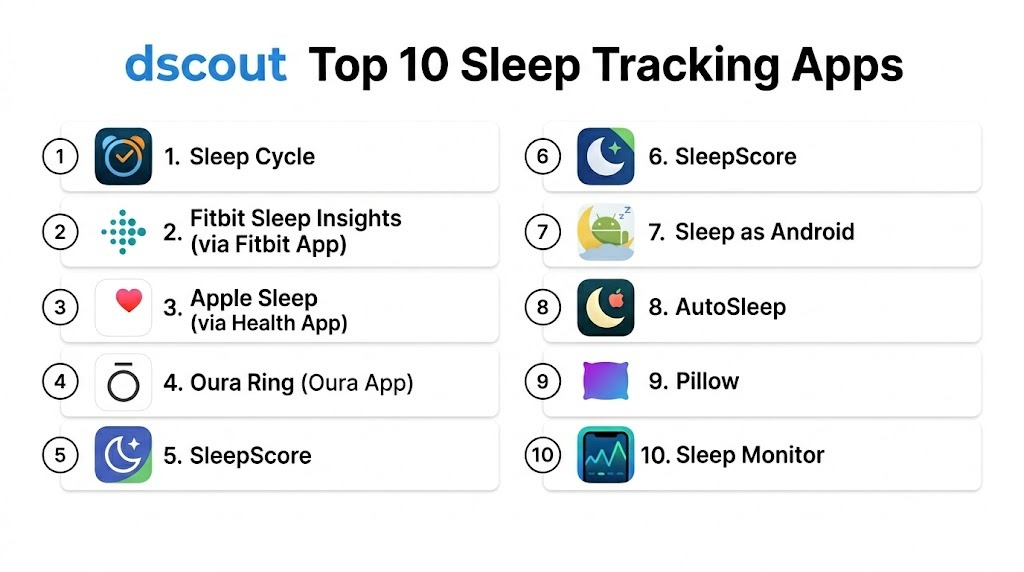
Top 10 Sleep Tracking Apps
1 — Sleep Cycle
Short description: Sleep Cycle is a smart alarm and sleep analysis app that measures sleep phases using movement and sound, offering personalized insights and sleep trend visualizations. It aims to wake users at optimal moments within their sleep cycles.
Key Features
- Smart alarm clock syncing with sleep phases
- Sleep phase detection using sensors
- Daily and long‑term sleep analysis
- Snore detection and trend logs
- Personalized sleep insights
- Integration with health platforms
- Sleep notes and mood tracking
Pros
- Smart alarm minimizes groggy wakeups
- Actionable analytics with trend history
- Easy setup with intuitive UI
Cons
- Some features locked behind premium subscription
- Accuracy varies without wearables
- Requires phone placement near bed
Platforms / Deployment
- iOS, Android
- Cloud / App
Security & Compliance
- Not publicly stated
Integrations & Ecosystem
Integrated with health platforms for holistic tracking.
- Health data sync
- Sleep trend export
- API Varies / N/A
Support & Community
- Knowledge base articles
- FAQs
- Email support
2 — Fitbit Sleep Insights (via Fitbit App)
Short description: Fitbit Sleep Insights is part of the Fitbit ecosystem, delivering in‑depth sleep tracking, sleep stage analysis (light, deep, REM), and personalized sleep scores using wearable biometric data.
Key Features
- Sleep stage analysis with wearables
- Sleep score and trend dashboards
- Heart rate and HRV correlation
- Smart wake and reminders
- Habit suggestions
- Integration with activity, stress, and fitness logs
- Guided breathing sessions
Pros
- Biometric‑enhanced tracking using Fitbit wearables
- Deep sleep stage insights
- Integrated wellness analytics
Cons
- Requires Fitbit device for full features
- Limited standalone app functionality
- Subscription adds advanced metrics
Platforms / Deployment
- iOS, Android, Web
- Cloud / Wearable integration
Security & Compliance
- Not publicly stated
Integrations & Ecosystem
Part of a broader health ecosystem.
- Fitbit wearables
- Health platform sync
- Activity and stress tracking
Support & Community
- Fitbit support channels
- User forums
- Tutorials
3 — Apple Sleep (via Health App)
Short description: Apple Sleep is built into the iOS Health ecosystem, tracking sleep duration and consistency with Apple Watch integration, delivering bedtime routines and trend insights.
Key Features
- Sleep duration and consistency tracking
- Wind‑down routines with scheduled modes
- Apple Watch biometrics for sleep phases
- Integration with Health app metrics
- Sleep patterns visualization
Pros
- Tight integration with Apple ecosystem
- Easy setup and low friction
- No separate subscription
Cons
- Sleep stage metrics limited without Apple Watch
- Less coaching or personalization
- Apple hardware required
Platforms / Deployment
- iOS, watchOS
- Cloud / Device
Security & Compliance
- Varies / N/A
Integrations & Ecosystem
Deeply integrated with Apple Health.
- Health metrics aggregation
- Wind‑down automation
- Sleep schedule notifications
Support & Community
- Apple support
- Help documentation
- Community discussions
4 — Oura Ring (Oura App)
Short description: Oura Ring tracks sleep with advanced biometric sensors, capturing sleep stages, total restfulness, HRV, temperature, and recovery metrics, offering holistic insights into sleep quality and readiness.
Key Features
- Sleep staging and duration
- HRV and readiness scores
- Body temperature and recovery data
- Sleep quality analytics
- Personalized recommendations
- Daily and long‑term trend reporting
Pros
- Highly accurate biometric tracking
- Comprehensive recovery insights
- Minimal daily effort
Cons
- Requires Oura Ring wearable
- Premium subscription for advanced insights
- Investment cost higher than average apps
Platforms / Deployment
- iOS, Android
- Cloud / Wearable
Security & Compliance
- Not publicly stated
Integrations & Ecosystem
- Wearable ecosystem with wellness tracking
- Sync with health platforms
- Export metrics
Support & Community
- Oura support tiers
- Knowledge base
- Community forum
5 — SleepScore
Short description: SleepScore uses sonar technology via phone speakers and microphones to monitor sleep cycles and provide personalized insights and evidence‑based recommendations to improve sleep quality.
Key Features
- Contactless monitoring using sonar
- Sleep stage detection
- Personalized sleep improvement plans
- Sleep score metrics
- Trend reports
- Tips and expert insights
Pros
- No wearables required
- Science‑based monitoring
- Actionable improvement suggestions
Cons
- Accuracy varies by environment and positioning
- Requires phone near bed
- Premium subscription for full recommendations
Platforms / Deployment
- iOS, Android
- Cloud
Security & Compliance
- Not publicly stated
Integrations & Ecosystem
- Sync export
- Recommendations inbox
- Integration Varies / N/A
Support & Community
- FAQs
- Support articles
- Email help
6 — Sleep as Android
Short description: Sleep as Android is a feature‑rich Android app providing sleep cycle tracking, smart alarms, snoring detection, wearable integration, and detailed analytics with open data export.
Key Features
- Sleep cycle analytics
- Smart alarms and gentle wake
- Snore detection using microphone
- Wearable support (Fitbit, Wear OS)
- Dream journal
- Sleep graphs and history
- Open data export
Pros
- Open ecosystem and exports
- Customizable features
- Strong wearable support
Cons
- Android only
- Advanced setup for full accuracy
- Interface feels utilitarian
Platforms / Deployment
- Android
- Cloud / App
Security & Compliance
- Not publicly stated
Integrations & Ecosystem
- Wearable compatibility
- Open data export
- Health platform sync
Support & Community
- Documentation
- User forums
- Tutorials
7 — AutoSleep
Short description: AutoSleep uses Apple Watch data to automatically track sleep without manual start/stop, providing deep insights into sleep stages, quality, and consistency.
Key Features
- Automatic sleep tracking with Apple Watch
- Sleep stage charts and scoring
- Heart rate and HRV insights
- Sleep history and trends
- Sleep quality recommendations
- Watch app for quick glance
Pros
- Automatic tracking with minimal input
- Strong Apple Watch integration
- Deep analytics
Cons
- Apple ecosystem dependent
- Less coaching guidance
- Subscription for advanced features
Platforms / Deployment
- iOS, watchOS
- Cloud / App
Security & Compliance
- Not publicly stated
Integrations & Ecosystem
- Apple Health sync
- Watch complications
- Trend export
Support & Community
- FAQs
- Help articles
- Apple user community
8 — Pillow
Short description: Pillow pairs with Apple devices to provide sleep stage detection, heart rate monitoring, dream analysis, and automatic tracking with optional audio recordings.
Key Features
- Sleep stage and duration analytics
- Heart rate tracking
- Dream and sound recording
- Automatic or manual session start
- Trends and insights dashboard
Pros
- Flexible tracking modes
- Integration with Apple Watch
- Sound detection for snore patterns
Cons
- Best with Apple Watch
- Premium needed for full features
- Less robust coaching
Platforms / Deployment
- iOS, watchOS
- Cloud / App
Security & Compliance
- Not publicly stated
Integrations & Ecosystem
- Apple Health
- Trend sync
- Audio features
Support & Community
- Help documentation
- Tutorials
- User forums
9 — Sleep Monitor
Short description: Sleep Monitor uses phone sensors to track sleep cycles and snoring patterns while providing bedtime reminders and a simple sleep score.
Key Features
- Sleep cycle detection
- Snore tracking
- Simple sleep score
- Bedtime reminders
- Trend history
Pros
- Straightforward interface
- No wearables required
- Useful for basic tracking
Cons
- Less detailed analytics
- Environment sensitivity
- Ads in free tier
Platforms / Deployment
- iOS, Android
- Cloud / App
Security & Compliance
- Not publicly stated
Integrations & Ecosystem
- Sleep logs export
- Basic reminders
- Sensor detection
Support & Community
- FAQs
- Help docs
- In‑app support
10 — Relax Melodies (Now BetterSleep)
Short description: BetterSleep combines sleep tracking with customizable soundscapes, bedtime stories, ambient mixes, and sleep habit recommendations to enhance sleep onset and duration.
Key Features
- Soundscapes and backgrounds for sleep
- Bedtime stories and ambient mixes
- Melody mixing tool
- Sleep duration tracking
- Habit reminders
- Personalized playlists
Pros
- Strong audio library
- Habit support for sleep routine
- Engaging sound customization
Cons
- Tracking less detailed than dedicated apps
- Subscription needed for full sound library
- Pure audio focus over analytics
Platforms / Deployment
- iOS, Android, Web
- Cloud
Security & Compliance
- Not publicly stated
Integrations & Ecosystem
- Sleep logs
- Playlist sharing
- Custom mixes
Support & Community
- Tutorials
- Help docs
- FAQ support
Comparison Table (Top 10)
| Tool Name | Best For | Platforms Supported | Deployment | Standout Feature | Public Rating |
|---|---|---|---|---|---|
| Sleep Cycle | Smart alarm & trend analysis | iOS, Android | App / Cloud | Smart wake & trend insights | N/A |
| Fitbit Sleep | Biometric wearable insights | iOS, Android, Web | Cloud | Wearable‑enhanced sleep scoring | N/A |
| Apple Sleep | Apple ecosystem cohesion | iOS, watchOS | Cloud | Health integration | N/A |
| Oura Ring | Advanced biometric recovery | iOS, Android | Cloud | Recovery & readiness insight | N/A |
| SleepScore | Contactless monitoring | iOS, Android | Cloud | Sonar sleep staging | N/A |
| Sleep as Android | Android open ecosystem | Android | Cloud / App | Wearable support + export | N/A |
| AutoSleep | Auto Apple Watch tracking | iOS, watchOS | App / Cloud | Automatic tracking | N/A |
| Pillow | Sound + heart rate tracking | iOS, watchOS | App / Cloud | Audio & sleep stage combo | N/A |
| Sleep Monitor | Simple basic tracking | iOS, Android | Cloud / App | Straightforward sleep scoring | N/A |
| BetterSleep | Sleep onset support with audio | iOS, Android, Web | Cloud | Customized soundscapes | N/A |
Evaluation & Scoring of Sleep Tracking Apps
| Tool Name | Core (25%) | Ease (15%) | Integrations (15%) | Security (10%) | Performance (10%) | Support (10%) | Value (15%) | Weighted Total |
|---|---|---|---|---|---|---|---|---|
| Sleep Cycle | 8 | 8 | 7 | 7 | 8 | 8 | 8 | 7.9 |
| Fitbit Sleep | 9 | 8 | 9 | 7 | 9 | 8 | 7 | 8.4 |
| Apple Sleep | 8 | 9 | 8 | 7 | 8 | 7 | 7 | 8.0 |
| Oura Ring | 9 | 7 | 8 | 7 | 9 | 8 | 7 | 8.1 |
| SleepScore | 8 | 7 | 6 | 7 | 8 | 7 | 8 | 7.5 |
| Sleep as Android | 8 | 7 | 7 | 7 | 8 | 7 | 8 | 7.6 |
| AutoSleep | 8 | 8 | 8 | 7 | 8 | 7 | 7 | 7.7 |
| Pillow | 8 | 7 | 7 | 7 | 8 | 7 | 7 | 7.4 |
| Sleep Monitor | 7 | 8 | 5 | 7 | 7 | 6 | 7 | 6.8 |
| BetterSleep | 7 | 8 | 6 | 7 | 7 | 7 | 8 | 7.5 |
Higher totals reflect broader tracking capabilities, ecosystem integration, usability, and value for improving sleep quality.
Which Sleep Tracking App Is Right for You?
Solo / Daily Users
- Sleep Cycle and Apple Sleep offer easy entry and actionable insights for consistent nightly tracking.
Fitness & Wellbeing Enthusiasts
- Fitbit Sleep and Oura Ring provide detailed biometric and recovery data when paired with wearables.
Android‑Focused Users
- Sleep as Android delivers strong feature depth and integration for Android devices.
Casual Tracking
- Sleep Monitor and BetterSleep provide simple scoring and audio support for basic awareness.
Habit and Behavior Focus
- Apps with coaching or habit nudges like SleepScore and AutoSleep help establish routines.
Audio & Sleep Onset Support
- BetterSleep excels with soundscapes and playlists to support falling asleep.
Frequently Asked Questions (FAQs)
1 — Do sleep tracking apps really help improve sleep?
They provide pattern awareness and habit insights, which can help users optimize routines, but coaching and behavior changes are essential for meaningful improvement.
2 — Which tracking method is most accurate?
Wearable biometric tracking (heart rate, movement) tends to be more accurate than phone‑only sensing, but methods vary by individual and device.
3 — Can these apps diagnose sleep disorders?
No. They provide insights and trends and are not replacements for clinical sleep studies or professional diagnosis.
4 — Do sleep apps work without wearables?
Yes. Apps like Sleep Cycle and SleepScore track sleep using phone sensors, though depth of data is limited compared to wearables.
5 — Are there features for tracking snoring?
Some apps offer snore detection, but environmental noise and positioning can affect accuracy.
6 — Can sleep data be shared with doctors?
Most apps allow export of sleep logs for review in health or clinical contexts.
7 — Is sleep tracking good for kids?
Some apps support family or multi‑user features, but parents should confirm safety and privacy practices.
8 — Do these apps offer offline tracking?
Apps with wearable integration and local sensor use can track offline, syncing later when connected.
9 — How do smart alarms work?
Smart alarms aim to wake users during light sleep stages within a chosen window to reduce grogginess.
10 — Are sleep coaching plans personalized?
Some apps use AI or trend analysis to tailor lifestyle and habit suggestions based on ongoing data.
Conclusion
Sleep tracking apps in are powerful tools for understanding and improving sleep. From Fitbit Sleep Insights and Oura Ring offering biometric depth, to Sleep Cycle and Sleep as Android providing approachable, sensor‑based tracking, there’s a solution for every level of engagement. Casual users can benefit from simple scoring apps, while tech enthusiasts and wellness advocates may invest in wearable‑enhanced sleep ecosystems. To choose the right app, shortlist 2–3 based on your device ecosystem, desired depth of data, and habit support, then test them consistently to uncover patterns that lead to healthier sleep.
