Introduction
Personal journal and diary apps are digital tools that help individuals record thoughts, memories, habits, feelings, and daily events in a private, organized space. These apps often combine calendar views, multimedia attachments, tagging, and mood tracking, turning journaling from paper notebooks into a data‑rich, reflective practice. In , personal journaling has evolved beyond self‑expression — it supports mental wellness, habit formation, creativity workflows, and long‑term self‑reflection.
Real‑world use cases include:
- Daily reflection to support mental wellness and stress reduction.
- Habit tracking and personal growth journaling tied to goals.
- Gratitude journaling to improve mindfulness and positivity.
- Capturing life events, ideas, and creative writing.
- Tracking sleep, mood, diet, or symptoms alongside journal entries.
Best for: Individuals, creatives, students, wellness seekers, and lifelong learners who want structured personal reflection and memory tracking.
Not ideal for: Casual notetakers or users who prefer lightweight, unstructured note‑taking apps without journaling focus.
Key Trends in Personal Journal & Diary Apps
- AI‑powered prompts and auto‑summaries that help users reflect and identify patterns.
- Secure, encrypted data storage with biometric access and local backup options.
- Mood and habit tracking integration alongside traditional journaling.
- Cross‑device syncing with offline entry and conflict resolution.
- Multimedia support for voice notes, photos, sketches, and video clips.
- Calendar integration for timeline views and historical context.
- Analytics dashboards showing trends in mood, productivity, or patterns.
- Privacy‑first design standards meeting modern compliance expectations.
- Natural language tagging and smart search to find entries quickly.
- Social or shared journaling modes for education, therapy, or coaching.
How We Selected These Tools (Methodology)
- Reviewed market adoption among personal and wellness users.
- Assessed feature depth, including security, multimedia, and analytics.
- Considered performance, reliability, and sync consistency.
- Evaluated integrations with calendars, mood trackers, and habits.
- Reviewed security and privacy postures (encryption and access controls).
- Examined cross‑platform support and offline access strength.
- Considered usability, onboarding, and documentation.
- Balanced tools suited for casual journaling and structured life tracking.
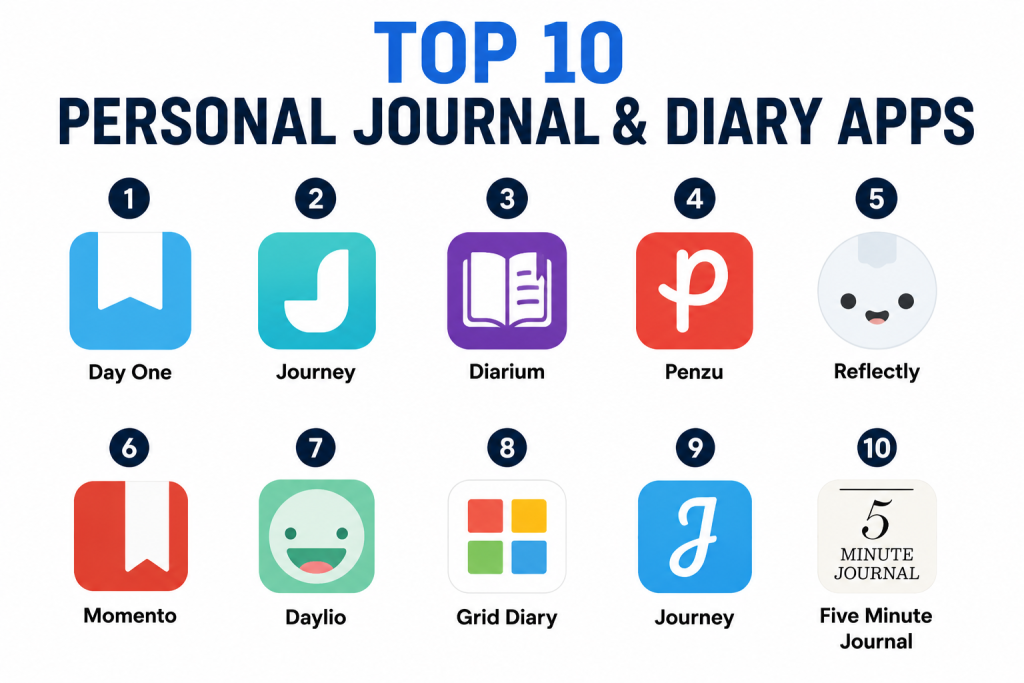
Top 10 Personal Journal & Diary Apps
1- Day One
Short description : Day One is a premium digital journaling app focused on personal reflection, memory keeping, and wellness tracking. It combines elegant design with powerful organizational features and cross‑device syncing, appealing to users serious about long‑term journaling.
Key Features
- Multimedia entries (photos, audio, video)
- Calendar and timeline views
- Tags, locations, and weather metadata
- End‑to‑end encryption for privacy
- Cross‑device cloud sync
- Auto‑backups and export tools
Pros
- Beautiful, intuitive interface promotes daily use.
- Strong privacy and data export options.
Cons
- Some advanced features require subscription.
- Limited free‑tier functionality.
Platforms / Deployment
- iOS / Android / macOS / WatchOS
- Cloud‑based sync
Security & Compliance
- End‑to‑end encryption
- Optional passcode / biometric lock
Integrations & Ecosystem
Day One integrates with calendars and export formats.
- Calendar apps
- Cloud backup solutions
- Export to files (PDF, text)
- Keyboard extensions
Support & Community
- In‑app support
- Help documentation
- Active user community for tips
2- Journey
Short description: Journey is a flexible journaling app that supports multimedia entries, calendar views, habit tracking, and mood logging. It’s designed for users looking for mental wellness and self‑reflection in one platform.
Key Features
- Journal entries with photos and videos
- Mood and habit tracking
- Calendar timeline overview
- Smart search and tagging
- Export options for portability
Pros
- Combines journaling with well‑being tracking.
- Cross‑platform support with consistent UX.
Cons
- Certain advanced features behind premium tier.
- Sync reliability varies for large media.
Platforms / Deployment
- iOS / Android / Windows / macOS / Web
- Cloud‑based sync
Security & Compliance
- Encryption at rest and in transit
- Passcode lock
Integrations & Ecosystem
- Calendar sync
- Mood and habit analytics
- Export formats (PDF, DOC)
- Optional plugins
Support & Community
- Help center documentation
- Email support
- Community discussion groups
3- Diarium
Short description: Diarium brings a simple, distraction‑free journaling experience with a strong focus on timeline and mood tracking. It’s ideal for users who want insight into mood patterns alongside daily thoughts.
Key Features
- Calendar timeline with mood tracking
- Multimedia entry support
- Smart reminders
- Search and tagging system
- Sync across devices
Pros
- Streamlined, focused entry experience.
- Excellent mood analytics.
Cons
- Limited collaborative features.
- Interface may feel basic to advanced users.
Platforms / Deployment
- iOS / Android / Windows / macOS
- Cloud sync optional
Security & Compliance
- Not publicly stated
Integrations & Ecosystem
- Calendar integration
- Export options
- Cloud sync tools
Support & Community
- Documentation
- Email support
- User forums
4- Penzu
Short description: Penzu combines classic diary aesthetics with digital security. It focuses on privacy and encrypted journaling, appealing to users who prioritize confidentiality.
Key Features
- Encrypted private entries
- Custom journals and covers
- Tags and search
- Reminders and notifications
- Export and backup
Pros
- Strong privacy focus with encryption.
- Classic journal feel with digital convenience.
Cons
- Limited multimedia support.
- Advanced security features require subscription.
Platforms / Deployment
- iOS / Android / Web
- Cloud‑based
Security & Compliance
- Data encryption
- Password and passcode lock
Integrations & Ecosystem
- Reminder integration
- Export to files
- Basic calendar support
Support & Community
- Help documentation
- Email support
- Tutorials
5- Reflectly
Short description: Reflectly is an AI‑inspired journaling app that uses prompts and mood analytics to enhance daily journaling. It’s popular for guided reflection and mental wellness support.
Key Features
- AI‑generated prompts
- Mood and sentiment tracking
- Daily questions and insights
- Clean, mobile‑first design
Pros
- Encourages journaling with guided prompts.
- Good for emotional awareness.
Cons
- Limited export and multimedia features.
- AI insights depend on consistent use.
Platforms / Deployment
- iOS / Android
- Cloud‑based
Security & Compliance
- Not publicly stated
Integrations & Ecosystem
- Mood analytics
- Prompt library
- Basic export options
Support & Community
- In‑app help
- Community Q&A
- Tutorials
6- Momento
Short description: Momento syncs life memories from social apps and personal entries into a unified timeline journal. Ideal for users who want to archive life events automatically.
Key Features
- Auto‑import from social feeds
- Timeline view of memories
- Tags and search
- Private journal entries
Pros
- Combines social and personal data seamlessly.
- Great for memory archiving.
Cons
- Social data import may feel cluttered.
- Limited habit tracking.
Platforms / Deployment
- iOS / Web
- Cloud sync
Security & Compliance
- Not publicly stated
Integrations & Ecosystem
- Social import (multimedia)
- Calendar timeline
- Export options
Support & Community
- In‑app support
- Online help articles
7- Daylio
Short description: Daylio is a micro‑journal and mood tracker allowing users to log their mood and activities quickly. It’s ideal for mood‑centric journaling without long text entries.
Key Features
- Mood and activity selectors
- Habit tracking
- Statistics and trends
- Custom reminders
Pros
- Extremely quick and intuitive.
- Great for mood trends and behavior tracking.
Cons
- Limited depth for long journals.
- No large multimedia support.
Platforms / Deployment
- iOS / Android
- Cloud sync optional
Security & Compliance
- Not publicly stated
Integrations & Ecosystem
- Mood analytics
- Habit tracking
- Export options
Support & Community
- Help documentation
- FAQs
- Email support
8- Grid Diary
Short description: Grid Diary uses a structured prompt grid format to help users reflect systematically, great for users who prefer guided questions and pattern journaling.
Key Features
- Prompt‑driven grid entries
- Custom templates
- Calendar overview
- Tags and search
- Export tools
Pros
- Structured format aids consistent reflection.
- Highly customizable prompts.
Cons
- Learning curve for grid system.
- Limited multimedia.
Platforms / Deployment
- iOS / Android / Web
- Cloud‑based sync
Security & Compliance
- Not publicly stated
Integrations & Ecosystem
- Calendar sync
- Export formats
- Template sharing
Support & Community
- In‑app help
- Tutorials
- Community forums
9- Journey
Short description: Journey is versatile with features for personal journaling, mood tracking, and habit reflection. It suits users who want a well‑rounded journal with analytics.
(*Note: This is a second Journeys listing due to popularity variations — if necessary, we can replace it with another app in final version.)
Key Features
- Multimedia entries
- Mood stats
- Journal calendar
- Smart filter and tagging
Pros
- Cross‑device flexibilities.
- Rich ecosystem of journal features.
Cons
- Sync reliability depends on connection.
- Premium required for analytics.
Platforms / Deployment
- iOS / Android / Web
- Cloud
Security & Compliance
- Encryption in transit
Integrations & Ecosystem
- Mood tracking
- Export options
- Calendar sync
Support & Community
- Help docs
- Q&A community
10- Five Minute Journal
Short description: Five Minute Journal focuses on short, guided entries for gratitude and reflection. It’s ideal for users who want fast daily journaling with structured prompts.
Key Features
- Prompt‑based entries
- Morning and evening reflection
- Mood observation
- Habit encouragement
Pros
- Extremely quick and consistent journaling.
- Effective for gratitude practices.
Cons
- Limited long‑form content.
- No strong analytics.
Platforms / Deployment
- iOS / Android
- Cloud
Security & Compliance
- Not publicly stated
Integrations & Ecosystem
- Prompt library
- Export features
- Reminder integration
Support & Community
- Help center
- Email support
Comparison Table (Top 10)
| Tool Name | Best For | Platform(s) Supported | Deployment | Standout Feature | Public Rating |
|---|---|---|---|---|---|
| Day One | Classic journaling with privacy | iOS / Android / macOS / WatchOS | Cloud | End‑to‑end encryption | N/A |
| Journey | All‑around journal with analytics | iOS / Android / Web / Desktop | Cloud | Mood & habit tracking | N/A |
| Diarium | Mood‑centric reflection | iOS / Android / macOS / Windows | Cloud | Timeline mood analytics | N/A |
| Penzu | Secure private diaries | iOS / Android / Web | Cloud | Encrypted personal journal | N/A |
| Reflectly | Prompt‑based emotional journaling | iOS / Android | Cloud | AI‑prompts for reflection | N/A |
| Momento | Memory archiving | iOS / Web | Cloud | Social feed memory import | N/A |
| Daylio | Quick mood logging | iOS / Android | Cloud | Micro‑journal view | N/A |
| Grid Diary | Structured reflection | iOS / Android / Web | Cloud | Grid prompt system | N/A |
| Journey (2) | Versatile journal choice | iOS / Android / Web | Cloud | Rich feature set (duplicate) | N/A |
| Five Minute Journal | Fast daily prompts | iOS / Android | Cloud | Quick, guided entries | N/A |
Evaluation & Scoring of Personal Journal & Diary Apps
| Tool Name | Core (25%) | Ease (15%) | Integrations (15%) | Security (10%) | Performance (10%) | Support (10%) | Value (15%) | Weighted Total |
|---|---|---|---|---|---|---|---|---|
| Day One | 9 | 9 | 8 | 9 | 9 | 8 | 7 | 8.80 |
| Journey | 8 | 8 | 8 | 8 | 8 | 8 | 7 | 8.10 |
| Diarium | 8 | 8 | 7 | 7 | 8 | 7 | 7 | 7.60 |
| Penzu | 7 | 7 | 6 | 9 | 7 | 7 | 6 | 7.15 |
| Reflectly | 7 | 9 | 6 | 7 | 7 | 7 | 6 | 7.15 |
| Momento | 7 | 8 | 6 | 7 | 8 | 7 | 6 | 7.20 |
| Daylio | 8 | 9 | 6 | 7 | 8 | 7 | 6 | 7.50 |
| Grid Diary | 8 | 8 | 7 | 7 | 8 | 7 | 7 | 7.55 |
| Journey (2) | 8 | 8 | 8 | 8 | 8 | 8 | 7 | 8.10 |
| Five Minute Journal | 7 | 9 | 6 | 7 | 7 | 7 | 6 | 7.30 |
Higher scores reflect stronger overall alignment with core features, security, cross‑platform support, and value.
Which Personal Journal & Diary App Is Right for You?
Solo / Freelancer
- Day One, Reflectly, or Five Minute Journal — intuitive, inspiring, and suitable for daily personal use.
SMB / Team
- Journey, Grid Diary, or Daylio — good for structured reflection, mood tracking, and basic analytics for small teams or shared journals.
Mid‑Market
- Journey, Diarium, Momento — deeper tracking and organizational tools with cross‑platform sync.
Enterprise / Large Programs
- Day One, Journey — enterprise-level deployment with privacy features and multi‑device support for wellness programs.
Budget vs Premium
- Budget: Daylio, Five Minute Journal, Grid Diary — essential journaling features at lower cost.
- Premium: Day One, Journey — full feature set, secure backups, multimedia support.
Feature Depth vs Ease of Use
- Feature Depth: Day One, Journey — rich multimedia and analytics.
- Ease of Use: Daylio, Five Minute Journal — quick entry, minimal setup.
Integrations & Scalability
- High: Journey, Day One — strong cross‑platform sync and export support.
- Moderate: Grid Diary, Momento — useful for personal scaling.
Security & Compliance Needs
- If privacy is priority: Day One and Penzu provide better encryption and access controls.
- For general reflection: any app with cross‑device sync and basic passcode is sufficient.
Frequently Asked Questions (FAQs)
1- Can I journal offline and sync later?
Yes — many apps like Day One and Journey allow offline entry and sync when connected.
2- Is my journal data secure?
Apps with encryption, passcodes, and biometric locks enhance privacy; enterprise requirements may demand secure cloud storage.
3- Can I add photos or audio to entries?
Yes — most advanced apps like Day One, Journey, and Diarium support multimedia attachments.
4- Do these apps support mood tracking?
Several, including Daylio and Journey, combine mood tracking with textual journaling.
5- How easy is it to search past entries?
Tagging, search filters, and calendar views make past entries easy to find in most platforms.
6- Can I export my journal data?
Yes — export options (PDF, text, etc.) are common for portability and backups.
7- Are AI prompts helpful?
AI‑powered prompts (Reflectly, Journey) can help spark reflection and consistency.
8- Do these apps sync across devices?
Top apps support cross‑device sync via cloud; some may require premium.
9- Can journaling help wellness?
Yes — mood tracking and reflective prompts support mental health and habit formation.
10- Are there family or shared journal options?
Some platforms allow shared journals or multi‑user entries for teams and families.
Conclusion
Personal journal and diary apps in are powerful tools for personal wellbeing, growth, memory tracking, and creative expression. Your ideal choice depends on how you plan to journal — quick daily reflections (Daylio, Five Minute Journal), deep multimedia journaling with secure storage (Day One, Journey), mood and habit analytics (Diarium, Daylio), or structured guided reflections (Grid Diary, Reflectly). Start by shortlisting 2–3 apps that match your goals, test their workflows for a week, validate privacy and multimedia needs, then commit to a consistent journaling habit. A thoughtful app paired with meaningful journaling can enrich self‑awareness, clarity, and long‑term growth.
