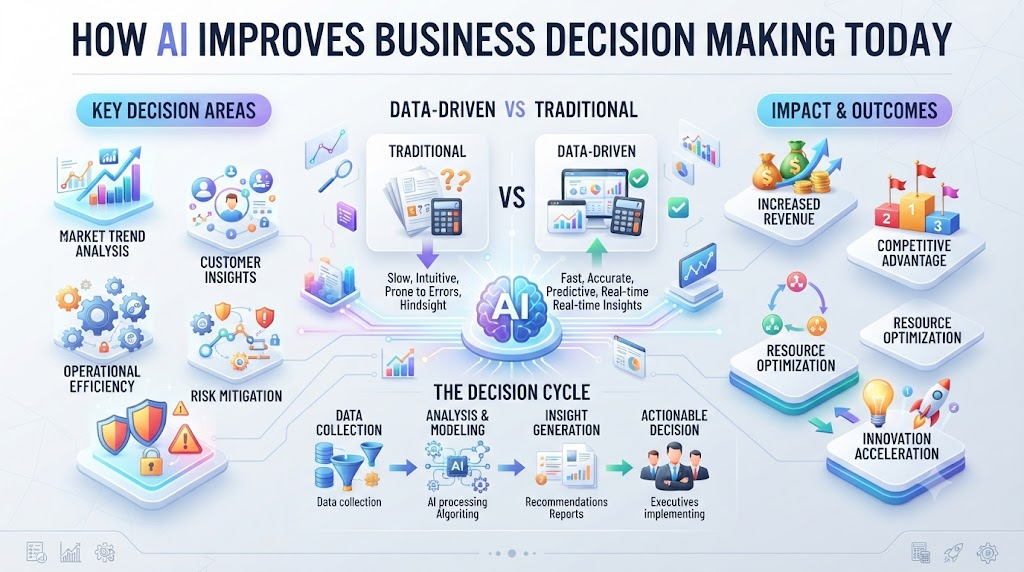
Every day, you face hard choices at work. You look at messy spreadsheets, old sales reports, and endless emails. You try to guess what your customers want next week. This constant guessing leads to stress and missed goals.
If you want to stop guessing, you need a better way to look at data. Modern leaders now turn to smart software to help them out. You can learn more about these smart tools by visiting AIUniverse.xyz to see how modern teams build better strategies.
When you use smart computer models, your business moves faster. These tools look at thousands of data points in mere seconds. They find hidden patterns that human eyes miss every single day. This means you make smarter choices with less worry.
What Is AI Decision Making?
When people talk about smart software, they often picture robots in movies. But in real life, it is just a set of step-by-step rules running on fast computers. These rules help you look at past sales and future trends.
You do not need a degree in math to use these systems. They take messy data and turn it into clean, simple charts. You can see right away what is working and what is failing. This gives you clear facts instead of gut feelings.
Think of it as having a smart assistant on your team. This assistant never sleeps and never gets tired. It reads every report and tells you where to put your money for the best return.
Why Old Ways of Deciding Fail
In the past, bosses made choices based on a gut feeling. They relied on years of personal experience. While experience matters, markets change too fast today. Old habits can lead your company down the wrong path.
Spreadsheets also cause big headaches. If one person types a wrong number in cell B4, your whole budget breaks. You might spend thousands of dollars on a failing project because of a simple typo.
Smart software fixes this human error problem. It cleans your data automatically. It warns you when numbers look strange. This keeps your business safe from costly mistakes.
How Smart Models Find Hidden Patterns
Computers are great at looking at huge piles of numbers. If you have five years of customer orders, a human cannot read them all in a day. A computer can read them in one second.
It looks for things like seasonal buying habits. It might tell you that people buy more boots when it rains on a Tuesday. You can then stock up on boots before the storm hits.
This level of detail changes how you run your store or office. You stop reacting to problems after they happen. Instead, you stay one step ahead of your market.
Real-World Story About Business Decisions
- Case One: A small retail shop used to guess how many winter coats to buy. They ran out of coats in November and lost thousands of dollars in sales. They installed a smart forecasting tool to check past weather and sales trends. Now, they stock the exact right number of coats every single year.
- Case Two: A delivery truck company lost money because drivers took long routes. They added a route-planning model to their dispatch office. The software saved them twenty percent on gas in the first month alone.
- Case Three: A local bakery threw away half their bread every night. They started using a sales predictor tool. The tool told the bakers how many loaves to make based on the day of the week and local events. Food waste dropped to almost zero.
- Case Four: A tech support team took hours to answer customer emails. They added an AI text sorter to read and label incoming messages. Support staff answered urgent tickets first, which made customer happiness scores shoot up.
- Case Five: A marketing team spent weeks picking photos for social media ads. They used an image-scoring tool to test which colors and faces got more clicks. Their ad campaign brought in twice as many new buyers.
- Case Six: A factory manager worried about machine breakages. Parts broke without warning, halting production for days. They put smart sensors on the motors to track heat and vibration. The sensors warned workers before a part failed, saving weeks of downtime.
- Case Seven: A hotel chain struggled to set room prices during slow months. They used a dynamic pricing tool that checked local flight bookings and event schedules. Room prices adjusted daily, keeping the hotel full all year long.
- Case Eight: A software startup hired too many people too fast and ran out of cash. They started using a financial forecasting model to track monthly burn rates. The model warned them to cut costs early, saving the company from bankruptcy.
- Case Nine: A clothing brand had trouble with clothes sitting on shelves. They used a trend tracker to see what style teenagers posted about on social media. They made more of those items and sold out in days.
- Case Ten: A consulting firm spent days writing client proposals from scratch. They used a smart writing helper to draft the core sections of each report. Consultants spent less time typing and more time talking to clients.
Comparing Old Methods and New Tools
| Feature | Old Spreadsheet Method | Modern AI Tool Method |
| Speed | Takes hours or days to update | Updates in real time |
| Accuracy | High risk of human typo errors | Low risk with auto-checks |
| Data Scale | Handles small local files easily | Handles millions of rows at once |
| Cost | Low software cost, high labor cost | Medium tool cost, low labor cost |
| Insights | Shows what already happened | Predicts what will happen next |
Common Mistakes and Pitfalls
- Mistake One: Trusting the computer blindly without checking the source data. Fix this by always reviewing the raw inputs before making a big money choice.
- Mistake Two: Buying expensive software that your team does not know how to use. Fix this by starting with free or cheap tools and training your staff slowly.
- Mistake Three: Trying to fix every part of your business at the same time. Fix this by picking one small problem, like inventory tracking, and fixing that first.
- Mistake Four: Ignoring employee fears about losing their jobs to computers. Fix this by showing your team how the tools make their daily work easier, not obsolete.
- Mistake Five: Collecting too much data that you never actually use. Fix this by only tracking numbers that tie directly to your main business goals.
- Mistake Six: Forgetting to update your software rules as your market changes. Fix this by scheduling a monthly review of how your models perform.
- Mistake Seven: Using messy or old customer data to train your models. Fix this by cleaning your database regularly and removing duplicate contact files.
- Mistake Eight: Expecting the software to run your business without human oversight. Fix this by keeping a human manager in charge of all final sign-offs.
- Mistake Nine: Buying tools based on flashy ads rather than actual company needs. Fix this by testing software with a small pilot group before you sign a yearly contract.
- Mistake Ten: Keeping your data locked in separate departments. Fix this by sharing data across sales, support, and marketing so your models see the full picture.
Step-by-Step Implementation Roadmap
- Step One: Write down your biggest daily business pain point, such as slow inventory checks or high customer churn.
- Step Two: Gather all your past sales and customer data into one clean digital folder or cloud drive.
- Step Three: Look at free or low-cost software options that match your specific business size and budget.
- Step Four: Pick one simple tool to test for thirty days with a small group of trusted workers.
- Step Five: Train your staff on how to read the charts and reports generated by the new tool.
- Step Six: Compare your old results with your new results after thirty days of testing the software.
- Step Seven: Fix any errors in your data feeds and adjust your settings to get clearer insights.
- Step Eight: Roll out the tool to the rest of your office departments once the test run succeeds.
- Step Nine: Set up monthly meetings to review how well your new decisions pay off for the company.
- Step Ten: Scale up your usage by adding advanced forecasting features as your team grows more confident.
Frequently Asked Questions
1. Do I need coding skills to use business AI tools?
No, you do not need any coding skills. Most modern tools feature simple point-and-click dashboards designed for everyday office workers.
2. How much does smart decision software cost?
Costs vary widely. Many basic tools offer free trials or low monthly subscriptions starting around twenty dollars per user.
3. Will smart software replace my human managers?
No, software cannot replace human judgment, empathy, or leadership. It only helps managers make faster choices with better data.
4. Is my company data safe in cloud software?
Most major cloud platforms use high-level encryption to keep your files safe. Always check the security rules of any vendor you use.
5. How long does it take to see results?
Most teams see better speed and clearer reports within the first two to four weeks of using a new tool.
6. What kind of data do I need to start?
You need basic business records, such as past sales numbers, customer purchase dates, and inventory logs.
7. Can small local shops use these tools?
Yes, small shops benefit greatly because smart tools help them save time and cut waste on tight budgets.
8. What if my team resists using new software?
Show them how the tool saves them from boring manual data entry. Training and patience help ease their worries.
9. How often should I check my software reports?
Review your main dashboard weekly to spot quick trends, and do a deeper check at the end of each month.
10. Where can I learn more about these tools?
You can explore guides, articles, and reviews on industry sites to find the right software match for your office.
Final Recommendation and Next Steps
You do not need to change your entire business overnight to benefit from smart technology. Start small by picking one annoying task that wastes your time every week. Clean up your data, test a simple tool, and watch how much faster you make good choices. Keep humans in charge of the final call, and let computers do the heavy lifting of reading numbers. Take that first step today and watch your business grow with clarity.
