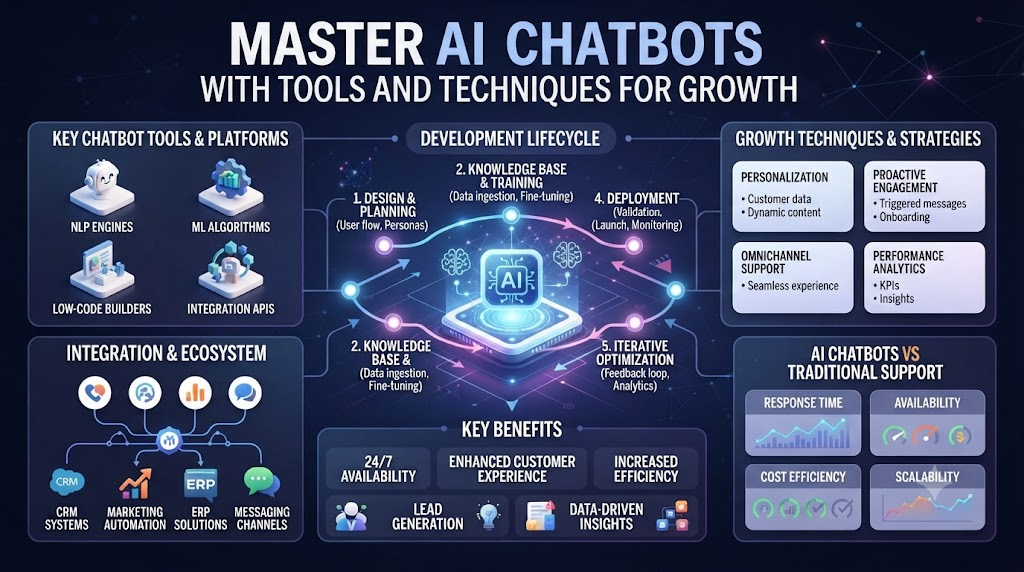
Building an effective customer support system often feels exhausting and slow. Support teams drown in repetitive questions while valuable leads slip away after hours. Traditional tools cannot keep up with modern user demands. Modern companies solve this problem using next-generation conversational technology. You can transform your support channels by deploying smart virtual assistants. These intelligent tools handle routine inquiries instantly and keep your human staff focused on complex challenges. Platforms like AIUniverse.xyz give you the exact framework needed to build context-aware chat agents. You can connect your proprietary data sources, train models securely, and launch automated workflows in minutes without writing complex code. Let us explore the core tools, underlying techniques, and practical strategies that make modern AI chatbots successful for businesses of all sizes. Understanding these elements helps you avoid costly errors and drive real results.
Understanding Modern AI Chatbot Technology
Traditional rule-based chatbots failed because they relied on rigid keyword matching. If you asked a question slightly differently, the bot broke down completely. Modern systems use advanced language models to understand human intent. They grasp context, humor, and complex multi-turn conversations effortlessly. You no longer need to write endless decision trees to map every user path. Instead, the underlying model interprets meaning and generates natural responses. This shift saves countless hours of setup and maintenance time.
The Core Building Blocks of Intelligent Chatbots
Building a robust chatbot requires three primary components working together smoothly. First, you need a powerful language model to process user inputs. Second, you need a secure retrieval engine to fetch accurate company data. Third, you need a flexible deployment widget that fits your website design. When these pieces combine, your bot delivers fast and reliable answers. You avoid the guesswork that plagued older software generations. Your customers receive precise guidance every single time they interact.
Retrieval-Augmented Generation Explained Simply
Large language models sometimes hallucinate or invent false information when they lack context. Retrieval-augmented generation solves this issue by anchoring answers in real data. When a user asks a question, the system searches your uploaded documents first. It extracts the exact relevant paragraphs and feeds them to the model. The model then writes a natural response based only on those verified facts. This technique eliminates guesswork and keeps your brand messaging strictly accurate.
Automating Customer Support and Lead Qualification
Your website visitors expect instant answers at any hour of the day. Waiting for business hours drives potential buyers straight to your competitors. Modern chat agents solve this by qualifying leads automatically while you sleep. They collect contact details, assess user intent, and route high-value prospects to sales reps. Meanwhile, they deflect up to eighty percent of routine tier-one support tickets. Your human agents gain breathing room to solve meaningful problems.
Connecting Chatbots to Your Existing Knowledge Bases
A chatbot is only as good as the information it can access. If your product documentation lives in scattered PDFs and Notion pages, your bot stays blind. Modern tools let you connect all these scattered repositories into a single index. The automated web spider crawls your portal on a regular schedule. It updates your bot knowledge base hourly so answers never go stale. You maintain total synchronization across your entire digital ecosystem without manual copy-pasting.
Security, Privacy, and Hallucination Defenses
Handling customer data demands strict security measures and robust privacy controls. Modern chatbot platforms incorporate enterprise-grade encryption and role-based access rules. They automatically redact sensitive personal information before it reaches third-party models. Built-in hallucination detection filters out unverified claims before they display to users. Prompt injection defenses protect your system from malicious manipulation attempts. You maintain full compliance with data protection laws while delivering secure experiences.
Multimodal Interactions and Voice Capabilities
Text-based chat is no longer the only way users communicate with brands. Modern virtual assistants support voice inputs and natural speech synthesis seamlessly. Customers can speak their questions and hear human-like responses in real time. Multimodal capabilities also let users upload images or documents directly into the chat. The system analyzes visual data and provides instant troubleshooting advice. These rich interactions mimic human conversations and build deeper customer trust.
Measuring Performance and Conversation Analytics
Deploying a chatbot is never a set-and-forget project for your team. You must monitor how conversations unfold to spot recurring friction points. Built-in analytics track sentiment scores, resolution times, and drop-off rates automatically. Topic clustering reveals what features or products confuse your users the most. You can refine your training data based on real conversation transcripts. These insights help you improve your support quality continuously over time.
Real-World Stories About Server Crashes and Support Crises
- Scenario 1: The Midnight Traffic Surge — A retail clothing brand experienced an unexpected viral spike on social media at midnight. Their small support team went offline, leaving thousands of shoppers stranded with checkout questions. Deploying an automated chat agent instantly resolved cart inquiries, preventing massive revenue loss and preserving customer satisfaction.
- Scenario 2: The Documentation Nightmare — A software-as-a-service startup struggled with outdated help center articles that confused users daily. Integrating a continuous web crawler synced all Notion pages and PDFs into their chatbot index automatically. Support tickets dropped by forty percent within the first week of deployment.
- Scenario 3: The Broken Legacy CRM — A financial services firm relied on an ancient database that refused to talk to modern cloud software. Using secure API middleware and custom connectors, their chat agent bridged the legacy gap securely. Customers could check account balances instantly without triggering security alarms or data leaks.
- Scenario 4: The Multilingual Expansion — An e-commerce platform expanded into European markets but could not afford round-the-clock multilingual human support staff. Activating built-in multi-language chat capabilities allowed their virtual assistant to converse fluently in five languages. International sales surged because buyers received instant answers in their native tongues.
- Scenario 5: The Hallucination Crisis — An early AI implementation at a healthcare portal began giving out incorrect medication dosage instructions due to weak constraints. Implementing strict retrieval-augmented generation boundaries and prompt filters eliminated false claims completely. The system now strictly quotes verified clinical guidelines with zero deviation.
- Scenario 6: The Holiday Booking Bottleneck — A travel agency faced overwhelming booking requests during the winter holiday season. Autonomous agents stepped in to qualify leads, check seat availability, and process payments securely inside the chat window. Human travel agents only handled complex trip customizations, saving hundreds of labor hours.
- Scenario 7: The Security Breach Attempt — A malicious user tried to trick a banking chatbot into revealing administrative password reset tokens using prompt injection tricks. Built-in security guardrails detected the adversarial pattern and blocked the request instantly. The system flagged the session for review without compromising any sensitive user records.
- Scenario 8: The Onboarding Drop-Off — A complex B2B software tool suffered from a high churn rate during user onboarding. Embedding a proactive chat widget that offered help when users lingered on confusing settings lowered drop-offs significantly. Active user retention increased by twenty-five percent in the first quarter alone.
- Scenario 9: The Voice Integration Pivot — A logistics firm noticed customers hated navigating long, frustrating interactive voice response phone trees. Replacing the rigid phone menu with a natural conversational voice AI agent cut call resolution times in half. Callers stated their tracking numbers naturally and received instant parcel updates.
- Scenario 10: The Unmonitored Knowledge Drift — A tech hardware company launched a new product line but forgot to update their chatbot training files. Customers received old specifications until automated topic analytics flagged a sudden spike in negative sentiment. The team updated the document index within minutes, restoring accurate customer trust.
Comparative Analysis of Chatbot Architectures
| Feature / Metric | Traditional Rule-Based Chatbots | Modern AI Chat Agents |
| Setup Time | Weeks of manual decision tree coding | Minutes using automated web crawling |
| User Intent Handling | Rigid keyword matching breaks easily | Advanced NLP understands context and tone |
| Knowledge Updates | Manual rewriting of script files | Automatic synchronization with active docs |
| Human Handoff | Abrupt disconnection with zero history | Smooth transfer with full conversation context |
| Support Capacity | Limited to pre-written FAQ answers | Unlimited dynamic answers from enterprise data |
Common Mistakes and Pitfalls in Chatbot Deployment
- Mistake 1: Relying Solely on Generic Public Models — Using base models without connecting your proprietary company data leads to generic or incorrect answers. Solution: Always ground your chatbot using retrieval-augmented generation connected to your verified internal documents.
- Mistake 2: Ignoring Regular Knowledge Maintenance — Leaving your chatbot index untouched while product prices and policies change creates frustrating user experiences. Solution: Set up automated web spiders and scheduled syncs to update your knowledge base hourly.
- Mistake 3: Failing to Define Clear Escalation Boundaries — Allowing a bot to handle sensitive refund disputes or emotional complaints without guardrails damages customer trust. Solution: Establish hard boundaries that immediately hand off complex or high-risk queries to human agents with full context.
- Mistake 4: Over-Collecting Personal User Information — Asking for phone numbers and email addresses immediately before providing value annoys visitors and spikes bounce rates. Solution: Deliver immediate help first, then ask for contact details naturally when qualifying high-intent leads.
- Mistake 5: Neglecting Mobile Responsiveness and UI Speed — Deploying a heavy chat widget that slows down your website loading times drives potential customers away. Solution: Use lightweight, embeddable chat components optimized for fast rendering across all mobile and desktop devices.
- Mistake 6: Skipping Conversation Analytics and Sentiment Reviews — Launching a bot and never reviewing transcripts leaves you blind to recurring user frustrations and system failures. Solution: Review sentiment scores, drop-off points, and clustering reports weekly to refine your bot’s conversational performance.
- Mistake 7: Using Overly Robotic and Unnatural Prompts — Programming your bot with stiff corporate phrasing makes users feel like they are talking to a brick wall. Solution: Tune your bot personality to match a friendly, approachable human brand voice that speaks clearly and directly.
- Mistake 8: Failing to Test Security and Prompt Injection Risks — Leaving your AI assistant unprotected against malicious prompt manipulation opens your business up to data leaks. Solution: Implement robust prompt injection defenses, automated PII redaction, and strict role-based access permissions.
- Mistake 9: Treating the Chatbot as a Standalone Silo — Keeping your chat tool disconnected from your CRM and calendar software prevents smooth lead conversion. Solution: Integrate your chatbot directly with your sales tools so it can book meetings and sync contact records automatically.
- Mistake 10: Launching Without Clear Success Metrics — Building a bot just to follow a tech trend without defining what success looks like makes ROI impossible to track. Solution: Track clear metrics like ticket deflection rates, resolution speeds, and lead conversion boosts from day one.
Step-by-Step Implementation Roadmap
- Step 1: Define Your Primary Use Case — Decide whether your chatbot will focus on tier-one customer support ticket deflection, lead qualification, or internal team assistance before writing any code.
- Step 2: Gather and Clean Your Knowledge Sources — Collect your product documentation, help center articles, PDF guides, and FAQs into a single organized folder to serve as the training foundation.
- Step 3: Choose the Right AI Platform — Select a reliable chatbot development platform that supports secure data connectors, semantic indexing, and easy web widget embedding.
- Step 4: Set Up Your Workspace and Indexing — Create your digital workspace on the platform and upload your cleaned documents or point the automated web spider to your documentation URLs.
- Step 5: Configure Bot Personality and Tone — Adjust your AI assistant system prompts to reflect a friendly, helpful, and professional brand voice that resonates with your target audience.
- Step 6: Build Automated Conversation Flows — Design visual multi-step pathways to route users by intent, collect necessary lead variables, and trigger CRM actions without code.
- Step 7: Establish Human Handoff Triggers — Program clear escalation rules that transfer complex chats to human agents smoothly with full transcript history and sentiment flags intact.
- Step 8: Embed and Test the Widget — Paste the lightweight deployment code snippet onto your website and run thorough test queries across multiple devices and browser windows.
- Step 9: Monitor Analytics and Sentiment — Review real-time conversation logs, topic clustering reports, and resolution metrics during your first week of live operation.
- Step 10: Iterate and Optimize Regularly — Update your knowledge base files, refine your prompt instructions, and tweak escalation rules continuously based on user feedback and performance data.
Final Recommendation and Next Steps
Deploying an intelligent AI chatbot no longer requires months of complex software development or massive engineering budgets. You can start small by indexing your core product documentation and launching a lightweight support widget on your high-traffic pages. Focus first on solving repetitive user questions and capturing high-intent leads while your team sleeps.
Review your conversation analytics weekly to spot knowledge gaps and refine your automated workflows. Keep your training data updated and maintain strict security guardrails to protect user privacy at every step. Take action today by mapping out your top three support bottlenecks, gathering your existing help articles, and launching your first context-aware chat agent to drive measurable business growth.
1. What is an AI chatbot and how does it work?
An AI chatbot is a software application powered by large language models and natural language processing. It understands human intent, processes context, and retrieves verified company data to generate accurate, conversational responses in real time.
2. How do modern AI chatbots differ from old rule-based bots?
Old rule-based bots relied on rigid keyword matching and endless decision trees that broke easily when users typed unexpected phrases. Modern AI models understand semantic meaning, handle complex multi-turn conversations, and adapt naturally to user phrasing.
3. What is retrieval-augmented generation and why does it matter?
Retrieval-augmented generation is a technique where the chatbot searches your uploaded company documents before answering. It extracts verified facts and forces the model to base its response on that data, eliminating hallucinations and ensuring factual accuracy.
4. Can I train a chatbot using my existing company documents?
Yes, modern platforms let you upload PDFs, spreadsheets, Notion pages, and help center URLs. An automated web spider crawls your sources regularly to keep your chatbot knowledge base synchronized and up to date.
5. How do AI chatbots handle complex customer support questions?
Smart chatbots resolve routine inquiries automatically but recognize their own limits. When a query becomes too complex, emotional, or sensitive, the system triggers an immediate human handoff, passing the full conversation history to a live agent.
6. Are AI chatbots secure and compliant with data privacy laws?
Leading chatbot platforms use enterprise-grade encryption, role-based access controls, and automated personal data redaction. They also include prompt injection defenses to protect your business systems from malicious manipulation.
7. How long does it take to deploy a custom AI chatbot?
You can create a workspace, upload your knowledge base, customize your bot personality, and embed the chat widget on your website in under ten minutes without writing any code.
8. What metrics should I track to measure chatbot success?
You should monitor ticket deflection rates, average resolution speeds, lead qualification counts, conversation sentiment scores, and user drop-off points to evaluate your bot’s business impact.
9. Can AI chatbots integrate with my existing CRM and business tools?
Yes, modern platforms offer pre-built connectors and APIs that link your chatbot directly to your CRM, email tools, payment gateways, and calendar software to automate workflows smoothly.
10. How do I prevent my chatbot from giving incorrect answers?
You prevent false answers by grounding your bot in verified internal documents using strict retrieval-augmented boundaries, running regular knowledge audits, and testing prompts against edge cases before public launch.
