Introduction
In an increasingly fast-paced digital economy, cash flow remains the ultimate metric of operational health. Yet, many finance departments struggle with fragmented systems, manual data entry, delayed payment collections, and cumbersome end-of-month reconciliations. Relying on spreadsheets, paper invoices, and disconnected payment portals creates severe operational bottlenecks. These delays not only increase human error but also inflate Accounts Receivable (AR) days and strain vendor relationships. In this comprehensive guide, you will learn how invoice and payment management software works, why automated reconciliation is essential for growing businesses, how to maintain seamless GST compliance in India, and how adopting an enterprise payment management platform like PayManagerPro elevates your entire financial ecosystem.
What is Invoice and Payment Management Software?
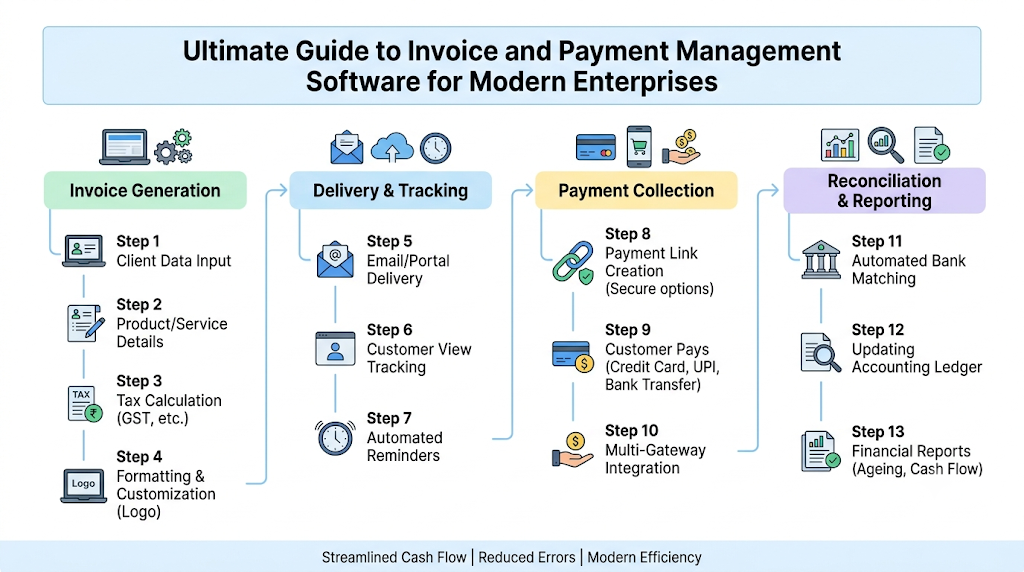
Invoice and payment management software is an integrated technology solution designed to automate, monitor, and optimize the entire lifecycle of enterprise billing and collections. Instead of managing billing, payment gateway portals, and bank ledgers separately, this software unifies all financial touchpoints into a single interface.
Invoice Creation ──> Payment Link Generation ──> Digital Collection ──> Auto-Reconciliation ──> General Ledger Sync
Core Components
- Billing Engine: Generates complaint digital invoices, recurring billing schedules, and itemized vouchers.
- Payment Orchestration: Integrates payment gateways, UPI rails, and direct bank transfers into unified shareable links.
- Reconciliation Module: Automatically matches bank settlement feeds with open invoice line items.
- Analytics & Reporting: Offers real-time visibility into collection ageing, outstanding balances, and cash flow trends.
By transitioning from manual ledgers to an end-to-end automated payment collection management software, enterprises shift from reactive debt collection to an automated, predictable invoice-to-cash workflow.
Why Modern Businesses Need Automated Payment Management
Relying on manual billing workflows introduces systemic friction as business volume grows. Scaling businesses face complex cash flow requirements that basic spreadsheets cannot support.
Unlocking Working Capital Through Payment Visibility
When collections are managed manually, finance leaders lack real-time visibility into open balances. Automated payment tracking software provides real-time status updates on issued, viewed, paid, and overdue invoices, helping teams address bottlenecks before they impact working capital.
Drastically Reduced Manual Workload
Finance personnel often spend hours copying data between ERP systems, payment gateway portals, and bank statements. Automation handles routine invoice creation, dispatches reminders, and executes matching algorithms without requiring human intervention.
Faster Collections and Improved Customer Experience
Frictionless payment methods allow clients to settle invoices instantly. Features like embedded instant payment links, auto-calculated partial payment options, and automated digital receipts remove payment friction, delivering a professional experience to customers.
Key Features of PayManagerPro
PayManagerPro is built from the ground up as an enterprise invoice and payment management platform that bridges the gap between billing, tax compliance, and financial settlement. Learn more about how the platform accelerates cash flow on the PayManagerPro About Us page.
1. Indian GST Compliance & Smart Invoice Numbering
Generates fully compliant GST invoices featuring sequential numbering, automated CGST, SGST, and IGST calculations, and dynamic HSN/SAC code lookups.
2. Multi-Channel Payment Link Management
Create dynamic or static payment links that allow clients to settle invoices via UPI, credit/debit cards, net banking, or digital wallets. Explore capabilities further in the Payment Links section.
3. Multi-Gateway Collection Dashboard
View transaction activities across multiple payment gateways (including Razorpay, Cashfree, and Paytm) from a single unified view. Discover detailed metrics inside the Dashboard.
4. Automated Settlement Reconciliation
Match ledger records directly against gateway settlement reports and bank feeds to ensure total financial precision. Read more about automated reconciliation workflows on the Reconciliation page.
5. Enterprise Workflows & Security
Implement Maker-Checker approval systems, role-based security permissions, and immutable audit logs tailored for multi-branch organizations. Review customized plans on our Pricing page.
6. Developer-Friendly API Architecture
Integrate billing capabilities directly with custom CRMs, internal databases, or legacy ERP engines using structured REST APIs. Access technical documentation via the API Hub and find developer support at the Help Center.
GST Invoice Software in India
Operating a business in India requires strict adherence to the Goods and Services Tax framework set forth by the GST Council. Non-compliant invoices can result in tax penalties and prevent business clients from claiming input tax credits (ITC).
Taxable Value ──> HSN/SAC Lookup ──> Determine Destination (Intra/Inter state) ──> Calculate CGST+SGST or IGST ──> Issue GST-Compliant Invoice
Navigating Dual Tax Structures
A reliable GST invoice software India solution automatically distinguishes between intra-state transactions (subject to CGST and SGST) and inter-state sales (subject to IGST). By keeping HSN/SAC rate tables up to date, system-calculated tax values eliminate expensive billing oversights.
Mandatory Compliance Elements
Proper invoice formats require clear tax identification numbers (GSTIN), structured item classifications, detailed tax breakdowns, and compliant invoice numbering sequences. Automated platforms format these items accurately, generating tax reports ready for monthly GSTR filings.
Payment Link Management
Traditional invoices often force clients to rely on slow, manual bank transfers. A dedicated payment link management platform turns every invoice into an instant digital collection channel.
- Multi-Channel Distribution: Deliver links directly to clients via automated WhatsApp messages, email invoices, or embedded SMS notifications.
- Partial Payments & Flexible Terms: Allow authorized enterprise clients to settle structured milestone payments while automatically updating the remaining ledger balance.
- Custom Expiry & Auto-Reminders: Set automatic expiration dates on quotes and schedule smart reminder sequences before payment due dates.
Automated Payment Collection
According to payment framework guidelines established by the Reserve Bank of India (RBI) and implemented via the National Payments Corporation of India (NPCI), digital payment adoption across corporate entities continues to reach record highs.
Invoice Issued ──> Dynamic Payment Link/QR Generated ──> Client Choice (UPI / Cards / Net Banking) ──> Instant Settlement Notification
Using payment collection management software that supports diverse digital rails ensures high collection success rates:
- UPI & Dynamic QR Codes: Allows instantaneous, low-friction mobile payments from corporate accounts.
- Corporate Net Banking: Facilitates secure, high-value transfers directly between banking institutions.
- Credit & Debit Cards: Supports corporate payment cards while automatically managing processing surcharges or settlement terms.
Invoice Payment Tracking Software
Static invoice ledgers fail to provide visibility into operational cash flow. Invoice payment tracking software replaces static spreadsheets with real-time tracking dashboards that monitor every invoice status:
- Sent & Viewed: Confirm exact dates and times clients open digital invoices.
- Partially Paid: Track partial settlements while updating balance statements instantly.
- Overdue Ageing: Categorize receivables into 30, 60, and 90-day ageing buckets to prioritize collection efforts.
Automating overdue payment notifications reduces uncomfortable manual follow-ups while ensuring accounts receivable collections stay on schedule.
Automated Payment Reconciliation Software
For growing finance teams, manual bank reconciliation is often the most time-consuming task at month-end. Finance professionals must manually match line items from gateway settlements, direct bank feeds, and sales invoices.
Gateway Settlement Feed + Direct Bank Statement Feed ──> Automated Reconciliation Engine ──> Exact Match / Exception Flagging
Automated payment reconciliation software solves this challenge by using intelligent matching rules:
- Settlement Matching: Matches batch gateway payouts directly with original sales invoices.
- Exception Handling: Automatically flags fee deductions, partial settlements, or chargebacks for manual review.
- Audit Trails: Maintains clear, immutable logs for every reconciled record, fully supporting international Accounting Standards.
Accounts Receivable Automation Software
Accounts receivable automation software unifies every phase of credit management—from issuing billing statements to sending reminders and reconciling payments—into an automated workflow.
Client Order ──> Auto-Generate Invoice ──> Automated Reminders ──> Multi-Rail Collection ──> Auto-Ledger Update
- Automated Invoice Generation: Automatically creates recurring bills and structured enterprise orders.
- Smart Collection Workflows: Triggers friendly follow-ups via email or WhatsApp as due dates approach.
- Instant Ledger Updates: Updates balance sheets and customer ledgers instantly when payments clear.
- Comprehensive Financial Reporting: Generates instant collection, ageing, and revenue forecast reports for finance leaders.
To learn more about streamlined invoicing workflows, explore the Invoice Management feature hub.
Invoice-to-Cash Automation
The invoice-to-cash lifecycle covers every step between issuing a bill and settling the funds in your ledger. Transitioning to full invoice to cash automation eliminates manual data entry bottlenecks across the business.
[Invoice Created] ──> [Dynamic Payment Link] ──> [Digital Collection] ──> [Gateway Settlement] ──> [Auto Reconciliation] ──> [Financial Reports]
By removing manual handoffs between sales, billing, and accounting teams, businesses dramatically shorten their cash collection cycles. This automation lowers average Days Sales Outstanding (DSO) and gives leadership an accurate, real-time view of working capital.
Enterprise Payment Management Platform
Enterprise organizations require advanced security, controls, and administrative customization to manage complex financial operations.
Headquarters (Master Controls) ──> Branch Units ──> Role-Based Access Controls ──> Maker-Checker Workflows
- Multi-Branch Operations: Manage multiple subsidiaries, operating entities, or retail branches within a single dashboard interface.
- Maker-Checker Workflows: Ensure compliance by requiring supervisor approval before issuing credits, adjustments, or refunds.
- Role-Based Access Control: Protect sensitive financial records by granting access based on job roles.
- Custom Enterprise Integration: Connect directly with enterprise resource platforms (ERPs) using secure, high-volume APIs.
Security, Compliance, and Audit Readiness
Financial software must meet rigorous enterprise security standards to protect sensitive data and support compliance under regulatory frameworks like the Ministry of Corporate Affairs (MCA) guidelines.
- Data Protection & Encryption: Encrypts data in transit and at rest using bank-grade protocols.
- Immutable Audit Logs: Tracks every change, payment event, and user action to create detailed audit trails for internal and external reviews.
- Tax Compliance Infrastructure: Prepares accurate tax records that simplify monthly tax reporting for the Income Tax Department.
Multi-Gateway Integration Capabilities
To avoid vendor lock-in and maximize payment success rates, modern payment infrastructure must connect seamlessly with top payment processing systems and enterprise business applications.
PayManagerPro Orchestration Engine
  ├── Payment Gateways: Razorpay | Cashfree | Paytm
  └── Business Systems: ERP Platforms | CRM Suites | Accounting Software
- Payment Gateway Routing: Connects seamlessly with leading processors like Razorpay, Cashfree, and Paytm to ensure high collection rates.
- Enterprise ERP Synchronization: Syncs invoice and payment data directly with core platforms like SAP, Oracle, and Tally.
- CRM Systems: Allows sales representatives to track invoice statuses and generate collection links within platforms like Salesforce or HubSpot.
Target Industries for PayManagerPro
Different industries face unique billing challenges. PayManagerPro provides flexible features tailored to specific vertical requirements:
- Manufacturing: Simplifies high-volume B2B orders, partial milestone payments, and multi-branch GST invoicing.
- Healthcare: Automates patient billing, insurance claims tracking, and hospital collection management.
- Education: Handles recurring fee collections, multi-channel payment links, and automated overdue notices for parents.
- Logistics & Transport: Accelerates freight billing, proof-of-delivery payment releases, and driver payout reconciliations.
- Retail & E-commerce: Unifies online sales, multi-store collections, and bank settlements into a single financial view.
- SaaS & Subscription Services: Automates recurring subscription billing, payment retries, and ledger updates.
- Agencies & Consultancies: Streamlines retainer invoices, milestone payments, and time-tracked billing.
- Financial Services: Enables secure payment link distribution, instant payment tracking, and automated audit logging.
- Professional Services: Simplifies hourly client billing, expense pass-throughs, and trust account tracking.
Manual Process vs. PayManagerPro
| Feature | Manual Process | PayManagerPro Platform |
| Invoice Creation | Slow, error-prone spreadsheet entry | Instant, template-driven automated creation |
| Payment Collections | Manual bank transfers and physical checks | Multi-channel digital links (UPI, Cards, Net Banking) |
| Payment Reconciliation | Line-by-line bank statement matching | Automated gateway and settlement feed matching |
| Financial Reporting | Delayed end-of-month manual reports | Real-time reporting dashboards |
| Error Rate | High risk of duplicate and tax entry errors | Zero-error automated tax calculations |
| Time Investment | Hours spent weekly on manual admin tasks | Fully automated background processing |
Key Business Benefits
Implementing specialized automated payment management software transforms accounting workflows into a competitive business advantage:
- Accelerated Cash Velocity: Embedded payment links and automated reminders lower overall DSO.
- Predictable Cash Flow: Clear visibility into collection schedules improves financial forecasting and working capital planning.
- Lower Operating Costs: Automating routine tasks reduces processing overhead and reliance on manual data entry.
- Elimination of Human Error: Automated calculations eliminate costly tax misclassifications and duplicate invoice entries.
- Actionable Financial Insights: Gain immediate access to key metrics on revenue trends, outstanding balances, and channel performance. To analyze key collection metrics, access detailed Reports.
Best Practices for Invoice and Payment Management
To get the most value out of your financial automation software, follow these core operational practices:
- Standardize Billing Terms: Set explicit payment windows (such as Net 15 or Net 30) and build automatic late fee structures into your invoices.
- Offer Multi-Rail Payment Options: Allow clients to pay using their preferred channels, including UPI, debit cards, credit cards, or net banking.
- Automate Reminder Schedules: Set up gentle reminder notifications sent 3 days before due dates, on the due date, and 7 days post-due date.
- Reconcile Settlements Daily: Run daily bank reconciliation routines to catch payment exceptions and discrepancies early.
Common Mistakes to Avoid in Accounts Receivable
Avoid these common operational pitfalls to keep your financial workflows running smoothly:
- Relying on Manual Spreadsheets: Using manual ledgers increases human error and limits real-time visibility as your invoice volume scales.
- Inconsistent Follow-ups: Inconsistent follow-up schedules lead to aging accounts receivable balances and reduced cash liquidity.
- Issuing Inaccurate GST Details: Entering incorrect HSN codes or GSTIN numbers causes payment disputes and invalidates client tax credits.
- Delaying Bank Reconciliations: Postponing reconciliation until month-end creates accounting backlogs and delays financial close cycles.
Future Trends in Digital Payment Management
Financial technology is evolving rapidly, driven by automated data processing, open banking frameworks, and modern API infrastructures.
AI-Powered Cash Forecasting ──> Automated Smart Reconciliation ──> Embedded Banking Rails
- AI-Driven Reconciliation: Advanced algorithms match complex unstructured payments, partial settlements, and multi-currency transactions automatically.
- Smart Collection Risk Scoring: Machine learning models analyze client payment habits to predict late payments and adjust collection schedules proactively.
- Embedded Banking Infrastructures: API-first platforms merge traditional business banking directly into enterprise invoicing systems, creating a fully integrated finance stack.
Frequently Asked Questions
What is invoice and payment management software?
Invoice and payment management software is a specialized technology platform designed to automate invoice generation, streamline digital payment collections, track unpaid receivables, and automate bank reconciliation routines. By replacing manual spreadsheets with unified workflows, it accelerates collections, lowers administrative costs, and improves working capital visibility across the organization.
How does automated payment reconciliation software work?
Automated payment reconciliation software continuously ingests electronic settlement feeds from payment gateways, merchant processors, and corporate bank accounts. It uses intelligent matching rules to match paid amounts with outstanding invoice entries in your ledger automatically. Any mismatched items are flagged for human review, eliminating tedious manual matching at month-end.
Is PayManagerPro compliant with Indian GST requirements?
Yes, PayManagerPro is fully compliant with Indian GST framework requirements established by the GST Council. The platform automatically calculates CGST, SGST, and IGST based on the transaction type, applies dynamic HSN/SAC codes, enforces sequential invoice numbering, and exports audit-ready transaction records for GSTR filings.
How do dynamic payment links help collect payments faster?
Dynamic payment links embed invoice details, recipient accounts, and balance amounts into a shareable web link. Clients can open the link and pay instantly using UPI, credit cards, debit cards, or net banking without keying in bank numbers manually. Removing this friction leads to faster settlements and lower DSO.
Can PayManagerPro integrate with existing ERP platforms?
Yes, PayManagerPro features developer-friendly REST APIs that integrate with top ERP systems, CRM tools, and accounting engines. This connectivity ensures that customer records, invoice states, and settlement data sync instantly across your technology ecosystem.
How does accounts receivable automation improve cash flow?
Accounts receivable automation handles routine billing tasks, schedules proactive payment reminders, offers friction-free collection links, and updates balance ledgers instantly. Automating these steps ensures invoices are delivered promptly, reduces delayed payments, and keeps cash moving smoothly into the business.
What payment channels does PayManagerPro support?
PayManagerPro supports a wide range of collection methods, including UPI apps, dynamic QR codes, corporate net banking, major credit/debit card brands, and digital wallets. Integrating multiple gateway providers ensures high authorization rates across all transactions.
How does the platform handle multi-branch business operations?
PayManagerPro offers an enterprise structure that lets multi-branch companies manage distinct business units within a unified admin interface. Administrators can set role-based security permissions, enforce Maker-Checker approval chains, and view consolidated or branch-specific financial reports.
What is the difference between manual reconciliation and automated reconciliation?
Manual reconciliation requires finance staff to check line items individually across bank statements, sales receipts, and gateway feeds—a process prone to human error and delays. Automated reconciliation uses smart algorithms to match payments instantly, flagging only exceptions for manual review.
Is customer payment data secure within PayManagerPro?
Yes, security is a core priority for PayManagerPro. The platform employs enterprise-grade data encryption, secure API protocols, strict role-based access rules, and detailed audit logging to safeguard sensitive financial information and maintain full regulatory compliance.
Conclusion
Managing modern business cash flow requires moving beyond disconnected, manual processes. Relying on paper billing, manual follow-ups, and spreadsheet reconciliation drains valuable time from finance teams and slows down cash collection cycles. Implementing unified invoice and payment management software like PayManagerPro helps enterprise teams automate billing routines, eliminate human error, maintain GST compliance, and speed up settlement reconciliation. By automating the complete invoice-to-cash lifecycle, your organization gains real-time visibility into working capital while delivering a convenient billing experience to clients.