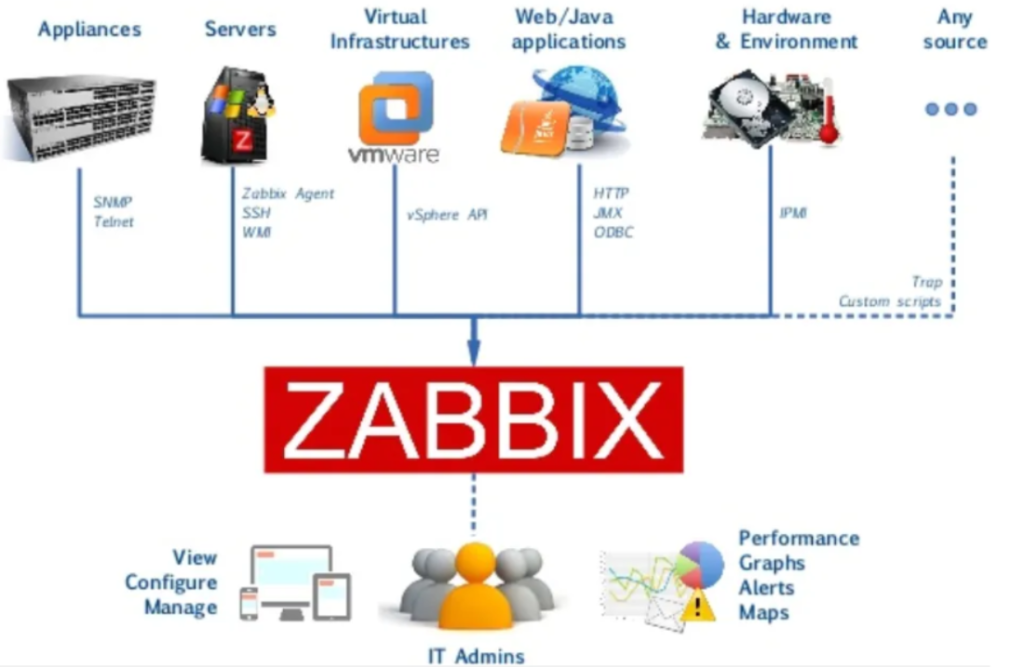
Zabbix is a powerful open-source monitoring solution designed to track and manage various metrics from networks, servers, cloud services, and applications. Renowned for its flexibility and scalability, Zabbix empowers organizations to monitor and ensure optimal performance across their IT infrastructure. Zabbix provides a comprehensive suite of features to collect, process, and visualize real-time data, making it an indispensable tool for IT administrators.
What is TOOLS?
TOOLS refers to technologies or software solutions used to simplify and optimize specific tasks in various domains. In the context of IT and network management, TOOLS are systems like Zabbix that offer monitoring, analytics, and alerting capabilities. These tools are crucial for maintaining the reliability and efficiency of IT infrastructures.
Top 10 Use Cases of TOOLS (Zabbix)
- Network Monitoring: Monitor bandwidth usage, network traffic, and the health of switches, routers, and other devices to prevent downtime.
- Server Performance Monitoring: Track server CPU, memory usage, disk space, and other critical parameters to ensure smooth operation.
- Application Monitoring: Gain insights into the performance of applications, such as web servers and databases, to identify bottlenecks.
- Cloud Infrastructure Monitoring: Monitor cloud services like AWS, Azure, or Google Cloud to optimize resource utilization and detect anomalies.
- Database Monitoring: Keep track of database performance metrics such as query execution times and connection statuses.
- Website and URL Monitoring: Check website availability and response times to ensure a seamless user experience.
- Log File Monitoring: Analyze log files for patterns and anomalies to proactively address potential issues.
- IoT Device Monitoring: Monitor connected IoT devices for data integrity, connectivity, and performance.
- Business Metrics Monitoring: Integrate with business systems to track key performance indicators (KPIs) in real time.
- Alerting and Incident Management: Set up custom alerts and automated responses to minimize resolution time during incidents.
What are the Features of TOOLS (Zabbix)?
- Scalability: Supports monitoring of thousands of devices across distributed environments.
- Custom Dashboards: Create personalized views with graphs, maps, and widgets.
- Advanced Notifications: Offers email, SMS, and third-party integrations for alerts.
- Data Collection: Supports agent-based and agentless monitoring methods.
- Templates: Provides predefined templates for quick setup and monitoring.
- Integration: Compatible with various APIs and third-party tools.
- Visualization: Offers charts, graphs, and heatmaps for data analysis.
- Security: Implements encryption and user roles for secure access.
- Flexible Configuration: Supports custom scripts and plugins for tailored solutions.
- Reporting: Generate detailed reports for analysis and compliance.
How Nessus Works and Its Architecture
Nessus is another popular tool for vulnerability scanning and security assessment. Its architecture includes:
- Nessus Server: The core engine that scans the network and processes data.
- Nessus Agents: Lightweight tools installed on hosts for in-depth local scanning.
- Policy Creation: Users define scan policies for specific environments.
- Scan Execution: The server interacts with agents or directly scans targets.
- Reporting: Detailed reports are generated post-scan for analysis.
The system works by running preconfigured or custom scripts on the target systems to identify vulnerabilities.
How to Install TOOLS (Zabbix)?
- Download: Get the latest Zabbix package from its official website.
- Set Up Database: Create a database and user for Zabbix.
- Install Packages: Use your operating system’s package manager to install Zabbix components.
- Configure: Update configuration files with database credentials.
- Start Services: Enable and start Zabbix services.
- Access Dashboard: Log in to the Zabbix web interface to complete the setup.
Basic Tutorials of TOOLS: Getting Started
- Login to Zabbix Dashboard: Access the web interface and explore the features.
- Add Hosts: Configure devices and systems to monitor.
- Set Up Triggers: Define conditions for alerting.
- Create Graphs: Visualize metrics for easier analysis.
- Enable Notifications: Configure email or SMS alerts.
- Explore Templates: Use predefined templates for quicker setups.
