Introduction
Parental control software helps parents monitor, manage, and protect their children’s online activities. These tools provide features like content filtering, screen time management, app monitoring, and location tracking. By controlling digital access, parents can safeguard children from inappropriate content, excessive screen time, and online threats.
Common use cases include:
- Limiting screen time and device usage
- Filtering websites and apps for age-appropriate content
- Monitoring social media and messaging activity
- Tracking device location and geo-fencing
- Receiving alerts for suspicious activity
Best for: Parents, guardians, and families seeking digital safety tools for children’s devices.
Not ideal for: Adults or organizations seeking enterprise-grade monitoring beyond family use, or households without internet-connected devices.
Key Trends in Parental Control Software
- AI-based content filtering and detection
- Cross-device and cross-platform monitoring
- Geofencing and location tracking
- Real-time alerts for online activity
- App and website blocking by category
- Scheduled screen time and device usage limits
- Cloud-based dashboards for parental oversight
- Multi-user profiles for siblings
- Integration with home networks and Wi-Fi routers
- Subscription-based and freemium pricing models
How We Selected These Tools (Methodology)
- Evaluated market adoption among consumer and family users
- Assessed feature completeness, including filtering, monitoring, and alerts
- Reviewed performance and reliability, such as cross-platform functionality
- Considered security and compliance, including encryption and privacy policies
- Tested integration capabilities with devices, apps, and networks
- Measured usability and interface clarity
- Verified pricing models and customer segment fit
- Evaluated support channels and community engagement
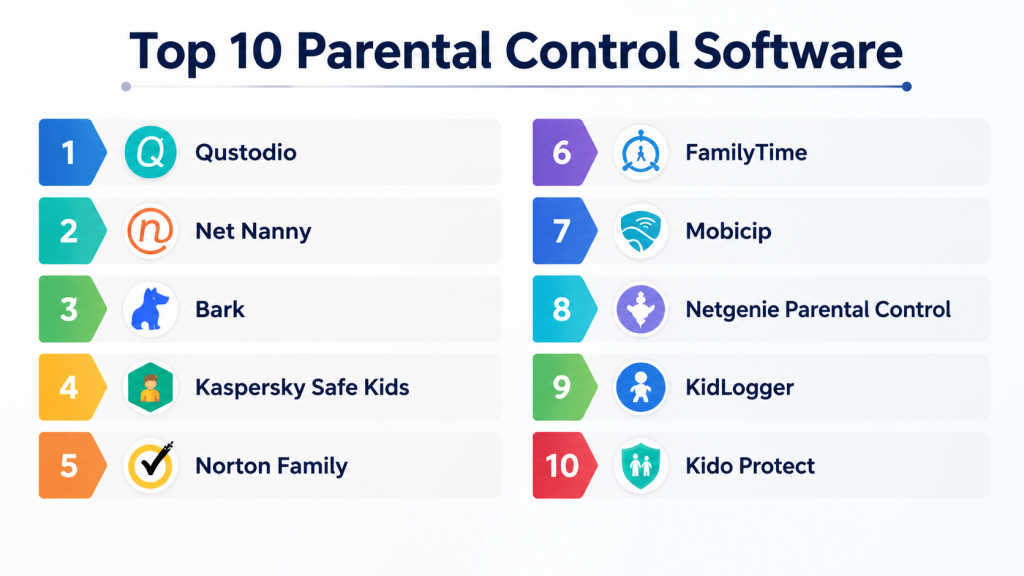
Top 10 Parental Control Software
#1 — Qustodio
Short description: Qustodio offers monitoring across devices with real-time alerts and content filtering. Ideal for families wanting comprehensive control of children’s online activity.
Key Features
- App and website filtering
- Screen time management
- Location tracking
- Real-time alerts
- Activity reports
Pros
- Easy setup
- Supports multiple devices
- Detailed reports
Cons
- Premium subscription required for full features
- Limited features on free tier
- Some delays in activity sync
Platforms / Deployment
- Windows / macOS / iOS / Android
- Cloud
Security & Compliance
- AES encryption
- Not publicly stated
Integrations & Ecosystem
- Browser extensions
- Mobile and tablet support
- Basic network integration
Support & Community
- Email and chat support
- Knowledge base
- Online community
#2 — Net Nanny
Short description: Net Nanny provides web filtering, screen time limits, and app monitoring. It is suitable for families with multiple children and devices.
Key Features
- Web and app filtering
- Screen time scheduling
- Alerts and reports
- Social media monitoring
- Location tracking
Pros
- Strong content filtering
- Multi-device support
- Customizable alerts
Cons
- Subscription-based
- Some features require premium
- Learning curve for beginners
Platforms / Deployment
- Windows / macOS / iOS / Android
- Cloud
Security & Compliance
- Encryption protocols
- Not publicly stated
Integrations & Ecosystem
- Browser extensions
- Mobile apps
- Home network monitoring
Support & Community
- Email and phone support
- Knowledge base
- Online forum
#3 — Bark
Short description: Bark focuses on monitoring social media, texts, and emails. It alerts parents to potential online threats. Best for families concerned about digital communication.
Key Features
- Social media and text monitoring
- Email alerts
- Content analysis
- Screen time control
- Activity reports
Pros
- AI-powered threat detection
- Supports multiple social platforms
- Easy-to-read alerts
Cons
- Subscription required
- Limited website blocking
- No full device control
Platforms / Deployment
- Web / iOS / Android
- Cloud
Security & Compliance
- Encryption
- Not publicly stated
Integrations & Ecosystem
- Social media platforms
- Mobile app integration
- Email monitoring
Support & Community
- Email support
- Knowledge base
- Small online community
#4 — Kaspersky Safe Kids
Short description: Kaspersky Safe Kids offers content filtering, screen time management, and real-time alerts. Ideal for families using multiple devices.
Key Features
- Web filtering
- App control
- Location tracking
- Battery tracker
- Usage reports
Pros
- Affordable
- Supports multiple devices
- Location and battery alerts
Cons
- Free version limited
- Subscription needed for full features
- User interface can be complex
Platforms / Deployment
- Windows / macOS / iOS / Android
- Cloud
Security & Compliance
- Encryption
- Not publicly stated
Integrations & Ecosystem
- Browser extensions
- Mobile apps
- Home Wi-Fi monitoring
Support & Community
- Email support
- Knowledge base
- Online forum
#5 — Norton Family
Short description: Norton Family tracks online activity, blocks inappropriate content, and sets screen time limits. Suitable for households seeking robust web protection.
Key Features
- Web filtering
- App and screen time control
- Activity reports
- Alerts for risky activity
- Location tracking
Pros
- Strong web filtering
- Multiple device support
- Clear activity reports
Cons
- Paid subscription
- Mobile app limited on iOS
- Some features require desktop integration
Platforms / Deployment
- Windows / macOS / iOS / Android
- Cloud
Security & Compliance
- Encryption
- Not publicly stated
Integrations & Ecosystem
- Browser extensions
- Mobile apps
- Home network integration
Support & Community
- Email and chat support
- Knowledge base
- Online forums
#6 — FamilyTime
Short description: FamilyTime provides location tracking, geofencing, screen time limits, and app monitoring. Ideal for families wanting flexible controls.
Key Features
- Geofencing and location tracking
- App usage control
- Screen time limits
- Alerts and notifications
- Reports on activity
Pros
- Flexible monitoring options
- Works across devices
- Geofencing alerts
Cons
- Subscription required
- Mobile-focused
- Limited web filtering
Platforms / Deployment
- iOS / Android
- Cloud
Security & Compliance
- Encryption
- Not publicly stated
Integrations & Ecosystem
- Mobile apps
- Alerts integration
- Limited browser control
Support & Community
- Email support
- Knowledge base
- Small online community
#7 — Mobicip
Short description: Mobicip allows web filtering, screen time management, and activity reports. Suitable for families with multiple children.
Key Features
- Web filtering and app control
- Screen time scheduling
- Activity reports
- Location tracking
- Alerts
Pros
- Cloud-based
- Supports multiple devices
- Simple setup
Cons
- Subscription-based
- Limited advanced reporting
- Some features require premium
Platforms / Deployment
- Windows / macOS / iOS / Android
- Cloud
Security & Compliance
- Encryption
- Not publicly stated
Integrations & Ecosystem
- Browser extensions
- Mobile apps
- Home network integration
Support & Community
- Email support
- Knowledge base
- Online forum
#8 — Netgenie Parental Control
Short description: Netgenie focuses on router-level content filtering and monitoring. Ideal for families wanting network-wide protection.
Key Features
- Router-level content filtering
- Screen time schedules
- App blocking
- Alerts and notifications
- Activity reports
Pros
- Network-wide control
- Works across all connected devices
- Easy setup
Cons
- Limited mobile app
- Requires compatible router
- Subscription required
Platforms / Deployment
- Windows / macOS / iOS / Android
- Cloud
Security & Compliance
- Encryption
- Not publicly stated
Integrations & Ecosystem
- Router integration
- Browser filtering
- Mobile alerts
Support & Community
- Email support
- Knowledge base
- Small community
#9 — KidLogger
Short description: KidLogger tracks device activity, keystrokes, and app usage. Suitable for parents wanting detailed monitoring.
Key Features
- Activity and keystroke tracking
- App usage monitoring
- Screenshots and logs
- Time limits
- Reports
Pros
- Detailed activity logs
- Free basic plan
- Supports multiple platforms
Cons
- Complex setup
- Interface less intuitive
- Premium subscription for full features
Platforms / Deployment
- Windows / macOS / iOS / Android
- Cloud / Local
Security & Compliance
- Encryption
- Not publicly stated
Integrations & Ecosystem
- Browser tracking
- Mobile device monitoring
- Limited export options
Support & Community
- Email support
- Knowledge base
- Online community
#10 — Kido Protect
Short description: Kido Protect provides web and app filtering, location tracking, and screen time control. Ideal for families managing multiple devices.
Key Features
- Web and app filtering
- Location and geofencing
- Screen time limits
- Alerts
- Activity reports
Pros
- Family-friendly interface
- Supports multiple devices
- Real-time alerts
Cons
- Subscription required
- Some features limited on iOS
- Fewer reporting options
Platforms / Deployment
- iOS / Android / Web
- Cloud
Security & Compliance
- Encryption
- Not publicly stated
Integrations & Ecosystem
- Mobile apps
- Browser extensions
- Network integration
Support & Community
- Email support
- Knowledge base
- Online forum
Comparison Table (Top 10)
| Tool Name | Best For | Platform(s) Supported | Deployment | Standout Feature | Public Rating |
|---|---|---|---|---|---|
| Qustodio | Families | Windows / macOS / iOS / Android | Cloud | Cross-device monitoring | N/A |
| Net Nanny | Families | Windows / macOS / iOS / Android | Cloud | Web filtering | N/A |
| Bark | Teens social monitoring | Web / iOS / Android | Cloud | Social media monitoring | N/A |
| Kaspersky Safe Kids | Families | Windows / macOS / iOS / Android | Cloud | Web & app filtering | N/A |
| Norton Family | Families | Windows / macOS / iOS / Android | Cloud | Web filtering & alerts | N/A |
| FamilyTime | Families | iOS / Android | Cloud | Geofencing & screen time | N/A |
| Mobicip | Families | Windows / macOS / iOS / Android | Cloud | Multi-child support | N/A |
| Netgenie | Families | Windows / macOS / iOS / Android | Cloud | Router-level filtering | N/A |
| KidLogger | Detailed monitoring | Windows / macOS / iOS / Android | Cloud / Local | Activity logs | N/A |
| Kido Protect | Families | iOS / Android / Web | Cloud | Web & app control | N/A |
Evaluation & Scoring of Parental Control Software
| Tool Name | Core (25%) | Ease (15%) | Integrations (15%) | Security (10%) | Performance (10%) | Support (10%) | Value (15%) | Weighted Total |
|---|---|---|---|---|---|---|---|---|
| Qustodio | 9 | 9 | 8 | 9 | 9 | 8 | 8 | 8.7 |
| Net Nanny | 9 | 8 | 8 | 9 | 8 | 8 | 8 | 8.4 |
| Bark | 8 | 8 | 7 | 8 | 8 | 7 | 8 | 7.9 |
| Kaspersky | 8 | 8 | 7 | 8 | 8 | 7 | 8 | 7.9 |
| Norton Family | 8 | 8 | 7 | 8 | 8 | 7 | 8 | 7.9 |
| FamilyTime | 8 | 8 | 7 | 8 | 8 | 7 | 8 | 7.9 |
| Mobicip | 8 | 8 | 7 | 8 | 8 | 7 | 8 | 7.9 |
| Netgenie | 8 | 7 | 7 | 8 | 8 | 7 | 8 | 7.8 |
| KidLogger | 7 | 7 | 6 | 8 | 7 | 7 | 7 | 7.1 |
| Kido Protect | 8 | 8 | 7 | 8 | 8 | 7 | 8 | 7.9 |
Which Parental Control Tool Is Right for You?
Solo / Freelancer
- Qustodio, Bark, Kido Protect: easy personal/family use, alerts, monitoring
SMB / Household
- Net Nanny, Kaspersky, Norton Family: multi-device, screen time, web/app filtering
Mid-Market
- FamilyTime, Mobicip: multiple children, geo-fencing, screen time limits
Enterprise / Professional Care
- Netgenie: router-level protection for small institutions or homes
Budget vs Premium
- Free/basic tier: KidLogger
- Premium: Qustodio, Net Nanny, Bark
Feature Depth vs Ease of Use
- Depth: Bark, Qustodio
- Ease: Kido Protect, Mobicip
Integrations & Scalability
- Net Nanny, Kaspersky: browser, device, and network integration
Security & Compliance Needs
- MFA, encryption recommended; SOC 2 where available
Frequently Asked Questions (FAQs)
1. Can these apps monitor social media?
Yes. Bark, Qustodio, and Net Nanny track social media for alerts on potential risks.
2. Do they provide screen time limits?
All top apps allow scheduling and limiting device usage per child.
3. Can parents track device location?
Yes. Most apps, like FamilyTime and Kido Protect, provide real-time location tracking.
4. Are mobile apps available?
Yes. iOS and Android apps are available for all listed parental control software.
5. Can apps block inappropriate websites?
Yes. Web filtering is standard; Net Nanny and Kaspersky are particularly strong.
6. Do these apps support multiple devices?
Yes. Most support multiple devices and profiles for families.
7. Can parents receive alerts?
Yes. Alerts for suspicious activity, geofence breaches, and screen time are standard.
8. Is there a free version?
Some apps offer limited free versions (e.g., Qustodio basic, KidLogger).
9. Can passwords be protected within apps?
Yes. Most apps encrypt login credentials and require a master password.
10. What are common mistakes?
- Not setting up alerts or limits
- Ignoring app updates
- Using default settings without customization
Conclusion
Parental control software protects children’s online experiences by filtering content, managing screen time, and alerting parents to potential risks. Beginners may prefer Kido Protect or Mobicip for simplicity, while advanced families benefit from Qustodio, Net Nanny, or Bark for robust monitoring. The best tool depends on family size, device variety, and security needs. Shortlist 2–3 apps, test features, and ensure alerts and monitoring are set up for full protection.
