Introduction
GPU Observability & Profiling Tools help engineering teams monitor, analyze, and optimize how GPUs are used across AI, machine learning, data science, rendering, simulation, high-performance computing, and cloud-native workloads. In simple words, these tools help teams understand whether GPUs are running efficiently, sitting idle, overheating, running out of memory, slowing down applications, or wasting infrastructure budget.
This matters now because GPU workloads are becoming more business-critical and more expensive to operate. Teams are using GPUs for model training, inference, computer vision, large language models, scientific computing, video processing, and accelerated analytics. Without the right observability and profiling tools, it becomes difficult to find performance bottlenecks, control costs, plan capacity, and maintain reliable GPU-powered services.
Common real-world use cases include:
- Monitoring GPU utilization across AI and ML clusters
- Profiling CUDA, PyTorch, TensorFlow, HIP, and HPC workloads
- Detecting GPU memory pressure, thermal issues, and hardware errors
- Improving model training and inference performance
- Optimizing Kubernetes GPU workloads and shared GPU infrastructure
Buyers should evaluate:
- GPU vendor support
- Real-time monitoring depth
- Profiling and trace analysis
- Kubernetes and container support
- Dashboard and alerting capabilities
- AI and ML framework compatibility
- Security controls such as RBAC, SSO, and audit logs
- Integration with Prometheus, Grafana, OpenTelemetry, APM, and CI/CD systems
- Ease of deployment and onboarding
- Pricing and long-term operational value
Best for: DevOps engineers, SRE teams, MLOps teams, AI infrastructure engineers, platform engineers, data scientists, HPC teams, cloud architects, and enterprises running GPU-heavy workloads.
Not ideal for: Small teams using a single GPU occasionally, basic experimentation environments, CPU-only applications, or users who only need simple one-time performance checks. In those cases, built-in framework logs, command-line GPU tools, or basic system monitoring may be enough.
Key Trends in GPU Observability & Profiling Tools
- GPU cost visibility is becoming a core requirement. Teams want to know which workloads, teams, jobs, or models are consuming GPU resources and whether that usage is justified.
- Kubernetes GPU monitoring is now essential. GPU workloads are increasingly scheduled through Kubernetes, so teams need visibility by pod, namespace, node, workload, and team.
- AI workload profiling is becoming more important. Model training and inference need detailed profiling to identify slow operators, memory bottlenecks, batch-size issues, and poor GPU utilization.
- Infrastructure monitoring and model performance are becoming connected. Teams want to correlate GPU usage with application latency, throughput, error rates, and user-facing performance.
- Open-source observability stacks remain popular. Prometheus, Grafana, and exporter-based monitoring continue to be attractive for teams that want flexibility and control.
- Enterprise observability platforms are adding GPU visibility. Platforms such as Datadog and Dynatrace are useful when teams want GPU monitoring inside a larger observability environment.
- Profiling tools are becoming more developer-friendly. Tools are improving their visual timelines, trace views, guided analysis, and command-line workflows.
- AMD GPU profiling is gaining more attention. Organizations using AMD accelerators need ROCm-focused tools for profiling HIP and high-performance workloads.
- Security and governance expectations are growing. Teams need controlled access, auditability, encryption, and role-based visibility for sensitive AI infrastructure.
- GPU utilization alone is no longer enough. Teams now also track memory bandwidth, power draw, temperature, error states, workload queues, kernel efficiency, and model-serving efficiency.
How We Selected These Tools
- We prioritized tools that are widely recognized by GPU engineers, DevOps teams, SRE teams, AI infrastructure teams, and performance engineers.
- We considered whether each tool supports real GPU monitoring, profiling, tracing, dashboarding, or workload optimization.
- We included a balanced mix of open-source tools, vendor-native tools, enterprise observability platforms, and developer-focused profilers.
- We looked at practical value for different users, including solo developers, SMBs, mid-market teams, enterprises, HPC users, and ML platform teams.
- We considered integration strength with Kubernetes, Prometheus, Grafana, ML frameworks, cloud platforms, APM tools, and CI/CD workflows.
- We evaluated whether the tool is useful for production operations, deep profiling, experiment tracking, or infrastructure visibility.
- We gave higher preference to tools that provide reliable documentation, broad ecosystem adoption, and real operational usefulness.
- We avoided guessing ratings, certifications, or compliance claims when details are not clearly known.
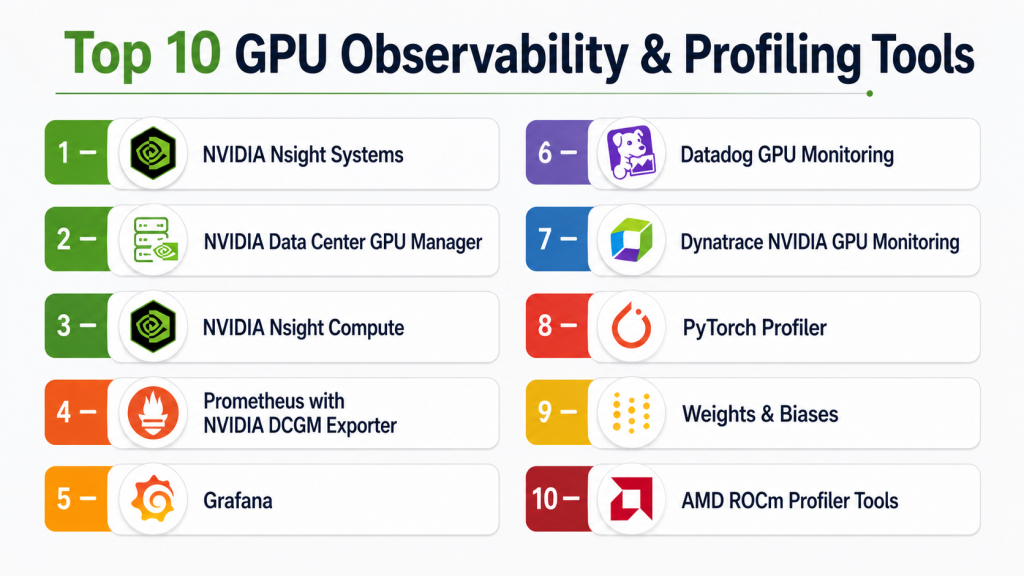
Top 10 GPU Observability & Profiling Tools
#1 — NVIDIA Nsight Systems
Short description:
NVIDIA Nsight Systems is a system-wide performance analysis tool for GPU-accelerated applications.
It helps developers understand how CPU activity, GPU activity, memory transfers, APIs, and threads interact during execution.
It is useful for CUDA applications, AI workloads, HPC systems, graphics workloads, simulations, and accelerated computing.
The tool gives a timeline-based view, making it easier to identify waiting time, synchronization issues, and execution delays.
It is often used before deeper kernel-level profiling because it helps teams understand where bottlenecks happen.
Nsight Systems is best for developers, performance engineers, CUDA teams, and HPC teams working with NVIDIA GPUs.
It is not a general production dashboard, but it is powerful for application-level performance investigation.
Key Features
- System-wide CPU and GPU timeline analysis
- CUDA API and runtime activity tracing
- Thread, process, and synchronization visibility
- Memory transfer and workload behavior analysis
- Useful for AI, HPC, simulation, and graphics workloads
- Helps identify CPU-GPU coordination issues
- Supports developer-focused profiling workflows
Pros
- Excellent for understanding full application execution flow
- Strong fit for NVIDIA GPU development environments
- Helps uncover hidden wait time and synchronization bottlenecks
Cons
- Not designed as a continuous production monitoring platform
- Requires performance engineering knowledge
- Mainly useful for NVIDIA GPU workloads
Platforms / Deployment
Windows / Linux
Cloud / Self-hosted / Hybrid: Varies / N/A
Security & Compliance
Not publicly stated. Security depends on how profiling data, local systems, and development environments are managed.
Integrations & Ecosystem
NVIDIA Nsight Systems fits naturally into the NVIDIA developer ecosystem. It is often used with CUDA, Nsight Compute, HPC applications, and GPU-accelerated software development workflows.
- NVIDIA CUDA
- NVIDIA Nsight Compute
- HPC development environments
- Local and remote profiling workflows
- AI and ML application optimization
- Command-line and GUI-based analysis
Support & Community
NVIDIA provides official documentation and developer resources. Community knowledge is strong among CUDA developers, GPU engineers, and HPC performance teams.
#2 — NVIDIA Data Center GPU Manager
Short description:
NVIDIA Data Center GPU Manager, often called DCGM, is a monitoring and management toolset for NVIDIA datacenter GPUs.
It is built for environments where many GPUs need continuous health, performance, and diagnostic visibility.
DCGM helps teams monitor GPU utilization, memory usage, temperature, power, errors, clocks, and health status.
It is commonly used in AI clusters, HPC systems, Kubernetes environments, and enterprise GPU infrastructure.
Unlike developer profilers, DCGM is more focused on operational monitoring and fleet-level GPU management.
It is often used as a telemetry source for Prometheus, Grafana, and commercial observability platforms.
For NVIDIA GPU infrastructure, DCGM is one of the most practical foundations for production observability.
Key Features
- NVIDIA datacenter GPU monitoring
- GPU health, diagnostics, and telemetry
- Temperature, power, memory, utilization, and clock monitoring
- GPU accounting and process-level visibility
- Useful for AI clusters and HPC systems
- Works well with Prometheus and Grafana workflows
- Strong fit for Kubernetes GPU node monitoring
Pros
- Strong production monitoring foundation for NVIDIA GPUs
- Useful for large GPU fleets and cluster environments
- Integrates well with cloud-native observability stacks
Cons
- NVIDIA-specific
- Requires setup effort for dashboards and alerts
- Not a deep application profiler by itself
Platforms / Deployment
Linux
Self-hosted / Hybrid / Cloud infrastructure
Security & Compliance
Not publicly stated as a standalone compliance product. Security depends on host access, monitoring stack configuration, authentication, and cluster governance.
Integrations & Ecosystem
DCGM works well as a GPU telemetry layer inside larger monitoring systems. It is commonly used with exporters, dashboards, and infrastructure observability tools.
- Prometheus
- Grafana
- Kubernetes
- NVIDIA GPU Operator
- DCGM Exporter
- HPC monitoring systems
Support & Community
NVIDIA provides official documentation and technical resources. Community adoption is strong in AI infrastructure, HPC, Kubernetes, and datacenter GPU operations.
#3 — NVIDIA Nsight Compute
Short description:
NVIDIA Nsight Compute is a kernel-level profiler for CUDA and NVIDIA GPU workloads.
It is designed for developers who need deep insight into GPU kernel performance rather than simple utilization charts.
The tool helps analyze memory access, instruction behavior, occupancy, throughput, and performance counters.
It is useful when a team already knows which GPU kernel or operation needs detailed optimization.
Nsight Compute is commonly used in CUDA development, HPC tuning, AI optimization, and scientific computing workflows.
It supports both graphical and command-line workflows, making it useful for manual and repeatable profiling.
It is best for advanced developers and performance engineers working deeply with NVIDIA GPU code.
Key Features
- CUDA kernel-level profiling
- Detailed GPU performance counters
- Memory access and occupancy analysis
- GUI and command-line profiling workflows
- Kernel comparison and performance investigation
- Useful for CUDA and accelerated computing workloads
- Helps optimize low-level GPU execution
Pros
- Excellent for deep CUDA kernel optimization
- Provides detailed GPU performance metrics
- Useful for advanced performance engineering teams
Cons
- Steeper learning curve than dashboard tools
- Not built for production fleet monitoring
- Mainly focused on NVIDIA GPU environments
Platforms / Deployment
Windows / Linux
Self-hosted / Developer environment / Hybrid
Security & Compliance
Not publicly stated. Security depends on development environment controls and how profiling output is stored or shared.
Integrations & Ecosystem
Nsight Compute fits into CUDA development and performance optimization workflows. It is often used after Nsight Systems or application monitoring identifies a specific kernel-level issue.
- CUDA Toolkit
- NVIDIA Nsight Systems
- HPC performance workflows
- AI model optimization
- Command-line automation
- Local and remote profiling workflows
Support & Community
NVIDIA provides documentation, guides, and developer support resources. The tool has strong adoption among CUDA developers, HPC teams, and GPU performance specialists.
#4 — Prometheus with NVIDIA DCGM Exporter
Short description:
Prometheus with NVIDIA DCGM Exporter is a popular open-source approach for GPU infrastructure monitoring.
DCGM Exporter exposes NVIDIA GPU metrics in a format that Prometheus can scrape, store, and query.
This setup is common in Kubernetes environments, AI platforms, and self-managed GPU clusters.
Teams can use it to monitor GPU utilization, memory, temperature, power usage, health, and workload behavior.
It is especially useful for teams that already use Prometheus as their main monitoring system.
Grafana is often added on top to create dashboards and operational views.
This stack is flexible and cost-effective, but it requires engineering effort to configure well.
Key Features
- Open-source GPU metrics collection
- Prometheus-compatible telemetry
- GPU utilization, memory, power, and temperature monitoring
- Kubernetes-friendly monitoring model
- Alerting through Prometheus Alertmanager
- Works well with Grafana dashboards
- Strong fit for SRE and platform teams
Pros
- Cost-effective and flexible
- Strong fit for Kubernetes and cloud-native environments
- Works well with existing Prometheus-based monitoring
Cons
- Requires setup, maintenance, and dashboard tuning
- Not a deep application-level profiler
- Security depends heavily on deployment configuration
Platforms / Deployment
Linux / Kubernetes
Self-hosted / Hybrid / Cloud infrastructure
Security & Compliance
Not publicly stated as a packaged compliance product. Security depends on Prometheus access controls, network configuration, RBAC, TLS, and monitoring architecture.
Integrations & Ecosystem
Prometheus with DCGM Exporter fits well into open-source observability stacks. It is commonly used when teams want flexible GPU metrics, custom dashboards, and alerting.
- NVIDIA DCGM Exporter
- Prometheus
- Grafana
- Kubernetes
- Alertmanager
- OpenTelemetry bridges
Support & Community
Prometheus has a large open-source community and strong documentation. Support depends on whether the team uses a self-managed or commercially supported monitoring setup.
#5 — Grafana
Short description:
Grafana is a dashboarding and visualization platform widely used for GPU observability.
It does not collect GPU metrics by itself, but it visualizes data from Prometheus, DCGM Exporter, Telegraf, and other telemetry systems.
Teams use Grafana to build GPU dashboards showing utilization, memory, temperature, power, errors, and node-level trends.
It is especially useful for SRE teams, platform engineers, AI infrastructure teams, and operations dashboards.
Grafana helps teams create shared views for capacity planning, troubleshooting, and resource optimization.
It is not a GPU profiler, so it should be paired with metric collectors and tracing tools.
For teams already using Grafana, adding GPU dashboards is often a practical next step.
Key Features
- Custom GPU observability dashboards
- Support for Prometheus and many other data sources
- Alerting and dashboard-sharing workflows
- Useful for GPU capacity and utilization views
- Strong open-source and enterprise ecosystem
- Team-based dashboard organization
- Flexible visualization and query support
Pros
- Highly customizable dashboards
- Strong ecosystem and community
- Works well with open-source and enterprise observability stacks
Cons
- Requires external GPU metric collectors
- Dashboard quality depends on setup
- Not a deep profiling tool
Platforms / Deployment
Web
Cloud / Self-hosted / Hybrid
Security & Compliance
Varies by edition and deployment. Enterprise features may include SSO, RBAC, audit logs, and access controls. Compliance details should be verified for the selected plan.
Integrations & Ecosystem
Grafana is strong because of its broad data-source ecosystem. It can become the central dashboard layer for GPU, infrastructure, application, and service metrics.
- Prometheus
- NVIDIA DCGM Exporter
- Loki
- Tempo
- Cloud monitoring systems
- Alerting and incident tools
Support & Community
Grafana has strong documentation, a large community, and commercial support options depending on the edition and deployment model.
#6 — Datadog GPU Monitoring
Short description:
Datadog GPU Monitoring is useful for teams that want GPU visibility inside a broader observability platform.
It helps teams monitor GPU health, utilization, memory, performance, and infrastructure behavior.
Datadog is especially valuable when teams need to connect GPU usage with Kubernetes, logs, traces, APM, cloud infrastructure, and service health.
It is a good fit for enterprises and growing teams that prefer managed observability over maintaining a fully custom stack.
For AI infrastructure teams, Datadog can help connect GPU metrics with application performance and operational incidents.
It is not a replacement for deep developer profilers such as Nsight Compute or PyTorch Profiler.
The main trade-off is that pricing and telemetry volume need careful planning at scale.
Key Features
- GPU fleet monitoring
- Infrastructure and application correlation
- Kubernetes and container visibility
- Dashboards, alerts, and incident workflows
- GPU health and performance metrics
- Integration with logs, traces, and APM
- Useful for managed observability teams
Pros
- Strong fit for enterprise observability
- Connects GPU metrics with broader application health
- Reduces the need to maintain every monitoring component manually
Cons
- Pricing can become a concern at scale
- Less specialized than low-level GPU profilers
- Best value comes when already using Datadog
Platforms / Deployment
Web / Agent-based monitoring
Cloud / Hybrid
Security & Compliance
Enterprise security capabilities may include SSO, role-based access, encryption, and audit-related controls depending on plan and configuration. Specific compliance details should be verified before purchase.
Integrations & Ecosystem
Datadog fits well into teams that want GPU monitoring connected with broader observability. It is useful when infrastructure, services, logs, and application traces need to be analyzed together.
- Kubernetes
- Cloud infrastructure
- Logs and APM
- Alerting and incident tools
- CI/CD workflows
- Infrastructure monitoring agents
Support & Community
Datadog provides commercial support, documentation, onboarding resources, and enterprise services. Community usage is strong among DevOps, SRE, and cloud operations teams.
#7 — Dynatrace NVIDIA GPU Monitoring
Short description:
Dynatrace NVIDIA GPU Monitoring is designed for teams that want NVIDIA GPU visibility within an enterprise observability platform.
It helps monitor GPU load, memory usage, utilization, and infrastructure behavior.
The tool is useful for teams already using Dynatrace for application monitoring, Kubernetes observability, infrastructure visibility, and service intelligence.
It is better suited for operational monitoring than low-level GPU kernel profiling.
Dynatrace can help enterprise teams understand how GPU infrastructure relates to application and service performance.
It is a strong option when observability, automation, and root-cause analysis are already centralized in Dynatrace.
For deep code-level optimization, teams may still need Nsight, PyTorch Profiler, or other specialized tools.
Key Features
- NVIDIA GPU infrastructure monitoring
- GPU load and memory visibility
- Host and infrastructure monitoring alignment
- Kubernetes and application observability support
- Enterprise dashboards and analysis
- AI-assisted observability workflows
- Extension-based monitoring model
Pros
- Strong fit for enterprise observability environments
- Useful when Dynatrace is already part of the stack
- Helps connect GPU behavior with broader system health
Cons
- Not a deep GPU profiler
- Best suited for NVIDIA-focused infrastructure
- Licensing and cost should be reviewed carefully
Platforms / Deployment
Web / Agent-based monitoring
Cloud / Hybrid / Enterprise deployment options
Security & Compliance
Enterprise controls may include access management, encryption, and governance features depending on deployment and plan. Specific compliance details should be verified before purchase.
Integrations & Ecosystem
Dynatrace works well in environments where infrastructure, services, applications, Kubernetes, and incidents are monitored together. GPU monitoring becomes part of a larger operational view.
- Kubernetes
- Cloud infrastructure
- Host monitoring
- Application monitoring
- Logs, metrics, and traces
- Incident and service management workflows
Support & Community
Dynatrace provides enterprise documentation, onboarding, technical support, and professional services. Community content is available, but support is mainly commercial.
#8 — PyTorch Profiler
Short description:
PyTorch Profiler is a profiling tool for teams building and optimizing PyTorch models.
It helps collect performance data during model training and inference.
The tool can show CPU activity, GPU activity, operator timing, memory behavior, and execution bottlenecks.
It is especially useful for data scientists, ML engineers, researchers, and model optimization teams.
Unlike infrastructure monitoring platforms, PyTorch Profiler focuses on model and framework-level behavior.
It helps teams understand why a model is slow, memory-heavy, or not using the GPU efficiently.
It is best used together with infrastructure monitoring for a complete GPU observability view.
Key Features
- PyTorch training and inference profiling
- CPU and GPU activity tracking
- Operator-level performance analysis
- Memory profiling support
- Trace export and visualization workflows
- Useful for model optimization
- Strong fit for ML engineering teams
Pros
- Excellent for PyTorch model-level bottleneck analysis
- Built into the PyTorch ecosystem
- Helpful for training and inference optimization
Cons
- Limited outside PyTorch workloads
- Not a fleet-level observability platform
- Requires ML engineering knowledge
Platforms / Deployment
Linux / Windows / macOS depending on PyTorch environment
Self-hosted / Cloud notebooks / Hybrid
Security & Compliance
Not publicly stated as a standalone compliance product. Security depends on the runtime environment, notebook platform, storage practices, and internal data policies.
Integrations & Ecosystem
PyTorch Profiler fits naturally into ML development workflows. It is commonly used in training scripts, notebooks, experiment environments, and model optimization pipelines.
- PyTorch
- Python training scripts
- Jupyter notebooks
- ML development environments
- Trace visualization tools
- Model optimization workflows
Support & Community
PyTorch has a large open-source community, strong documentation, and broad adoption across research and production ML teams.
#9 — Weights & Biases
Short description:
Weights & Biases is an ML experiment tracking and collaboration platform that also helps teams observe system metrics during model runs.
It can track GPU utilization, GPU memory, CPU usage, system memory, disk usage, and training behavior.
The tool is useful when teams want to connect resource usage with experiments, model performance, and training outcomes.
It is not a low-level GPU profiler, but it is valuable for understanding GPU efficiency across ML experiments.
Data scientists and ML engineers use it to compare runs, monitor training, and identify inefficient resource usage.
It is especially helpful for collaborative ML teams managing multiple experiments and models.
For production infrastructure monitoring, it should usually be paired with GPU observability tools.
Key Features
- ML experiment tracking
- GPU utilization and memory visibility
- Training run comparison
- Team collaboration workflows
- Model and experiment dashboards
- System metric tracking
- Useful for ML resource efficiency analysis
Pros
- Strong fit for ML teams and data scientists
- Connects GPU usage with experiment results
- Helpful collaboration and run comparison features
Cons
- Not a deep kernel-level profiler
- Not a full infrastructure monitoring replacement
- Best value comes from ML experiment workflows
Platforms / Deployment
Web / Python workflows
Cloud / Varies / N/A
Security & Compliance
Security and compliance capabilities vary by plan and deployment. SSO, RBAC, audit logs, and compliance details should be verified before purchase.
Integrations & Ecosystem
Weights & Biases fits into the ML lifecycle. It connects well with model training code, notebooks, frameworks, and experiment tracking workflows.
- PyTorch
- TensorFlow
- Jupyter notebooks
- Python ML workflows
- Model training pipelines
- Experiment dashboards
Support & Community
Weights & Biases has strong documentation, tutorials, ML community adoption, and commercial support options depending on plan.
#10 — AMD ROCm Profiler Tools
Short description:
AMD ROCm Profiler Tools are designed for profiling and optimizing workloads running on AMD GPUs.
They are useful for HIP applications, ROCm-based workloads, HPC systems, scientific computing, and accelerated AI workloads.
These tools help teams analyze GPU traces, runtime activity, hardware counters, memory behavior, and CPU-GPU interaction.
They are important for organizations that use AMD accelerators instead of NVIDIA GPUs.
ROCm profiling tools are more developer-focused than general dashboarding platforms.
They help performance engineers understand why an AMD GPU workload is slow or inefficient.
They are best for AMD GPU developers, HPC engineers, Linux performance teams, and advanced optimization use cases.
Key Features
- HIP and ROCm application profiling
- Runtime activity and trace analysis
- Hardware counter collection
- CPU-GPU behavior visibility
- Kernel-level performance investigation
- Useful for HPC and scientific workloads
- Strong fit for AMD GPU optimization
Pros
- Strong choice for AMD GPU environments
- Useful for HIP, ROCm, and HPC workloads
- Provides detailed data for performance tuning
Cons
- Not useful for NVIDIA-only environments
- Requires ROCm and performance engineering knowledge
- Not a general enterprise dashboard platform
Platforms / Deployment
Linux
Self-hosted / HPC / Developer environments
Security & Compliance
Not publicly stated. Security depends on host access controls, profiling data management, and internal engineering policies.
Integrations & Ecosystem
AMD ROCm Profiler Tools fit into AMD GPU development and high-performance computing workflows. They are useful when teams need low-level visibility into AMD GPU execution.
- AMD ROCm
- HIP applications
- Linux performance workflows
- HPC environments
- CPU-GPU tracing workflows
- Developer profiling pipelines
Support & Community
AMD provides documentation and ROCm resources. Community strength is strongest among Linux, HPC, scientific computing, and AMD accelerator users.
Comparison Table
| Tool Name | Best For | Platform(s) Supported | Deployment | Standout Feature | Public Rating |
|---|---|---|---|---|---|
| NVIDIA Nsight Systems | System-wide GPU application profiling | Windows, Linux | Self-hosted / Hybrid | CPU-GPU timeline analysis | N/A |
| NVIDIA Data Center GPU Manager | NVIDIA GPU fleet monitoring | Linux | Self-hosted / Hybrid | Datacenter GPU health and diagnostics | N/A |
| NVIDIA Nsight Compute | CUDA kernel-level profiling | Windows, Linux | Self-hosted / Hybrid | Detailed CUDA kernel performance metrics | N/A |
| Prometheus with NVIDIA DCGM Exporter | Open-source GPU monitoring | Linux, Kubernetes | Self-hosted / Hybrid | Flexible GPU metrics and alerting | N/A |
| Grafana | GPU dashboards and visualization | Web | Cloud / Self-hosted / Hybrid | Custom GPU observability dashboards | N/A |
| Datadog GPU Monitoring | Enterprise GPU observability | Web, Agent-based | Cloud / Hybrid | GPU monitoring with APM correlation | N/A |
| Dynatrace NVIDIA GPU Monitoring | Enterprise NVIDIA GPU monitoring | Web, Agent-based | Cloud / Hybrid | GPU visibility inside enterprise observability | N/A |
| PyTorch Profiler | PyTorch model optimization | Linux, Windows, macOS | Self-hosted / Hybrid | Operator-level training and inference profiling | N/A |
| Weights & Biases | ML experiment and GPU usage tracking | Web, Python workflows | Cloud / Varies / N/A | GPU metrics connected to experiments | N/A |
| AMD ROCm Profiler Tools | AMD GPU profiling | Linux | Self-hosted / HPC | HIP and ROCm workload profiling | N/A |
Evaluation & Scoring of GPU Observability & Profiling Tools
| Tool Name | Core (25%) | Ease (15%) | Integrations (15%) | Security (10%) | Performance (10%) | Support (10%) | Value (15%) | Weighted Total (0–10) |
|---|---|---|---|---|---|---|---|---|
| NVIDIA Nsight Systems | 9 | 6 | 7 | 6 | 9 | 8 | 8 | 7.65 |
| NVIDIA Data Center GPU Manager | 9 | 6 | 9 | 7 | 9 | 8 | 9 | 8.20 |
| NVIDIA Nsight Compute | 10 | 5 | 7 | 6 | 9 | 8 | 8 | 7.75 |
| Prometheus with NVIDIA DCGM Exporter | 8 | 6 | 9 | 6 | 8 | 8 | 10 | 8.00 |
| Grafana | 7 | 8 | 10 | 8 | 8 | 9 | 8 | 8.15 |
| Datadog GPU Monitoring | 8 | 8 | 9 | 9 | 8 | 9 | 6 | 8.05 |
| Dynatrace NVIDIA GPU Monitoring | 8 | 8 | 9 | 9 | 8 | 9 | 6 | 8.05 |
| PyTorch Profiler | 8 | 7 | 8 | 5 | 8 | 8 | 10 | 7.80 |
| Weights & Biases | 7 | 9 | 8 | 8 | 7 | 9 | 7 | 7.80 |
| AMD ROCm Profiler Tools | 8 | 5 | 6 | 5 | 8 | 7 | 9 | 6.95 |
The scoring is comparative and should not be treated as a universal ranking for every team. A tool with a lower score may still be the best choice for a specific workload or GPU vendor. For example, Nsight Compute is extremely strong for CUDA kernel profiling, while Grafana is stronger as a visualization layer. Buyers should use this table to build a shortlist, then validate each tool through a real pilot.
Which GPU Observability & Profiling Tool Is Right for You?
Solo / Freelancer
Solo developers and freelancers usually need practical tools that are easy to access and useful for direct debugging. If you are working with PyTorch models, PyTorch Profiler is a strong starting point because it helps you understand model-level performance. If you are building CUDA applications, NVIDIA Nsight Systems and NVIDIA Nsight Compute are better choices.
For AMD GPU work, AMD ROCm Profiler Tools are more suitable. If you only need simple dashboards, a small Prometheus and Grafana setup may work, but it may take extra time to configure.
SMB
Small and medium businesses need a balance of cost, visibility, and setup effort. If the team already uses open-source monitoring, Prometheus with NVIDIA DCGM Exporter and Grafana is a strong option. It gives useful GPU monitoring without forcing the team into a larger commercial platform.
ML-focused SMBs may also benefit from Weights & Biases, especially when experiment tracking and GPU usage need to be viewed together. If the team already uses Datadog, adding GPU monitoring there may be easier than building a separate stack.
Mid-Market
Mid-market teams usually need better operational visibility, alerts, dashboards, team ownership, and Kubernetes support. A practical setup may include DCGM, Prometheus, and Grafana for infrastructure monitoring, plus Nsight Systems, Nsight Compute, or PyTorch Profiler for deeper debugging.
If the team wants less operational maintenance, Datadog or Dynatrace may be more suitable. The decision depends on whether the team prefers a self-managed open-source stack or a managed observability platform.
Enterprise
Enterprises should usually think in layers. For NVIDIA GPU infrastructure, NVIDIA DCGM is a strong telemetry foundation. For dashboards, Grafana is useful. For open-source monitoring, Prometheus with DCGM Exporter is practical. For enterprise-wide correlation, Datadog or Dynatrace can connect GPU metrics with applications, services, Kubernetes, logs, and incidents.
Enterprises should also keep specialized profilers available. Nsight Systems, Nsight Compute, PyTorch Profiler, and ROCm Profiler Tools are important when teams need to solve deeper performance issues.
Budget vs Premium
For budget-conscious teams, Prometheus with DCGM Exporter and Grafana offers strong value. It requires setup and maintenance, but it gives flexibility and avoids heavy platform dependency.
Premium teams may prefer Datadog or Dynatrace because they provide managed dashboards, enterprise workflows, support, and broader correlation across infrastructure and applications. The higher cost may be justified when operational simplicity matters.
Feature Depth vs Ease of Use
For deeper profiling, choose NVIDIA Nsight Compute, NVIDIA Nsight Systems, PyTorch Profiler, or AMD ROCm Profiler Tools. These tools require more expertise but provide deeper technical insight.
For easier operational dashboards, choose Grafana, Datadog, Dynatrace, or Prometheus-based GPU monitoring. These are better for SRE, DevOps, and platform teams responsible for day-to-day reliability.
Integrations & Scalability
If your team already uses Kubernetes, Prometheus, and Grafana, then adding DCGM Exporter is a natural path. It scales well when the team knows how to manage labels, dashboards, alerts, and retention.
If your team already uses Datadog or Dynatrace, extending those platforms into GPU monitoring may reduce tool sprawl. ML teams that care about experiment tracking should consider Weights & Biases alongside infrastructure monitoring.
Security & Compliance Needs
Security-focused teams should validate SSO, SAML, MFA, RBAC, audit logs, encryption, retention policies, and data access rules. Commercial platforms may provide stronger centralized controls, while open-source systems require careful self-managed configuration.
Teams should also remember that profiling traces and experiment logs may contain sensitive information. GPU observability should be treated as part of the wider security and governance strategy.
Frequently Asked Questions
1. What is GPU observability?
GPU observability means monitoring GPU health, usage, memory, power, temperature, errors, and workload behavior. It helps teams understand whether GPUs are working efficiently and whether GPU problems are affecting applications.
2. What is GPU profiling?
GPU profiling is a deeper analysis process used to understand why a GPU workload is slow or inefficient. It may include kernel analysis, memory behavior, operator timing, trace analysis, and CPU-GPU coordination.
3. What is the difference between GPU monitoring and GPU profiling?
GPU monitoring is continuous and helps teams watch infrastructure health. GPU profiling is usually used during investigation or optimization to understand detailed performance bottlenecks.
4. Which GPU observability tool is best for Kubernetes?
Prometheus with NVIDIA DCGM Exporter and Grafana is a strong option for Kubernetes environments. It helps teams monitor GPU metrics by nodes, pods, workloads, and namespaces when configured properly.
5. Which tool is best for CUDA profiling?
NVIDIA Nsight Compute is best suited for CUDA kernel-level profiling. NVIDIA Nsight Systems is also useful when teams need a system-wide timeline before going deeper into specific kernels.
6. Which tool is best for PyTorch performance analysis?
PyTorch Profiler is a strong choice for PyTorch model performance analysis. It helps show operator timing, CPU and GPU activity, memory usage, and training or inference bottlenecks.
7. Are Datadog and Dynatrace enough for GPU profiling?
Datadog and Dynatrace are stronger for observability and monitoring than deep profiling. For low-level GPU optimization, teams usually still need tools such as Nsight Compute, Nsight Systems, PyTorch Profiler, or ROCm Profiler Tools.
8. What pricing models should buyers expect?
Open-source tools usually do not have license costs but require engineering time for setup and maintenance. Commercial platforms may charge based on hosts, usage, telemetry volume, modules, or plan level.
9. What are common onboarding challenges?
Common onboarding challenges include missing GPU labels, weak dashboards, noisy alerts, unclear team ownership, limited Kubernetes mapping, and poor integration with application performance data.
10. What mistakes should teams avoid?
Teams should avoid tracking only GPU utilization. They should also monitor memory usage, temperature, power, errors, workload queues, application latency, and model throughput.
Conclusion
GPU Observability & Profiling Tools are important for any team that depends on GPU-powered workloads. The best choice depends on the environment, GPU vendor, team size, workload type, and operational goals. NVIDIA DCGM is a strong foundation for NVIDIA GPU fleet monitoring. Prometheus and Grafana are practical for open-source observability. Nsight Systems and Nsight Compute are better for deep NVIDIA performance analysis. PyTorch Profiler is useful for model-level optimization, while AMD ROCm Profiler Tools are important for AMD GPU environments. Datadog and Dynatrace are good options for teams that want enterprise observability and broader application correlation.There is no single universal winner. A platform team may need dashboards and alerts, while a performance engineer may need trace and kernel-level profiling. A machine learning team may need experiment tracking, while an enterprise SRE team may need centralized monitoring and
