Introduction
Application Modernization Tools help organizations transform legacy applications, infrastructure, and software systems into modern, cloud-native, scalable, and maintainable architectures. These tools support rehosting, refactoring, replatforming, containerization, and microservices adoption, enabling businesses to improve performance, reduce technical debt, and increase agility.
In and beyond, modernization has become a strategic priority for enterprises seeking digital transformation. Cloud adoption, hybrid work models, regulatory compliance, and the need for faster feature delivery have accelerated the demand for application modernization tools. Modern platforms often incorporate AI-driven insights, automated dependency mapping, and integrated security and compliance checks, making modernization more predictable and less risky.
Real-World Use Cases
- Migrating monolithic applications to microservices
- Containerizing legacy workloads for cloud deployment
- Refactoring code to support DevOps and CI/CD pipelines
- Improving performance and scalability of critical business systems
- Enhancing security and compliance through modern frameworks
Evaluation Criteria for Buyers
When evaluating application modernization tools, organizations should consider:
- Support for rehosting, replatforming, and refactoring
- Cloud and hybrid infrastructure compatibility
- Automation and AI-assisted recommendations
- Dependency mapping and application assessment
- Security and compliance capabilities
- Integration with CI/CD and DevOps pipelines
- Scalability and performance optimization
- Monitoring and reporting
- Cost-effectiveness
- Vendor support and ecosystem maturity
Best for: Enterprises, SMBs, IT teams, software architects, DevOps teams, financial services, healthcare, and organizations with legacy applications needing modernization.
Not ideal for: Organizations already fully operating on modern cloud-native platforms or small projects with limited complexity.
Key Trends in Application Modernization Tools
- AI-assisted code analysis and refactoring recommendations
- Automated application discovery and dependency mapping
- Cloud-native containerization and microservices adoption
- Integration with CI/CD pipelines and DevOps workflows
- Multi-cloud modernization support
- Enhanced security, audit, and compliance automation
- Low-code/no-code modernization capabilities
- Automated performance and scalability assessments
- Cost optimization and resource planning features
- Integration with observability and monitoring tools
How We Selected These Tools
The selection of top application modernization tools was based on:
- Market adoption and enterprise mindshare
- Feature completeness for rehosting, refactoring, and containerization
- Reliability and performance signals in real-world migrations
- Security posture, compliance support, and audit capabilities
- Integration ecosystem and DevOps compatibility
- Scalability across large enterprises and SMBs
- AI/automation capabilities for modernization planning
- Quality of documentation, onboarding, and support services
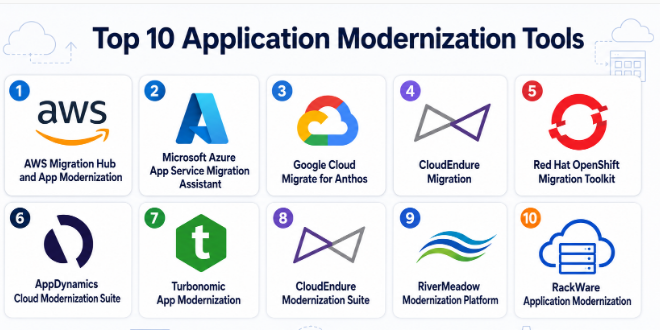
Top 10 Application Modernization Tools
1- AWS Migration Hub and App Modernization
Short description: AWS Migration Hub and App Modernization provides tools for discovering, assessing, and modernizing applications for deployment on AWS cloud infrastructure. It supports rehosting, replatforming, and refactoring workloads while providing insights into modernization paths. Enterprises use it to move legacy applications to AWS and adopt microservices and containerized architectures. Its automation and monitoring capabilities simplify modernization planning and execution.
Key Features
- Application discovery and assessment
- Rehosting, replatforming, and refactoring support
- Containerization recommendations
- AI-assisted modernization insights
- Continuous monitoring and reporting
- Integration with AWS DevOps services
- Security and compliance automation
Pros
- Native AWS integration
- Scalable for enterprise workloads
- Strong automation and guidance
Cons
- AWS-centric, less multi-cloud support
- Some advanced features require AWS expertise
Platforms / Deployment
- Cloud
Security & Compliance
- Encryption
- IAM integration
- Audit logging
- SOC 2, ISO 27001
Integrations & Ecosystem
Integrates seamlessly with AWS ecosystem including:
- AWS Lambda
- ECS/EKS
- CloudFormation
- CodePipeline
- CloudWatch
Support & Community
Enterprise support, extensive documentation, and a large AWS partner ecosystem.
2- Microsoft Azure App Service Migration Assistant
Short description: Azure App Service Migration Assistant simplifies the migration and modernization of .NET, Java, and PHP applications to Azure. It automates dependency analysis, compatibility assessments, and cloud resource provisioning. Organizations adopting Microsoft technologies often use it to modernize applications while leveraging Azure cloud benefits.
Key Features
- Automated dependency mapping
- Compatibility and modernization assessments
- App rehosting and refactoring support
- Cloud provisioning
- CI/CD integration
- Monitoring and logging
- Cost estimation and optimization
Pros
- Native Azure support
- Simplified modernization workflow
- Integrated monitoring and diagnostics
Cons
- Best suited for Microsoft environments
- Limited cross-cloud support
Platforms / Deployment
- Cloud
Security & Compliance
- RBAC
- Encryption
- Audit capabilities
Integrations & Ecosystem
- Azure DevOps
- Visual Studio
- Azure Monitor
- Azure Kubernetes Service
- Azure Active Directory
Support & Community
Comprehensive Microsoft documentation and enterprise support.
3- Google Cloud Migrate for Anthos
Short description: Google Cloud Migrate for Anthos enables containerization and refactoring of legacy applications for deployment on Google Kubernetes Engine. It allows organizations to modernize monolithic applications, adopt microservices, and migrate workloads to GCP with minimal downtime. AI-driven insights simplify modernization decisions.
Key Features
- Automated containerization
- Application refactoring recommendations
- Kubernetes deployment support
- Continuous assessment and monitoring
- Migration orchestration
- Cost and resource optimization
- Integration with GCP services
Pros
- Cloud-native modernization support
- Strong container and Kubernetes integration
- AI-assisted assessment
Cons
- GCP-centric
- May require Kubernetes expertise
Platforms / Deployment
- Cloud
Security & Compliance
- IAM integration
- Encryption
- Audit logging
Integrations & Ecosystem
- Google Kubernetes Engine
- Cloud Run
- Anthos
- Cloud Build
- Stackdriver monitoring
Support & Community
Enterprise support and cloud-native migration guidance.
4- VMware Tanzu Application Platform
Short description: VMware Tanzu Application Platform enables enterprises to modernize applications for Kubernetes, containers, and cloud-native architectures. It provides automation for building, deploying, and managing microservices while supporting enterprise governance and DevOps workflows.
Key Features
- Kubernetes-based modernization
- CI/CD pipeline integration
- Microservices support
- Dependency and vulnerability scanning
- Automated buildpacks
- Application governance
- Observability and monitoring
Pros
- Strong Kubernetes integration
- Enterprise-ready platform
- Supports full modernization lifecycle
Cons
- Complexity for smaller teams
- Requires VMware ecosystem familiarity
Platforms / Deployment
- Hybrid
- Cloud
Security & Compliance
- RBAC
- Encryption
- Audit logging
Integrations & Ecosystem
- VMware vSphere
- Kubernetes ecosystems
- DevOps pipelines
- Observability tools
Support & Community
Strong VMware ecosystem support and enterprise documentation.
5- Red Hat OpenShift Migration Toolkit
Short description: Red Hat OpenShift Migration Toolkit enables modernization of legacy applications and workloads for containerized deployment on OpenShift. It provides automated migration analysis, containerization support, and CI/CD integration. Enterprises use it to transition monolithic applications to cloud-native platforms with reduced risk.
Key Features
- Application discovery and assessment
- Automated containerization
- CI/CD pipeline integration
- Dependency mapping
- Cloud-native deployment support
- Monitoring and observability
- Migration orchestration
Pros
- Native OpenShift support
- Scalable containerization
- Integrated DevOps workflows
Cons
- OpenShift-focused
- Requires container expertise
Platforms / Deployment
- Hybrid
- Cloud
Security & Compliance
- RBAC
- Encryption
- Audit logging
Integrations & Ecosystem
- OpenShift
- Red Hat Enterprise Linux
- Kubernetes
- CI/CD platforms
- DevOps toolchains
Support & Community
Strong enterprise support and OpenShift community.
6- AppDynamics Cloud Modernization Suite
Short description: AppDynamics Cloud Modernization Suite helps enterprises assess, monitor, and modernize applications for cloud deployment. It provides insights into performance, dependencies, and modernization readiness, helping teams refactor or rehost applications efficiently.
Key Features
- Application performance monitoring
- Dependency mapping
- Modernization readiness assessment
- Automated refactoring recommendations
- Cloud deployment insights
- Monitoring and alerting
- Resource optimization
Pros
- Strong observability and monitoring
- AI-driven modernization recommendations
- Supports multiple cloud providers
Cons
- Not a full migration automation tool
- Requires integration with other modernization platforms
Platforms / Deployment
- Cloud
- Hybrid
Security & Compliance
- RBAC
- Encryption
- Audit logging
Integrations & Ecosystem
- AWS
- Azure
- Google Cloud
- CI/CD pipelines
- Monitoring and logging platforms
Support & Community
Enterprise-grade documentation and support.
7- Turbonomic App Modernization
Short description: Turbonomic App Modernization leverages AI to recommend modernization strategies for workloads. It helps organizations identify refactoring, replatforming, and containerization opportunities while ensuring performance and cost optimization.
Key Features
- AI-driven modernization recommendations
- Workload analysis
- Dependency mapping
- Performance optimization
- Cost and resource planning
- Containerization support
- Cloud-native migration guidance
Pros
- Intelligent insights
- Supports decision-making
- Cross-cloud applicability
Cons
- Not a standalone migration engine
- Best used alongside other tools
Platforms / Deployment
- Cloud
- Hybrid
Security & Compliance
- Encryption
- Access controls
Integrations & Ecosystem
- Cloud providers (AWS, Azure, GCP)
- Container platforms
- CI/CD pipelines
- Monitoring platforms
Support & Community
Strong enterprise guidance and implementation support.
8- CloudEndure Modernization Suite
Short description: CloudEndure Modernization Suite automates application refactoring and rehosting for cloud environments. It provides continuous replication, risk mitigation, and orchestration capabilities. Enterprises use it to migrate legacy workloads with minimal downtime and improved efficiency.
Key Features
- Continuous replication
- Automated refactoring support
- Risk mitigation
- Orchestration and scheduling
- Multi-cloud support
- Dependency mapping
- Performance monitoring
Pros
- Near-zero downtime migration
- Reliable replication
- Enterprise-ready automation
Cons
- AWS-focused
- Limited multi-cloud support
Platforms / Deployment
- Cloud
Security & Compliance
- Encryption
- IAM integration
Integrations & Ecosystem
- AWS ecosystem
- CI/CD pipelines
- Monitoring tools
Support & Community
Enterprise support and documentation.
9- RiverMeadow Modernization Platform
Short description: RiverMeadow provides cloud modernization and migration automation for workloads and applications. It supports multi-cloud deployments and helps organizations rehost, replatform, or refactor applications efficiently while minimizing operational risk.
Key Features
- Automated modernization workflows
- Multi-cloud support
- Application dependency analysis
- Migration orchestration
- Resource optimization
- Reporting dashboards
- Cloud-native recommendations
Pros
- Multi-cloud flexibility
- Automation-focused
- Supports large-scale modernization
Cons
- Smaller ecosystem
- Limited mainstream adoption
Platforms / Deployment
- Hybrid
- Cloud
Security & Compliance
- Encryption
- Access controls
Integrations & Ecosystem
- AWS, Azure, GCP
- VMware
- CI/CD pipelines
- Monitoring tools
Support & Community
Enterprise implementation support.
10- RackWare Application Modernization
Short description: RackWare offers modernization, workload mobility, and disaster recovery support for legacy applications. Enterprises use it to refactor, replatform, or containerize applications while ensuring minimal downtime and operational continuity.
Key Features
- Workload refactoring
- Migration orchestration
- Multi-cloud support
- Disaster recovery integration
- Dependency mapping
- Automation workflows
- Performance optimization
Pros
- Broad deployment options
- Integration with DR and cloud
- Automation capabilities
Cons
- Smaller market presence
- Limited community adoption
Platforms / Deployment
- Hybrid
- Cloud
Security & Compliance
- Encryption
- Access controls
Integrations & Ecosystem
- AWS, Azure, GCP
- VMware
- CI/CD platforms
- Monitoring tools
Support & Community
Enterprise-focused support.
Comparison Table
| Tool Name | Best For | Platform(s) Supported | Deployment | Standout Feature | Public Rating |
|---|---|---|---|---|---|
| AWS Migration Hub & App Modernization | AWS workloads | Cloud | Cloud | Native AWS automation | N/A |
| Azure App Service Migration Assistant | Microsoft apps | Cloud | Cloud | Automated assessments | N/A |
| Google Cloud Migrate for Anthos | Container modernization | Cloud | Cloud | Kubernetes integration | N/A |
| VMware Tanzu Application Platform | Enterprise Kubernetes | Cloud/Hybrid | Hybrid | Full microservices support | N/A |
| Red Hat OpenShift Migration Toolkit | OpenShift modernization | Cloud/Hybrid | Hybrid | Automated containerization | N/A |
| AppDynamics Cloud Modernization Suite | Observability-driven modernization | Cloud/Hybrid | Hybrid | AI-assisted insights | N/A |
| Turbonomic App Modernization | AI-driven recommendations | Cloud/Hybrid | Hybrid | Intelligent workload optimization | N/A |
| CloudEndure Modernization Suite | Enterprise refactoring | Cloud | Cloud | Continuous replication | N/A |
| RiverMeadow Modernization Platform | Multi-cloud modernization | Cloud/Hybrid | Hybrid | Automation workflows | N/A |
| RackWare Application Modernization | DR + modernization | Cloud/Hybrid | Hybrid | Workload mobility + DR | N/A |
Evaluation & Scoring of Application Modernization Tools
| Tool Name | Core | Ease | Integrations | Security | Performance | Support | Value | Weighted Total |
| AWS Migration Hub & App Modernization | 10 | 8 | 10 | 9 | 9 | 9 | 8 | 9.0 |
| Azure App Service Migration Assistant | 9 | 9 | 9 | 9 | 9 | 9 | 8 | 8.9 |
| Google Cloud Migrate for Anthos | 9 | 8 | 8 | 9 | 9 | 8 | 8 | 8.5 |
| VMware Tanzu Application Platform | 9 | 7 | 9 | 8 | 9 | 8 | 7 | 8.3 |
| Red Hat OpenShift Migration Toolkit | 8 | 8 | 8 | 8 | 8 | 8 | 7 | 7.9 |
| AppDynamics Cloud Modernization Suite | 8 | 8 | 8 | 8 | 8 | 8 | 8 | 8.0 |
| Turbonomic App Modernization | 8 | 8 | 8 | 8 | 8 | 8 | 8 | 8.0 |
| CloudEndure Modernization Suite | 9 | 7 | 8 | 8 | 9 | 8 | 7 | 8.1 |
| RiverMeadow Modernization Platform | 8 | 7 | 8 | 8 | 8 | 7 | 8 | 7.8 |
| RackWare Application Modernization | 8 | 7 | 8 | 8 | 8 | 7 | 8 | 7.8 |
These scores provide comparative guidance. Enterprises may prioritize automation, scalability, and cloud-native integration, while SMBs may value ease of use and cost-effectiveness. Scores should be interpreted in context of organizational requirements.
Which Application Modernization Tool Is Right for You?
Solo / Freelancer
Most solo developers and small teams will benefit from lightweight modernization recommendations in native cloud provider tools such as AWS or Azure migration services.
SMB
Azure App Service Migration Assistant, AWS Migration Hub, and Google Cloud Migrate provide straightforward modernization guidance for SMBs seeking cloud-native improvements without complex enterprise overhead.
Mid-Market
Red Hat OpenShift Migration Toolkit, VMware Tanzu, and Turbonomic support broader workloads, containerization, and modernization workflows suitable for mid-market organizations.
Enterprise
AWS Migration Hub, VMware Tanzu, CloudEndure, and RiverMeadow are best suited for large-scale application modernization with automation, AI-assisted insights, multi-cloud support, and enterprise governance.
Budget vs Premium
Native cloud provider tools are cost-efficient, while enterprise suites like VMware Tanzu, AppDynamics, and CloudEndure deliver deeper functionality at higher investment levels.
Feature Depth vs Ease of Use
Tools like Azure and AWS provide simplicity, while Turbonomic, VMware Tanzu, and RiverMeadow provide comprehensive modernization capabilities but may require more expertise.
Integrations & Scalability
Large organizations should prioritize platforms offering multi-cloud, container orchestration, and DevOps pipeline integrations.
Security & Compliance Needs
Enterprises in regulated industries should focus on tools providing integrated security, compliance reporting, audit logs, and encryption across modernization workflows.
Frequently Asked Questions
1- What is an application modernization tool?
It is software that helps organizations refactor, replatform, containerize, or rehost legacy applications for improved performance, cloud readiness, and maintainability.
2- Why is application modernization important?
Modernization improves scalability, reduces technical debt, enhances security, supports DevOps, and aligns applications with cloud-native architectures.
3- What types of modernization are supported?
Rehosting, replatforming, refactoring, containerization, microservices adoption, and hybrid-cloud deployments.
4- Can these tools reduce downtime?
Yes. Many provide automated replication, orchestration, and migration capabilities that minimize downtime during modernization.
5- Do these tools integrate with CI/CD pipelines?
Most top tools support integration with popular DevOps workflows, CI/CD tools, and container orchestration platforms.
6- How do AI features help?
AI assists in code analysis, dependency mapping, workload assessment, modernization recommendations, and risk mitigation.
7- Are cloud migrations required for modernization?
Not always. Some tools enable on-premises modernization or hybrid-cloud approaches without requiring full cloud migration.
8- What security features are included?
Encryption, access control, audit logging, compliance validation, and vulnerability assessment are often included.
9- Can these tools support multi-cloud strategies?
Yes, leading platforms support AWS, Azure, Google Cloud, OpenShift, VMware, and hybrid environments.
10- How should organizations choose a modernization platform?
Evaluate automation capabilities, cloud compatibility, AI-assisted recommendations, security and compliance, integration, support, and total cost of ownership.
Conclusion
Application modernization tools are essential for organizations looking to transform legacy applications into scalable, cloud-ready, and maintainable systems. Enterprises often leverage AWS Migration Hub, Azure App Service Migration Assistant, VMware Tanzu, and CloudEndure for large-scale modernization with automation, AI-assisted insights, and governance. Mid-market organizations benefit from Red Hat OpenShift, Turbonomic, and RiverMeadow for containerization and multi-cloud workflows. Smaller teams or cloud-native adopters may find Azure or AWS services sufficient. The ideal platform depends on organizational size, modernization strategy, existing infrastructure, and regulatory requirements. Begin by shortlisting two to three tools, pilot a modernization project, validate integrations and security compliance, and then scale the chosen solution to achieve long-term application modernization goals.
