Introduction
Live streaming studio software enables creators, businesses, and broadcasters to produce and stream live video content with professional-quality visuals, audio, and real-time interaction. These tools act as control centers for managing multiple video sources, overlays, transitions, audio mixing, and streaming outputs across platforms.
With the rapid growth of live content across gaming, education, marketing, and events, streaming software has evolved significantly. Modern solutions now include AI-powered scene switching, cloud-based streaming, audience engagement tools, and multi-platform broadcasting—all designed to simplify complex production workflows.
Common use cases include:
- Game streaming and content creation
- Webinars and virtual events
- Live podcasts and interviews
- Online teaching and training sessions
- Corporate broadcasts and product launches
Key evaluation criteria buyers should consider:
- Multi-source video and audio input support
- Streaming quality and encoding performance
- Platform integrations (YouTube, Twitch, etc.)
- Scene transitions and overlays
- AI automation and smart controls
- Cloud vs local streaming capabilities
- Latency and real-time performance
- Collaboration and remote guest features
- Ease of setup and usability
Best for: Streamers, educators, marketers, media teams, and businesses producing live video content.
Not ideal for: Users who only need simple video recording—basic screen recorders may suffice.
Key Trends in Live Streaming Studio Software
- AI-powered production: Auto scene switching and smart framing
- Cloud-based streaming studios: No local setup required
- Multi-streaming: Broadcasting to multiple platforms simultaneously
- Interactive features: Live chat overlays, polls, and audience engagement
- Remote collaboration: Inviting guests from anywhere
- Low-latency streaming: Real-time interaction improvements
- Vertical video support: Optimized for mobile platforms
- Integration with marketing tools: CRM and analytics platforms
- Automation workflows: Scheduled streams and pre-configured scenes
- Hybrid event support: Combining physical and virtual audiences
How We Selected These Tools (Methodology)
- Evaluated market adoption among streamers and businesses
- Assessed video/audio production capabilities
- Reviewed performance and encoding efficiency
- Considered AI and automation features
- Included tools for beginners to professionals
- Analyzed multi-platform streaming capabilities
- Evaluated integration with streaming platforms and tools
- Reviewed community support and documentation
- Balanced free, open-source, and premium solutions
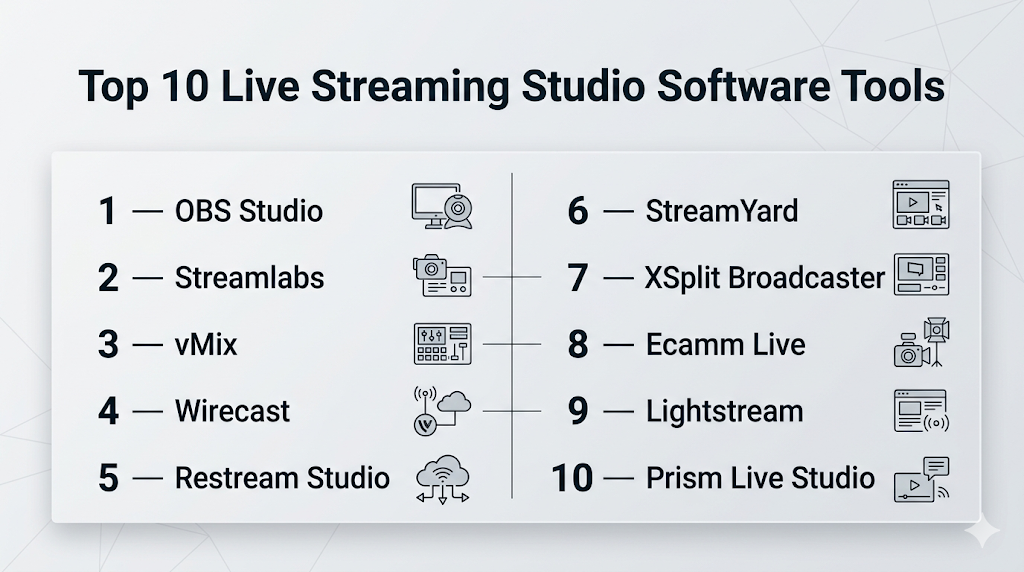
Top 10 Live Streaming Studio Software Tools
#1 — OBS Studio
Short description: A free, open-source streaming software widely used for professional live streaming and recording.
Key Features
- Multi-source video/audio capture
- Scene composition and transitions
- Real-time encoding
- Plugin support
- Custom overlays and filters
- High-performance streaming
Pros
- Completely free and open-source
- Highly customizable
Cons
- Steep learning curve
- No built-in cloud features
Platforms / Deployment
Windows / macOS / Linux
Local
Security & Compliance
Not publicly stated
Integrations & Ecosystem
Large plugin ecosystem.
- Streaming platforms
- Custom plugins
- Developer extensions
Support & Community
Massive global community and extensive tutorials.
#2 — Streamlabs
Short description: A user-friendly streaming software built on OBS, designed for creators and streamers.
Key Features
- Pre-built overlays and themes
- Integrated alerts and widgets
- Multi-streaming support
- Chat management
- Monetization tools
Pros
- Easy to use
- Built-in monetization features
Cons
- Resource-intensive
- Some features behind paywall
Platforms / Deployment
Windows / macOS
Local
Security & Compliance
Not publicly stated
Integrations & Ecosystem
Strong creator ecosystem.
- Streaming platforms
- Donation tools
- Alerts
Support & Community
Large creator community.
#3 — vMix
Short description: A professional live production software for high-end streaming and broadcasting.
Key Features
- Multi-camera support
- Live video mixing
- 4K streaming
- Instant replay
- Remote guest integration
Pros
- Broadcast-level features
- High performance
Cons
- Windows-only
- Expensive
Platforms / Deployment
Windows
Local
Security & Compliance
Not publicly stated
Integrations & Ecosystem
Professional integrations.
- Cameras
- Streaming platforms
- Hardware tools
Support & Community
Strong professional user base.
#4 — Wirecast
Short description: A professional streaming software used for live events and broadcasting.
Key Features
- Multi-source input
- Live switching
- Built-in graphics
- Streaming to multiple platforms
- Recording capabilities
Pros
- Professional-grade features
- Reliable performance
Cons
- Expensive
- Learning curve
Platforms / Deployment
Windows / macOS
Local
Security & Compliance
Not publicly stated
Integrations & Ecosystem
Supports professional workflows.
- Cameras
- Streaming platforms
Support & Community
Established community.
#5 — Restream Studio
Short description: A cloud-based streaming studio for multi-platform broadcasting.
Key Features
- Browser-based streaming
- Multi-streaming
- Guest invitations
- Chat aggregation
- Branding tools
Pros
- No installation required
- Easy multi-platform streaming
Cons
- Internet-dependent
- Limited advanced controls
Platforms / Deployment
Web
Cloud
Security & Compliance
Not publicly stated
Integrations & Ecosystem
Cloud-first integrations.
- Streaming platforms
- Social media
Support & Community
Growing user base.
#6 — StreamYard
Short description: A simple cloud-based streaming tool for interviews, webinars, and podcasts.
Key Features
- Guest streaming
- Screen sharing
- Branding overlays
- Multi-streaming
- Recording
Pros
- Extremely easy to use
- Great for interviews
Cons
- Limited advanced production tools
- Branding limitations on free plan
Platforms / Deployment
Web
Cloud
Security & Compliance
Not publicly stated
Integrations & Ecosystem
Supports content workflows.
- Social platforms
- Streaming tools
Support & Community
Strong creator adoption.
#7 — XSplit Broadcaster
Short description: A streaming and recording software designed for gamers and professionals.
Key Features
- Scene management
- Plugin support
- Video mixing
- Streaming tools
- Custom transitions
Pros
- Easy setup
- Good performance
Cons
- Windows-only
- Paid features
Platforms / Deployment
Windows
Local
Security & Compliance
Not publicly stated
Integrations & Ecosystem
Supports streaming workflows.
- Plugins
- Platforms
Support & Community
Moderate community.
#8 — Ecamm Live
Short description: A macOS-focused live streaming software with professional features.
Key Features
- Multi-camera support
- Screen sharing
- Interview mode
- Overlays and graphics
- Live switching
Pros
- Mac-optimized performance
- Easy interface
Cons
- macOS-only
- Subscription pricing
Platforms / Deployment
macOS
Local
Security & Compliance
Not publicly stated
Integrations & Ecosystem
Supports content creators.
- Streaming platforms
- Video tools
Support & Community
Strong Mac user community.
#9 — Lightstream
Short description: A cloud-based streaming studio designed for creators and gamers.
Key Features
- Browser-based streaming
- Cloud overlays
- Console streaming support
- Scene management
- Multi-platform streaming
Pros
- No high-end hardware required
- Easy setup
Cons
- Subscription required
- Limited advanced features
Platforms / Deployment
Web
Cloud
Security & Compliance
Not publicly stated
Integrations & Ecosystem
Cloud integrations.
- Streaming platforms
- Gaming consoles
Support & Community
Growing community.
#10 — Prism Live Studio
Short description: A mobile-friendly streaming app designed for social media creators.
Key Features
- Mobile streaming
- Filters and effects
- Multi-platform streaming
- Chat integration
- Simple UI
Pros
- Great for mobile creators
- Easy to use
Cons
- Limited professional features
- Mobile-focused
Platforms / Deployment
Windows / iOS / Android
Local / Cloud
Security & Compliance
Not publicly stated
Integrations & Ecosystem
Social media integrations.
- Streaming platforms
- Mobile tools
Support & Community
Popular among mobile creators.
Comparison Table (Top 10)
| Tool Name | Best For | Platform(s) Supported | Deployment | Standout Feature | Public Rating |
|---|---|---|---|---|---|
| OBS Studio | Professionals | Multi-platform | Local | Free & customizable | N/A |
| Streamlabs | Beginners | Win/macOS | Local | Built-in alerts | N/A |
| vMix | Broadcast | Windows | Local | 4K production | N/A |
| Wirecast | Events | Win/macOS | Local | Multi-source mixing | N/A |
| Restream Studio | Multi-streaming | Web | Cloud | Browser-based | N/A |
| StreamYard | Interviews | Web | Cloud | Guest streaming | N/A |
| XSplit | Gamers | Windows | Local | Easy setup | N/A |
| Ecamm Live | Mac users | macOS | Local | Mac optimization | N/A |
| Lightstream | Cloud creators | Web | Cloud | No hardware needed | N/A |
| Prism Live Studio | Mobile creators | Multi-platform | Hybrid | Mobile streaming | N/A |
Evaluation & Scoring of Live Streaming Studio Software
| Tool Name | Core (25%) | Ease (15%) | Integrations (15%) | Security (10%) | Performance (10%) | Support (10%) | Value (15%) | Weighted Total |
|---|---|---|---|---|---|---|---|---|
| OBS Studio | 9 | 6 | 9 | 5 | 9 | 10 | 10 | 8.6 |
| Streamlabs | 8 | 9 | 8 | 5 | 8 | 9 | 8 | 8.2 |
| vMix | 10 | 6 | 8 | 5 | 10 | 8 | 7 | 8.3 |
| Wirecast | 9 | 6 | 8 | 5 | 9 | 8 | 7 | 8.0 |
| Restream Studio | 8 | 9 | 9 | 5 | 7 | 8 | 8 | 8.1 |
| StreamYard | 7 | 10 | 8 | 5 | 7 | 8 | 8 | 7.9 |
| XSplit | 8 | 8 | 7 | 5 | 8 | 7 | 7 | 7.6 |
| Ecamm Live | 8 | 9 | 7 | 5 | 8 | 7 | 7 | 7.8 |
| Lightstream | 7 | 9 | 8 | 5 | 7 | 7 | 8 | 7.7 |
| Prism Live Studio | 6 | 10 | 6 | 5 | 7 | 7 | 9 | 7.4 |
How to interpret the scores:
- Higher scores indicate balanced performance across key criteria
- Professionals should prioritize core features and performance
- Beginners should prioritize ease of use and value
- Free tools score high in value but may lack advanced features
- Choose based on your streaming workflow and goals
Which Live Streaming Studio Software Tool Is Right for You?
Solo / Freelancer
- Best options: OBS Studio, Streamlabs, StreamYard
- Focus on ease and affordability
SMB
- Best options: Restream Studio, Ecamm Live
- Balance features and usability
Mid-Market
- Best options: Wirecast, vMix
- Need advanced production tools
Enterprise
- Best options: vMix, Wirecast
- Require broadcast-level workflows
Budget vs Premium
- Budget: OBS Studio, Prism Live Studio
- Premium: vMix, Wirecast
Feature Depth vs Ease of Use
- Advanced: vMix, Wirecast
- Easy: StreamYard, Streamlabs
Integrations & Scalability
- Strong: Restream, OBS
- Limited: Prism Live
Security & Compliance Needs
- Most tools: Not publicly stated
- Enterprises should validate internally
Frequently Asked Questions (FAQs)
What is live streaming studio software?
It is software used to create and broadcast live video content.
Is OBS Studio free?
Yes, it is completely free and open-source.
Can I stream to multiple platforms?
Yes, many tools support multi-streaming.
Do I need a powerful PC?
Yes, for high-quality streaming and multiple sources.
Are cloud streaming tools better?
They are easier to use but depend on internet speed.
Can I invite guests to streams?
Yes, tools like StreamYard support remote guests.
What is latency in streaming?
The delay between live action and viewer playback.
Can I use overlays and graphics?
Yes, most tools support customization.
Is mobile streaming possible?
Yes, tools like Prism Live support mobile streaming.
Are AI features available?
Yes, some tools offer automation and smart controls.
Conclusion
Live streaming studio software has become a critical tool for content creators, businesses, and broadcasters. From free open-source tools to professional broadcast solutions, the market offers options for every level of expertise and use case.
