Introduction
Copyright registration tools are software platforms or services that help creators, businesses, and legal professionals register and manage copyrights for original works. These tools simplify the process of documenting authorship, preparing registration applications, submitting to relevant government offices, tracking registration status, and maintaining records of intellectual property (IP). In and beyond, digital content proliferation — such as videos, images, software, writing, and AI‑generated content — has made easy, reliable copyright registration a necessity for creators and organizations of all sizes.
Copyright registration is more than paperwork: it establishes legal ownership, enables enforcement against infringement, and provides enforceable rights in disputes, licensing, and commercialization. While governments generally govern copyright registration, modern tools help streamline the process, reduce errors, and integrate with legal and project workflows.
Real‑world use cases include:
- Independent authors registering books, articles, and digital content.
- Software developers securing copyright for code and digital assets.
- Creators protecting images, videos, and multimedia works.
- Enterprises tracking and managing large IP portfolios.
- Legal professionals preparing, filing, and monitoring registrations on behalf of clients.
What buyers should evaluate:
- Supported jurisdictions and local legal requirements
- Automation and guidance in application preparation
- Document and evidence management
- Integration with legal and accounting tools
- Compliance and audit trails
- Ease of use for non‑lawyers
- Support for batch submissions and portfolio management
- Security and data protection
- Pricing and scalability
- Reporting and status tracking
Best for: Independent creators, legal professionals, creative agencies, digital platforms with user‑generated content, and enterprises with significant intellectual property portfolios that need systematic, reliable, and compliant copyright registration workflows.
Not ideal for: Casual creators who rarely publish original works, small teams with low documentation needs, or those who prefer manual government portal submissions without intermediary tools.
Key Trends in Copyright Registration Tools
- AI‑assisted application preparation: Automated extraction of metadata, work descriptions, and classification based on uploaded content.
- Guided compliance workflows: Step‑by‑step guidance and error checking based on jurisdictional rules.
- Secure evidence storage and timestamping: Immutable logging of drafts, proofs, and submission artifacts.
- Batch and portfolio management: Tools that handle large volumes of registrations for enterprises.
- Integration with content platforms: APIs that link content repositories with registration workflows.
- Multi‑jurisdiction coverage: Support for global copyright registration standards and local variations.
- Automated status tracking: Alerts and dashboards for registration progress and renewals.
- Blockchain for proof of existence: Immutable digital certificates and timestamping for evidentiary value.
- Modular subscription models: Tiered pricing based on usage, volume, and features.
- Data privacy and security compliance: Sophisticated encryption, audit trails, and compliance with privacy laws.
How We Selected These Tools (Methodology)
- Market adoption: Tools widely used by creators, legal teams, and enterprises.
- Feature completeness: Comprehensive support for application preparation, submission, tracking, and management.
- Reliability: Stability, uptime, and consistent performance for high‑volume workflows.
- Security posture: Encryption, access control, audit logs, and data protection practices.
- Integrations: APIs and ecosystem support for content, legal, accounting, and IP management systems.
- Scalability: Suitable for individuals, small teams, and enterprise portfolios.
- Usability: Clarity of UI/UX for legal and non‑legal users alike.
- Support & documentation: Onboarding resources, guides, responsive support channels.
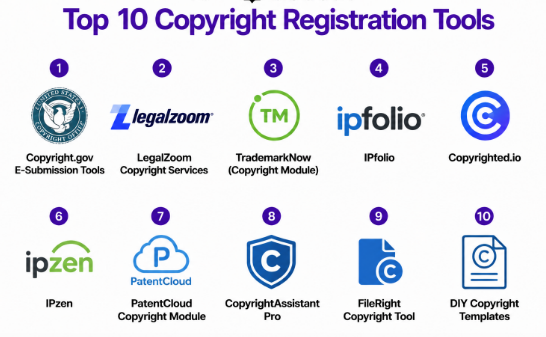
Top 10 Copyright Registration Tools
1- Copyright.gov E‑Submission Tools
Short description: The official United States Copyright Office e‑submission portal and toolset provide direct filing and management of registration applications with the U.S. Copyright Office. It is the authoritative tool for creators registering works in the United States.
Key Features
- Official submission interface for the U.S. Copyright Office
- Form preparation with required fields and validations
- Document upload and evidence attachment
- Status tracking and correspondence storage
- Direct indexing of registrations
- Batch submission support for certain categories
Pros
- Direct, authoritative filing with the government
- No intermediary fees other than statutory government fees
- Comprehensive support for U.S. copyright categories
Cons
- Interface can feel dated and complex
- Geared only to U.S. jurisdiction
Platforms / Deployment
- Web
- Cloud
Security & Compliance
- Not publicly stated
Integrations & Ecosystem
- Direct government system
- Limited API provisioning
- Workflow tools from legal platforms (via custom integration)
Support & Community
- Government help desk support
- Documentation and filing guides
- Limited interactive support
2- LegalZoom Copyright Services
Short description: LegalZoom offers copyright registration services with guided workflows, document preparation, and attorney support for creators and small businesses. It combines automation with human review assistance.
Key Features
- Guided application preparation
- Document review by legal professionals
- Submission handling to government offices
- Status tracking and updates
- Templates and content categorization help
Pros
- Simplifies legal language and filing steps
- Access to attorney support
- Good for individuals and small businesses
Cons
- Additional fees beyond government charges
- Less suitable for large enterprise portfolios
Platforms / Deployment
- Web
- Cloud
Security & Compliance
- Not publicly stated
Integrations & Ecosystem
- Document management systems
- Email notifications
- Legal workflow tools
Support & Community
- Email and phone support
- Legal advisor access
- Knowledge base
3- TrademarkNow (Copyright Module)
Short description: TrademarkNow, known for trademark research and management, offers copyright registration workflows as part of its broader IP management suite, suitable for enterprises and IP teams.
Key Features
- IP portfolio management
- Automated classification and guidance
- Workflow automation for filing and tracking
- Search and risk analysis tools
- Reporting dashboards
Pros
- Enterprise‑grade IP management
- Centralized dashboard for multiple IP types
- Integration with legal workflows
Cons
- Stronger focus on trademarks; copyright module is part of a larger suite
- Higher pricing for full suite
Platforms / Deployment
- Web
- Cloud
Security & Compliance
- Not publicly stated
Integrations & Ecosystem
- CRM and legal systems
- Analytics and reporting stacks
- Document repositories
Support & Community
- Dedicated onboarding support
- Documentation and guides
- Enterprise support teams
4- IPfolio
Short description: IPfolio is an intellectual property management platform that includes copyright registration, tracking, and portfolio oversight for enterprises and IP professionals.
Key Features
- IP portfolio dashboard
- Workflow automation for registration and renewals
- Evidence and document management
- Reporting and analytics
- Role‑based access and audit logs
Pros
- Built for enterprise IP teams
- Centralized oversight of all IP assets
- Strong data organization features
Cons
- High learning curve
- Implementation and setup may require professional services
Platforms / Deployment
- Web
- Cloud
Security & Compliance
- Not publicly stated
Integrations & Ecosystem
- Legal and accounting tools
- Document management systems
- Enterprise authentication services
Support & Community
- Dedicated implementation support
- Training resources
- Customer success teams
5- Copyrighted.io
Short description: Copyrighted.io is a creator‑focused registration tool that provides guided steps for preparing and submitting copyright applications, with optional professional review and simple tracking.
Key Features
- Step‑by‑step application guidance
- Document upload and evidence support
- Status tracking
- Templates and examples for common formats
- Email notifications
Pros
- Easy to use for independent creators
- Affordable entry‑level service
- Simple dashboards
Cons
- Limited enterprise features
- Fewer integrations than larger platforms
Platforms / Deployment
- Web
- Cloud
Security & Compliance
- Not publicly stated
Integrations & Ecosystem
- Email alerts
- Document storage
- Optional API for partners
Support & Community
- Email support
- Tutorials and guides
- Community forums
6- IPzen
Short description: IPzen is an IP lifecycle management platform that supports multiple IP types, including copyrights, with workflow automation and portfolio tracking.
Key Features
- Custom workflows for registration and renewals
- Centralized IP dashboard
- Evidence and document repository
- Alerts and notifications
- Reporting and analytics
Pros
- Unified IP management for enterprises
- Scalable workflow automation
- Flexible reporting
Cons
- Interface may be complex for smaller teams
- Setup requires configuration
Platforms / Deployment
- Web
- Cloud
Security & Compliance
- Not publicly stated
Integrations & Ecosystem
- ERP and legal systems
- Document management
- Analytics connections
Support & Community
- Email support
- Documentation
- Professional services
7- PatentCloud Copyright Module
Short description: Known for patent analytics, PatentCloud also provides copyright registration tools as part of its IP analytics and workflow suite, aimed at research‑intensive organizations.
Key Features
- Metadata enrichment and auto‑classification
- Workflow automation
- Integrated analytics dashboards
- Evidence repository
- Global IP coverage
Pros
- Strong analytics and research tools
- Useful for organizations with mixed IP needs
- Centralized workflows
Cons
- Strong patent focus; copyright module may be secondary
- Premium pricing
Platforms / Deployment
- Web
- Cloud
Security & Compliance
- Not publicly stated
Integrations & Ecosystem
- Legal systems
- Document repositories
- Analytics tools
Support & Community
- Dedicated support
- Knowledge base
- Professional onboarding
8- CopyrightAssistant Pro
Short description: CopyrightAssistant Pro focuses on helping creators prepare, validate, and export registration applications with automated checks and guided workflows, ideal for individual creators and small teams.
Key Features
- Guided application builder
- Error checking and validation
- Exportable PDF applications
- Document proof management
- Status tracking
Pros
- Simple interface
- Automated error checking
- Good for small teams
Cons
- Lacks advanced IP portfolio management
- Limited reporting
Platforms / Deployment
- Web
- Cloud
Security & Compliance
- Not publicly stated
Integrations & Ecosystem
- Document storage
- Email notifications
Support & Community
- Email support
- Tutorials
- Community knowledge base
9- FileRight Copyright Tool
Short description: FileRight offers a suite of legal filing tools, including copyright registration support, with attorney review options and filing assistance.
Key Features
- Guided preparation and filing
- Attorney review option
- Status monitoring
- Document storage
- Evidence management
Pros
- Professional backing
- Good for complex filings
- Attorney review increases accuracy
Cons
- Higher cost
- Less focus on automation
Platforms / Deployment
- Web
- Cloud
Security & Compliance
- Not publicly stated
Integrations & Ecosystem
- Legal practice systems
- Document management
Support & Community
- Email and phone support
- Legal advisor access
- Documentation
10- DIY Copyright Templates
Short description: DIY Copyright Templates provides downloadable, jurisdiction‑specific copyright application templates with instructional guidance, ideal for basic self‑filing.
Key Features
- Jurisdiction‑specific templates
- Step‑by‑step instructions
- Checklists for evidence
- Printable versions
- Guidance for manual filing
Pros
- Very low cost
- Great for occasional users
- No subscription
Cons
- No automation or tracking
- Manual processes required
Platforms / Deployment
- Web
- Cloud
Security & Compliance
- Not publicly stated
Integrations & Ecosystem
- Documentation library
Support & Community
- Email support
- Guides and articles
- Community discussions
Comparison Table (Top 10)
| Tool Name | Best For | Platform(s) Supported | Deployment | Standout Feature | Public Rating |
|---|---|---|---|---|---|
| Copyright.gov Tools | Direct government filing | Web | Cloud | Official filing | N/A |
| LegalZoom Copyright | Small businesses & creators | Web | Cloud | Attorney support | N/A |
| TrademarkNow | Enterprise IP teams | Web | Cloud | Enterprise IP management | N/A |
| IPfolio | Enterprises with large IP portfolios | Web | Cloud | Centralized IP dashboard | N/A |
| Copyrighted.io | Independent creators | Web | Cloud | Simple guided workflows | N/A |
| IPzen | Enterprise IP management | Web | Cloud | Workflow automation | N/A |
| PatentCloud | Research‑intensive organizations | Web | Cloud | Analytics + workflows | N/A |
| CopyrightAssistant Pro | Small teams and creators | Web | Cloud | Automated error checking | N/A |
| FileRight | Complex legal filings | Web | Cloud | Attorney review | N/A |
| DIY Copyright Templates | Occasional or manual filers | Web | Cloud | Low‑cost templates | N/A |
Evaluation & Scoring of Copyright Registration Tools
| Tool Name | Core (25%) | Ease (15%) | Integrations (15%) | Security (10%) | Performance (10%) | Support (10%) | Value (15%) | Weighted Total (0–10) |
|---|---|---|---|---|---|---|---|---|
| Copyright.gov Tools | 8 | 7 | 6 | 7 | 8 | 7 | 9 | 7.7 |
| LegalZoom Copyright | 8 | 8 | 7 | 7 | 7 | 8 | 7 | 7.6 |
| TrademarkNow | 9 | 7 | 8 | 7 | 8 | 8 | 7 | 8.0 |
| IPfolio | 9 | 7 | 8 | 7 | 8 | 7 | 7 | 7.8 |
| Copyrighted.io | 7 | 9 | 6 | 7 | 7 | 7 | 9 | 7.7 |
| IPzen | 8 | 7 | 7 | 7 | 7 | 7 | 7 | 7.2 |
| PatentCloud | 8 | 7 | 8 | 7 | 8 | 7 | 7 | 7.7 |
| CopyrightAssistant Pro | 7 | 8 | 6 | 7 | 7 | 7 | 9 | 7.4 |
| FileRight | 8 | 7 | 7 | 7 | 7 | 8 | 7 | 7.4 |
| DIY Copyright Templates | 6 | 9 | 5 | 7 | 6 | 7 | 9 | 7.0 |
Interpretation: Scores compare each tool’s core capability, ease of use, integrations, security, performance, support, and value. Organizations should weigh these scores alongside their needs for automation, tracking, legal support, and portfolio scale.
Which Copyright Registration Tool Is Right for You?
Solo / Freelancer
- Copyrighted.io and DIY Copyright Templates for simple, low‑cost workflows without heavy automation.
SMB
- LegalZoom Copyright and CopyrightAssistant Pro provide guided filing with oversight and status tracking.
Mid‑Market
- TrademarkNow and IPfolio help manage multiple works, workflows, and reporting for professional teams.
Enterprise
- IPfolio, PatentCloud, and TrademarkNow offer scalable dashboarding, automation, and tracking across IP categories.
Budget vs Premium
- DIY Copyright Templates and Copyrighted.io are cost‑effective.
- IPfolio, TrademarkNow, and PatentCloud deliver premium enterprise capabilities.
Feature Depth vs Ease of Use
- Copyrighted.io and CopyrightAssistant Pro balance simplicity with core functionality.
- IPfolio and TrademarkNow prioritize depth and control for portfolio oversight.
Integrations & Scalability
- Enterprise tools integrate with legal systems, content repositories, and analytics platforms.
- Smaller tools focus on standalone workflows with basic notifications.
Security & Compliance Needs
- Verify encryption, role‑based access, and audit logging based on legal risk and document sensitivity.
Frequently Asked Questions (FAQs)
1- What pricing models do copyright registration tools use?
Most platforms offer subscription plans, usage‑based fees, or tiered service levels with optional professional support.
2- Do these tools replace legal counsel?
Tools streamline filing and provide compliance checks, but complex copyright disputes or global strategy often benefit from an attorney.
3- Can they handle international registrations?
Some tools support global workflows, but local legal differences may require region‑specific processes.
4- Is documentation stored securely?
Leading tools use secure cloud storage with encryption and access controls, but confirm specific practices before committing.
5- Do tools support batch filing?
Enterprise platforms often include batch submission and portfolio management features.
6- How long does registration take?
Processing timelines vary by jurisdiction, but tools aim to automate document submission and tracking.
7- Can tools track registration status?
Yes, most provide dashboards or email notifications for application progress and updates.
8- Are templates provided?
Several tools include templates, guidance, and validation to reduce filing errors.
9- Do I need to upload evidence?
Yes, most jurisdictions require evidence or copies of the work being registered.
10- What are alternatives to these tools?
Manual government portal filing, attorney‑assisted services, and simple checklist templates are alternatives, but they lack automation and tracking.
Conclusion
Copyright registration tools simplify the complex and legally significant process of registering original works. For casual creators, guided tools like Copyrighted.io or templates can provide low‑cost access, while enterprises benefit from comprehensive platforms like IPfolio and TrademarkNow. Regardless of scale, organizations should shortlist a few tools, conduct pilot tests for accuracy and workflow needs, and validate integration, security, and reporting before making long‑term commitments.
