Introduction
Family organization apps are digital platforms designed to help households coordinate schedules, manage tasks, share grocery lists, track chores, and communicate efficiently among family members. In with busy lifestyles, multiple school and work schedules, and remote work becoming more common, these apps have become essential for maintaining household harmony. Modern apps now integrate AI to suggest task allocation, optimize schedules, and provide reminders across multiple devices, making family coordination seamless and stress-free.
Real-world use cases include:
- Families coordinating multiple work, school, and extracurricular schedules across parents and children.
- Parents managing chores, homework, and household responsibilities for kids and teenagers.
- Shared grocery and meal planning among family members or roommates.
- Monitoring and assigning allowances or task-based rewards for children.
- Coordinating extended family events or collaborative household projects.
Best for: Families with children, busy households, roommates, and shared households looking for seamless task and schedule management.
Not ideal for: Individuals who live alone or households that do not require frequent scheduling or task coordination.
Key Trends in Family Organization Apps
- AI-based task and chore assignment to balance family responsibilities
- Cross-platform synchronization across mobile, tablet, desktop, and smart devices
- Integration with smart home systems and voice assistants (Alexa, Google Assistant, Siri)
- Shared calendars with color-coded events and activity prioritization
- Collaborative grocery lists and meal planning with AI suggestions
- Offline accessibility for schedules, tasks, and lists
- Security and privacy improvements, including encryption and compliance with GDPR/HIPAA for children’s data
- Gamification for chores and task completion to motivate children
- Real-time notifications and reminders for critical family events
- Premium subscription models offering advanced AI features, analytics, and multi-family coordination
How We Selected These Tools (Methodology)
- Evaluated market adoption, download volume, and active user base
- Assessed feature completeness including calendars, tasks, grocery integration, and AI assistance
- Reviewed reliability, offline support, and cross-device synchronization
- Analyzed security posture and privacy policy compliance
- Considered integrations with smart devices, voice assistants, and family management ecosystems
- Examined usability, interface design, and accessibility for different age groups
- Determined suitability across single-parent, dual-parent, and extended family households
- Factored in user feedback, adoption trends, and expert opinions
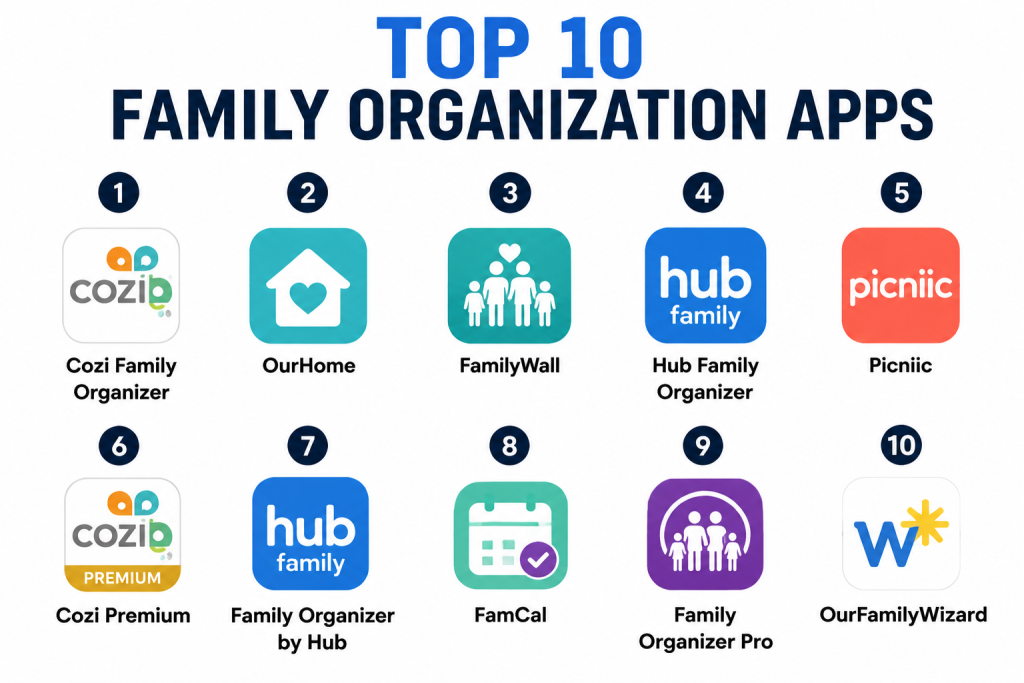
Top 10 Family Organization Apps
1- Cozi Family Organizer
Short description: Cozi is a comprehensive family management app offering shared calendars, to-do lists, grocery lists, and meal planning. Suitable for families of all sizes.
Key Features
- Shared family calendars with color-coded schedules
- Grocery and to-do lists with real-time updates
- Meal planning and recipe integration
- Reminders and notifications for events and tasks
- Cross-device synchronization
- Offline access
Pros
- Combines multiple family organization features in one app
- Strong collaboration and multi-user support
Cons
- Some premium features require subscription
- Interface may feel overwhelming for new users
Platforms / Deployment
- iOS, Android, Web / Cloud
Security & Compliance
- Not publicly stated
Integrations & Ecosystem
- Voice assistants (Alexa, Google Assistant, Siri)
- Calendar apps for syncing events
- Recipe import and meal planning tools
Support & Community
- Email support and online tutorials
- Active user community and forums
2- OurHome
Short description: OurHome helps families track chores, rewards, and shared tasks, combining task management with gamification for children.
Key Features
- Chore assignment and tracking
- Points and rewards system for children
- Shared grocery lists and meal planning
- Calendar and event reminders
- Offline access and notifications
Pros
- Motivates children with gamified chores
- Simple task assignment for parents
Cons
- Less robust calendar management
- Some features require in-app purchases
Platforms / Deployment
- iOS, Android / Cloud
Security & Compliance
- Not publicly stated
Integrations & Ecosystem
- Grocery apps for shared lists
- Cross-device syncing for family members
- Notifications for chores and tasks
Support & Community
- Tutorials and help center
- Small but active user community
3- FamilyWall
Short description: FamilyWall provides family calendars, private messaging, and shared lists, ideal for households coordinating schedules and responsibilities.
Key Features
- Shared family calendar and events
- Private messaging and chat
- Task and grocery list management
- Photo albums and document storage
- Notifications and reminders
Pros
- Combines communication with scheduling
- Supports file sharing for family documents
Cons
- Interface may feel complex
- Premium subscription required for full features
Platforms / Deployment
- iOS, Android, Web / Cloud
Security & Compliance
- Not publicly stated
Integrations & Ecosystem
- Voice assistant integration
- Calendar syncing
- Shared grocery lists
Support & Community
- Email support and guides
- Active online community
4- Hub Family Organizer
Short description: Hub offers a unified platform for family scheduling, grocery management, tasks, and private communication. Suitable for busy households.
Key Features
- Shared calendar and event management
- To-do and chore tracking
- Grocery lists with real-time updates
- Private messaging
- Notifications and reminders
- Cross-device sync
Pros
- All-in-one family management solution
- Easy collaboration across household members
Cons
- Some advanced features require subscription
- Learning curve for new users
Platforms / Deployment
- iOS, Android, Web / Cloud
Security & Compliance
- Not publicly stated
Integrations & Ecosystem
- Smart home integration
- Recipe and meal planning apps
- Voice assistant support
Support & Community
- Tutorials, email support
- Small user community
5- Picniic
Short description: Picniic is a family management app combining calendar, to-do lists, grocery planning, and meal coordination for organized households.
Key Features
- Shared family calendar
- Task and chore assignment
- Grocery and meal planning lists
- Notifications and reminders
- Document and photo storage
- Offline support
Pros
- Comprehensive feature set
- Supports multiple family members
Cons
- Premium subscription required
- Some features limited in free version
Platforms / Deployment
- iOS, Android / Cloud
Security & Compliance
- Not publicly stated
Integrations & Ecosystem
- Calendar and task apps
- Voice assistants for reminders
- Meal planning apps
Support & Community
- Tutorials and help center
- Online community forum
6- Cozi Premium
Short description: Cozi Premium adds enhanced features such as color-coded event tagging, advanced reminders, and extended meal planning capabilities.
Key Features
- Advanced calendar management
- Extended meal planning and recipe import
- Color-coded event tags
- Smart notifications and reminders
- Family task prioritization
Pros
- Enhances collaboration with premium features
- Comprehensive scheduling for busy families
Cons
- Paid subscription required
- Overkill for small households with minimal coordination
Platforms / Deployment
- iOS, Android, Web / Cloud
Security & Compliance
- Not publicly stated
Integrations & Ecosystem
- Smart assistant integration
- Calendar syncing with external apps
- Meal planning and recipe apps
Support & Community
- Premium support via email
- Tutorials and guides
7- Family Organizer by Hub
Short description: Focused on family scheduling, this app combines task, calendar, and grocery management with notifications to ensure coordination across households.
Key Features
- Shared calendar and tasks
- Grocery and meal lists
- Notifications and reminders
- Offline access
- Cross-device synchronization
Pros
- Simple and easy-to-use interface
- Good for multi-member households
Cons
- Limited advanced features
- No gamification for children
Platforms / Deployment
- iOS, Android, Web / Cloud
Security & Compliance
- Not publicly stated
Integrations & Ecosystem
- Calendar apps
- Grocery list integration
- Smart device notifications
Support & Community
- Help center and tutorials
- Email support
8- FamCal
Short description: FamCal is a family calendar and task app supporting event scheduling, reminders, grocery lists, and task tracking for households of all sizes.
Key Features
- Shared calendar and events
- Task and chore tracking
- Grocery list management
- Notifications and reminders
- Offline access
- Cross-device sync
Pros
- Intuitive calendar management
- Supports multiple family members
Cons
- Free version has limited features
- Premium required for full functionality
Platforms / Deployment
- iOS, Android, Web / Cloud
Security & Compliance
- Not publicly stated
Integrations & Ecosystem
- Calendar syncing
- Grocery list integration
- Voice assistant support
Support & Community
- Tutorials, guides, and email support
- Small online community
9- Family Organizer Pro
Short description: Family Organizer Pro offers advanced features for task management, grocery planning, and shared scheduling with notifications and offline support.
Key Features
- Calendar and task management
- Grocery and meal planning lists
- Notifications and reminders
- Offline access and syncing
- Cross-device access
- AI suggestions for recurring tasks
Pros
- Advanced task and schedule coordination
- Good for tech-savvy households
Cons
- Paid subscription required
- Interface may be complex for casual users
Platforms / Deployment
- iOS, Android / Cloud
Security & Compliance
- Not publicly stated
Integrations & Ecosystem
- Recipe and meal planning apps
- Smart home devices
- Cross-device notifications
Support & Community
- Tutorials and guides
- Email support
10- OurFamilyWizard
Short description: OurFamilyWizard is designed for co-parenting households, combining scheduling, shared lists, communication, and expense tracking for organized families.
Key Features
- Shared calendar and scheduling
- Grocery and task lists
- Secure messaging between parents
- Expense tracking and reports
- Notifications and reminders
- Cross-device sync
Pros
- Designed for co-parenting coordination
- Secure communication tools
Cons
- Focused on co-parenting; less useful for general households
- Subscription required
Platforms / Deployment
- iOS, Android, Web / Cloud
Security & Compliance
- Not publicly stated
Integrations & Ecosystem
- Expense and calendar apps
- Secure communication platforms
- Meal planning integrations
Support & Community
- Email support and tutorials
- Small but targeted user community
Comparison Table (Top 10)
| Tool Name | Best For | Platform(s) Supported | Deployment | Standout Feature | Public Rating |
|---|---|---|---|---|---|
| Cozi Family Organizer | Families | iOS, Android, Web | Cloud | Shared calendar + grocery lists | N/A |
| OurHome | Parents | iOS, Android | Cloud | Gamified chore tracking | N/A |
| FamilyWall | Households | iOS, Android, Web | Cloud | Calendar + messaging | N/A |
| Hub Family Organizer | Busy households | iOS, Android, Web | Cloud | Unified scheduling + grocery | N/A |
| Picniic | Families | iOS, Android, Web | Cloud | Multi-feature hub | N/A |
| Cozi Premium | Large families | iOS, Android, Web | Cloud | Advanced reminders & tags | N/A |
| Family Organizer by Hub | Households | iOS, Android, Web | Cloud | Task + grocery + scheduling | N/A |
| FamCal | Families | iOS, Android, Web | Cloud | Intuitive calendar | N/A |
| Family Organizer Pro | Tech-savvy households | iOS, Android | Cloud | AI suggestions | N/A |
| OurFamilyWizard | Co-parenting | iOS, Android, Web | Cloud | Secure communication | N/A |
Evaluation & Scoring
| Tool Name | Core (25%) | Ease (15%) | Integrations (15%) | Security (10%) | Performance (10%) | Support (10%) | Value (15%) | Weighted Total |
|---|---|---|---|---|---|---|---|---|
| Cozi Family Organizer | 9 | 8 | 8 | 7 | 9 | 8 | 8 | 8.3 |
| OurHome | 8 | 8 | 7 | 7 | 8 | 7 | 7 | 7.6 |
| FamilyWall | 8 | 7 | 7 | 7 | 8 | 7 | 7 | 7.5 |
| Hub Family Organizer | 8 | 7 | 7 | 7 | 8 | 7 | 7 | 7.5 |
| Picniic | 8 | 8 | 7 | 7 | 8 | 7 | 8 | 7.8 |
| Cozi Premium | 9 | 8 | 8 | 7 | 9 | 8 | 8 | 8.3 |
| Family Organizer by Hub | 8 | 7 | 7 | 7 | 8 | 7 | 7 | 7.5 |
| FamCal | 8 | 8 | 7 | 7 | 8 | 7 | 7 | 7.6 |
| Family Organizer Pro | 8 | 7 | 7 | 7 | 8 | 7 | 7 | 7.5 |
| OurFamilyWizard | 8 | 7 | 7 | 8 | 8 | 7 | 7 | 7.6 |
Interpretation: Scores reflect comparative performance across features, usability, integrations, security, support, and value. Higher scores indicate better alignment with family needs. Selection should consider household structure, collaboration needs, and AI/automation features.
Which Family Organization Tool Is Right for You?
Solo / Freelancer
FamCal, Out of Milk, or Listonic-like apps are useful for individuals managing personal shopping or small household coordination.
SMB
Cozi, Picniic, or OurHome suit small households needing shared calendars, grocery lists, and task management.
Mid-Market
FamilyWall, Hub Family Organizer, or Cozi Premium support medium-sized households, including multi-generation homes or shared living arrangements.
Enterprise
Smart family management for large households or co-parenting coordination is best handled by OurFamilyWizard or Picniic Enterprise, supporting AI recommendations and detailed reporting.
Budget vs Premium
Free apps like FamCal or OurHome offer basic calendars and task tracking. Premium apps like Cozi Premium, Picniic, and OurFamilyWizard provide AI task suggestions, enhanced reminders, and secure communication.
Feature Depth vs Ease of Use
Cozi Premium and Picniic provide advanced features for large families. Simpler apps like FamCal and OurHome prioritize ease of use.
Integrations & Scalability
Apps integrating with grocery, calendar, voice assistants, and smart home devices scale best for multi-member households.
Security & Compliance Needs
Check privacy policies when sharing lists and messages among multiple users. Some apps store sensitive data but formal certifications are often undisclosed.
Frequently Asked Questions (FAQs)
1- What pricing models do family organization apps offer?
Most apps provide a freemium version for basic calendars, lists, and reminders. Premium subscriptions unlock AI, advanced notifications, and extended collaboration features.
2- How easy is onboarding and setup?
Apps generally allow immediate calendar or list creation. Advanced features like AI task recommendations may require registration or premium subscription.
3- Can these apps be used offline?
Many apps offer offline access for task lists and schedules. Collaboration and AI suggestions typically require an internet connection.
4- Are family apps secure?
Apps encrypt data but formal compliance like GDPR or HIPAA is rarely publicly disclosed. Choose apps with clear privacy policies for sensitive family data.
5- Can multiple users collaborate on a single household?
Yes, most apps (Cozi, Picniic, OurHome) allow multiple users to edit calendars, assign chores, and update grocery lists in real time.
6- Are AI features useful?
AI can suggest task allocation, recurring chores, grocery items, or event reminders to optimize family management.
7- Do these apps reduce household stress?
Yes, by centralizing calendars, tasks, and communication, families experience smoother coordination and fewer missed tasks.
8- Which apps are best for co-parenting households?
OurFamilyWizard is specifically designed for co-parenting, with secure messaging and scheduling.
9- Can these apps integrate with smart home devices?
Yes, voice assistants and smart appliances can sync with some apps for reminders, lists, and notifications.
10- Are these apps suitable for large households?
Premium apps like Cozi Premium, Picniic, and OurFamilyWizard can manage multi-member households with complex schedules.
Conclusion
Family organization apps in are essential for households of all sizes, combining shared calendars, task management, grocery planning, and AI-powered reminders. Individuals benefit from simpler apps like FamCal or OurHome, while medium and large households gain efficiency from Cozi Premium, Picniic, and OurFamilyWizard. Buyers should shortlist, test AI features, collaboration functionality, and offline access, and ensure privacy standards meet household needs before adoption. The best choice depends on household size, task complexity, and desired automation level.
