Introduction
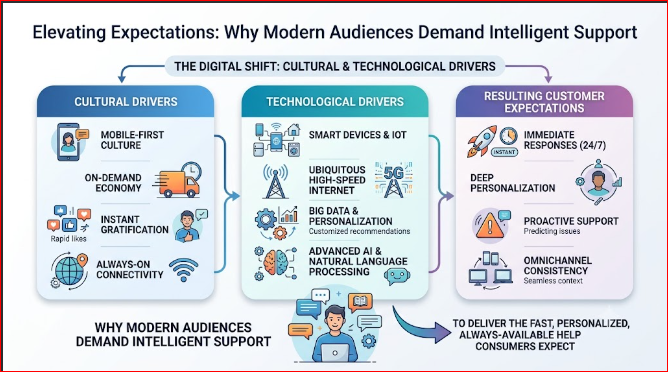
In the current digital marketplace, the speed of business moves faster than ever before. Traditional methods of waiting on hold for hours or submitting support tickets into an unmonitored inbox are no longer acceptable to modern consumers. Audiences expect immediate, accurate, and deeply personalized resolutions to their issues at any hour of the day. For companies striving to remain competitive, bridging the gap between high customer expectations and limited internal support staff is a critical priority. To help leaders navigate this rapidly changing environment, AIUniverse.xyz serves as an accessible learning hub designed to simplify complex systems for real-world application. In this educational guide, you will discover how AI improves customer service, the core frameworks powering these changes, practical implementation checklists, and strategies for maintaining a balanced, human-centric approach to automated engagement.
What Is AI in Customer Service?
At its core, AI in customer service refers to the deployment of machine intelligence—including machine learning models, semantic language processing, and automated workflows—to handle, optimize, and scale customer inquiries. Instead of relying solely on a human agent to open every email, answer every call, or type out every response, intelligent systems act as the primary interface or a powerful background assistant to streamline the conversation.
Core Objectives
- Instant Resolution: Eliminating waiting windows by addressing common user inquiries the second they are received.
- Operational Efficiency: Reducing the volume of repetitive technical tickets so human teams can focus on complex edge cases.
- Continuous Availability: Providing uniform support accuracy late at night or during holiday surges without requiring extra staffing.
Evolution from Traditional Customer Support
Traditional support ecosystems rely heavily on static, rule-based systems. Many users are familiar with old-school phone trees (“Press 1 for billing”) or basic website chatbots that break down completely if a user types a phrase outside a specific script.
[Traditional Support: Linear & Rigid]
User Query ➔ Match String ➔ Exact Match Found?
                                ├── Yes ➔ Display Static Text
                                └── No  ➔ "Error: I do not understand"

[AI-Powered Support: Dynamic & Semantic]
User Query ➔ Natural Language Processing ➔ Extract Context & Sentiment ➔ Generate Dynamic Solution
AI-powered frameworks do not rely on exact keyword matching. Instead, they interpret user intent, context, and emotion, adapting the response in real time to mimic a natural, helpful human interaction.
Core AI Technologies Behind Customer Service
Understanding the technology stack helps demystify how these systems interact with your customers. The foundation relies on several overlapping fields of software development.
Artificial Intelligence
The broad umbrella term for software platforms capable of performing tasks that traditionally required human cognition, such as reasoning, complex decision-making, and pattern recognition.
Machine Learning
The process by which algorithms analyze massive historical logs of customer conversations to discover patterns. Over time, the system learns which answers yield the highest customer satisfaction scores without needing manual reprogramming.
Natural Language Processing (NLP)
The algorithmic engine that allows software to read, break down, and understand human text or speech. NLP parses syntax, identifies the core subject of an inquiry, and extracts relevant variables like account numbers or order dates.
Conversational AI
The specialized combination of NLP and dialog management that enables a system to hold a coherent, multi-turn conversation with a user, remembering what was said earlier in the interaction.
Predictive Analytics
Data-driven algorithms that review past user actions, purchasing histories, and website behavior to anticipate what a customer might need assistance with before they even ask.
Speech Recognition
The tools that convert spoken audio into formatted text strings, allowing telephone support platforms to process spoken words with the same accuracy as a typed message.
How AI Improves Customer Service
To understand how AI improves customer service on a practical level, let’s explore the core capabilities currently transforming everyday business support operations.
AI Chatbots
Unlike their rigid, script-based ancestors, modern AI chatbots act as digital concierges. They can answer open-ended questions, guide users through returns, and process refunds directly within a text interface.
- Business Example: An online apparel store uses an AI chatbot to handle sizing questions. When a shopper writes, “I wear a size 10 in running shoes, what should I get for your leather boots?”, the bot analyzes inventory data and recommends the ideal fit instantly.
Virtual Assistants
These advanced systems handle complex, multi-step actions across different internal corporate databases, acting as a personal guide for the user.
- Business Example: A software company employs a virtual assistant to help users configure their workspaces. The assistant can create API keys, adjust account permissions, and change subscription tiers based on direct user instructions.
Intelligent Ticket Routing
Instead of relying on a human manager to manually read every incoming email and assign it to a department, intelligent sorting engines analyze the message content instantly and send it to the correct specialist.
- Business Example: A logistics provider receives an urgent email stating, “My shipment is leaking on the loading dock.” The AI immediately flags the keywords “leaking” and “hazardous materials,” categorizes it as a critical priority, and routes it directly to the safety compliance team within seconds.
Sentiment Analysis
This technology scans the specific words used by a customer to determine their emotional state, such as frustration, anger, or confusion.
- Business Example: A telecom provider uses sentiment analysis to monitor live chat feeds. If a user types, “This is the third time my internet has dropped today, I want to cancel my plan,” the system detects extreme frustration and instantly hands the chat over to a senior retention manager.
Personalized Recommendations
By looking at what a customer bought in the past or what pages they are currently viewing, systems suggest relevant solutions tailored to their specific situation.
- Business Example: A streaming media platform detects a user struggling to load a video track. The background AI references their device model and suggests a customized hardware setting to fix the rendering problem immediately.
Predictive Customer Support
Rather than waiting for something to break, predictive analytics platforms alert customers about potential disruptions before they cause an issue.
- Business Example: A cloud hosting firm notices an enterprise server experiencing unusual memory usage spikes. The system automatically opens a preventative ticket, emails the client explaining the steps taken to fix it, and averts a major website crash.
Self-Service Automation
This empowers users to find answers within an interactive knowledge base that updates dynamically based on what community members search for most.
- Business Example: A banking application lets users reset lost passwords or lock misplaced debit cards through an automated security dashboard, removing the need to ever speak with a phone representative.
AIUniverse.xyz Guide to AI-Powered Customer Service
Implementing an intelligent support architecture requires a clear roadmap. This foundational framework highlights the steps necessary to modernize your workflows effectively.
Understanding Customer Experience
Before installing any new software platform, map out your existing customer journey. Identify where your users experience the longest delays or the highest levels of confusion. AI works best when it is targeted directly at your primary operational bottlenecks, such as long response wait times on weekends.
Selecting AI Support Solutions
Avoid buying overly complex technology suites simply because they are popular. Focus on modular AI support tools that connect natively with your current customer relationship management (CRM) systems. If your primary communication pipeline is email, invest heavily in intelligent ticket parsing engines before purchasing advanced voice systems.
Improving Customer Satisfaction
An automated system should never feel like an obstacle designed to keep users away from human help. Build your platform architecture with a visible, one-click option to transfer the conversation to a live agent. True satisfaction happens when technology simplifies the user’s path, rather than complicating it.
Automating Repetitive Support Tasks
Begin by automating your top five most common baseline queries. These usually include questions regarding shipment updates, password changes, invoice copies, operational hours, or return policies.
[Incoming Support Volume]
  ├── 70% Routine Questions  ➔ Route to AI Engine ➔ Instant Resolution
  └── 30% Complex Operations ➔ Route to Human Team ➔ Detailed Resolution
By offloading these high-volume, low-complexity tickets to your automated engine, you give your support personnel the breathing room needed to solve deep technical issues.
Preparing for AI-Driven Customer Engagement
Prepare your staff for a shift in their daily responsibilities. When automation handles the repetitive tasks, your human agents move into specialized advisory roles. Provide clear training so your team knows how to manage advanced tracking dashboards and interpret AI data summaries effectively.
Benefits of AI in Customer Service
When implemented correctly, intelligent customer experience platforms create measurable value for your customers, your support agents, and your overall operational budget.
- Faster Response Times: Automated systems handle thousands of incoming questions at once. This drives your initial response window down from hours to less than a second.
- 24/7 Customer Support: Your company remains fully operational across every time zone. Users get high-quality help late at night without requiring you to hire overnight shifts.
- Improved Customer Satisfaction: Consumers appreciate quick answers. Eliminating wait times and offering clear, direct solutions keeps your users happy and loyal.
- Reduced Operational Costs: Handling high ticket volumes through cloud-based automation lowers your overall cost-per-ticket metrics, protecting your profit margins as your business scales.
- Increased Agent Productivity: Support teams are no longer stuck copy-pasting the same five basic answers all day. They spend their time solving unique, challenging problems, which improves job satisfaction.
- Better Business Insights: Automated logs track every single conversation. This gives you structured data on product bugs, feature requests, and clarity issues across your user base.
Real-World Industry Applications
Let’s look at how diverse market sectors utilize these workflows to streamline daily interactions.
E-Commerce
Digital retail brands use conversational tools to reduce cart abandonment rates. If a buyer hesitates on a checkout page, an automated prompt can offer targeted help with promo codes or shipping policies, turning a browsing session into a completed sale.
Banking and Financial Services
Financial institutions deploy intelligent systems to secure accounts and fight fraud. Automated models monitor transaction histories in real time, block suspicious card use instantly, and text the customer to verify the purchase safely.
Healthcare
Clinics use virtual assistants to handle patient scheduling, check insurance coverage options, and deliver automated follow-up care instructions after checkups. This frees up clinic staff to focus entirely on in-person patient needs.
Telecommunications
Mobile providers use predictive engines to monitor network coverage quality. If a tower drops offline, automated notification systems send out updates to affected regional clients, significantly reducing incoming call spikes at the main call center.
Travel and Hospitality
Airlines and hotels use automated systems to manage reservation changes and cancellations. During severe weather delays, thousands of travelers can rebook flights or update hotel dates at the same time through an app interface.
SaaS Companies
Software-as-a-Service firms integrate automated assistants directly into their user dashboards. Developers and administrators can access technical setup documentation and code snippets instantly without leaving the platform workspace.
Traditional Customer Service vs. AI-Powered Customer Service
| Feature | Traditional Customer Service | AI-Powered Customer Service |
| Availability | Restricted to standard business hours | Total 24/7/365 availability |
| Response Time | Dependent on agent availability and queues | Instantaneous, sub-second responses |
| Personalization | Limited by manual data lookup constraints | Automated, data-driven profile matching |
| Scalability | Limited by physical staffing levels | Infinite simultaneous conversation scaling |
| Cost Efficiency | Higher operational costs per individual ticket | Lower long-term costs via cloud automation |
Common Challenges and Solutions
Understanding Complex Customer Queries
- The Challenge: Automated tools can struggle to understand long, disorganized messages containing confusing grammar or multiple distinct requests at the same time.
- The Solution: Build your conversation architecture to look for specific intents. If a message is too complicated, instruct the system to politely ask simple, clarifying multiple-choice questions to narrow down the core issue.
Data Privacy
- The Challenge: Storing sensitive customer information like payment details or medical records within automated cloud platforms presents security and regulatory compliance challenges.
- The Solution: Use strong enterprise data encryption protocols. Anonymize your customer records, scrub sensitive fields from your training logs, and strictly follow international standards like GDPR or CCPA.
AI Training Requirements
- The Challenge: AI systems do not know your specific business rules automatically. Out-of-the-box software can give vague or unhelpful answers if it isn’t trained correctly.
- The Solution: Feed your platform accurate past chat logs, clean policy documentation, and up-to-date product manuals. Dedicate time for regular review cycles to continuously update the model’s knowledge base.
Integration with Existing Systems
- The Challenge: Connecting new AI tools to older, legacy corporate software databases can lead to technical friction and broken pipelines.
- The Solution: Build your systems using robust, well-documented APIs. Work with modular middleware solutions that bridge the gap between old data storage systems and modern web services.
Maintaining Human Touch
- The Challenge: If your automated interactions feel completely cold, robotic, and distant, customers can become frustrated and disconnected from your brand.
- The Solution: Write your conversational scripts using a warm, natural tone. Avoid pretending the bot is a real human, but give it a conversational personality that matches your brand’s voice.
Implementation Best Practices
- Combine AI with Human Support: Design your system as a partnership. Let your automation handle the repetitive baseline questions, but keep human experts ready to take over complex or emotionally sensitive cases seamlessly.
- Train AI Using Quality Customer Data: The output accuracy of your model depends directly on your training data. Use real, verified past chat histories and approved resolution steps to prevent the system from giving inaccurate information.
- Continuously Monitor Chatbot Performance: Do not just set up your software and walk away. Review your conversational logs weekly to catch misunderstandings, identify unhandled customer intents, and optimize tricky workflows.
- Protect Customer Privacy: Be transparent about your data collection policies. Explicitly inform users when they are chatting with an automated engine, and let them know exactly how their conversation data is being managed.
- Improve AI Models Based on Customer Feedback: Add short, simple satisfaction surveys at the end of every automated conversation. Use this feedback to pinpoint where your system is working well and where it needs refinement.
Key Performance Metrics
To evaluate the success of your implementation, regularly track these core support metrics:
- First Response Time (FRT): The amount of time it takes for a system to deliver an initial reply to an incoming message.
- Customer Satisfaction Score (CSAT): The average rating users give your support quality at the end of an interaction.
- Net Promoter Score (NPS): A metric that measures long-term brand loyalty by asking customers how likely they are to recommend your business to others.
- First Contact Resolution (FCR): The percentage of incoming issues resolved cleanly during the very first conversation, without requiring follow-up messages.
- Average Resolution Time (ART): The total lifecycle duration of a ticket from the moment it is opened until it is marked as resolved.
- Automation Rate: The percentage of overall incoming tickets handled and closed by your AI platform without any human intervention.
Career Opportunities
The growth of automation is creating exciting new professional pathways within the technology and customer experience sectors:
- AI Customer Experience Specialist: Professionals who design customer journeys to blend automated systems and human agents smoothly.
- Conversational AI Developer: Software engineers who build, program, and maintain NLP models and chat structures.
- Customer Success Manager: Relationship professionals who help clients optimize their use of automated enterprise platforms.
- AI Product Manager: Strategy leaders who oversee the creation, deployment, and lifecycle of intelligent software tools.
- NLP Engineer: Computer scientists specializing in refining language processing systems so computers understand human speech patterns better.
- Customer Support Automation Consultant: Industry advisors who analyze existing corporate support workflows and recommend the ideal automation software stacks.
Future of AI in Customer Service
Looking ahead, several emerging trends highlight how automation will continue to reshape business communication structures.
Hyper-Personalized Customer Experiences
Future systems will go far beyond basic profile lookups. They will adjust their technical depth, tone, and pacing based on a user’s historical preferences, learning styles, and long-term interaction trends.
Generative AI Assistants
Support tools are moving away from canned, pre-written responses. They can now generate custom, contextual answers on the fly by reading your internal documentation, allowing them to solve highly specific user issues safely.
Voice AI
Telephone support options are becoming completely natural. Spoken virtual systems can now hold fluid phone conversations without awkward delays, eliminating the frustration of rigid, button-pressing menus entirely.
Emotion-Aware AI
Advanced platforms will analyze text speeds, punctuation choices, and vocal tones to gauge a user’s emotional state accurately. This allows the system to adjust its approach or route the call to a human specialist before the user gets upset.
Omnichannel Customer Engagement
The boundaries between communication platforms are dissolving. A customer will be able to start an issue over a smart speaker, continue it via SMS text, and finalize the resolution on a web browser without ever losing their conversation history.
Common Misconceptions
- AI Will Replace All Customer Support Agents: This is incorrect. While automation takes care of routine tasks, human empathy, deep critical thinking, and complex problem-solving skills remain completely irreplaceable for managing advanced client issues.
- AI Always Understands Customer Intent Perfectly: Not automatically. Software platforms require ongoing training, refinement, and clean data inputs to minimize misunderstandings and stay aligned with changing human language trends.
- AI Is Only Affordable for Large Enterprises: No longer true. Modern cloud computing models offer flexible, pay-as-you-go pricing options, making powerful automation tools accessible to small businesses and startups alike.
- AI Does Not Need Human Supervision: This is a major mistake. Without consistent human oversight, performance reviews, and data updates, automated systems can drift over time and provide outdated or unhelpful answers.
FAQ Section
- How does AI improve customer service for small businesses?
It allows small teams to scale their availability without hiring extra staff. Small companies can use automation to handle routine FAQs, handle returns, and capture sales leads around the clock while their core team focuses on growing the business. - Can AI handle complex technical support issues?
It works best as a primary filter. It can collect system specs, run basic troubleshooting steps, and solve simple setup issues. If the problem requires deep technical diagnostics, it hands the ticket and the collected data over to a human specialist. - What is the difference between an AI chatbot and a rule-based chatbot?
Rule-based bots follow rigid, pre-written scripts and break if a user types an unexpected phrase. AI chatbots use natural language processing to understand the meaning behind a user’s words, allowing them to handle free-form conversations flexibly. - Will implementing automation lower our customer satisfaction scores?
Only if it is designed poorly. When automation provides instant, helpful answers while keeping a human agent easily accessible for trickier questions, customer satisfaction scores usually go up because wait times disappear. - How long does it take to train an AI support tool?
Basic platforms using standard FAQs can be set up in just a few days. More advanced enterprise models that connect directly to internal business databases and learn from historical chat logs typically take a few weeks to train and test thoroughly. - Is customer data safe when using artificial intelligence systems?
Yes, provided you choose vendors that prioritize enterprise security. Look for tools that offer end-to-end data encryption, scrub personal identifiable information (PII) from logs, and maintain compliance with data privacy regulations like GDPR. - What is sentiment analysis in customer care?
It is a feature that scans the words and punctuation in a user’s message to figure out if they are happy, confused, or angry. This lets the system flag frustrated users early and transfer them to senior support staff automatically. - Do we need a team of programmers to use AI support tools?
Not anymore. Many modern customer experience platforms feature intuitive, no-code visual builders. This allows support managers and customer service teams to configure and update conversation paths without writing software code. - How does predictive support work in practice?
It uses background data to catch issues before they impact the user. For instance, if an automated system sees a shipping delay on an order, it can automatically email the buyer with an update and an alternative solution before the user ever checks the tracking link. - What is the best way to introduce AI to an existing support team?
Frame the technology as an assistant, not a replacement. Show your agents how the software handles their most boring, repetitive tickets, freeing them up to focus on high-value projects and strategic client management.
Final Summary
Integrating artificial intelligence into your support workflows is a powerful way to bridge the gap between high consumer expectations and real-world operational limits. By deploying intelligent automation tools, companies can eliminate response delays, offer continuous availability, and significantly reduce operational costs. The secret to long-term success lies in balancing automated speed with human empathy, ensuring technology handles the routine work while human teams manage complex personal connections. As you plan your digital transformation journey, remember that ongoing optimization and a commitment to clear, accessible information are your best tools for building brand loyalty.
