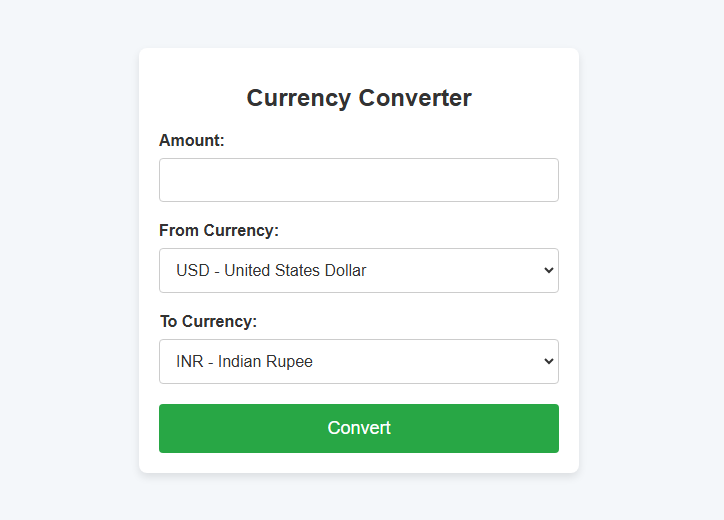
Currency converters are essential tools for financial and travel purposes. In this blog post, we will guide you through building a simple yet effective currency converter using PHP and a third-party API to fetch live exchange rates. This step-by-step tutorial will teach you how to input an amount, select currencies, and perform real-time currency conversion.
Features of the Currency Converter
- Accepts user input for the amount to be converted.
- Allows the selection of source and target currencies.
- Uses the ExchangeRate API to fetch live exchange rates.
- Displays the converted amount in a user-friendly format.
Requirements
Before we begin, ensure you have the following:
- A local server setup like XAMPP, WAMP, or any PHP-supported environment.
- A valid API key from ExchangeRate API.
- Basic knowledge of HTML, CSS, and PHP.
Code Walkthrough
1. PHP Logic for Currency Conversion
The PHP script processes the form submission, fetches live exchange rates, and calculates the converted amount.
<?php
// Initialize result variable
$result = "";

if ($_SERVER["REQUEST_METHOD"] == "POST") {
    $amount = $_POST['amount'];
    $from_currency = $_POST['from_currency'];
    $to_currency = $_POST['to_currency'];

    $apiKey = "YOUR_API_KEY"; // Replace with your API key
    $url = "https://api.exchangerate-api.com/v4/latest/$from_currency";

    // Fetch the exchange rates
    $response = file_get_contents($url);
    $data = json_decode($response, true);

    if ($data && isset($data['rates'][$to_currency])) {
        $rate = $data['rates'][$to_currency];
        $converted_amount = $amount * $rate;
        $result = "$amount $from_currency = $converted_amount $to_currency";
    } else {
        $result = "Unable to fetch exchange rates. Try again later.";
    }
}
?>
- The
file_get_contentsfunction retrieves exchange rates from the API. - The conversion formula is straightforward:
Converted Amount = Amount × Exchange Rate
2. HTML Form for User Input
This form collects the amount, source currency, and target currency.
<form action="" method="POST">
    <label for="amount">Amount:</label>
    <input type="number" name="amount" required>

    <label for="from_currency">From Currency:</label>
    <select name="from_currency" required>
        <option value="USD">USD - United States Dollar</option>
        <option value="EUR">EUR - Euro</option>
        <!-- Add other currencies as needed -->
    </select>

    <label for="to_currency">To Currency:</label>
    <select name="to_currency" required>
        <option value="USD">USD - United States Dollar</option>
        <option value="EUR">EUR - Euro</option>
        <!-- Add other currencies as needed -->
    </select>

    <button type="submit" id="convertButton">Convert</button>
</form>
3. Displaying Conversion Results
Results are dynamically displayed after form submission:
<?php if ($result): ?>
    <div class="result">
        <p><?php echo $result; ?></p>
    </div>
<?php endif; ?>
4. Adding Styles
You can style the converter with a simple CSS file. Save this as style.css:
body {
    font-family: Arial, sans-serif;
    background-color: #f8f9fa;
    margin: 0;
    padding: 0;
}

.container {
    max-width: 600px;
    margin: 50px auto;
    background: #ffffff;
    padding: 20px;
    box-shadow: 0 4px 6px rgba(0, 0, 0, 0.1);
    border-radius: 8px;
}

h1 {
    text-align: center;
    color: #333;
}

label {
    display: block;
    margin-bottom: 5px;
    font-weight: bold;
}

input, select, button {
    width: 100%;
    margin-bottom: 15px;
    padding: 10px;
    font-size: 16px;
    border: 1px solid #ddd;
    border-radius: 4px;
}

button {
    background-color: #007bff;
    color: #ffffff;
    border: none;
    cursor: pointer;
}

button:hover {
    background-color: #0056b3;
}

.result {
    text-align: center;
    margin-top: 20px;
    font-size: 18px;
    color: #28a745;
}
5. JavaScript Enhancement
A simple JavaScript function updates the conversion button after submission.
<script>
    function updateButtonWithResult(result) {
        var button = document.getElementById("convertButton");
        button.innerHTML = result;
    }
</script>
Steps to Run the Project
- Save the PHP code as
index.phpin your project folder. - Save the CSS file as
style.cssin the same directory. - Run the project on your local server (e.g.,
http://localhost/currency-converter/). - Input values and perform currency conversions.
Customization Ideas
- Add More Currencies: Extend the list of currencies in the dropdown.
- Error Handling: Display user-friendly messages for invalid inputs or API errors.
- Mobile Responsiveness: Use CSS media queries to make the design responsive.
- Graphical Representations: Add charts to show historical exchange rates.
Conclusion
This PHP-based currency converter demonstrates how to integrate APIs into a real-world project. With a bit of customization and styling, you can deploy this project for personal or business use. Try it out and share your experience in the comments below!
